Solved Memory Full

When you get to step 7, do you get the message that begins with "one or more of the operations...."?

Or do you get the message shown in your post 18?

Are you prepared, willing, and able to do a clean install?
 

My Computer

Computer type
PC/Desktop
Computer Manufacturer/Model Number
Ignatz Special; 4 speed manual gearbox; factory air conditioning; one of one
OS
Windows 7 Home Premium SP1, 64-bit
CPU
Intel Skylake i5-6600K, not overclocked
Motherboard
AsRock Z170M Extreme 4, micro ATX
Memory
8 GB HyperX DDR4-2666 (2 x 4 GB)
Graphics Card(s)
none; graphics are integrated on CPU
Sound Card
onboard: Realtek ALC1150; external: USB Behringer UF0-202
Monitor(s) Displays
Dell S2340M 23 inch IPS
Screen Resolution
1600 x 900
Hard Drives
System: Crucial MX100 series SSD, 128 GB;
Data: Samsung Spinpoint 103SJ, 1 TB;
Backup: WD Caviar Green WD30EZRX-00D8PB0, 3 TB
PSU
Rosewill SilentNight 500 watt fanless, semi-modular
Case
Antec Solo II
Cooling
Noctua NH-U12S; Noctua F12 intake, Noctua S12A exhaust
Keyboard
Microsoft 200 6JH-00001 USB
Mouse
Dell or Microsoft optical wired; USB
Antivirus
Microsoft Security Essentials and Malwarebytes Premium
Browser
Pale Moon
Other Info
All fans PWM; speeds at idle: CPU circa 500 rpm; intake circa 600 rpm; exhaust circa 600 rpm; CPU temps 27 idle and 47 C load in a warm room (27 C/81 F) when running Intel Extreme Tuning Utility stress test.
When you get to step 7, do you get the message that begins with "one or more of the operations...."?

Or do you get the message shown in your post 18?

Are you prepared, willing, and able to do a clean install?

I got message as in my post when I get to step no. 7...
I am not good with computer, So I am not confident for clean install.
 

My Computer

Computer Manufacturer/Model Number
Hewlett-Packard / dv6 notebook PC
OS
Windows 7 Home Premium 64bit
CPU
Intel(R) Core(TM) i5 CPU M 450 @ 2.40GHz, 2 core
Motherboard
Hewlett-Packard 144A
Memory
4 GB
Graphics Card(s)
ATI
Sound Card
ATI High Definition Audio Device
Monitor(s) Displays
Name Intel(R) HD Graphics
Screen Resolution
Resolution 1366 x 768 x 60 hertz
Hard Drives
466GB TOSHIBA TOSHIBA MK5056GSY (SATA)
C: 223.09 GB
G: 220.99 GB (partition)
Is your personal data completely backed up to some other drive?

Do you have a valid 25 character Windows 7 Product Key, probably found on a sticker somewhere on the PC?

What discs did HP supply with the PC?

Can you go into more detail about what happened with Partition Wizard 4.22? Did you get the same "This function is not supported....." as shown in post 11?
 

My Computer

Computer type
PC/Desktop
Computer Manufacturer/Model Number
Ignatz Special; 4 speed manual gearbox; factory air conditioning; one of one
OS
Windows 7 Home Premium SP1, 64-bit
CPU
Intel Skylake i5-6600K, not overclocked
Motherboard
AsRock Z170M Extreme 4, micro ATX
Memory
8 GB HyperX DDR4-2666 (2 x 4 GB)
Graphics Card(s)
none; graphics are integrated on CPU
Sound Card
onboard: Realtek ALC1150; external: USB Behringer UF0-202
Monitor(s) Displays
Dell S2340M 23 inch IPS
Screen Resolution
1600 x 900
Hard Drives
System: Crucial MX100 series SSD, 128 GB;
Data: Samsung Spinpoint 103SJ, 1 TB;
Backup: WD Caviar Green WD30EZRX-00D8PB0, 3 TB
PSU
Rosewill SilentNight 500 watt fanless, semi-modular
Case
Antec Solo II
Cooling
Noctua NH-U12S; Noctua F12 intake, Noctua S12A exhaust
Keyboard
Microsoft 200 6JH-00001 USB
Mouse
Dell or Microsoft optical wired; USB
Antivirus
Microsoft Security Essentials and Malwarebytes Premium
Browser
Pale Moon
Other Info
All fans PWM; speeds at idle: CPU circa 500 rpm; intake circa 600 rpm; exhaust circa 600 rpm; CPU temps 27 idle and 47 C load in a warm room (27 C/81 F) when running Intel Extreme Tuning Utility stress test.
Is your personal data completely backed up to some other drive?

Do you have a valid 25 character Windows 7 Product Key, probably found on a sticker somewhere on the PC?

What discs did HP supply with the PC?

Can you go into more detail about what happened with Partition Wizard 4.22? Did you get the same "This function is not supported....." as shown in post 11?

All data is on C: as well as on external drive. I have win 7 key. HP didn't supply anything, so I made recovery disc long time ago.

Partition Wizard 4.22 not working at all. I do not get any option or I can not select anython or click anywhere
 

My Computer

Computer Manufacturer/Model Number
Hewlett-Packard / dv6 notebook PC
OS
Windows 7 Home Premium 64bit
CPU
Intel(R) Core(TM) i5 CPU M 450 @ 2.40GHz, 2 core
Motherboard
Hewlett-Packard 144A
Memory
4 GB
Graphics Card(s)
ATI
Sound Card
ATI High Definition Audio Device
Monitor(s) Displays
Name Intel(R) HD Graphics
Screen Resolution
Resolution 1366 x 768 x 60 hertz
Hard Drives
466GB TOSHIBA TOSHIBA MK5056GSY (SATA)
C: 223.09 GB
G: 220.99 GB (partition)
I've requested more help from others.

I don't know if anyone else can help. If not, you may have to do a clean install.

To do that, you will need an install disc. It's good to have one regardless. If you have Windows 7 64-bit English, go to this site:

Official Windows 7 SP1 ISO from Digital River « My Digital Life

Scroll down to the Home Premium area and download this file: X17-58997.iso

Burn it to a disc. You can install with the burned disc and activate with your existing Product Key.

I'd probably go to HP web site and download the Ethernet driver for your particular PC and put it on a USB thumb drive, a CD, or on your external. You will need it to reestablish an Internet connection if the Windows installation disc does not provide the proper Ethernet driver.

At this point, your choices are:

1: Hope someone else responds in this thread with a solution

2: Proceed with the EaseUS application

3: Do a clean install

In the meantime, download and burn that disc.
 

My Computer

Computer type
PC/Desktop
Computer Manufacturer/Model Number
Ignatz Special; 4 speed manual gearbox; factory air conditioning; one of one
OS
Windows 7 Home Premium SP1, 64-bit
CPU
Intel Skylake i5-6600K, not overclocked
Motherboard
AsRock Z170M Extreme 4, micro ATX
Memory
8 GB HyperX DDR4-2666 (2 x 4 GB)
Graphics Card(s)
none; graphics are integrated on CPU
Sound Card
onboard: Realtek ALC1150; external: USB Behringer UF0-202
Monitor(s) Displays
Dell S2340M 23 inch IPS
Screen Resolution
1600 x 900
Hard Drives
System: Crucial MX100 series SSD, 128 GB;
Data: Samsung Spinpoint 103SJ, 1 TB;
Backup: WD Caviar Green WD30EZRX-00D8PB0, 3 TB
PSU
Rosewill SilentNight 500 watt fanless, semi-modular
Case
Antec Solo II
Cooling
Noctua NH-U12S; Noctua F12 intake, Noctua S12A exhaust
Keyboard
Microsoft 200 6JH-00001 USB
Mouse
Dell or Microsoft optical wired; USB
Antivirus
Microsoft Security Essentials and Malwarebytes Premium
Browser
Pale Moon
Other Info
All fans PWM; speeds at idle: CPU circa 500 rpm; intake circa 600 rpm; exhaust circa 600 rpm; CPU temps 27 idle and 47 C load in a warm room (27 C/81 F) when running Intel Extreme Tuning Utility stress test.
I've requested more help from others.

I don't know if anyone else can help. If not, you may have to do a clean install.

To do that, you will need an install disc. It's good to have one regardless. If you have Windows 7 64-bit English, go to this site:

Official Windows 7 SP1 ISO from Digital River « My Digital Life
.

Just a question for clean instalment: If I do with win7 disc burn from link you suggested, will I lose any HP features. I have HP recovery disk though, I can use it anyway.

I do not want to go with EaseUS. I would rather wait for someone else's respond. f it will not work, I will go for clean install. Mean while I will burn a disk from link you suggested.
 

My Computer

Computer Manufacturer/Model Number
Hewlett-Packard / dv6 notebook PC
OS
Windows 7 Home Premium 64bit
CPU
Intel(R) Core(TM) i5 CPU M 450 @ 2.40GHz, 2 core
Motherboard
Hewlett-Packard 144A
Memory
4 GB
Graphics Card(s)
ATI
Sound Card
ATI High Definition Audio Device
Monitor(s) Displays
Name Intel(R) HD Graphics
Screen Resolution
Resolution 1366 x 768 x 60 hertz
Hard Drives
466GB TOSHIBA TOSHIBA MK5056GSY (SATA)
C: 223.09 GB
G: 220.99 GB (partition)
Just a question for clean instalment: If I do with win7 disc burn from link you suggested, will I lose any HP features. I have HP recovery disk though, I can use it anyway.

I forgot about HP recovery. You can always try that if necessary. Since you now have dynamic disks, I don't know how well it will work.

If you do a clean install, you will not have any of the "bloatware" associated with an HP installation. Most people would prefer that. The ISO file is Windows per se, and does not include the extra stuff HP may have put on your PC.

As far as I know, you should be able to go to the HP web site and download whatever HP features you think are desirable. I'd get the Ethernet driver for sure, before I did a clean install.
 

My Computer

Computer type
PC/Desktop
Computer Manufacturer/Model Number
Ignatz Special; 4 speed manual gearbox; factory air conditioning; one of one
OS
Windows 7 Home Premium SP1, 64-bit
CPU
Intel Skylake i5-6600K, not overclocked
Motherboard
AsRock Z170M Extreme 4, micro ATX
Memory
8 GB HyperX DDR4-2666 (2 x 4 GB)
Graphics Card(s)
none; graphics are integrated on CPU
Sound Card
onboard: Realtek ALC1150; external: USB Behringer UF0-202
Monitor(s) Displays
Dell S2340M 23 inch IPS
Screen Resolution
1600 x 900
Hard Drives
System: Crucial MX100 series SSD, 128 GB;
Data: Samsung Spinpoint 103SJ, 1 TB;
Backup: WD Caviar Green WD30EZRX-00D8PB0, 3 TB
PSU
Rosewill SilentNight 500 watt fanless, semi-modular
Case
Antec Solo II
Cooling
Noctua NH-U12S; Noctua F12 intake, Noctua S12A exhaust
Keyboard
Microsoft 200 6JH-00001 USB
Mouse
Dell or Microsoft optical wired; USB
Antivirus
Microsoft Security Essentials and Malwarebytes Premium
Browser
Pale Moon
Other Info
All fans PWM; speeds at idle: CPU circa 500 rpm; intake circa 600 rpm; exhaust circa 600 rpm; CPU temps 27 idle and 47 C load in a warm room (27 C/81 F) when running Intel Extreme Tuning Utility stress test.
Just a question for clean instalment: If I do with win7 disc burn from link you suggested, will I lose any HP features. I have HP recovery disk though, I can use it anyway.

I forgot about HP recovery. You can always try that if necessary. Since you now have dynamic disks, I don't know how well it will work.

If you do a clean install, you will not have any of the "bloatware" associated with an HP installation. Most people would prefer that. The ISO file is Windows per se, and does not include the extra stuff HP may have put on your PC.

As far as I know, you should be able to go to the HP web site and download whatever HP features you think are desirable. I'd get the Ethernet driver for sure, before I did a clean install.
I am trying to figure out which driver to download (My laptop is HP dv6 but there are many of dv6xxxx)
Can you guide me please.
 

My Computer

Computer Manufacturer/Model Number
Hewlett-Packard / dv6 notebook PC
OS
Windows 7 Home Premium 64bit
CPU
Intel(R) Core(TM) i5 CPU M 450 @ 2.40GHz, 2 core
Motherboard
Hewlett-Packard 144A
Memory
4 GB
Graphics Card(s)
ATI
Sound Card
ATI High Definition Audio Device
Monitor(s) Displays
Name Intel(R) HD Graphics
Screen Resolution
Resolution 1366 x 768 x 60 hertz
Hard Drives
466GB TOSHIBA TOSHIBA MK5056GSY (SATA)
C: 223.09 GB
G: 220.99 GB (partition)

My Computer

Computer type
PC/Desktop
Computer Manufacturer/Model Number
Ignatz Special; 4 speed manual gearbox; factory air conditioning; one of one
OS
Windows 7 Home Premium SP1, 64-bit
CPU
Intel Skylake i5-6600K, not overclocked
Motherboard
AsRock Z170M Extreme 4, micro ATX
Memory
8 GB HyperX DDR4-2666 (2 x 4 GB)
Graphics Card(s)
none; graphics are integrated on CPU
Sound Card
onboard: Realtek ALC1150; external: USB Behringer UF0-202
Monitor(s) Displays
Dell S2340M 23 inch IPS
Screen Resolution
1600 x 900
Hard Drives
System: Crucial MX100 series SSD, 128 GB;
Data: Samsung Spinpoint 103SJ, 1 TB;
Backup: WD Caviar Green WD30EZRX-00D8PB0, 3 TB
PSU
Rosewill SilentNight 500 watt fanless, semi-modular
Case
Antec Solo II
Cooling
Noctua NH-U12S; Noctua F12 intake, Noctua S12A exhaust
Keyboard
Microsoft 200 6JH-00001 USB
Mouse
Dell or Microsoft optical wired; USB
Antivirus
Microsoft Security Essentials and Malwarebytes Premium
Browser
Pale Moon
Other Info
All fans PWM; speeds at idle: CPU circa 500 rpm; intake circa 600 rpm; exhaust circa 600 rpm; CPU temps 27 idle and 47 C load in a warm room (27 C/81 F) when running Intel Extreme Tuning Utility stress test.
Thanks mate :) I couldn't find ethernet driver but I able to find and download wi-fi driver. I have saved it on memory stick.
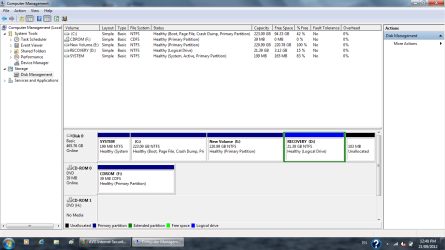
Win 7 is still downloading
 

My Computer

Computer Manufacturer/Model Number
Hewlett-Packard / dv6 notebook PC
OS
Windows 7 Home Premium 64bit
CPU
Intel(R) Core(TM) i5 CPU M 450 @ 2.40GHz, 2 core
Motherboard
Hewlett-Packard 144A
Memory
4 GB
Graphics Card(s)
ATI
Sound Card
ATI High Definition Audio Device
Monitor(s) Displays
Name Intel(R) HD Graphics
Screen Resolution
Resolution 1366 x 768 x 60 hertz
Hard Drives
466GB TOSHIBA TOSHIBA MK5056GSY (SATA)
C: 223.09 GB
G: 220.99 GB (partition)
You may as well download the rest of the stuff HP has at that site for your particular PC.

You may not need it or even want it, but just in case, now is the time to get it rather than later.

If you do a clean install, you will get a bunch of drivers directly from the install disc and you may not need much or anything from the HP downloads.

I'd probably try the HP recovery as a last resort before a clean install---if you don't get any further assistance in this thread.

When you get that Windows 7 ISO downloaded and burned, you should confirm that you can in fact boot from it. If you can't boot from it, it's useless. If it boots, you can cancel out at the first screen, remove the disc from the DVD drive, and reboot to your current installation.

If you figured out your exact model number, you may as well add it to your system specs.
 

My Computer

Computer type
PC/Desktop
Computer Manufacturer/Model Number
Ignatz Special; 4 speed manual gearbox; factory air conditioning; one of one
OS
Windows 7 Home Premium SP1, 64-bit
CPU
Intel Skylake i5-6600K, not overclocked
Motherboard
AsRock Z170M Extreme 4, micro ATX
Memory
8 GB HyperX DDR4-2666 (2 x 4 GB)
Graphics Card(s)
none; graphics are integrated on CPU
Sound Card
onboard: Realtek ALC1150; external: USB Behringer UF0-202
Monitor(s) Displays
Dell S2340M 23 inch IPS
Screen Resolution
1600 x 900
Hard Drives
System: Crucial MX100 series SSD, 128 GB;
Data: Samsung Spinpoint 103SJ, 1 TB;
Backup: WD Caviar Green WD30EZRX-00D8PB0, 3 TB
PSU
Rosewill SilentNight 500 watt fanless, semi-modular
Case
Antec Solo II
Cooling
Noctua NH-U12S; Noctua F12 intake, Noctua S12A exhaust
Keyboard
Microsoft 200 6JH-00001 USB
Mouse
Dell or Microsoft optical wired; USB
Antivirus
Microsoft Security Essentials and Malwarebytes Premium
Browser
Pale Moon
Other Info
All fans PWM; speeds at idle: CPU circa 500 rpm; intake circa 600 rpm; exhaust circa 600 rpm; CPU temps 27 idle and 47 C load in a warm room (27 C/81 F) when running Intel Extreme Tuning Utility stress test.
I'll download all. I am not sure about boot but once I have the disk I may need help for clean installing
 

My Computer

Computer Manufacturer/Model Number
Hewlett-Packard / dv6 notebook PC
OS
Windows 7 Home Premium 64bit
CPU
Intel(R) Core(TM) i5 CPU M 450 @ 2.40GHz, 2 core
Motherboard
Hewlett-Packard 144A
Memory
4 GB
Graphics Card(s)
ATI
Sound Card
ATI High Definition Audio Device
Monitor(s) Displays
Name Intel(R) HD Graphics
Screen Resolution
Resolution 1366 x 768 x 60 hertz
Hard Drives
466GB TOSHIBA TOSHIBA MK5056GSY (SATA)
C: 223.09 GB
G: 220.99 GB (partition)
These steps have worked without fail countless times so you must have a bad burn of the CD. Try again:

The problem is that you converted your HD to Dynamic which is only meant to be used to span a partition across multiple HD's. Apparently you didn't see the warning message.

The solution to solve this non-destructively is to boot free Partition Wizard CD version 4.2 which is the last one which offers this as a free feature: pw422.zip ISO - Windows Live.

Download the ISO, rightclick to burn it to CD using Windows Image Burner, or use ImgBurn.

Boot CD, follow these steps: How to convert dynamic disk to basic disk with Partition Wizard?

Then create a new Logical partition in the space you made: Partition Wizard Create Partition Video Help
 
  • Like
Reactions: Arc
These steps have worked without fail countless times so you must have a bad burn of the CD. Try again:
:
:
Then create a new Logical partition in the space you made: Partition Wizard Create Partition Video Help

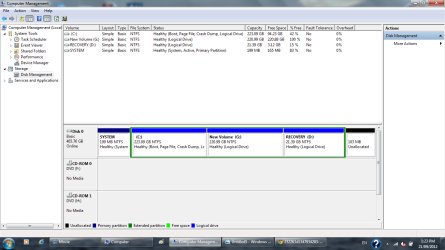
Thanks gregrocker. I re-download file and burn to new disc. It worked. I convert my hard drive (Disk 0) to basic space using version PW4.22
Untitled5.png

After that I run PWv7.6 and converted to all partition to Logical Space. After that w7 didn't start. So I converted system to primary partition > restart pc and w7 started.
Untitled6.png

I do not know if I do it right or wrong! Do i need to convert C: to primary drive and change status to active?
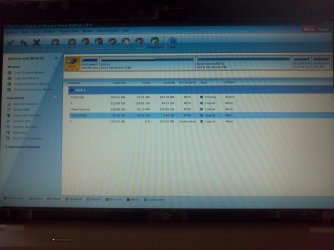
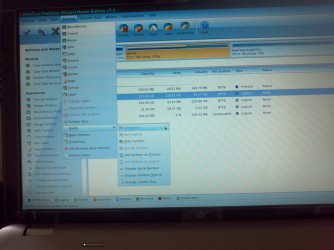
the following pics taken during PWv7.6
IMG_20120921_133002.jpg
IMG_20120921_133042.jpg
 
Last edited:

My Computer

Computer Manufacturer/Model Number
Hewlett-Packard / dv6 notebook PC
OS
Windows 7 Home Premium 64bit
CPU
Intel(R) Core(TM) i5 CPU M 450 @ 2.40GHz, 2 core
Motherboard
Hewlett-Packard 144A
Memory
4 GB
Graphics Card(s)
ATI
Sound Card
ATI High Definition Audio Device
Monitor(s) Displays
Name Intel(R) HD Graphics
Screen Resolution
Resolution 1366 x 768 x 60 hertz
Hard Drives
466GB TOSHIBA TOSHIBA MK5056GSY (SATA)
C: 223.09 GB
G: 220.99 GB (partition)
You may as well download the rest of the stuff HP has at that site for your particular PC.

You may not need it or even want it, but just in case, now is the time to get it rather than later.
.
.
If you figured out your exact model number, you may as well add it to your system specs.

Thanks ignatzatsonic, I downloaded all drivers and I have everything ready now. I may not need it now but I have it if I need in future
 

My Computer

Computer Manufacturer/Model Number
Hewlett-Packard / dv6 notebook PC
OS
Windows 7 Home Premium 64bit
CPU
Intel(R) Core(TM) i5 CPU M 450 @ 2.40GHz, 2 core
Motherboard
Hewlett-Packard 144A
Memory
4 GB
Graphics Card(s)
ATI
Sound Card
ATI High Definition Audio Device
Monitor(s) Displays
Name Intel(R) HD Graphics
Screen Resolution
Resolution 1366 x 768 x 60 hertz
Hard Drives
466GB TOSHIBA TOSHIBA MK5056GSY (SATA)
C: 223.09 GB
G: 220.99 GB (partition)
C should not be active, so it is OK.

The System partition is active as it should be.

The Recovery partition should NOT be logical. It needs to be primary.

C and G can remain logical.

Stay with it. You almost have it done.
 

My Computer

Computer type
PC/Desktop
Computer Manufacturer/Model Number
Ignatz Special; 4 speed manual gearbox; factory air conditioning; one of one
OS
Windows 7 Home Premium SP1, 64-bit
CPU
Intel Skylake i5-6600K, not overclocked
Motherboard
AsRock Z170M Extreme 4, micro ATX
Memory
8 GB HyperX DDR4-2666 (2 x 4 GB)
Graphics Card(s)
none; graphics are integrated on CPU
Sound Card
onboard: Realtek ALC1150; external: USB Behringer UF0-202
Monitor(s) Displays
Dell S2340M 23 inch IPS
Screen Resolution
1600 x 900
Hard Drives
System: Crucial MX100 series SSD, 128 GB;
Data: Samsung Spinpoint 103SJ, 1 TB;
Backup: WD Caviar Green WD30EZRX-00D8PB0, 3 TB
PSU
Rosewill SilentNight 500 watt fanless, semi-modular
Case
Antec Solo II
Cooling
Noctua NH-U12S; Noctua F12 intake, Noctua S12A exhaust
Keyboard
Microsoft 200 6JH-00001 USB
Mouse
Dell or Microsoft optical wired; USB
Antivirus
Microsoft Security Essentials and Malwarebytes Premium
Browser
Pale Moon
Other Info
All fans PWM; speeds at idle: CPU circa 500 rpm; intake circa 600 rpm; exhaust circa 600 rpm; CPU temps 27 idle and 47 C load in a warm room (27 C/81 F) when running Intel Extreme Tuning Utility stress test.
I can convert recovery ti primary. Do recovery partition status need to be active?
 

My Computer

Computer Manufacturer/Model Number
Hewlett-Packard / dv6 notebook PC
OS
Windows 7 Home Premium 64bit
CPU
Intel(R) Core(TM) i5 CPU M 450 @ 2.40GHz, 2 core
Motherboard
Hewlett-Packard 144A
Memory
4 GB
Graphics Card(s)
ATI
Sound Card
ATI High Definition Audio Device
Monitor(s) Displays
Name Intel(R) HD Graphics
Screen Resolution
Resolution 1366 x 768 x 60 hertz
Hard Drives
466GB TOSHIBA TOSHIBA MK5056GSY (SATA)
C: 223.09 GB
G: 220.99 GB (partition)
I can convert recovery ti primary. Do recovery partition status need to be active?

No, you're fine with System being the only partition marked as active.
 

My Computer

OS
Windows 7 Ultimate x64
To keep HP System and Recovery bootable they should remain Primary partitions, while C can be converted to Logical then shrunk to add as many adjacent Logical partitions as you want with PW CD.
:
Until then you can Clean Up Factory Bloatware

Thanks Greg, I have done factory boltware clean up. It's great. I see my Computer starts up quicker and performing faster...
I am not confident that I will able to do clean re installation by my self. I am thinking to hold it for a while.
 

My Computer

Computer Manufacturer/Model Number
Hewlett-Packard / dv6 notebook PC
OS
Windows 7 Home Premium 64bit
CPU
Intel(R) Core(TM) i5 CPU M 450 @ 2.40GHz, 2 core
Motherboard
Hewlett-Packard 144A
Memory
4 GB
Graphics Card(s)
ATI
Sound Card
ATI High Definition Audio Device
Monitor(s) Displays
Name Intel(R) HD Graphics
Screen Resolution
Resolution 1366 x 768 x 60 hertz
Hard Drives
466GB TOSHIBA TOSHIBA MK5056GSY (SATA)
C: 223.09 GB
G: 220.99 GB (partition)
Back
Top