Solved Memory Full

Yes use the Step 2 Download tool to burn to DVD if you're using a fresh ISO from Step 1. Or you can use ImgBurn at 4x speed. Either one is good.

 
Thanks Greg, re installation done with your help, thanks again.
I have done partition as per this image:
Untitled.png

Installed Microsoft Security Essentials, done driver installing, Now downloading and installing Windows update.
Now few issues related to HP,I am going to fix those next
 

My Computer

Computer Manufacturer/Model Number
Hewlett-Packard / dv6 notebook PC
OS
Windows 7 Home Premium 64bit
CPU
Intel(R) Core(TM) i5 CPU M 450 @ 2.40GHz, 2 core
Motherboard
Hewlett-Packard 144A
Memory
4 GB
Graphics Card(s)
ATI
Sound Card
ATI High Definition Audio Device
Monitor(s) Displays
Name Intel(R) HD Graphics
Screen Resolution
Resolution 1366 x 768 x 60 hertz
Hard Drives
466GB TOSHIBA TOSHIBA MK5056GSY (SATA)
C: 223.09 GB
G: 220.99 GB (partition)
What drivers did you install before installing all of your Important and Optional Windows Updates? Did you have to install Ethernet or Wireless to get online?

This tutorial is quite clear that newer drivers will be delivered via optional Updates when you enable Automatically get recommended drivers and updates for your hardware.

Only then should you import any drivers missing in Device Manager from the Support Downloads webpage for your model, not a drivers disk which will already be out of date.
 
What drivers did you install before installing all of your Important and Optional Windows Updates? Did you have to install Ethernet or Wireless to get online?

This tutorial is quite clear that newer drivers will be delivered via optional Updates when you enable Automatically get recommended drivers and updates for your hardware.

Only then should you import any drivers missing in Device Manager from the Support Downloads webpage for your model, not a drivers disk which will already be out of date.

I did not need to install wireless driver. It was automatically. Windows install updates two times and updated all drivers. I installed, web cam driver and finger print device driver which was missing and touch pad driver as touch pad was not working completely. when I wrote, windows was installing updates third time.
 

My Computer

Computer Manufacturer/Model Number
Hewlett-Packard / dv6 notebook PC
OS
Windows 7 Home Premium 64bit
CPU
Intel(R) Core(TM) i5 CPU M 450 @ 2.40GHz, 2 core
Motherboard
Hewlett-Packard 144A
Memory
4 GB
Graphics Card(s)
ATI
Sound Card
ATI High Definition Audio Device
Monitor(s) Displays
Name Intel(R) HD Graphics
Screen Resolution
Resolution 1366 x 768 x 60 hertz
Hard Drives
466GB TOSHIBA TOSHIBA MK5056GSY (SATA)
C: 223.09 GB
G: 220.99 GB (partition)
It is working good so far...Still installing programs slowly, one by one...
 

My Computer

Computer Manufacturer/Model Number
Hewlett-Packard / dv6 notebook PC
OS
Windows 7 Home Premium 64bit
CPU
Intel(R) Core(TM) i5 CPU M 450 @ 2.40GHz, 2 core
Motherboard
Hewlett-Packard 144A
Memory
4 GB
Graphics Card(s)
ATI
Sound Card
ATI High Definition Audio Device
Monitor(s) Displays
Name Intel(R) HD Graphics
Screen Resolution
Resolution 1366 x 768 x 60 hertz
Hard Drives
466GB TOSHIBA TOSHIBA MK5056GSY (SATA)
C: 223.09 GB
G: 220.99 GB (partition)
Hi Greg, I am at step 16 now. Once it completed, I will create Win 7 back up image.
Just a question, Will this Image disk able to recover all partitions (as I have my data on different partition) or just a C: partition only.
 

My Computer

Computer Manufacturer/Model Number
Hewlett-Packard / dv6 notebook PC
OS
Windows 7 Home Premium 64bit
CPU
Intel(R) Core(TM) i5 CPU M 450 @ 2.40GHz, 2 core
Motherboard
Hewlett-Packard 144A
Memory
4 GB
Graphics Card(s)
ATI
Sound Card
ATI High Definition Audio Device
Monitor(s) Displays
Name Intel(R) HD Graphics
Screen Resolution
Resolution 1366 x 768 x 60 hertz
Hard Drives
466GB TOSHIBA TOSHIBA MK5056GSY (SATA)
C: 223.09 GB
G: 220.99 GB (partition)
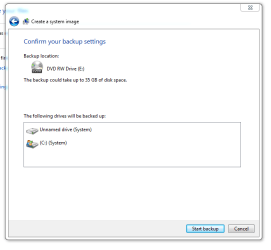
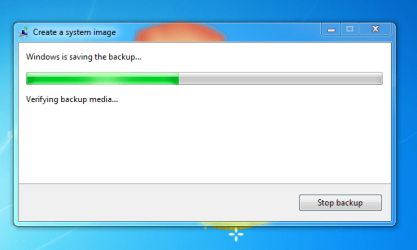
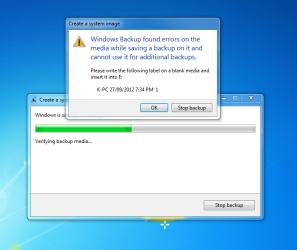
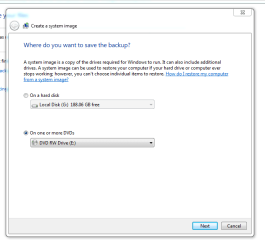
Hi Greg, I tried to create image disk, but it gives me error:
Capture2.PNG
Capture4.PNG
Capture5.PNG
Capture9.PNG
Capture10.PNG

This happened 3 times
 

My Computer

Computer Manufacturer/Model Number
Hewlett-Packard / dv6 notebook PC
OS
Windows 7 Home Premium 64bit
CPU
Intel(R) Core(TM) i5 CPU M 450 @ 2.40GHz, 2 core
Motherboard
Hewlett-Packard 144A
Memory
4 GB
Graphics Card(s)
ATI
Sound Card
ATI High Definition Audio Device
Monitor(s) Displays
Name Intel(R) HD Graphics
Screen Resolution
Resolution 1366 x 768 x 60 hertz
Hard Drives
466GB TOSHIBA TOSHIBA MK5056GSY (SATA)
C: 223.09 GB
G: 220.99 GB (partition)
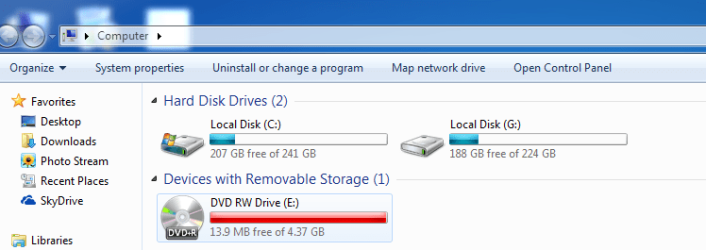
Not sure what's going on! All the three times back up did burn DVD, and gives error once it reach to max capacity.
Capture11.PNG
I have 1 TB external drive, which I use for back up. I have 400 GB data on it. Is it possible to create image on it's remaining space.
 

My Computer

Computer Manufacturer/Model Number
Hewlett-Packard / dv6 notebook PC
OS
Windows 7 Home Premium 64bit
CPU
Intel(R) Core(TM) i5 CPU M 450 @ 2.40GHz, 2 core
Motherboard
Hewlett-Packard 144A
Memory
4 GB
Graphics Card(s)
ATI
Sound Card
ATI High Definition Audio Device
Monitor(s) Displays
Name Intel(R) HD Graphics
Screen Resolution
Resolution 1366 x 768 x 60 hertz
Hard Drives
466GB TOSHIBA TOSHIBA MK5056GSY (SATA)
C: 223.09 GB
G: 220.99 GB (partition)
I have 1 TB external drive, which I use for back up. I have 400 GB data on it. Is it possible to create image on it's remaining space.

Yes, definitely. Just keep your images in a folder on the external.

A hard drive is much more reliable for imaging purposes than DVDs---as your own experience is proving. Even if the DVD imaging appears to go well, you never know what surprises you are in for until you attempt a restore. You can have problems restoring from HDD or DVD, but HDD will minimize the possibility.

Any image you make will include whatever partitions you choose to include in it. C alone, C and D together in one image, C and D separately in individual images, etc.

Windows built-in imaging has its own idea of "system files" and may include partitions other than C in a system backup---depending on your particular configuration.

But imaging programs differ widely in how well the interface is designed and how easy the various choices are to understand. You may find something like Macrium or Acronis more user-friendly.

If you have a System Reserved partition, you need to image it.

Back up your personal data through some method that does not use an image.
 

My Computer

Computer type
PC/Desktop
Computer Manufacturer/Model Number
Ignatz Special; 4 speed manual gearbox; factory air conditioning; one of one
OS
Windows 7 Home Premium SP1, 64-bit
CPU
Intel Skylake i5-6600K, not overclocked
Motherboard
AsRock Z170M Extreme 4, micro ATX
Memory
8 GB HyperX DDR4-2666 (2 x 4 GB)
Graphics Card(s)
none; graphics are integrated on CPU
Sound Card
onboard: Realtek ALC1150; external: USB Behringer UF0-202
Monitor(s) Displays
Dell S2340M 23 inch IPS
Screen Resolution
1600 x 900
Hard Drives
System: Crucial MX100 series SSD, 128 GB;
Data: Samsung Spinpoint 103SJ, 1 TB;
Backup: WD Caviar Green WD30EZRX-00D8PB0, 3 TB
PSU
Rosewill SilentNight 500 watt fanless, semi-modular
Case
Antec Solo II
Cooling
Noctua NH-U12S; Noctua F12 intake, Noctua S12A exhaust
Keyboard
Microsoft 200 6JH-00001 USB
Mouse
Dell or Microsoft optical wired; USB
Antivirus
Microsoft Security Essentials and Malwarebytes Premium
Browser
Pale Moon
Other Info
All fans PWM; speeds at idle: CPU circa 500 rpm; intake circa 600 rpm; exhaust circa 600 rpm; CPU temps 27 idle and 47 C load in a warm room (27 C/81 F) when running Intel Extreme Tuning Utility stress test.
You do not want to save the backup image to DVD's. Save to an external HD or another internal HD.

I have edited the tutorial to reflect this.
 
Thanks Greg, I am doing it on External HD now.
 

My Computer

Computer Manufacturer/Model Number
Hewlett-Packard / dv6 notebook PC
OS
Windows 7 Home Premium 64bit
CPU
Intel(R) Core(TM) i5 CPU M 450 @ 2.40GHz, 2 core
Motherboard
Hewlett-Packard 144A
Memory
4 GB
Graphics Card(s)
ATI
Sound Card
ATI High Definition Audio Device
Monitor(s) Displays
Name Intel(R) HD Graphics
Screen Resolution
Resolution 1366 x 768 x 60 hertz
Hard Drives
466GB TOSHIBA TOSHIBA MK5056GSY (SATA)
C: 223.09 GB
G: 220.99 GB (partition)
Hi Greg, It's done. Thanks a lot for your guidance throughout the thread
 

My Computer

Computer Manufacturer/Model Number
Hewlett-Packard / dv6 notebook PC
OS
Windows 7 Home Premium 64bit
CPU
Intel(R) Core(TM) i5 CPU M 450 @ 2.40GHz, 2 core
Motherboard
Hewlett-Packard 144A
Memory
4 GB
Graphics Card(s)
ATI
Sound Card
ATI High Definition Audio Device
Monitor(s) Displays
Name Intel(R) HD Graphics
Screen Resolution
Resolution 1366 x 768 x 60 hertz
Hard Drives
466GB TOSHIBA TOSHIBA MK5056GSY (SATA)
C: 223.09 GB
G: 220.99 GB (partition)
It is working well, only one problem! I arrange my gadgets on right hand side. Every time I restart my computer all gadgets move to top left corner, stack over each other. I have to arrange each of them manually at every start ups. Can you help me with this please?
 

My Computer

Computer Manufacturer/Model Number
Hewlett-Packard / dv6 notebook PC
OS
Windows 7 Home Premium 64bit
CPU
Intel(R) Core(TM) i5 CPU M 450 @ 2.40GHz, 2 core
Motherboard
Hewlett-Packard 144A
Memory
4 GB
Graphics Card(s)
ATI
Sound Card
ATI High Definition Audio Device
Monitor(s) Displays
Name Intel(R) HD Graphics
Screen Resolution
Resolution 1366 x 768 x 60 hertz
Hard Drives
466GB TOSHIBA TOSHIBA MK5056GSY (SATA)
C: 223.09 GB
G: 220.99 GB (partition)
Never heard of that one. Are you using Win7 gadgets, dragging them off of menu and placing where you want them? Try right clicking Desktop to Refresh which is how icon positions are saved.
 
I've used win 7 gadgets. I placed them by dragging them on desktop.
 

My Computer

Computer Manufacturer/Model Number
Hewlett-Packard / dv6 notebook PC
OS
Windows 7 Home Premium 64bit
CPU
Intel(R) Core(TM) i5 CPU M 450 @ 2.40GHz, 2 core
Motherboard
Hewlett-Packard 144A
Memory
4 GB
Graphics Card(s)
ATI
Sound Card
ATI High Definition Audio Device
Monitor(s) Displays
Name Intel(R) HD Graphics
Screen Resolution
Resolution 1366 x 768 x 60 hertz
Hard Drives
466GB TOSHIBA TOSHIBA MK5056GSY (SATA)
C: 223.09 GB
G: 220.99 GB (partition)
Problem solved! I just remove all gadgets, add them again, run CCleaner, Restart Computer 3-4 times, no problem so far. Do not know what worked but problem is gone.
Thanks all for help. Special thanks to ignatzatsonic and gregrocker... Thanks mate :)

I have marked it as solved.
 

My Computer

Computer Manufacturer/Model Number
Hewlett-Packard / dv6 notebook PC
OS
Windows 7 Home Premium 64bit
CPU
Intel(R) Core(TM) i5 CPU M 450 @ 2.40GHz, 2 core
Motherboard
Hewlett-Packard 144A
Memory
4 GB
Graphics Card(s)
ATI
Sound Card
ATI High Definition Audio Device
Monitor(s) Displays
Name Intel(R) HD Graphics
Screen Resolution
Resolution 1366 x 768 x 60 hertz
Hard Drives
466GB TOSHIBA TOSHIBA MK5056GSY (SATA)
C: 223.09 GB
G: 220.99 GB (partition)
Back
Top