
Memory is bad...

sotorious

New member
Power User
Local time
6:43 PM
Messages
512
Location
Houston
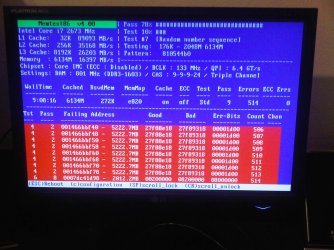
well i ran memtest 86 for about 9 hours and turns out i have bad ram,

although i did overclock it to get it at 1600 mhz bloke should know about this, i guess my next test is to put it back to normal and re test, if it is bad this could explain all the issues i have been having
 

Attachments
  • IMG00009-20091125-2103.jpg
    IMG00009-20091125-2103.jpg
    387.4 KB · Views: 44

My Computer

OS
windows 7 professional 64 bit
CPU
intel core i7 920 (1366)
Motherboard
Asus P6T Deluxe V2
Memory
Corsair Dominators (TR3X6G1600C8D)
Graphics Card(s)
Sapphire 5970
Sound Card
on board / Asus Xonar D2
Monitor(s) Displays
lg flatron wide 22" 2x
Hard Drives
caviar black 1tb
caviar green 1tb

external western digital my book 1tb
external western my book digital 500gb
PSU
corsair 750w
Case
antec 1200
Cooling
sythek mugen - 2
Keyboard
flico maje
Mouse
g500
Internet Speed
comcast houstont x, 16mb down with boost. 2mb up
With your machine and cost of it, you should let a professional look at it to repair if needed and set to default clocking.
 

My Computer

Computer Manufacturer/Model Number
self built
OS
7600.20510 x86
CPU
P4 550 3.4 GHz HT running at 3.5 GHz
Motherboard
MSI PM8M3-V (MS-7211 v1.x) Micro-ATX mainboard
Memory
OCZ 2 GB(2x1GB) DDR400mHz running @ 414 mHz
Graphics Card(s)
HIS Radeon HD 3850 IceQ 3 Turbo HDMI Dual DL-DVI AGP
Sound Card
MOTU Traveler firewire studio interface 192 kHz 24 bit
Monitor(s) Displays
22" widescreen Acer X223W LCD, 17" Compaq P75 CRT
Screen Resolution
1680x1050 and 1280x1024
Hard Drives
SATA I x2 WD, 400 GB and 120 GB, SATA 2 WD Caviar Black 1 TB
PSU
350W generic
Case
Cybertronpc, it glows blue
Cooling
stock cpu fan, Ice-Q 3 gpu and system, many case fans
Keyboard
Logitch Classical Keyboard 200
Mouse
Logitech Mediaplay cordless
Internet Speed
1792/448 kbits/sec
Other Info
SATA II PCI fake RAID adapter, 1 GB Readyboost, original ATI Remote Wonder (even works with WMC perfectly), Logitech Rumblepad 2 game controller x2
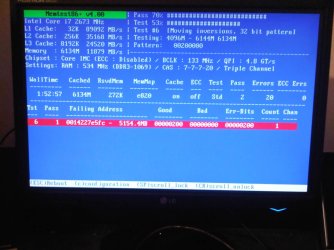
i set the speeds back to default and there still errors coming back so i think the ram may be defected from the beginning

that may explain my problems i was posting about in the gaming section of these forums,
 

My Computer

OS
windows 7 professional 64 bit
CPU
intel core i7 920 (1366)
Motherboard
Asus P6T Deluxe V2
Memory
Corsair Dominators (TR3X6G1600C8D)
Graphics Card(s)
Sapphire 5970
Sound Card
on board / Asus Xonar D2
Monitor(s) Displays
lg flatron wide 22" 2x
Hard Drives
caviar black 1tb
caviar green 1tb

external western digital my book 1tb
external western my book digital 500gb
PSU
corsair 750w
Case
antec 1200
Cooling
sythek mugen - 2
Keyboard
flico maje
Mouse
g500
Internet Speed
comcast houstont x, 16mb down with boost. 2mb up
i set the speeds back to default and there still errors coming back so i think the ram may be defected from the beginning

that may explain my problems i was posting about in the gaming section of these forums,

Very well could be. See if the ram could be RMAed. Show them the screenshot if you have to.
 

My Computer

Computer Manufacturer/Model Number
self built
OS
7600.20510 x86
CPU
P4 550 3.4 GHz HT running at 3.5 GHz
Motherboard
MSI PM8M3-V (MS-7211 v1.x) Micro-ATX mainboard
Memory
OCZ 2 GB(2x1GB) DDR400mHz running @ 414 mHz
Graphics Card(s)
HIS Radeon HD 3850 IceQ 3 Turbo HDMI Dual DL-DVI AGP
Sound Card
MOTU Traveler firewire studio interface 192 kHz 24 bit
Monitor(s) Displays
22" widescreen Acer X223W LCD, 17" Compaq P75 CRT
Screen Resolution
1680x1050 and 1280x1024
Hard Drives
SATA I x2 WD, 400 GB and 120 GB, SATA 2 WD Caviar Black 1 TB
PSU
350W generic
Case
Cybertronpc, it glows blue
Cooling
stock cpu fan, Ice-Q 3 gpu and system, many case fans
Keyboard
Logitch Classical Keyboard 200
Mouse
Logitech Mediaplay cordless
Internet Speed
1792/448 kbits/sec
Other Info
SATA II PCI fake RAID adapter, 1 GB Readyboost, original ATI Remote Wonder (even works with WMC perfectly), Logitech Rumblepad 2 game controller x2
yea i need to, i think friday im just gonna go buy new ram and then send this 1 back try an get my money back.

here is a screen shot of it only running for 2 hours and w/ an error
 

Attachments

  • IMG00010-20091126-0006.jpg
    IMG00010-20091126-0006.jpg
    211.4 KB · Views: 19

My Computer

OS
windows 7 professional 64 bit
CPU
intel core i7 920 (1366)
Motherboard
Asus P6T Deluxe V2
Memory
Corsair Dominators (TR3X6G1600C8D)
Graphics Card(s)
Sapphire 5970
Sound Card
on board / Asus Xonar D2
Monitor(s) Displays
lg flatron wide 22" 2x
Hard Drives
caviar black 1tb
caviar green 1tb

external western digital my book 1tb
external western my book digital 500gb
PSU
corsair 750w
Case
antec 1200
Cooling
sythek mugen - 2
Keyboard
flico maje
Mouse
g500
Internet Speed
comcast houstont x, 16mb down with boost. 2mb up
You are fortunate that your memory problem can be fixed with a stick of ram...mine would take brain surgery, and that wouldn't guarantee a solution.
 

My Computer

Computer Manufacturer/Model Number
DIY
OS
W7x64 Pro, SuSe 12.1/** W7 x64 Pro, XP MCE
CPU
Phenom II 1090T w/Noctua NH-D14 /**4400+ X2 w/CM Hyper TX 3
Motherboard
ASRock 890FX Deluxe 4/**A8N-SLI
Memory
2 x 2GB Patriot PGS34g1600LLKA/**4x1GB Corsair VS
Graphics Card(s)
EVGA GTX460 SC/**EVGA 8800GTS
Sound Card
Asus Xonar D2X/**Xonar D1
Monitor(s) Displays
Acer X233H, Dell E152FPc /**LG M237-WD
Screen Resolution
1920x1080 & 1024x768/**1980x1080
Hard Drives
WDC 2TB, 1.5TB, 1TB, 500GB,Seagate 500GB , Maxtor 80GB /**500GB Seagate & WDC 1TB Black
PSU
CM RS600 w/ APC BX1000G/**Antec 500 TP w/ APC BX1000
Case
HAF922/**Antec 1040IIB
Cooling
3x200mm, 1x140 and 1x120mm/**5x80mm fans
Keyboard
Logitech Media USB/**Saitek Eclipse
Mouse
Cordless Trackman Wheel/**Ditto
Internet Speed
3.3Mbps
Other Info
SB 560 5.1 w/ Sennheiser RS140/**Creative T20 speakers, Dvico FusionHDTV7 Gold RT, Cisco E3000, HP 5510V AIO, Linksys E3000, Belkin F5U237 hub and **F5D8055 adapter
(** = 2nd rig)
You are fortunate that your memory problem can be fixed with a stick of ram...mine would take brain surgery, and that wouldn't guarantee a solution.

yea but im not 100% its the ram, im running the hell out of prime 95 trying o get my system to crash but damn it, it wont crash!!!!!!!!!!!!


and why is yours so bad???
 

My Computer

OS
windows 7 professional 64 bit
CPU
intel core i7 920 (1366)
Motherboard
Asus P6T Deluxe V2
Memory
Corsair Dominators (TR3X6G1600C8D)
Graphics Card(s)
Sapphire 5970
Sound Card
on board / Asus Xonar D2
Monitor(s) Displays
lg flatron wide 22" 2x
Hard Drives
caviar black 1tb
caviar green 1tb

external western digital my book 1tb
external western my book digital 500gb
PSU
corsair 750w
Case
antec 1200
Cooling
sythek mugen - 2
Keyboard
flico maje
Mouse
g500
Internet Speed
comcast houstont x, 16mb down with boost. 2mb up
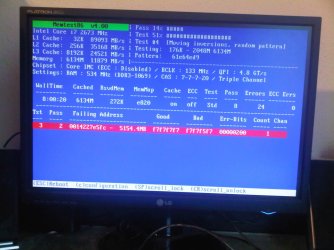
you think this could be causing anything???
 

Attachments

  • DSC01750.jpg
    DSC01750.jpg
    744.9 KB · Views: 55

My Computer

OS
windows 7 professional 64 bit
CPU
intel core i7 920 (1366)
Motherboard
Asus P6T Deluxe V2
Memory
Corsair Dominators (TR3X6G1600C8D)
Graphics Card(s)
Sapphire 5970
Sound Card
on board / Asus Xonar D2
Monitor(s) Displays
lg flatron wide 22" 2x
Hard Drives
caviar black 1tb
caviar green 1tb

external western digital my book 1tb
external western my book digital 500gb
PSU
corsair 750w
Case
antec 1200
Cooling
sythek mugen - 2
Keyboard
flico maje
Mouse
g500
Internet Speed
comcast houstont x, 16mb down with boost. 2mb up
you think this could be causing anything???

No, that's probably fine but to be sure you can check the motherboard manual. It tells you which slots to install to in most cases, such as your 3 sticks.
 

My Computer

Computer Manufacturer/Model Number
self built
OS
7600.20510 x86
CPU
P4 550 3.4 GHz HT running at 3.5 GHz
Motherboard
MSI PM8M3-V (MS-7211 v1.x) Micro-ATX mainboard
Memory
OCZ 2 GB(2x1GB) DDR400mHz running @ 414 mHz
Graphics Card(s)
HIS Radeon HD 3850 IceQ 3 Turbo HDMI Dual DL-DVI AGP
Sound Card
MOTU Traveler firewire studio interface 192 kHz 24 bit
Monitor(s) Displays
22" widescreen Acer X223W LCD, 17" Compaq P75 CRT
Screen Resolution
1680x1050 and 1280x1024
Hard Drives
SATA I x2 WD, 400 GB and 120 GB, SATA 2 WD Caviar Black 1 TB
PSU
350W generic
Case
Cybertronpc, it glows blue
Cooling
stock cpu fan, Ice-Q 3 gpu and system, many case fans
Keyboard
Logitch Classical Keyboard 200
Mouse
Logitech Mediaplay cordless
Internet Speed
1792/448 kbits/sec
Other Info
SATA II PCI fake RAID adapter, 1 GB Readyboost, original ATI Remote Wonder (even works with WMC perfectly), Logitech Rumblepad 2 game controller x2
you think this could be causing anything???

No, that's probably fine but to be sure you can check the motherboard manual. It tells you which slots to install to in most cases, such as your 3 sticks.

I was showing that the metal rod from the fan is touching the ram if you look closely. sorry i wasn't clear the first time.
 
Last edited:

My Computer

OS
windows 7 professional 64 bit
CPU
intel core i7 920 (1366)
Motherboard
Asus P6T Deluxe V2
Memory
Corsair Dominators (TR3X6G1600C8D)
Graphics Card(s)
Sapphire 5970
Sound Card
on board / Asus Xonar D2
Monitor(s) Displays
lg flatron wide 22" 2x
Hard Drives
caviar black 1tb
caviar green 1tb

external western digital my book 1tb
external western my book digital 500gb
PSU
corsair 750w
Case
antec 1200
Cooling
sythek mugen - 2
Keyboard
flico maje
Mouse
g500
Internet Speed
comcast houstont x, 16mb down with boost. 2mb up
You are fortunate that your memory problem can be fixed with a stick of ram...mine would take brain surgery, and that wouldn't guarantee a solution.

yea but im not 100% its the ram, im running the hell out of prime 95 trying o get my system to crash but damn it, it wont crash!!!!!!!!!!!!


and why is yours so bad???
Age, stroke...health.

Even if they are in the right slots, try reseating them, swapping positions, and with only one stick to test. I had a problem with one of my rigs running 3 sticks, even though it was supposed to be okay.
 

My Computer

Computer Manufacturer/Model Number
DIY
OS
W7x64 Pro, SuSe 12.1/** W7 x64 Pro, XP MCE
CPU
Phenom II 1090T w/Noctua NH-D14 /**4400+ X2 w/CM Hyper TX 3
Motherboard
ASRock 890FX Deluxe 4/**A8N-SLI
Memory
2 x 2GB Patriot PGS34g1600LLKA/**4x1GB Corsair VS
Graphics Card(s)
EVGA GTX460 SC/**EVGA 8800GTS
Sound Card
Asus Xonar D2X/**Xonar D1
Monitor(s) Displays
Acer X233H, Dell E152FPc /**LG M237-WD
Screen Resolution
1920x1080 & 1024x768/**1980x1080
Hard Drives
WDC 2TB, 1.5TB, 1TB, 500GB,Seagate 500GB , Maxtor 80GB /**500GB Seagate & WDC 1TB Black
PSU
CM RS600 w/ APC BX1000G/**Antec 500 TP w/ APC BX1000
Case
HAF922/**Antec 1040IIB
Cooling
3x200mm, 1x140 and 1x120mm/**5x80mm fans
Keyboard
Logitech Media USB/**Saitek Eclipse
Mouse
Cordless Trackman Wheel/**Ditto
Internet Speed
3.3Mbps
Other Info
SB 560 5.1 w/ Sennheiser RS140/**Creative T20 speakers, Dvico FusionHDTV7 Gold RT, Cisco E3000, HP 5510V AIO, Linksys E3000, Belkin F5U237 hub and **F5D8055 adapter
(** = 2nd rig)
Oh yeah I see what you mean. It looks like some kind of metal. If so, that's no good.

See if the manual says that could run that in another slot maybe. Find out acceptable configurations.
 

My Computer

Computer Manufacturer/Model Number
self built
OS
7600.20510 x86
CPU
P4 550 3.4 GHz HT running at 3.5 GHz
Motherboard
MSI PM8M3-V (MS-7211 v1.x) Micro-ATX mainboard
Memory
OCZ 2 GB(2x1GB) DDR400mHz running @ 414 mHz
Graphics Card(s)
HIS Radeon HD 3850 IceQ 3 Turbo HDMI Dual DL-DVI AGP
Sound Card
MOTU Traveler firewire studio interface 192 kHz 24 bit
Monitor(s) Displays
22" widescreen Acer X223W LCD, 17" Compaq P75 CRT
Screen Resolution
1680x1050 and 1280x1024
Hard Drives
SATA I x2 WD, 400 GB and 120 GB, SATA 2 WD Caviar Black 1 TB
PSU
350W generic
Case
Cybertronpc, it glows blue
Cooling
stock cpu fan, Ice-Q 3 gpu and system, many case fans
Keyboard
Logitch Classical Keyboard 200
Mouse
Logitech Mediaplay cordless
Internet Speed
1792/448 kbits/sec
Other Info
SATA II PCI fake RAID adapter, 1 GB Readyboost, original ATI Remote Wonder (even works with WMC perfectly), Logitech Rumblepad 2 game controller x2
You are fortunate that your memory problem can be fixed with a stick of ram...mine would take brain surgery, and that wouldn't guarantee a solution.

yea but im not 100% its the ram, im running the hell out of prime 95 trying o get my system to crash but damn it, it wont crash!!!!!!!!!!!!


and why is yours so bad???
Age, stroke...health.

Even if they are in the right slots, try reseating them, swapping positions, and with only one stick to test. I had a problem with one of my rigs running 3 sticks, even though it was supposed to be okay.


yea im thinking about getting a whole new 3 pack and rmaing this 1 back.
 

My Computer

OS
windows 7 professional 64 bit
CPU
intel core i7 920 (1366)
Motherboard
Asus P6T Deluxe V2
Memory
Corsair Dominators (TR3X6G1600C8D)
Graphics Card(s)
Sapphire 5970
Sound Card
on board / Asus Xonar D2
Monitor(s) Displays
lg flatron wide 22" 2x
Hard Drives
caviar black 1tb
caviar green 1tb

external western digital my book 1tb
external western my book digital 500gb
PSU
corsair 750w
Case
antec 1200
Cooling
sythek mugen - 2
Keyboard
flico maje
Mouse
g500
Internet Speed
comcast houstont x, 16mb down with boost. 2mb up
RMA it if you can. I had two sets of Corsair go bad. lol
 

My Computer

Computer type
PC/Desktop
Computer Manufacturer/Model Number
HomieJunker
OS
W7 Prof 64 bit
CPU
i7-3770k
Motherboard
Sabertooth Z77
Memory
G.Skill Sniper 1866 16 GB
Graphics Card(s)
Evga GTX 770
Sound Card
Sound Blaster Z
Monitor(s) Displays
Asus VG278HE
Screen Resolution
1920 x 1080
Hard Drives
4 Seagate Barracudas 250 GB
2 Intel® X25-M 160GB
PSU
Corsair H1000X
Case
Lian-Li A77B
Cooling
Phantek 120 dual fans
Keyboard
Corsair K70 RGB
Mouse
Logitech G502
Internet Speed
FiOS Quantum
Antivirus
Avira
Browser
Chrome
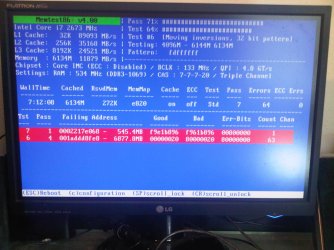
well here is a minor update i put everything back to stock everything and after 8 hours of running only 1 msg came up.


and im guessing windows 7 mem test isnt that thorough.
 

Attachments

  • IMG00011-20091126-1122.jpg
    IMG00011-20091126-1122.jpg
    217.9 KB · Views: 4
Last edited:

My Computer

OS
windows 7 professional 64 bit
CPU
intel core i7 920 (1366)
Motherboard
Asus P6T Deluxe V2
Memory
Corsair Dominators (TR3X6G1600C8D)
Graphics Card(s)
Sapphire 5970
Sound Card
on board / Asus Xonar D2
Monitor(s) Displays
lg flatron wide 22" 2x
Hard Drives
caviar black 1tb
caviar green 1tb

external western digital my book 1tb
external western my book digital 500gb
PSU
corsair 750w
Case
antec 1200
Cooling
sythek mugen - 2
Keyboard
flico maje
Mouse
g500
Internet Speed
comcast houstont x, 16mb down with boost. 2mb up
minor but depressing update. Well i took out the 3rd stick and ran memtest with only 2 sticks in for about 5 hours or so, then i took the other 2 ram sticks out and put the bad ram in the middle slot so far it has been running for 2 hours and 20 mins. Usually around this time it would have came up with an error....


now i have one more test to try taking one of the "good sticks" and putting it in the last slot to see if its a motherboard problem and say it comes up with bad info i guess its the mobo... now on the other hand. If it doesnt come up bad maybe this mobo has a hard time running the ram in tri???? right now im slumped and a little pissed cause i thought i was for sure it was one of the rams, and this is what i was scared of when i went to put this stick only to test it wouldnt come up with any issues....
 

My Computer

OS
windows 7 professional 64 bit
CPU
intel core i7 920 (1366)
Motherboard
Asus P6T Deluxe V2
Memory
Corsair Dominators (TR3X6G1600C8D)
Graphics Card(s)
Sapphire 5970
Sound Card
on board / Asus Xonar D2
Monitor(s) Displays
lg flatron wide 22" 2x
Hard Drives
caviar black 1tb
caviar green 1tb

external western digital my book 1tb
external western my book digital 500gb
PSU
corsair 750w
Case
antec 1200
Cooling
sythek mugen - 2
Keyboard
flico maje
Mouse
g500
Internet Speed
comcast houstont x, 16mb down with boost. 2mb up
minor but depressing update. Well i took out the 3rd stick and ran memtest with only 2 sticks in for about 5 hours or so, then i took the other 2 ram sticks out and put the bad ram in the middle slot so far it has been running for 2 hours and 20 mins. Usually around this time it would have came up with an error....


now i have one more test to try taking one of the "good sticks" and putting it in the last slot to see if its a motherboard problem and say it comes up with bad info i guess its the mobo... now on the other hand. If it doesnt come up bad maybe this mobo has a hard time running the ram in tri???? right now im slumped and a little pissed cause i thought i was for sure it was one of the rams, and this is what i was scared of when i went to put this stick only to test it wouldnt come up with any issues....

I'm not sure if you have checked this or not but according to the OCZ forum you need the command rate to 2t the trc to 45 and the trfc to 90 with the voltage manually set to 1.65v for your particular memory to run stable. The QPI voltage also needs to be within .5 of the dimm voltage.

As for running Prime 95 without errors, are you running the Blend test for that?
 

My Computer

Computer type
PC/Desktop
Computer Manufacturer/Model Number
Home built
OS
Windows 7 Ult, Windows 8.1 Pro,
CPU
Q9650-4.275GHz, E8600 4.5GHz, E6750-3.8GHz
Motherboard
Evga 780i FTW
Memory
G.Skill PC2 9600 1200Mhz 5 5 5 15 2T
Graphics Card(s)
GTX480
Sound Card
Asus Xonar D2
Monitor(s) Displays
HannsG
Screen Resolution
1680X1050
Hard Drives
GSkill Phoenix Pro 120GB SSD
PSU
ThermalTake Toughpower 1000Watt modular
Case
ThermalTake XaserV
Cooling
Xigmatek S1283
Keyboard
Logitech G15
Mouse
Logitech G9
Internet Speed
T1
minor but depressing update. Well i took out the 3rd stick and ran memtest with only 2 sticks in for about 5 hours or so, then i took the other 2 ram sticks out and put the bad ram in the middle slot so far it has been running for 2 hours and 20 mins. Usually around this time it would have came up with an error....


now i have one more test to try taking one of the "good sticks" and putting it in the last slot to see if its a motherboard problem and say it comes up with bad info i guess its the mobo... now on the other hand. If it doesnt come up bad maybe this mobo has a hard time running the ram in tri???? right now im slumped and a little pissed cause i thought i was for sure it was one of the rams, and this is what i was scared of when i went to put this stick only to test it wouldnt come up with any issues....

I'm not sure if you have checked this or not but according to the OCZ forum you need the command rate to 2t the trc to 45 and the trfc to 90 with the voltage manually set to 1.65v for your particular memory to run stable. The QPI voltage also needs to be within .5 of the dimm voltage.

As for running Prime 95 without errors, are you running the Blend test for that?


well even if i left it at stock speeds, you dont think it would run stable???? what i did now was switch the ram around in there slots putting the 3rd to 1st and ran memtest again

im almost starting to think its the mother board... if i still have to run it a certin way ill try it like that but at stock everything it doesnt seem like i should get any issues, i guess i should start with replacing the ram first??
 

Attachments

  • IMG00012-20091127-1047.jpg
    IMG00012-20091127-1047.jpg
    338.4 KB · Views: 6

My Computer

OS
windows 7 professional 64 bit
CPU
intel core i7 920 (1366)
Motherboard
Asus P6T Deluxe V2
Memory
Corsair Dominators (TR3X6G1600C8D)
Graphics Card(s)
Sapphire 5970
Sound Card
on board / Asus Xonar D2
Monitor(s) Displays
lg flatron wide 22" 2x
Hard Drives
caviar black 1tb
caviar green 1tb

external western digital my book 1tb
external western my book digital 500gb
PSU
corsair 750w
Case
antec 1200
Cooling
sythek mugen - 2
Keyboard
flico maje
Mouse
g500
Internet Speed
comcast houstont x, 16mb down with boost. 2mb up

My Computer

Computer Manufacturer/Model Number
self built
OS
7600.20510 x86
CPU
P4 550 3.4 GHz HT running at 3.5 GHz
Motherboard
MSI PM8M3-V (MS-7211 v1.x) Micro-ATX mainboard
Memory
OCZ 2 GB(2x1GB) DDR400mHz running @ 414 mHz
Graphics Card(s)
HIS Radeon HD 3850 IceQ 3 Turbo HDMI Dual DL-DVI AGP
Sound Card
MOTU Traveler firewire studio interface 192 kHz 24 bit
Monitor(s) Displays
22" widescreen Acer X223W LCD, 17" Compaq P75 CRT
Screen Resolution
1680x1050 and 1280x1024
Hard Drives
SATA I x2 WD, 400 GB and 120 GB, SATA 2 WD Caviar Black 1 TB
PSU
350W generic
Case
Cybertronpc, it glows blue
Cooling
stock cpu fan, Ice-Q 3 gpu and system, many case fans
Keyboard
Logitch Classical Keyboard 200
Mouse
Logitech Mediaplay cordless
Internet Speed
1792/448 kbits/sec
Other Info
SATA II PCI fake RAID adapter, 1 GB Readyboost, original ATI Remote Wonder (even works with WMC perfectly), Logitech Rumblepad 2 game controller x2
Even at stock speeds you will need to make those adjustments. The OCZ can be a bit tricky to set up and usually requires the voltage to run at 1.64 to get the full rated speed from them. The other adjustments are particular to OCZ memory and will usually be required before they run stable. I'd exchange the memory first but I would try those settings I posted before I went that route.

2t command rate! the trc to 45 and the trfc to 90 with the voltage manually set to 1.65v timings set to spec, and don't forget about the QPI voltage which may need a bump. 1.15 -1.25
 

My Computer

Computer type
PC/Desktop
Computer Manufacturer/Model Number
Home built
OS
Windows 7 Ult, Windows 8.1 Pro,
CPU
Q9650-4.275GHz, E8600 4.5GHz, E6750-3.8GHz
Motherboard
Evga 780i FTW
Memory
G.Skill PC2 9600 1200Mhz 5 5 5 15 2T
Graphics Card(s)
GTX480
Sound Card
Asus Xonar D2
Monitor(s) Displays
HannsG
Screen Resolution
1680X1050
Hard Drives
GSkill Phoenix Pro 120GB SSD
PSU
ThermalTake Toughpower 1000Watt modular
Case
ThermalTake XaserV
Cooling
Xigmatek S1283
Keyboard
Logitech G15
Mouse
Logitech G9
Internet Speed
T1
Back
Top