
Memory is bad...

DRAM CAS# Latency - 8
DRAM RAS# to CAS# Delay - 8
DRAM RAS# PRE Time - 8
DRAM RAS# ACT Time – 24


on those you have alot of - do you want me to just change it to like 8 and then it will say 8 dram clock
 

My Computer

OS
windows 7 professional 64 bit
CPU
intel core i7 920 (1366)
Motherboard
Asus P6T Deluxe V2
Memory
Corsair Dominators (TR3X6G1600C8D)
Graphics Card(s)
Sapphire 5970
Sound Card
on board / Asus Xonar D2
Monitor(s) Displays
lg flatron wide 22" 2x
Hard Drives
caviar black 1tb
caviar green 1tb

external western digital my book 1tb
external western my book digital 500gb
PSU
corsair 750w
Case
antec 1200
Cooling
sythek mugen - 2
Keyboard
flico maje
Mouse
g500
Internet Speed
comcast houstont x, 16mb down with boost. 2mb up
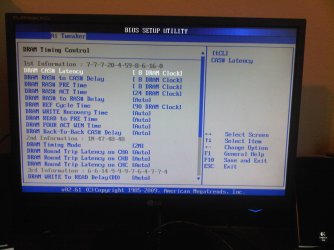
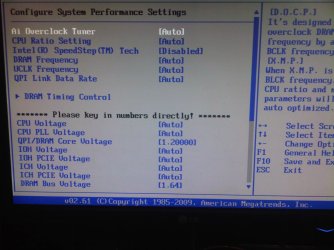
ok this is what i did DRAM RAS# to RAS# Delay - Auto > Try setting this to 45 "not sure" but may work on Auto. i couldnt find anything that said 45 it was all low numbers so i left it auto
 

Attachments

  • IMG00013-20091127-1223.jpg
    IMG00013-20091127-1223.jpg
    264.3 KB · Views: 8
  • IMG00014-20091127-1223.jpg
    IMG00014-20091127-1223.jpg
    273.2 KB · Views: 7

My Computer

OS
windows 7 professional 64 bit
CPU
intel core i7 920 (1366)
Motherboard
Asus P6T Deluxe V2
Memory
Corsair Dominators (TR3X6G1600C8D)
Graphics Card(s)
Sapphire 5970
Sound Card
on board / Asus Xonar D2
Monitor(s) Displays
lg flatron wide 22" 2x
Hard Drives
caviar black 1tb
caviar green 1tb

external western digital my book 1tb
external western my book digital 500gb
PSU
corsair 750w
Case
antec 1200
Cooling
sythek mugen - 2
Keyboard
flico maje
Mouse
g500
Internet Speed
comcast houstont x, 16mb down with boost. 2mb up
I was checking out the reviews on this Ram at newegg, the reviews not very good at all although some had good luck. There were many bad sticks being detected. But getting it to work correctly seems to be very setting specific. OCZ forums might be worth a try also.

I also read that the XPM profiles are not working correctly with your memory. For 1600MHz you might also need to set 2:12 memory ratio.

Some had better luck using 1333 for memory speed.
 

My Computer

Computer type
PC/Desktop
Computer Manufacturer/Model Number
Home built
OS
Windows 7 Ult, Windows 8.1 Pro,
CPU
Q9650-4.275GHz, E8600 4.5GHz, E6750-3.8GHz
Motherboard
Evga 780i FTW
Memory
G.Skill PC2 9600 1200Mhz 5 5 5 15 2T
Graphics Card(s)
GTX480
Sound Card
Asus Xonar D2
Monitor(s) Displays
HannsG
Screen Resolution
1680X1050
Hard Drives
GSkill Phoenix Pro 120GB SSD
PSU
ThermalTake Toughpower 1000Watt modular
Case
ThermalTake XaserV
Cooling
Xigmatek S1283
Keyboard
Logitech G15
Mouse
Logitech G9
Internet Speed
T1
I was checking out the reviews on this Ram at newegg, the reviews not very good at all although some had good luck. There were many bad sticks being detected. But getting it to work correctly seems to be very setting specific. OCZ forums might be worth a try also.

i been there, now im wondering if i go get ram, should i just upgrade to the corisair dominators

im just trying to get my ram stable, to see if my ram is defected or my mobo... this stuff is so frustrating.
 

My Computer

OS
windows 7 professional 64 bit
CPU
intel core i7 920 (1366)
Motherboard
Asus P6T Deluxe V2
Memory
Corsair Dominators (TR3X6G1600C8D)
Graphics Card(s)
Sapphire 5970
Sound Card
on board / Asus Xonar D2
Monitor(s) Displays
lg flatron wide 22" 2x
Hard Drives
caviar black 1tb
caviar green 1tb

external western digital my book 1tb
external western my book digital 500gb
PSU
corsair 750w
Case
antec 1200
Cooling
sythek mugen - 2
Keyboard
flico maje
Mouse
g500
Internet Speed
comcast houstont x, 16mb down with boost. 2mb up
Yes the reviews are saying what you are. XMP profiles doesn't work at all and it defaults to 1066, lots of BSOD's unless settings are perfect and also lots of defective sticks. Particular about settings and difficult to set up in general but the specs from OCZ should help. QPI may need 1.25-1.35.

Believe it or not, just about every single enthusiast board requires specific memory settings to be stable but your's is a bit more of a pain than usual. I would test those new settings with memtest and see if it helps. The only reason for sticking with this memory is because RMA is a pain and takes considerable time.

It's kinda hard to say if it's a setting problem or if the memory is faulty because the reviews are all over the place. My choice for memory would be GSkill not Corsair.
 
Last edited:

My Computer

Computer type
PC/Desktop
Computer Manufacturer/Model Number
Home built
OS
Windows 7 Ult, Windows 8.1 Pro,
CPU
Q9650-4.275GHz, E8600 4.5GHz, E6750-3.8GHz
Motherboard
Evga 780i FTW
Memory
G.Skill PC2 9600 1200Mhz 5 5 5 15 2T
Graphics Card(s)
GTX480
Sound Card
Asus Xonar D2
Monitor(s) Displays
HannsG
Screen Resolution
1680X1050
Hard Drives
GSkill Phoenix Pro 120GB SSD
PSU
ThermalTake Toughpower 1000Watt modular
Case
ThermalTake XaserV
Cooling
Xigmatek S1283
Keyboard
Logitech G15
Mouse
Logitech G9
Internet Speed
T1

My Computer

OS
windows 7 professional 64 bit
CPU
intel core i7 920 (1366)
Motherboard
Asus P6T Deluxe V2
Memory
Corsair Dominators (TR3X6G1600C8D)
Graphics Card(s)
Sapphire 5970
Sound Card
on board / Asus Xonar D2
Monitor(s) Displays
lg flatron wide 22" 2x
Hard Drives
caviar black 1tb
caviar green 1tb

external western digital my book 1tb
external western my book digital 500gb
PSU
corsair 750w
Case
antec 1200
Cooling
sythek mugen - 2
Keyboard
flico maje
Mouse
g500
Internet Speed
comcast houstont x, 16mb down with boost. 2mb up
After reading those reviews I think it's safe to say it's not a board problem. If there are bad sticks then of course no amount of adjusting will help but you need to at least try before you give up on them.

It might be worth it to test one stick at a time to determine if a bad stick is the cause of the problems or if it's the settings holding you back.
 

My Computer

Computer type
PC/Desktop
Computer Manufacturer/Model Number
Home built
OS
Windows 7 Ult, Windows 8.1 Pro,
CPU
Q9650-4.275GHz, E8600 4.5GHz, E6750-3.8GHz
Motherboard
Evga 780i FTW
Memory
G.Skill PC2 9600 1200Mhz 5 5 5 15 2T
Graphics Card(s)
GTX480
Sound Card
Asus Xonar D2
Monitor(s) Displays
HannsG
Screen Resolution
1680X1050
Hard Drives
GSkill Phoenix Pro 120GB SSD
PSU
ThermalTake Toughpower 1000Watt modular
Case
ThermalTake XaserV
Cooling
Xigmatek S1283
Keyboard
Logitech G15
Mouse
Logitech G9
Internet Speed
T1
got new ram now about to test it hopefully here we go ill report back

ps those adjustments i did made it error like crazy
 

My Computer

OS
windows 7 professional 64 bit
CPU
intel core i7 920 (1366)
Motherboard
Asus P6T Deluxe V2
Memory
Corsair Dominators (TR3X6G1600C8D)
Graphics Card(s)
Sapphire 5970
Sound Card
on board / Asus Xonar D2
Monitor(s) Displays
lg flatron wide 22" 2x
Hard Drives
caviar black 1tb
caviar green 1tb

external western digital my book 1tb
external western my book digital 500gb
PSU
corsair 750w
Case
antec 1200
Cooling
sythek mugen - 2
Keyboard
flico maje
Mouse
g500
Internet Speed
comcast houstont x, 16mb down with boost. 2mb up
got a huge problem bought the new ram ran mem test for 8 hours things came back fine.... but i get to windows and it only shows 4 gigs of ram in cpu z it shows six.... i guess thats it the motherboard is a goner. **** time to start stripping my computer.
 

My Computer

OS
windows 7 professional 64 bit
CPU
intel core i7 920 (1366)
Motherboard
Asus P6T Deluxe V2
Memory
Corsair Dominators (TR3X6G1600C8D)
Graphics Card(s)
Sapphire 5970
Sound Card
on board / Asus Xonar D2
Monitor(s) Displays
lg flatron wide 22" 2x
Hard Drives
caviar black 1tb
caviar green 1tb

external western digital my book 1tb
external western my book digital 500gb
PSU
corsair 750w
Case
antec 1200
Cooling
sythek mugen - 2
Keyboard
flico maje
Mouse
g500
Internet Speed
comcast houstont x, 16mb down with boost. 2mb up
I don't know that it would account for 2GB of missing ram, but I had to enable the Memory Hole in the BIOS to show 4GBs instead of 3GBs.
 

My Computer

Computer Manufacturer/Model Number
DIY
OS
W7x64 Pro, SuSe 12.1/** W7 x64 Pro, XP MCE
CPU
Phenom II 1090T w/Noctua NH-D14 /**4400+ X2 w/CM Hyper TX 3
Motherboard
ASRock 890FX Deluxe 4/**A8N-SLI
Memory
2 x 2GB Patriot PGS34g1600LLKA/**4x1GB Corsair VS
Graphics Card(s)
EVGA GTX460 SC/**EVGA 8800GTS
Sound Card
Asus Xonar D2X/**Xonar D1
Monitor(s) Displays
Acer X233H, Dell E152FPc /**LG M237-WD
Screen Resolution
1920x1080 & 1024x768/**1980x1080
Hard Drives
WDC 2TB, 1.5TB, 1TB, 500GB,Seagate 500GB , Maxtor 80GB /**500GB Seagate & WDC 1TB Black
PSU
CM RS600 w/ APC BX1000G/**Antec 500 TP w/ APC BX1000
Case
HAF922/**Antec 1040IIB
Cooling
3x200mm, 1x140 and 1x120mm/**5x80mm fans
Keyboard
Logitech Media USB/**Saitek Eclipse
Mouse
Cordless Trackman Wheel/**Ditto
Internet Speed
3.3Mbps
Other Info
SB 560 5.1 w/ Sennheiser RS140/**Creative T20 speakers, Dvico FusionHDTV7 Gold RT, Cisco E3000, HP 5510V AIO, Linksys E3000, Belkin F5U237 hub and **F5D8055 adapter
(** = 2nd rig)
I don't know that it would account for 2GB of missing ram, but I had to enable the Memory Hole in the BIOS to show 4GBs instead of 3GBs.

what memory hole??? i mean my old ram was showing 6 gigs... unless this disabled something when i put it in
 

My Computer

OS
windows 7 professional 64 bit
CPU
intel core i7 920 (1366)
Motherboard
Asus P6T Deluxe V2
Memory
Corsair Dominators (TR3X6G1600C8D)
Graphics Card(s)
Sapphire 5970
Sound Card
on board / Asus Xonar D2
Monitor(s) Displays
lg flatron wide 22" 2x
Hard Drives
caviar black 1tb
caviar green 1tb

external western digital my book 1tb
external western my book digital 500gb
PSU
corsair 750w
Case
antec 1200
Cooling
sythek mugen - 2
Keyboard
flico maje
Mouse
g500
Internet Speed
comcast houstont x, 16mb down with boost. 2mb up
I don't remember it's exact location, and I can't reboot at the moment to go into the BIOS, but since you have an Asus MB, I'm fairly certain that you will find it if you browse through the BIOS.
 

My Computer

Computer Manufacturer/Model Number
DIY
OS
W7x64 Pro, SuSe 12.1/** W7 x64 Pro, XP MCE
CPU
Phenom II 1090T w/Noctua NH-D14 /**4400+ X2 w/CM Hyper TX 3
Motherboard
ASRock 890FX Deluxe 4/**A8N-SLI
Memory
2 x 2GB Patriot PGS34g1600LLKA/**4x1GB Corsair VS
Graphics Card(s)
EVGA GTX460 SC/**EVGA 8800GTS
Sound Card
Asus Xonar D2X/**Xonar D1
Monitor(s) Displays
Acer X233H, Dell E152FPc /**LG M237-WD
Screen Resolution
1920x1080 & 1024x768/**1980x1080
Hard Drives
WDC 2TB, 1.5TB, 1TB, 500GB,Seagate 500GB , Maxtor 80GB /**500GB Seagate & WDC 1TB Black
PSU
CM RS600 w/ APC BX1000G/**Antec 500 TP w/ APC BX1000
Case
HAF922/**Antec 1040IIB
Cooling
3x200mm, 1x140 and 1x120mm/**5x80mm fans
Keyboard
Logitech Media USB/**Saitek Eclipse
Mouse
Cordless Trackman Wheel/**Ditto
Internet Speed
3.3Mbps
Other Info
SB 560 5.1 w/ Sennheiser RS140/**Creative T20 speakers, Dvico FusionHDTV7 Gold RT, Cisco E3000, HP 5510V AIO, Linksys E3000, Belkin F5U237 hub and **F5D8055 adapter
(** = 2nd rig)
just got my system to crash
 

My Computer

OS
windows 7 professional 64 bit
CPU
intel core i7 920 (1366)
Motherboard
Asus P6T Deluxe V2
Memory
Corsair Dominators (TR3X6G1600C8D)
Graphics Card(s)
Sapphire 5970
Sound Card
on board / Asus Xonar D2
Monitor(s) Displays
lg flatron wide 22" 2x
Hard Drives
caviar black 1tb
caviar green 1tb

external western digital my book 1tb
external western my book digital 500gb
PSU
corsair 750w
Case
antec 1200
Cooling
sythek mugen - 2
Keyboard
flico maje
Mouse
g500
Internet Speed
comcast houstont x, 16mb down with boost. 2mb up
this is so insane, i am lost for words, it only reads 4 gigs of the corsair dominators, and it reads all 6 gigs of ocz, when it does read all 6 gigs of corsair it blue screens this is so damn weird. i think it really has something to do with the last slot in my motherboard i am now convinced. that is the only explination, maybe its not the ram that has been bad period..

im gonna take it to techs tomorrow, he is going to tell me he cant find anything, i remember last time they did that. and i ended up paying 60 bucks for no reason and finding my old problem later on down the road.


http://vip.asus.com/forum/view.aspx...id=1&model=Rampage II Extreme&page=1&count=15
 

My Computer

OS
windows 7 professional 64 bit
CPU
intel core i7 920 (1366)
Motherboard
Asus P6T Deluxe V2
Memory
Corsair Dominators (TR3X6G1600C8D)
Graphics Card(s)
Sapphire 5970
Sound Card
on board / Asus Xonar D2
Monitor(s) Displays
lg flatron wide 22" 2x
Hard Drives
caviar black 1tb
caviar green 1tb

external western digital my book 1tb
external western my book digital 500gb
PSU
corsair 750w
Case
antec 1200
Cooling
sythek mugen - 2
Keyboard
flico maje
Mouse
g500
Internet Speed
comcast houstont x, 16mb down with boost. 2mb up
this is so insane, i am lost for words, it only reads 4 gigs of the corsair dominators, and it reads all 6 gigs of ocz, when it does read all 6 gigs of corsair it blue screens this is so damn weird. i think it really has something to do with the last slot in my motherboard i am now convinced. that is the only explination, maybe its not the ram that has been bad period..

im gonna take it to techs tomorrow, he is going to tell me he cant find anything, i remember last time they did that. and i ended up paying 60 bucks for no reason and finding my old problem later on down the road.


ASUSTeK Computer Inc.-Forum- i installed 6 GB of ddr3 and just recognize 4GB


You really don't listen so well, heh?

http://www.sevenforums.com/crashes-debugging/42498-bsod-i-need-know-how-acess-file.html

Thanks for wasting my time.
 

My Computer

Computer Manufacturer/Model Number
self built
OS
7600.20510 x86
CPU
P4 550 3.4 GHz HT running at 3.5 GHz
Motherboard
MSI PM8M3-V (MS-7211 v1.x) Micro-ATX mainboard
Memory
OCZ 2 GB(2x1GB) DDR400mHz running @ 414 mHz
Graphics Card(s)
HIS Radeon HD 3850 IceQ 3 Turbo HDMI Dual DL-DVI AGP
Sound Card
MOTU Traveler firewire studio interface 192 kHz 24 bit
Monitor(s) Displays
22" widescreen Acer X223W LCD, 17" Compaq P75 CRT
Screen Resolution
1680x1050 and 1280x1024
Hard Drives
SATA I x2 WD, 400 GB and 120 GB, SATA 2 WD Caviar Black 1 TB
PSU
350W generic
Case
Cybertronpc, it glows blue
Cooling
stock cpu fan, Ice-Q 3 gpu and system, many case fans
Keyboard
Logitch Classical Keyboard 200
Mouse
Logitech Mediaplay cordless
Internet Speed
1792/448 kbits/sec
Other Info
SATA II PCI fake RAID adapter, 1 GB Readyboost, original ATI Remote Wonder (even works with WMC perfectly), Logitech Rumblepad 2 game controller x2
this is so insane, i am lost for words, it only reads 4 gigs of the corsair dominators, and it reads all 6 gigs of ocz, when it does read all 6 gigs of corsair it blue screens this is so damn weird. i think it really has something to do with the last slot in my motherboard i am now convinced. that is the only explination, maybe its not the ram that has been bad period..

im gonna take it to techs tomorrow, he is going to tell me he cant find anything, i remember last time they did that. and i ended up paying 60 bucks for no reason and finding my old problem later on down the road.


ASUSTeK Computer Inc.-Forum- i installed 6 GB of ddr3 and just recognize 4GB


You really don't listen so well, heh?

http://www.sevenforums.com/crashes-debugging/42498-bsod-i-need-know-how-acess-file.html

Thanks for wasting my time.

what you have told me was update things i have already updated a file i have no idea where to find, and a certain setup with certain ram. I mean thank you for helping me and all, but telling me to take it to a specialist is really not that helpful.

i updated my bios this morning, i updated chipset a few weeks ago, i dont see how that caused a blue screen with the new ram i bought. but blue screens are not occurring on my old set of ram's

Im trying to pin the point the issue as best as i can so when i take the computer to someone they will know what do look straight 2.
 

My Computer

OS
windows 7 professional 64 bit
CPU
intel core i7 920 (1366)
Motherboard
Asus P6T Deluxe V2
Memory
Corsair Dominators (TR3X6G1600C8D)
Graphics Card(s)
Sapphire 5970
Sound Card
on board / Asus Xonar D2
Monitor(s) Displays
lg flatron wide 22" 2x
Hard Drives
caviar black 1tb
caviar green 1tb

external western digital my book 1tb
external western my book digital 500gb
PSU
corsair 750w
Case
antec 1200
Cooling
sythek mugen - 2
Keyboard
flico maje
Mouse
g500
Internet Speed
comcast houstont x, 16mb down with boost. 2mb up
I told you which memory to get and why. And to also replace a file that you can easily do with minimal research.

???
 

My Computer

Computer Manufacturer/Model Number
self built
OS
7600.20510 x86
CPU
P4 550 3.4 GHz HT running at 3.5 GHz
Motherboard
MSI PM8M3-V (MS-7211 v1.x) Micro-ATX mainboard
Memory
OCZ 2 GB(2x1GB) DDR400mHz running @ 414 mHz
Graphics Card(s)
HIS Radeon HD 3850 IceQ 3 Turbo HDMI Dual DL-DVI AGP
Sound Card
MOTU Traveler firewire studio interface 192 kHz 24 bit
Monitor(s) Displays
22" widescreen Acer X223W LCD, 17" Compaq P75 CRT
Screen Resolution
1680x1050 and 1280x1024
Hard Drives
SATA I x2 WD, 400 GB and 120 GB, SATA 2 WD Caviar Black 1 TB
PSU
350W generic
Case
Cybertronpc, it glows blue
Cooling
stock cpu fan, Ice-Q 3 gpu and system, many case fans
Keyboard
Logitch Classical Keyboard 200
Mouse
Logitech Mediaplay cordless
Internet Speed
1792/448 kbits/sec
Other Info
SATA II PCI fake RAID adapter, 1 GB Readyboost, original ATI Remote Wonder (even works with WMC perfectly), Logitech Rumblepad 2 game controller x2
I told you which memory to get and why. And to also replace a file that you can easily do with minimal research.

???

I did the research but maybe i dont know how to search it right, i get things like it telling me some stuff i dont understand its not saying which program its coming from, people are talking about getting rid of it and it coming back.

so you think all this has to do with timing...

cause i dont understand why it cant run at clock speeds...
 

My Computer

OS
windows 7 professional 64 bit
CPU
intel core i7 920 (1366)
Motherboard
Asus P6T Deluxe V2
Memory
Corsair Dominators (TR3X6G1600C8D)
Graphics Card(s)
Sapphire 5970
Sound Card
on board / Asus Xonar D2
Monitor(s) Displays
lg flatron wide 22" 2x
Hard Drives
caviar black 1tb
caviar green 1tb

external western digital my book 1tb
external western my book digital 500gb
PSU
corsair 750w
Case
antec 1200
Cooling
sythek mugen - 2
Keyboard
flico maje
Mouse
g500
Internet Speed
comcast houstont x, 16mb down with boost. 2mb up
This is the last post I will ever make on the subject. You should get the RAM shown on the overclocker's page since you can be sure it is good for the motherboard and all of the other reasons why I said. If they are using it to overclock the heck out of the board and cpu, it will do well for you.
 

My Computer

Computer Manufacturer/Model Number
self built
OS
7600.20510 x86
CPU
P4 550 3.4 GHz HT running at 3.5 GHz
Motherboard
MSI PM8M3-V (MS-7211 v1.x) Micro-ATX mainboard
Memory
OCZ 2 GB(2x1GB) DDR400mHz running @ 414 mHz
Graphics Card(s)
HIS Radeon HD 3850 IceQ 3 Turbo HDMI Dual DL-DVI AGP
Sound Card
MOTU Traveler firewire studio interface 192 kHz 24 bit
Monitor(s) Displays
22" widescreen Acer X223W LCD, 17" Compaq P75 CRT
Screen Resolution
1680x1050 and 1280x1024
Hard Drives
SATA I x2 WD, 400 GB and 120 GB, SATA 2 WD Caviar Black 1 TB
PSU
350W generic
Case
Cybertronpc, it glows blue
Cooling
stock cpu fan, Ice-Q 3 gpu and system, many case fans
Keyboard
Logitch Classical Keyboard 200
Mouse
Logitech Mediaplay cordless
Internet Speed
1792/448 kbits/sec
Other Info
SATA II PCI fake RAID adapter, 1 GB Readyboost, original ATI Remote Wonder (even works with WMC perfectly), Logitech Rumblepad 2 game controller x2
Last edited:

My Computer

OS
windows 7 professional 64 bit
CPU
intel core i7 920 (1366)
Motherboard
Asus P6T Deluxe V2
Memory
Corsair Dominators (TR3X6G1600C8D)
Graphics Card(s)
Sapphire 5970
Sound Card
on board / Asus Xonar D2
Monitor(s) Displays
lg flatron wide 22" 2x
Hard Drives
caviar black 1tb
caviar green 1tb

external western digital my book 1tb
external western my book digital 500gb
PSU
corsair 750w
Case
antec 1200
Cooling
sythek mugen - 2
Keyboard
flico maje
Mouse
g500
Internet Speed
comcast houstont x, 16mb down with boost. 2mb up
Back
Top