Solved Memory RAM advice

graphomet

New member
Member
VIP
Local time
7:13 AM
Messages
100
Hi Forum.

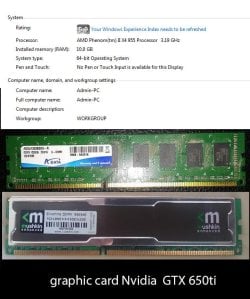
I'd like to add some more memory to my PC, I got my PC upgraded 3 years ago, and the Tech guy left in my PC my old RAM and I spotted the new ones called Mushkin silverline. So My main question are ram sticks compatible with other brands, or is it better to have the same brand used? for example I saw my Mushkin silverline are the budget price ones, but If I can go for the Mushkin redline, which is considered super duper, would it cause issues having a more advanced memory stick as opposed to the ones with less performance?

Thank you.
 

My Computer My Computer

Computer type
PC/Desktop
Computer Manufacturer/Model Number
Custom build
OS
windows 7 home premium 64bit
CPU
AMD Phenom(tm) II X4 955 Processor
Motherboard
ASRock M3A790GXH/128M
Memory
8.00 GB
Graphics Card(s)
NVIDIA GeForce GTX 650 Ti
Sound Card
(1) High Definition Audio Device (2) USB Audio Device (3
Antivirus
Avast Free
Browser
Chrome
It's always best to run RAM in kits, I certainly wouldn't pair new with your old RAM. What are your system specs and the exact specs of the new RAM? We wouldn't be able to advise on compatibility before we knew all of that.
 

My Computer My Computer

Computer type
PC/Desktop
Computer Manufacturer/Model Number
Custom Build
OS
W7 Pro x64 SP1 | W10 Pro IP x64 | W8.1 Pro x64 VM | Linux Mint VM
CPU
i7-4790k @ 4GHz (4.4GHz Boost)
Motherboard
ASUS Sabertooth Z87 (BIOS Rev 2004)
Memory
16GB DDR3 Kingston HyperX Fury @ 1600MHz CL 9-9-9-27
Graphics Card(s)
EVGA GTX 980 Classified
Sound Card
Realtek Onboard
Monitor(s) Displays
Samsung S27D390
Screen Resolution
1920 x 1080
Hard Drives
240GB Intel 520 Series SSD |
Samsung 850 EVO 120GB SSD |
2TB WD Caviar Black |
2TB WD Caviar Green
PSU
Corsair HX850-80 Gold Modular
Case
Cooler Master Silencio 650
Cooling
Corsair H80i w/2 x Corsair SP120 | 2 x 120mm Noctua NF-S12B
Keyboard
Microsoft Sidewinder X4
Mouse
Gigabyte M6900 optical
Internet Speed
152mb
Antivirus
F-Secure
Browser
Firefox 38.0
Other Info
Backup Rig: Win 7 Pro 64-bit | AMD A10-5800k | ASUS F2A85-V Pro | 8GB Samsung DDR3 @1600MHz | 120GB Toshiba SDD | 2TB Seagate HDD | Cooler Master Silencio 550
Hi, Here are some of my pc specks... I know they are old.

Its been like 2 years now Im getting the BSOD.. its been one day since Im taking each memory out and seeing if it crashes, so i can see which ram stick is faulty.

I have installed on my PC 2 of each of these RAM sticks. maybe they are conflicting with each other and its causing this problem Im assuming.

Also what would be the best solution if I am to buy new ram sticks. I use Adobe products, for video editing and design. Ill be getting a new machine done up by the end of the year. So whats the best temporally low cost ram just to be safe for now. I can spend up to $300 for now.
 

Attachments

  • WF_1.jpg
    WF_1.jpg
    96.6 KB · Views: 4

My Computer My Computer

Computer type
PC/Desktop
Computer Manufacturer/Model Number
Custom build
OS
windows 7 home premium 64bit
CPU
AMD Phenom(tm) II X4 955 Processor
Motherboard
ASRock M3A790GXH/128M
Memory
8.00 GB
Graphics Card(s)
NVIDIA GeForce GTX 650 Ti
Sound Card
(1) High Definition Audio Device (2) USB Audio Device (3
Antivirus
Avast Free
Browser
Chrome
Right, first of all can you fill in your system specs by following the link in my signature, that's what's needed. Secondly I wouldn't be running that RAM together, while it may not be the cause of the BSODs it's certainly could be causing issues.

Fill in your specs as above first, then post up your BSOD logs following http://www.sevenforums.com/bsod-help-support/96879-blue-screen-death-bsod-posting-instructions.html

To test your RAM follow the instructions below.

Download and run MemTest86+ to test your RAM. http://www.sevenforums.com/tutorials/105647-ram-test-memtest86.html

   Note
picture.php


Run MemTest86+ for at least 8 passes. Ideally set it off before you go to bed and leave it overnight, we're looking for zero errors here. A single error will show something's going bad with your RAM.
 

My Computer My Computer

Computer type
PC/Desktop
Computer Manufacturer/Model Number
Custom Build
OS
W7 Pro x64 SP1 | W10 Pro IP x64 | W8.1 Pro x64 VM | Linux Mint VM
CPU
i7-4790k @ 4GHz (4.4GHz Boost)
Motherboard
ASUS Sabertooth Z87 (BIOS Rev 2004)
Memory
16GB DDR3 Kingston HyperX Fury @ 1600MHz CL 9-9-9-27
Graphics Card(s)
EVGA GTX 980 Classified
Sound Card
Realtek Onboard
Monitor(s) Displays
Samsung S27D390
Screen Resolution
1920 x 1080
Hard Drives
240GB Intel 520 Series SSD |
Samsung 850 EVO 120GB SSD |
2TB WD Caviar Black |
2TB WD Caviar Green
PSU
Corsair HX850-80 Gold Modular
Case
Cooler Master Silencio 650
Cooling
Corsair H80i w/2 x Corsair SP120 | 2 x 120mm Noctua NF-S12B
Keyboard
Microsoft Sidewinder X4
Mouse
Gigabyte M6900 optical
Internet Speed
152mb
Antivirus
F-Secure
Browser
Firefox 38.0
Other Info
Backup Rig: Win 7 Pro 64-bit | AMD A10-5800k | ASUS F2A85-V Pro | 8GB Samsung DDR3 @1600MHz | 120GB Toshiba SDD | 2TB Seagate HDD | Cooler Master Silencio 550
I actually laughed for a sec, when you said post your BSOD! I know them off by heart now. These are the messages I get when my PC crashes.

PFN List Corrupt
Bad pool header in non page area
IRQL_NOT_LESS_EQUAL
PAGE_FAULT_IN_NONPAGED_AREA

These are the ones I remember occurring once a day.
 

My Computer My Computer

Computer type
PC/Desktop
Computer Manufacturer/Model Number
Custom build
OS
windows 7 home premium 64bit
CPU
AMD Phenom(tm) II X4 955 Processor
Motherboard
ASRock M3A790GXH/128M
Memory
8.00 GB
Graphics Card(s)
NVIDIA GeForce GTX 650 Ti
Sound Card
(1) High Definition Audio Device (2) USB Audio Device (3
Antivirus
Avast Free
Browser
Chrome
Please post a link to your motherboard, we need to know what you have so we can advise you.
 

My Computer My Computer

Computer type
PC/Desktop
Computer Manufacturer/Model Number
Skylake Special #666
OS
Windows 10 Pro x64
CPU
Intel Core i7 6700K
Motherboard
Asus Sabertooth Z170 Mark 1
Memory
GSkill TridentZ RGB 16GB 3600 16-16-16-36
Graphics Card(s)
EVGA GTX 980 Ti SC x2
Sound Card
Realtek High Definition
Monitor(s) Displays
AOC G2460PG
Screen Resolution
1920 x 1080 144Hz
Hard Drives
Samsung 860 Pro 256GB, Seagate Barracuda 4TB x2
PSU
EVGA 1000 P2, EVGA White Custom Braided Cables
Case
Corsair Vengeance C70 Gunmetal Black
Cooling
Corsair H100i v2, Corsair ML120 x2, Thermal Grizzly Kryonaut
Keyboard
Logitech G910 Orion Spectrum
Mouse
Logitech G700s
Internet Speed
Verizon Fios Quantum Gateway 75/75
Antivirus
Windows Defender, Malwarebytes Free 3.8.3
Browser
Chrome
Other Info
Corsair SP120 x4, LG Blu-ray Drive, Durabrand HT-395 100 Watt Dolby Digital Amp, Corsair H2100 Wireless 7.1 Headset

My Computer My Computer

Computer type
PC/Desktop
Computer Manufacturer/Model Number
Custom Build
OS
Windows 7 Ultimate x64 SP1
CPU
AMD Phenom 2 1090T
Motherboard
Gigabyte GA-890FXA-UD5
Memory
2x8GB Kingston HyperX Fury Black 1600Mhz Unganged
Graphics Card(s)
MSI GTX 970 Gaming 4G
Sound Card
Realtek On-Board HD 7.1 Audio / Logitech G35
Monitor(s) Displays
3xAcer GD245HQ
Screen Resolution
1920x1080
Hard Drives
Samsung 850 Pro 512GB SSD - OS /
WD Caviar Black SATA 3 - 1 TBx2 - Dynamic RAID 0 /
WD Caviar Green SATA 2 - 640GBx2 - Dynamic RAID 0 /
WD Caviar Green SATA 2 - 640GB - Internal Backup /
Seagate Barracude SATA 3 - 3TB - External Backup/ Sync
PSU
HighPower 1000W
Case
Cooler Master HAF 932
Cooling
Noctua NH-D14
Keyboard
Logitech G19
Mouse
Logitech G500
Internet Speed
100/4 Mbit Cable (100GB quota)
Antivirus
ZoneAlarm Extreme Security / MBAM Pro / MBAE Free / SAS Free
Browser
IE 11 - Firefox - Chrome
Other Info
Logitech F710/ G27/ G940/ Z5500 // TrackIR 5 // Nvidia 3D Surround Vision
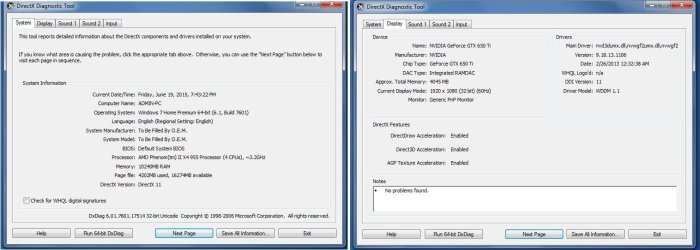
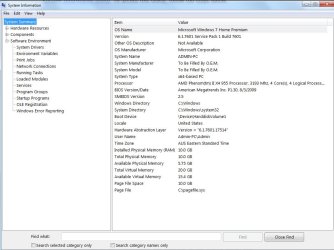
Here are the specks, Ill do the BSOD instruction now.
 

Attachments

  • WF7.jpg
    WF7.jpg
    122.1 KB · Views: 5
  • ws56.jpg
    ws56.jpg
    105.4 KB · Views: 3
Last edited:

My Computer My Computer

Computer type
PC/Desktop
Computer Manufacturer/Model Number
Custom build
OS
windows 7 home premium 64bit
CPU
AMD Phenom(tm) II X4 955 Processor
Motherboard
ASRock M3A790GXH/128M
Memory
8.00 GB
Graphics Card(s)
NVIDIA GeForce GTX 650 Ti
Sound Card
(1) High Definition Audio Device (2) USB Audio Device (3
Antivirus
Avast Free
Browser
Chrome
dm log collector.

Here is the zip file. I did the dm log collector.
 

Attachments

My Computer My Computer

Computer type
PC/Desktop
Computer Manufacturer/Model Number
Custom build
OS
windows 7 home premium 64bit
CPU
AMD Phenom(tm) II X4 955 Processor
Motherboard
ASRock M3A790GXH/128M
Memory
8.00 GB
Graphics Card(s)
NVIDIA GeForce GTX 650 Ti
Sound Card
(1) High Definition Audio Device (2) USB Audio Device (3
Antivirus
Avast Free
Browser
Chrome
If you ask me, you should remove the old RAMs, then load BIOS defaults and check whether RAM settings are correct (adjust if not). Then test for a while (until you get BSODs or feel confident they are alright).
And only then, add your old RAMs into the mix. If BSOD, then make sure you run them at the slower timings (whichever set is slower) or add some voltage (may not work). At the end it is possible they won't work together.
 

My Computer My Computer

Computer type
PC/Desktop
Computer Manufacturer/Model Number
Custom Build
OS
Windows 7 Ultimate x64 SP1
CPU
AMD Phenom 2 1090T
Motherboard
Gigabyte GA-890FXA-UD5
Memory
2x8GB Kingston HyperX Fury Black 1600Mhz Unganged
Graphics Card(s)
MSI GTX 970 Gaming 4G
Sound Card
Realtek On-Board HD 7.1 Audio / Logitech G35
Monitor(s) Displays
3xAcer GD245HQ
Screen Resolution
1920x1080
Hard Drives
Samsung 850 Pro 512GB SSD - OS /
WD Caviar Black SATA 3 - 1 TBx2 - Dynamic RAID 0 /
WD Caviar Green SATA 2 - 640GBx2 - Dynamic RAID 0 /
WD Caviar Green SATA 2 - 640GB - Internal Backup /
Seagate Barracude SATA 3 - 3TB - External Backup/ Sync
PSU
HighPower 1000W
Case
Cooler Master HAF 932
Cooling
Noctua NH-D14
Keyboard
Logitech G19
Mouse
Logitech G500
Internet Speed
100/4 Mbit Cable (100GB quota)
Antivirus
ZoneAlarm Extreme Security / MBAM Pro / MBAE Free / SAS Free
Browser
IE 11 - Firefox - Chrome
Other Info
Logitech F710/ G27/ G940/ Z5500 // TrackIR 5 // Nvidia 3D Surround Vision
Ill remove the old rams, and leave the 2 new ones in. The old rams are close to the processor, so when I take them out of the slots, should I also place the new ones in their position or it doesn't matter having ram sticks further away from the possessor?
 

My Computer My Computer

Computer type
PC/Desktop
Computer Manufacturer/Model Number
Custom build
OS
windows 7 home premium 64bit
CPU
AMD Phenom(tm) II X4 955 Processor
Motherboard
ASRock M3A790GXH/128M
Memory
8.00 GB
Graphics Card(s)
NVIDIA GeForce GTX 650 Ti
Sound Card
(1) High Definition Audio Device (2) USB Audio Device (3
Antivirus
Avast Free
Browser
Chrome
You should consult your motherboard manual for slot selection.
 

My Computer My Computer

Computer type
PC/Desktop
Computer Manufacturer/Model Number
Custom Build
OS
Windows 7 Ultimate x64 SP1
CPU
AMD Phenom 2 1090T
Motherboard
Gigabyte GA-890FXA-UD5
Memory
2x8GB Kingston HyperX Fury Black 1600Mhz Unganged
Graphics Card(s)
MSI GTX 970 Gaming 4G
Sound Card
Realtek On-Board HD 7.1 Audio / Logitech G35
Monitor(s) Displays
3xAcer GD245HQ
Screen Resolution
1920x1080
Hard Drives
Samsung 850 Pro 512GB SSD - OS /
WD Caviar Black SATA 3 - 1 TBx2 - Dynamic RAID 0 /
WD Caviar Green SATA 2 - 640GBx2 - Dynamic RAID 0 /
WD Caviar Green SATA 2 - 640GB - Internal Backup /
Seagate Barracude SATA 3 - 3TB - External Backup/ Sync
PSU
HighPower 1000W
Case
Cooler Master HAF 932
Cooling
Noctua NH-D14
Keyboard
Logitech G19
Mouse
Logitech G500
Internet Speed
100/4 Mbit Cable (100GB quota)
Antivirus
ZoneAlarm Extreme Security / MBAM Pro / MBAE Free / SAS Free
Browser
IE 11 - Firefox - Chrome
Other Info
Logitech F710/ G27/ G940/ Z5500 // TrackIR 5 // Nvidia 3D Surround Vision
One last time:

Right, first of all can you fill in your system specs by following the link in my signature

I'm not going to be jumping backwards and forwards and sifting through screenshots to keep finding your components, that's what the system specs area is there for as it follows your every post and we can find the information in one click.

Now, all of your dumps (including 0x3B, 0x50, 0x24, 0xA and 0x4E) are pointing towards memory corruption so it's imperative to remove the old RAM, configure the two sticks of new RAM according to the instructions in your motherboard manual as already pointed out and run MemTest86+ as posted in post #4
 

My Computer My Computer

Computer type
PC/Desktop
Computer Manufacturer/Model Number
Custom Build
OS
W7 Pro x64 SP1 | W10 Pro IP x64 | W8.1 Pro x64 VM | Linux Mint VM
CPU
i7-4790k @ 4GHz (4.4GHz Boost)
Motherboard
ASUS Sabertooth Z87 (BIOS Rev 2004)
Memory
16GB DDR3 Kingston HyperX Fury @ 1600MHz CL 9-9-9-27
Graphics Card(s)
EVGA GTX 980 Classified
Sound Card
Realtek Onboard
Monitor(s) Displays
Samsung S27D390
Screen Resolution
1920 x 1080
Hard Drives
240GB Intel 520 Series SSD |
Samsung 850 EVO 120GB SSD |
2TB WD Caviar Black |
2TB WD Caviar Green
PSU
Corsair HX850-80 Gold Modular
Case
Cooler Master Silencio 650
Cooling
Corsair H80i w/2 x Corsair SP120 | 2 x 120mm Noctua NF-S12B
Keyboard
Microsoft Sidewinder X4
Mouse
Gigabyte M6900 optical
Internet Speed
152mb
Antivirus
F-Secure
Browser
Firefox 38.0
Other Info
Backup Rig: Win 7 Pro 64-bit | AMD A10-5800k | ASUS F2A85-V Pro | 8GB Samsung DDR3 @1600MHz | 120GB Toshiba SDD | 2TB Seagate HDD | Cooler Master Silencio 550

My Computer My Computer

Computer type
PC/Desktop
Computer Manufacturer/Model Number
Home made Desktop
OS
Windows 10 Pro. 64/ version 1709 Windows 7 Pro/64
CPU
Intel i7-6800K @ 4.3
Motherboard
ASUS X-99 Deluxe II
Memory
Corsair Platinum 16 gig @2400
Graphics Card(s)
EVGA GTX 1070 OC
Monitor(s) Displays
Asus 27" LED LCD/VE278Q
Screen Resolution
1920-1080 or 1280-720 HDMI
Hard Drives
INTEL SSD 730-240 Gb Sata 3.0/
PSU
EVGA Platium 1200W
Case
Phanteks Luxe Tempered Glass 8 fans/ one radiator
Cooling
XSPC/ Water Cooled CPU
Keyboard
Das 4 Professional
Mouse
Logitech M705/MX Anywhere 2-S
Internet Speed
100 mbits
Antivirus
Microsoft Security Essentials/ Malwarebytes Premium 3.0/ SAS
Browser
I.E. 11 default/Firefox/ ISP Time Warner Cable/Spectrum
Other Info
LG BluRay Burner/
Sound system-KLipsch-THX/
Icy Dock ssd Hot Swap bays.
Hi forum.

I have filled out my system specs. I hope its sufficient info about my PC system.

Today I removed the old Ram sticks, and placed the two new ones in their position. Im following up on how the system goes. Hoping it was the old Rams causing the BSOD.
 

My Computer My Computer

Computer type
PC/Desktop
Computer Manufacturer/Model Number
Custom build
OS
windows 7 home premium 64bit
CPU
AMD Phenom(tm) II X4 955 Processor
Motherboard
ASRock M3A790GXH/128M
Memory
8.00 GB
Graphics Card(s)
NVIDIA GeForce GTX 650 Ti
Sound Card
(1) High Definition Audio Device (2) USB Audio Device (3
Antivirus
Avast Free
Browser
Chrome
Thank you for updating your specs. Have you run MemTest86+ as advised in post #4?
 

My Computer My Computer

Computer type
PC/Desktop
Computer Manufacturer/Model Number
Custom Build
OS
W7 Pro x64 SP1 | W10 Pro IP x64 | W8.1 Pro x64 VM | Linux Mint VM
CPU
i7-4790k @ 4GHz (4.4GHz Boost)
Motherboard
ASUS Sabertooth Z87 (BIOS Rev 2004)
Memory
16GB DDR3 Kingston HyperX Fury @ 1600MHz CL 9-9-9-27
Graphics Card(s)
EVGA GTX 980 Classified
Sound Card
Realtek Onboard
Monitor(s) Displays
Samsung S27D390
Screen Resolution
1920 x 1080
Hard Drives
240GB Intel 520 Series SSD |
Samsung 850 EVO 120GB SSD |
2TB WD Caviar Black |
2TB WD Caviar Green
PSU
Corsair HX850-80 Gold Modular
Case
Cooler Master Silencio 650
Cooling
Corsair H80i w/2 x Corsair SP120 | 2 x 120mm Noctua NF-S12B
Keyboard
Microsoft Sidewinder X4
Mouse
Gigabyte M6900 optical
Internet Speed
152mb
Antivirus
F-Secure
Browser
Firefox 38.0
Other Info
Backup Rig: Win 7 Pro 64-bit | AMD A10-5800k | ASUS F2A85-V Pro | 8GB Samsung DDR3 @1600MHz | 120GB Toshiba SDD | 2TB Seagate HDD | Cooler Master Silencio 550
Hi Boozad.

This time Ill put in all 4 ram sticks, unfortunately even now with the 2 new ram sticks I got a BSOD again. This time I got a new error: Reference by pointer.

Ive never seen this error message before.

So Ill insert all 4 RAM sticks and try the MemTest86+
 

My Computer My Computer

Computer type
PC/Desktop
Computer Manufacturer/Model Number
Custom build
OS
windows 7 home premium 64bit
CPU
AMD Phenom(tm) II X4 955 Processor
Motherboard
ASRock M3A790GXH/128M
Memory
8.00 GB
Graphics Card(s)
NVIDIA GeForce GTX 650 Ti
Sound Card
(1) High Definition Audio Device (2) USB Audio Device (3
Antivirus
Avast Free
Browser
Chrome
Leave the old RAM out. There's a problem somewhere and putting the old RAM back in isn't helping identify what the problem is. Run the tool linked in the BSOD Posting Instructions again and upload the new lots so I can see the latest dump file.
 

My Computer My Computer

Computer type
PC/Desktop
Computer Manufacturer/Model Number
Custom Build
OS
W7 Pro x64 SP1 | W10 Pro IP x64 | W8.1 Pro x64 VM | Linux Mint VM
CPU
i7-4790k @ 4GHz (4.4GHz Boost)
Motherboard
ASUS Sabertooth Z87 (BIOS Rev 2004)
Memory
16GB DDR3 Kingston HyperX Fury @ 1600MHz CL 9-9-9-27
Graphics Card(s)
EVGA GTX 980 Classified
Sound Card
Realtek Onboard
Monitor(s) Displays
Samsung S27D390
Screen Resolution
1920 x 1080
Hard Drives
240GB Intel 520 Series SSD |
Samsung 850 EVO 120GB SSD |
2TB WD Caviar Black |
2TB WD Caviar Green
PSU
Corsair HX850-80 Gold Modular
Case
Cooler Master Silencio 650
Cooling
Corsair H80i w/2 x Corsair SP120 | 2 x 120mm Noctua NF-S12B
Keyboard
Microsoft Sidewinder X4
Mouse
Gigabyte M6900 optical
Internet Speed
152mb
Antivirus
F-Secure
Browser
Firefox 38.0
Other Info
Backup Rig: Win 7 Pro 64-bit | AMD A10-5800k | ASUS F2A85-V Pro | 8GB Samsung DDR3 @1600MHz | 120GB Toshiba SDD | 2TB Seagate HDD | Cooler Master Silencio 550
Load defaults in BIOS (first menu or exit menu), old settings can be interfering. Then check if Auto timings are correct.
 

My Computer My Computer

Computer type
PC/Desktop
Computer Manufacturer/Model Number
Custom Build
OS
Windows 7 Ultimate x64 SP1
CPU
AMD Phenom 2 1090T
Motherboard
Gigabyte GA-890FXA-UD5
Memory
2x8GB Kingston HyperX Fury Black 1600Mhz Unganged
Graphics Card(s)
MSI GTX 970 Gaming 4G
Sound Card
Realtek On-Board HD 7.1 Audio / Logitech G35
Monitor(s) Displays
3xAcer GD245HQ
Screen Resolution
1920x1080
Hard Drives
Samsung 850 Pro 512GB SSD - OS /
WD Caviar Black SATA 3 - 1 TBx2 - Dynamic RAID 0 /
WD Caviar Green SATA 2 - 640GBx2 - Dynamic RAID 0 /
WD Caviar Green SATA 2 - 640GB - Internal Backup /
Seagate Barracude SATA 3 - 3TB - External Backup/ Sync
PSU
HighPower 1000W
Case
Cooler Master HAF 932
Cooling
Noctua NH-D14
Keyboard
Logitech G19
Mouse
Logitech G500
Internet Speed
100/4 Mbit Cable (100GB quota)
Antivirus
ZoneAlarm Extreme Security / MBAM Pro / MBAE Free / SAS Free
Browser
IE 11 - Firefox - Chrome
Other Info
Logitech F710/ G27/ G940/ Z5500 // TrackIR 5 // Nvidia 3D Surround Vision
Here is the new crash Zip.

I'm now starting to think it could be my graphics card, causing the issue.
 

Attachments

My Computer My Computer

Computer type
PC/Desktop
Computer Manufacturer/Model Number
Custom build
OS
windows 7 home premium 64bit
CPU
AMD Phenom(tm) II X4 955 Processor
Motherboard
ASRock M3A790GXH/128M
Memory
8.00 GB
Graphics Card(s)
NVIDIA GeForce GTX 650 Ti
Sound Card
(1) High Definition Audio Device (2) USB Audio Device (3
Antivirus
Avast Free
Browser
Chrome
Back
Top