memory upgrade question

awamsn

New member
Local time
2:16 AM
Messages
15
hi all,

i have purchased 2x2gb of ram from crucial.com and as adviced they are compatable with my asus p5n-e sli motherboard
this is the motherboard page:
ASUSTeK Computer Inc. - Motherboards - ASUS P5N-E SLI

and these are the ram chips or whatever they're called that i purchased
4GB kit (2GBx2), Ballistix 240-pin DIMM, DDR2 PC2-8500 upgrades for ASUS P5N-E SLI Motherboard, CT1196814 from Crucial.com

my question is are they going to work with the previous ram chips i had or it would be better if i remove them and just install the new ram chips

these are the details of my old ram chips

2x 1GB 240p PC2-4200 CL4 8c 128x8 DDR2-533 1Rx8 UDIMM, Micron, BMI, MT8HTF12864AY-53EE1

thanks
 

My Computer

Computer Manufacturer/Model Number
packard bell
OS
windows 7
CPU
intel core 2 quad
Motherboard
asus
Memory
2gb
Graphics Card(s)
nvidia geforce 8600 gt
Sound Card
onboard
Monitor(s) Displays
xerox
Hard Drives
320x2
You do not want to run those together.

Even it does work, your new expensive RAM will operate at the speed of your old RAM.
 

My Computer

OS
Windows 7 Ultimate x64
CPU
P4 3.2
Motherboard
Intel 815GM
Memory
DDR 400
Graphics Card(s)
ATI HD3850
Sound Card
C-Media 7.1
Monitor(s) Displays
SyncMaster 244T
Screen Resolution
1920*1200
Hard Drives
Several
PSU
500
Case
PowerSpec $24
Cooling
ThermalTake copper
Internet Speed
Blazing
thank you very much for your advice :)
 

My Computer

Computer Manufacturer/Model Number
packard bell
OS
windows 7
CPU
intel core 2 quad
Motherboard
asus
Memory
2gb
Graphics Card(s)
nvidia geforce 8600 gt
Sound Card
onboard
Monitor(s) Displays
xerox
Hard Drives
320x2
I agree with DeVandal. The speeds of the old memory is too slow for you new memory and may not even run. The best bet is to just remove the old memory and use the new higher speed memory. Download CPUID - System & hardware benchmark, monitoring, reporting. After you install the new memory check the Memory tab and it will show what options the memory is set to. Then check the SPD tab and it will show the settings the memory can run at. To get full performance you may have to go into the Bios and reset the memory settings. Let us know how it works and if you need any more help with the settings.

Jim :geek:
 

My Computer

Computer type
PC/Desktop
Computer Manufacturer/Model Number
Home Built
OS
Windows 8.1 Pro w/Media Center 64bit, Windows 7 HP 64bit
CPU
Phenom II X6 1100T
Motherboard
ASUS M5A99X EVO
Memory
Crucial Balistic 8gb DDR3-1866 CL9
Graphics Card(s)
MSI R6850 Cyclone IGD5 PE
Sound Card
On Board
Monitor(s) Displays
ASUS VE258Q 25" LED with DVI-HDMI-DisplayPort
Screen Resolution
1920 x 1080
Hard Drives
Two WD Cavier Black 2TB Sata III, WD My Book Essential 2TB USB 3.0
PSU
Seasonic X650 80 Plus GOLD Modular
Case
Corsair 400R
Cooling
Antec Kuhler H2O 620, Two 120mm and four 140mm
Keyboard
Logitech K120
Mouse
Logitech Marble Mouse USB, Logitech Precision Game Pad
Internet Speed
15MB
Antivirus
Norton IS 2013, Malwarebytes Pro Beta 2
Browser
IE-11, FF-27
Other Info
APC UPS ES 750, Netgear WNR3500L Gigabit & Wireless N Router with SamKnows Test Program, Motorola SB6120 Gigabit Cable Modem. Brother HL-2170W Laser Printer, Epson V300 Scanner
hi all,

i have purchased 2x2gb of ram from crucial.com and as adviced they are compatable with my asus p5n-e sli motherboard
this is the motherboard page:
ASUSTeK Computer Inc. - Motherboards - ASUS P5N-E SLI

and these are the ram chips or whatever they're called that i purchased
4GB kit (2GBx2), Ballistix 240-pin DIMM, DDR2 PC2-8500 upgrades for ASUS P5N-E SLI Motherboard, CT1196814 from Crucial.com

my question is are they going to work with the previous ram chips i had or it would be better if i remove them and just install the new ram chips

these are the details of my old ram chips

2x 1GB 240p PC2-4200 CL4 8c 128x8 DDR2-533 1Rx8 UDIMM, Micron, BMI, MT8HTF12864AY-53EE1

thanks

You will need a 64-bit version of Windows 7 to use all your 4GB
 

My Computer

Computer type
PC/Desktop
Computer Manufacturer/Model Number
Custom Build
OS
Windows 10 Pro x64, Arch Linux
CPU
Intel Core 2 Quad Q8200 OC'd 3.08GHz
Motherboard
Asus Rampage formula LGA775
Memory
8GB DDR2 900Mhz
Graphics Card(s)
MSI GT730 2GB GDDR5 (Kepler)
Sound Card
Supreme FX2
Monitor(s) Displays
Samsung LS22F350 LED
Screen Resolution
1080P
Hard Drives
Kingston SSDNow UV400 120GB, 500GB Hitachi, 2TB Samsung, 500GB Seagate FreeAgent, 640GB Samsung, 160GB Toshiba (Arch)
PSU
AeroCool 500W Bronze
Cooling
Cooler Master V6 + 3X fans
Keyboard
Prolink keyboard
Mouse
Logitech M705
Internet Speed
1MiB/s
Browser
Chrome Beta
thanks for your replies and help .. so much appreciated

Phone man

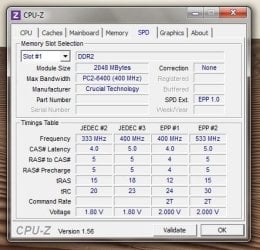
I downloaded the CUID CPU-Z and I captured whats on the memory tab and the spd tab for you to look at (attached)

i went on the bios and i couldnt find the memory reset option but i tried the load defult setting instead

if there is anything that i can do to improve the preformance please let me know

thanks
 

Attachments

  • 1.jpg
    1.jpg
    30.2 KB · Views: 3
  • 2.jpg
    2.jpg
    37.8 KB · Views: 4

My Computer

Computer Manufacturer/Model Number
packard bell
OS
windows 7
CPU
intel core 2 quad
Motherboard
asus
Memory
2gb
Graphics Card(s)
nvidia geforce 8600 gt
Sound Card
onboard
Monitor(s) Displays
xerox
Hard Drives
320x2
In the picture that you provide above, you are running your PC-8500 (1066mhz) RAM at 400Mhz...so with it being DDR2...when you double 400 you get 800Mhz. The way to get your memory running faster than 800Mhz...up to it's maximum of 1066mhz...is to start to experiment with overclocking your CPU. Since you have a Packard Bell (in your specs), you might find that you cannot manipulate things like FSB speed though. You will have to look around to be sure. But you could take your RAM up to a FSB speed of 533 (533 x 2 = 1066). Everything will depend upon whether your CPU can handle it and the extra heat.

With a FSB:MEM divider of 2:3...this likely means that your FSB speed on your processor is 266Mhz...and your memory is now running at 400Mhz (3/2 x 266FSB). This would be right with your orignal ram as 266Mhz x 2 (for DDR) is 533Mhz...which is what your original sticks were rated at.
 

My Computer

Computer Manufacturer/Model Number
Self-Built in July 2009
OS
Windows 7 Ultimate x64
CPU
Intel Q9550 2.83Ghz OC'd to 3.40Ghz
Motherboard
Gigabyte GA-EP45-UD3R rev. 1.1, F12 BIOS
Memory
8GB G.Skill PI DDR2-800, 4-4-4-12 timings
Graphics Card(s)
EVGA 1280MB Nvidia GeForce GTX570
Sound Card
Realtek ALC899A 8 channel onboard audio
Monitor(s) Displays
23" Acer x233H
Screen Resolution
1920x1080
Hard Drives
Intel X25-M 80GB Gen 2 SSD
Western Digital 1TB Caviar Black, 32MB cache. WD1001FALS
PSU
Corsair 620HX modular
Case
Antec P182
Cooling
stock
Keyboard
ABS M1 Mechanical
Mouse
Logitech G9 Laser Mouse
Internet Speed
15/2 cable modem
Other Info
Windows and Linux enthusiast. Logitech G35 Headset.
You are running at the highest "standard" setting for your memory. The two listings for EPP are what the memory can handle but is considered over clocking. You will notice the max voltage for those settings is 2.0v and higher voltage may be required for the memory to be stable at those settings. All these settings should be available in the Bios but I don't know where. You may want to post in the Overclocking section of this forum if you want to give it a try. This is where the Memtest comes in handy to see if your memory will be OK at the higher settings.

Jim :geek:
 

My Computer

Computer type
PC/Desktop
Computer Manufacturer/Model Number
Home Built
OS
Windows 8.1 Pro w/Media Center 64bit, Windows 7 HP 64bit
CPU
Phenom II X6 1100T
Motherboard
ASUS M5A99X EVO
Memory
Crucial Balistic 8gb DDR3-1866 CL9
Graphics Card(s)
MSI R6850 Cyclone IGD5 PE
Sound Card
On Board
Monitor(s) Displays
ASUS VE258Q 25" LED with DVI-HDMI-DisplayPort
Screen Resolution
1920 x 1080
Hard Drives
Two WD Cavier Black 2TB Sata III, WD My Book Essential 2TB USB 3.0
PSU
Seasonic X650 80 Plus GOLD Modular
Case
Corsair 400R
Cooling
Antec Kuhler H2O 620, Two 120mm and four 140mm
Keyboard
Logitech K120
Mouse
Logitech Marble Mouse USB, Logitech Precision Game Pad
Internet Speed
15MB
Antivirus
Norton IS 2013, Malwarebytes Pro Beta 2
Browser
IE-11, FF-27
Other Info
APC UPS ES 750, Netgear WNR3500L Gigabit & Wireless N Router with SamKnows Test Program, Motorola SB6120 Gigabit Cable Modem. Brother HL-2170W Laser Printer, Epson V300 Scanner
Back
Top