memory usage high

Wicca

New member
Local time
6:44 AM
Messages
546
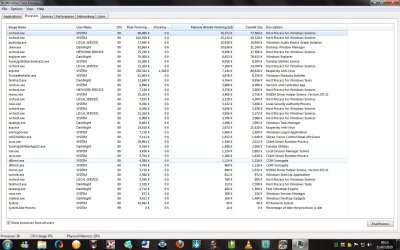
in this screenshot is how much percent my phsical memory is at i have a 32 bit
system 3GB RAM and 5 GB page file but why is the usage so high
 

Attachments

  • Untitled.jpg
    Untitled.jpg
    166.9 KB · Views: 217

My Computer

Computer Manufacturer/Model Number
i power x8870
OS
7
CPU
intel 2 core quad Q6600 2.40 ghz
Memory
3.00GB 350 mhz each
Graphics Card(s)
geforce 8800gtx
Sound Card
realtek
Screen Resolution
1440by900
Hard Drives
5400rpm 2 of them
PSU
OCZ 600 watt power supply
Internet Speed
nvidia nforce networking controller 90kb/s
Other Info
total virtual memory is 7.88 GB
this is a 32-bit system
it say's 29% or 1Gig, unless i'm reading it wrong. that's not high

Ken
 

My Computer

Computer Manufacturer/Model Number
Dell Optiplex 980
OS
Win7 x64 Ultimate SP1
CPU
Intel i7-2600
Memory
8 Gig
Graphics Card(s)
Geforce gt 520
Monitor(s) Displays
LG & Acer
Screen Resolution
1920x1080
Internet Speed
Fios 45/35
Other Info
Windows Home Server
it is when it used to stay down at 17 percent
 

My Computer

Computer Manufacturer/Model Number
i power x8870
OS
7
CPU
intel 2 core quad Q6600 2.40 ghz
Memory
3.00GB 350 mhz each
Graphics Card(s)
geforce 8800gtx
Sound Card
realtek
Screen Resolution
1440by900
Hard Drives
5400rpm 2 of them
PSU
OCZ 600 watt power supply
Internet Speed
nvidia nforce networking controller 90kb/s
Other Info
total virtual memory is 7.88 GB
this is a 32-bit system
how can i get it back down
 

My Computer

Computer Manufacturer/Model Number
i power x8870
OS
7
CPU
intel 2 core quad Q6600 2.40 ghz
Memory
3.00GB 350 mhz each
Graphics Card(s)
geforce 8800gtx
Sound Card
realtek
Screen Resolution
1440by900
Hard Drives
5400rpm 2 of them
PSU
OCZ 600 watt power supply
Internet Speed
nvidia nforce networking controller 90kb/s
Other Info
total virtual memory is 7.88 GB
this is a 32-bit system
Seems like your AV program my be the blame or you are loading to many programs at start-up. Over time they buildup as you add software. Run "ccleaner" to clean tings up and remove any start up entrys you don't need.

Ken
 

My Computer

Computer Manufacturer/Model Number
Dell Optiplex 980
OS
Win7 x64 Ultimate SP1
CPU
Intel i7-2600
Memory
8 Gig
Graphics Card(s)
Geforce gt 520
Monitor(s) Displays
LG & Acer
Screen Resolution
1920x1080
Internet Speed
Fios 45/35
Other Info
Windows Home Server
i bearly have anything starting up at start
 

My Computer

Computer Manufacturer/Model Number
i power x8870
OS
7
CPU
intel 2 core quad Q6600 2.40 ghz
Memory
3.00GB 350 mhz each
Graphics Card(s)
geforce 8800gtx
Sound Card
realtek
Screen Resolution
1440by900
Hard Drives
5400rpm 2 of them
PSU
OCZ 600 watt power supply
Internet Speed
nvidia nforce networking controller 90kb/s
Other Info
total virtual memory is 7.88 GB
this is a 32-bit system
this is really annoying i recently changed user accounts on comp and deleted the other
 

My Computer

Computer Manufacturer/Model Number
i power x8870
OS
7
CPU
intel 2 core quad Q6600 2.40 ghz
Memory
3.00GB 350 mhz each
Graphics Card(s)
geforce 8800gtx
Sound Card
realtek
Screen Resolution
1440by900
Hard Drives
5400rpm 2 of them
PSU
OCZ 600 watt power supply
Internet Speed
nvidia nforce networking controller 90kb/s
Other Info
total virtual memory is 7.88 GB
this is a 32-bit system
Seriously your memory is fine. Stop worrying about it.
 

My Computer

Computer type
PC/Desktop
Computer Manufacturer/Model Number
Alienware Aurora ALX R4
OS
Windows 10 Pro (x64)
CPU
Intel Core i7-3930K (3.2GHz - 4.5GHz)
Motherboard
Alienware Aurora-R4 x79
Memory
4x Samsung 4GB PC3-12800 DDR3 (16GB 1600MHz)
Graphics Card(s)
Nvidia Geforce GTX 690
Sound Card
SteelSeries Siberia Elite
Monitor(s) Displays
Dell UltraSharp U3011
Screen Resolution
2560x1600
Hard Drives
Samsung 850 Pro 256 GB, Seagate 1TB Desktop Hybrid HDD, 2x Western Digital 4TB Green HDD
PSU
875W Some Dell PSU <.<
Case
Alienware Aurora ALX
Cooling
Custom Liquid Cooling (EK CPU & GPU blocks) dual EK 480RAD
Keyboard
Logitech G710+ Mechanical
Mouse
Logitech G700s
Internet Speed
Verizon Fios (50 mbps average)
Other Info
Server: Intel NUC D54250WYK: i5-4250U, 16GB, 256 GB mSATA, Windows Server 2012 R2
i bearly have anything starting up at start

If you want to cut down on caching you can set Superfetch to only cache boot files.

In this article they get you most of the way there. The mistake many of these make is they neglect to tell you that "EnablePrefetcher" and "EnableSuperfetch" should always be set to the same number. I have mine both set to 2 to only cache boot files, on both Vista and W7.

It works the same way in both. Just remember when you follow the article to set them both the same. To get back to system default, just set them both to 3.


Change SuperFetch to Only Cache System Boot Files in Vista - How-To Geek

edit: the usual provisos apply. Before messing with your registry you should back it up by making a Restore Point, a backup image of your system partition, or using a utility like ERUNT.
 

My Computer

Computer Manufacturer/Model Number
HP Media Center
OS
Windows 7 32 bit
CPU
AMD 5200+ dual core
Memory
2 GB
Graphics Card(s)
NVidia GeForce 6150SE 128 MB
Monitor(s) Displays
CRT
Screen Resolution
1280x1024
Hard Drives
500 GB Sata internal :

SIIG USB 3.0 docking stations w/WD Caviar Black 6 Gb/s drives
Keyboard
PS/2
Mouse
PS/2 Wheel Mouse
Other Info
SIIG USB 3.0 PCIexpress card.
this is really annoying i recently changed user accounts on comp and deleted the other


Being annoyed in your situation is like being annoyed because the gas gauge in your car is down from full to 3/4 of a tank.

So what?

The gas tank's full capacity is meant to be used. Likewise, all of your memory is meant to be used. Otherwise, why even own it?

Why complain because 29% is in use---you've got 71% of the tank remaining.
 

My Computer

Computer type
PC/Desktop
Computer Manufacturer/Model Number
Ignatz Special; 4 speed manual gearbox; factory air conditioning; one of one
OS
Windows 7 Home Premium SP1, 64-bit
CPU
Intel Skylake i5-6600K, not overclocked
Motherboard
AsRock Z170M Extreme 4, micro ATX
Memory
8 GB HyperX DDR4-2666 (2 x 4 GB)
Graphics Card(s)
none; graphics are integrated on CPU
Sound Card
onboard: Realtek ALC1150; external: USB Behringer UF0-202
Monitor(s) Displays
Dell S2340M 23 inch IPS
Screen Resolution
1600 x 900
Hard Drives
System: Crucial MX100 series SSD, 128 GB;
Data: Samsung Spinpoint 103SJ, 1 TB;
Backup: WD Caviar Green WD30EZRX-00D8PB0, 3 TB
PSU
Rosewill SilentNight 500 watt fanless, semi-modular
Case
Antec Solo II
Cooling
Noctua NH-U12S; Noctua F12 intake, Noctua S12A exhaust
Keyboard
Microsoft 200 6JH-00001 USB
Mouse
Dell or Microsoft optical wired; USB
Antivirus
Microsoft Security Essentials and Malwarebytes Premium
Browser
Pale Moon
Other Info
All fans PWM; speeds at idle: CPU circa 500 rpm; intake circa 600 rpm; exhaust circa 600 rpm; CPU temps 27 idle and 47 C load in a warm room (27 C/81 F) when running Intel Extreme Tuning Utility stress test.
in this screenshot is how much percent my phsical memory is at i have a 32 bit
system 3GB RAM and 5 GB page file but why is the usage so high


You have to be kidding. I have 4 gigs can only use three and this is my ram and cpu usage. I am glad it is. 41% ram and 55% cpu.

Ken
 

My Computer

Computer Manufacturer/Model Number
HP Pavillion dv-7 1005 Tx
OS
Win 8 Release candidate 8400
CPU
[email protected]
Memory
4 gigs
Graphics Card(s)
Nvidia 9600M
Sound Card
HD built-in
Monitor(s) Displays
17" Wxga
Screen Resolution
1440x900
Cooling
none
Internet Speed
45Mb down 5Mb up
but how come when i changed my user account to a new one this happens is no longer stays at 17 percent at idle any idea
 

My Computer

Computer Manufacturer/Model Number
i power x8870
OS
7
CPU
intel 2 core quad Q6600 2.40 ghz
Memory
3.00GB 350 mhz each
Graphics Card(s)
geforce 8800gtx
Sound Card
realtek
Screen Resolution
1440by900
Hard Drives
5400rpm 2 of them
PSU
OCZ 600 watt power supply
Internet Speed
nvidia nforce networking controller 90kb/s
Other Info
total virtual memory is 7.88 GB
this is a 32-bit system
I dont understand your pre-occupation with 17% memory use?? Typically Windows 7 will preload 30% of your memory so your current memory usage is typical ... Try not to obsess over this.. as some say, unused RAM is wasted RAM .. ;)
 

My Computer

Computer type
PC/Desktop
Computer Manufacturer/Model Number
LENOVO K450 @3.0GHZ
OS
64-bit Windows 8.1 Pro
CPU
Core(TM) i5 CPU 4330 Haswell @ 3.20GHz
Motherboard
LENOVO
Memory
12.00 GB
Graphics Card(s)
Intel(R) HD Graphics
Sound Card
Intel HD integtrated
Monitor(s) Displays
HP 25' ISP Monitor
Screen Resolution
1900/1020
Hard Drives
(1) ST1000DM003-1CH162 (2) Generic STORAGE DEVICE USB Device (3) Generic STORAGE DEVICE USB Device
Internet Speed
100mb down/10mb up
  • Like
Reactions: JMH
but how come when i changed my user account to a new one this happens is no longer stays at 17 percent at idle any idea

If you are not used to an OS that aggressively caches it's a surprise. I can remember upgrading to Red Hat Linux 6.x and running top. I was aghast that nearly all my ram was being used. It just cached very aggressively. If it needs the memory it discards what's used the least.

If the caching is causing a lot of HD churning then limit it using the link I provided. It ain't gonna' happen by itself.
 

My Computer

Computer Manufacturer/Model Number
HP Media Center
OS
Windows 7 32 bit
CPU
AMD 5200+ dual core
Memory
2 GB
Graphics Card(s)
NVidia GeForce 6150SE 128 MB
Monitor(s) Displays
CRT
Screen Resolution
1280x1024
Hard Drives
500 GB Sata internal :

SIIG USB 3.0 docking stations w/WD Caviar Black 6 Gb/s drives
Keyboard
PS/2
Mouse
PS/2 Wheel Mouse
Other Info
SIIG USB 3.0 PCIexpress card.
Why do you have so many repeat processes, like “Dark Knight” and “svchost”??? To me, that doesn’t look right… I would also highly recommend that you run CCleaner, both the registry cleaner (SAVE THE BACKUP FILE TO “DOCUMENTS” WHEN IT PROMPTS YOU TOO!!!) and the useless unused bits of information cleaner as well (don’t worry, it’s free and never screws anything up provided you save the backup files for the registry). That’s in addition to a few virus scans. Try MBam first (also free, just the basic scanner and removal, without real-time protection), that usually detects and gets rid of most of the nasty things mainstream antivirus programs often miss (especially true of McAfee and Norton).

However, aside from that, 1GB of RAM in Windows 7 is truly not that high. A forum full of actual W7 users would not lie to you, and if it WERE truly an issue, there would be rantings and ravings all over the place that would make headline news - trust me on that. Since neither is the case, there isn't a problem here.

But yeah, you know my RAM usage is chronically at or over 1GB too, and that’s with touch-screen and multi-touch packs + OEM Acer utilities running in addition to all of 7’s native “extras”, like "superfetch" among many others.


But, you do have a few limited options here...

1. Deal with it, and be happy that $50+ of RAM is actually going to use (for stability and quicker access via preloading, giving YOU a smoother ride) where it otherwise would be completely untouched.

2. Disable most if not all of those “extras” in 7 (i.e. Superfetch and/or Aero), lose a lot of what you paid for/upgraded to 7 for in the first place.

3. Upgrade to x64 bit to unlock 4GB of RAM so that the 1GB used doesn’t matter.

4. Ditch 7 altogether for something else if it bothers you so terribly much.

Your call…


Here's the links to those programs (yes, they are safe - I wouldn't use them or recommend them to you or everybody else if they weren't).

CCleaner: CCleaner - Optimization and Cleaning - Free Download
MBam: Malwarebytes' Anti-Malware: Malwarebytes

 

My Computer

Computer Manufacturer/Model Number
Acer Aspire 5738PG-6306
OS
7 Ultimate x64 SP1
CPU
Core 2 Duo T6600 @ 2.20GHz
Motherboard
Acer JV50 | Intel PM45 Chipset | BIOS Phoenix v1.21
Memory
4GB SDRAM DDR2 667
Graphics Card(s)
ATI Mobility Radeon 4570HD 512MB VDDR3 (2.25GB HyperMemory)
Sound Card
Integrated Dolby Home Theater HD Audio Support
Monitor(s) Displays
15.6" LED backlight HD/WS CineCrystal w/ Multi-Touch
Screen Resolution
Notebook: 1366x768 | Syncmaster P2370HD: 1920x1080
Hard Drives
Primary internal: 320GB WD3200BEVT-22ZCT0 @ 5400 RPM | Secondary external 1: 2TB Cavalry CAXB3702T0 @7200 RPM (USB 2.0) | Secondary external 2: 500GB Calvary CAUM @7200 RPM (USB 2.0).
PSU
AC Adapter
Case
Blue Clam shell
Cooling
OEM Bult-in.
Keyboard
Microsoft Wireless 3000 (USB)
Mouse
Logitech V220 (USB)
Internet Speed
31Mbps DL/25Mbps UL - Verizon fiOs/Netgear WNDR37AV
Other Info
EXTERNAL DISPLAY: 23" Samsung Syncmaster P2370HD | EXTERNAL SOUND: 300 Watt MX-KB30 JVC Stereo (AUX) | ROUTER: Netgear WNDR37AV 802.11a/b/g/n Dual-Band Gigabit | Satechi 12-Port USB 2.0 Hub | GAME PAD: SteelSeries 3GC USB 2.0 (JoyToKey Mapping) | DETAILED SYSTEM SPECIFICATIONS: http://www.tigerdirect.com/applications/SearchTools/item-details.asp?EdpNo=5265887&CatId=4938
Sorry for the double post here, but...

but how come when i changed my user account to a new one this happens is no longer stays at 17 percent at idle any idea
Because you likely have the first account set up for your personal needs, and the new one doesn't clone the previous. It's more or less a blank start with a new User account because all of the programs and files do NOT transfer over to the new account from the old account, which has never had a secular program installed on, and therefore those programs are not set to automatically load up on the system's start, which is why and also where the RAM usage spikes dramatically for 10 minutes or so before settling back down.

But again, stop worrying about this. If it starts eating ALL 3GB of your RAM to the point where you are getting critical system memory error notifications, THEN you can start worrying yourself sick over it. But that will likely never happen with 3GB RAM, I don't care what you're doing: it just. doesn't. happen. on. new. here and now. today. computers. period.

Ever heard of the "if it ain't broke, don't fix it" mantra? It applies here big-time.

So please just relax and enjoy your computing. :p
 

My Computer

Computer Manufacturer/Model Number
Acer Aspire 5738PG-6306
OS
7 Ultimate x64 SP1
CPU
Core 2 Duo T6600 @ 2.20GHz
Motherboard
Acer JV50 | Intel PM45 Chipset | BIOS Phoenix v1.21
Memory
4GB SDRAM DDR2 667
Graphics Card(s)
ATI Mobility Radeon 4570HD 512MB VDDR3 (2.25GB HyperMemory)
Sound Card
Integrated Dolby Home Theater HD Audio Support
Monitor(s) Displays
15.6" LED backlight HD/WS CineCrystal w/ Multi-Touch
Screen Resolution
Notebook: 1366x768 | Syncmaster P2370HD: 1920x1080
Hard Drives
Primary internal: 320GB WD3200BEVT-22ZCT0 @ 5400 RPM | Secondary external 1: 2TB Cavalry CAXB3702T0 @7200 RPM (USB 2.0) | Secondary external 2: 500GB Calvary CAUM @7200 RPM (USB 2.0).
PSU
AC Adapter
Case
Blue Clam shell
Cooling
OEM Bult-in.
Keyboard
Microsoft Wireless 3000 (USB)
Mouse
Logitech V220 (USB)
Internet Speed
31Mbps DL/25Mbps UL - Verizon fiOs/Netgear WNDR37AV
Other Info
EXTERNAL DISPLAY: 23" Samsung Syncmaster P2370HD | EXTERNAL SOUND: 300 Watt MX-KB30 JVC Stereo (AUX) | ROUTER: Netgear WNDR37AV 802.11a/b/g/n Dual-Band Gigabit | Satechi 12-Port USB 2.0 Hub | GAME PAD: SteelSeries 3GC USB 2.0 (JoyToKey Mapping) | DETAILED SYSTEM SPECIFICATIONS: http://www.tigerdirect.com/applications/SearchTools/item-details.asp?EdpNo=5265887&CatId=4938
the reason is i want as low as i can get coz i play alot of games which require 2 gb RAm
and how come it is different now in my other account it was 17 percent idle and now it is 29 percent idle
i have the other account delete also there is no virus on my com i checked
 

My Computer

Computer Manufacturer/Model Number
i power x8870
OS
7
CPU
intel 2 core quad Q6600 2.40 ghz
Memory
3.00GB 350 mhz each
Graphics Card(s)
geforce 8800gtx
Sound Card
realtek
Screen Resolution
1440by900
Hard Drives
5400rpm 2 of them
PSU
OCZ 600 watt power supply
Internet Speed
nvidia nforce networking controller 90kb/s
Other Info
total virtual memory is 7.88 GB
this is a 32-bit system
To summarize all the others comments, your system is working as designed.

Ken
 

My Computer

Computer Manufacturer/Model Number
Dell Optiplex 980
OS
Win7 x64 Ultimate SP1
CPU
Intel i7-2600
Memory
8 Gig
Graphics Card(s)
Geforce gt 520
Monitor(s) Displays
LG & Acer
Screen Resolution
1920x1080
Internet Speed
Fios 45/35
Other Info
Windows Home Server
thanks all but how come in my first account it only used 17 percent idle and now is uses 29 percent idle
like why can i not get back to the 17 orginaley that is why i am asking my system is working fine
but i need to know this
 

My Computer

Computer Manufacturer/Model Number
i power x8870
OS
7
CPU
intel 2 core quad Q6600 2.40 ghz
Memory
3.00GB 350 mhz each
Graphics Card(s)
geforce 8800gtx
Sound Card
realtek
Screen Resolution
1440by900
Hard Drives
5400rpm 2 of them
PSU
OCZ 600 watt power supply
Internet Speed
nvidia nforce networking controller 90kb/s
Other Info
total virtual memory is 7.88 GB
this is a 32-bit system
I'll say it again, your system is normal. I would guess the change is because you or someone you know (maybe the OEM if it came with 7 preinstalled) turned off certain services and decorative features to cut down on RAM and CPU usage. If you do a google search you can find many tutorials on what can/should be turned off to optimize 7 for your needs.
 

My Computer

Computer type
Laptop
Computer Manufacturer/Model Number
Toshiba P775-S7100
OS
Windows 7 Professional SP1 64-bit
CPU
Intel Core i5-2450M @2.5 GHz
Memory
6 GB DDR3 1333MHz
Graphics Card(s)
Intel HD 3000
Monitor(s) Displays
Built-in 17.3" LED; 22" Insignia NS-L22Q-10A
Screen Resolution
1600x900; 1360x768
Hard Drives
750 GB Hitachi
1TB Seagate FreeAgent External
Internet Speed
Verizon DSL Speed(Down/Up): 3360 Kbps / 800 Kbps
Antivirus
MSE and MBAM Pro
Browser
IE10
Back
Top