

Hi,
Does anyone know of a way to monitor a remote computers memory usage over a period of time and it create a report on the usage.
I have tried Remote Process Explorer - kill, run or change process priority on a local or remote computer which gives me a nice graph for a 5 minute period but it doesn't save that to any form of output, it's just the last 5 minutes history:
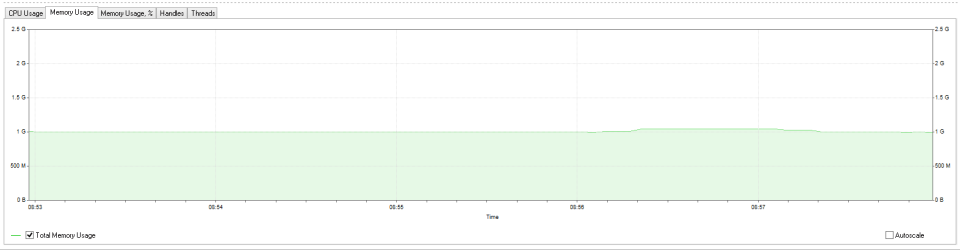
I would like to be able monitor that computer over 8 hours and provide some form of report at the end.
Regards,
Jamie
Does anyone know of a way to monitor a remote computers memory usage over a period of time and it create a report on the usage.
I have tried Remote Process Explorer - kill, run or change process priority on a local or remote computer which gives me a nice graph for a 5 minute period but it doesn't save that to any form of output, it's just the last 5 minutes history:
I would like to be able monitor that computer over 8 hours and provide some form of report at the end.
Regards,
Jamie
My Computer
At a glance
Windows 8.1 Pro x64Intel Core i5-2500K @ 3.30GHz - S11558GB Corsair DDR3 XMS3, PC3-12800NVIDIA GeForce GTX 650
- Computer type
- PC/Desktop
- Computer Manufacturer/Model Number
- Self Built
- OS
- Windows 8.1 Pro x64
- CPU
- Intel Core i5-2500K @ 3.30GHz - S1155
- Motherboard
- Asus P8P67 LE Rev3, Intel P67, S115
- Memory
- 8GB Corsair DDR3 XMS3, PC3-12800
- Graphics Card(s)
- NVIDIA GeForce GTX 650
- Sound Card
- On-Board
- Monitor(s) Displays
- 3 x 24" {Extended Display}
- Screen Resolution
- 1920 x 1080
- Hard Drives
- 300GB Seagate Barracuda 7200
- PSU
- 550W Coolermaster GX550
- Case
- Silverstone Precision PS04B
- Cooling
- Stock
- Keyboard
- Logitech K120
- Mouse
- World of Warcraft Cataclysm MMO Gaming Mouse
- Internet Speed
- 80 MB
- Antivirus
- MSE / Windows Defender
- Browser
- Chrome


