
System protection - "Current Usage" gradually increasing over time ???
For some reason the "Current Usage" amount is slowly increasing over time on my system.
It's not due to additional restore points being created, because i've checked, and there is only one restore point available / saved. Yet if I keep checking back at this dialog window, the value keeps going up.
Here is the value where I started writing this post:
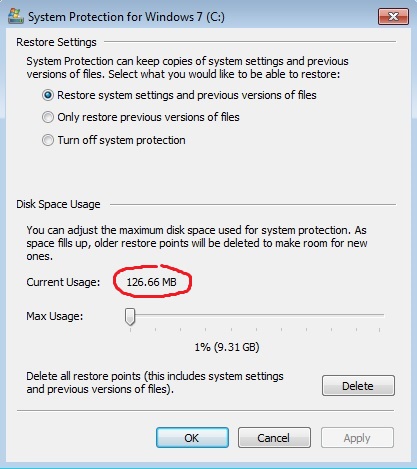
And here is the value 5 minutes later:
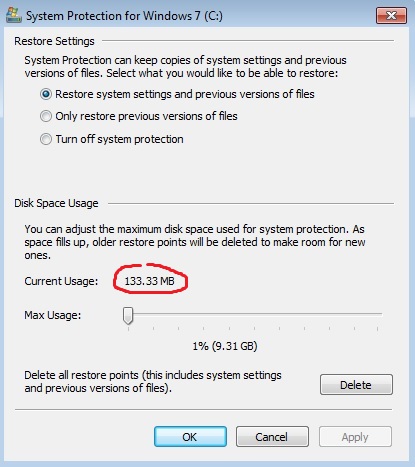
Is this normal ??
Thanks.
Edit: After doing some calculations, and watching how fast the usage amount goes up over time. I can estimate that i'll be losing between 150 - 200Mb each day. That's over 1Gb a week. Ten weeks is then over 10Gb. And so on and so on. This can't be normal right ?
For some reason the "Current Usage" amount is slowly increasing over time on my system.
It's not due to additional restore points being created, because i've checked, and there is only one restore point available / saved. Yet if I keep checking back at this dialog window, the value keeps going up.
Here is the value where I started writing this post:
And here is the value 5 minutes later:
Is this normal ??
Thanks.
Edit: After doing some calculations, and watching how fast the usage amount goes up over time. I can estimate that i'll be losing between 150 - 200Mb each day. That's over 1Gb a week. Ten weeks is then over 10Gb. And so on and so on. This can't be normal right ?
Last edited:
My Computer
At a glance
Win 7 Pro SP1 (64bit)
- Computer type
- PC/Desktop
- OS
- Win 7 Pro SP1 (64bit)

