Memory Usage Too High

lully

New member
Local time
3:56 AM
Messages
4
Hi, im new here.i found the thread about the high memory usage. but the last post is 400++days ago. and i cant find answer for my problem. so i decide to post a new 1.

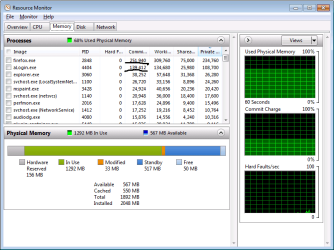
Firefox showing high memory usage. Is it normal? because, it never happened before untill i have the blue screen problem. i forgot to take the screen shot.:( when i open other program, aLogin.exe (online game from IGG), the memory rise up till 100k and sometime reach 200k too. it also never happened before.before this, i can open up to 9 windows of aLogin without any problems and the memory usage is around 20k to 35k only. can someone help me out with this problem?
 

Attachments

  • high usage memory.png
    high usage memory.png
    20.8 KB · Views: 100

My Computer

Computer Manufacturer/Model Number
Aspire 4750
OS
Microsoft Windows 7 Starter 32-bit 7601 Multiprocessor Free Service Pack 1
CPU
Intel(R) Core(TM) i3-2310M CPU @ 2.10GHz
Motherboard
Acer Aspire 4750
Memory
2GB DDR3
Graphics Card(s)
Intel(R) HD Graphics Family
Sound Card
1) High Definition Audio Device (2) High Definition Audio
Screen Resolution
1366x768
Hard Drives
WDC WD5000BPVT-22HXZT1 ATA Device 500GB
Firefox usage is a bit high but not unreasonable. aLogin also a tic high.

I have seen firefox use upward of 450 Mb. It depends on how many addons and tabs open.
 

My Computer

Computer Manufacturer/Model Number
HP Pavillion dv-7 1005 Tx
OS
Win 8 Release candidate 8400
CPU
[email protected]
Memory
4 gigs
Graphics Card(s)
Nvidia 9600M
Sound Card
HD built-in
Monitor(s) Displays
17" Wxga
Screen Resolution
1440x900
Cooling
none
Internet Speed
45Mb down 5Mb up
Firefox usage is a bit high but not unreasonable. aLogin also a tic high.

I have seen firefox use upward of 450 Mb. It depends on how many addons and tabs open.


aLogin never use high memory before. :cry: i cant open many aLogin anymore because im afraid my laptop will broken. i also disable my addons and only open 3 tabs in firefox.
 

My Computer

Computer Manufacturer/Model Number
Aspire 4750
OS
Microsoft Windows 7 Starter 32-bit 7601 Multiprocessor Free Service Pack 1
CPU
Intel(R) Core(TM) i3-2310M CPU @ 2.10GHz
Motherboard
Acer Aspire 4750
Memory
2GB DDR3
Graphics Card(s)
Intel(R) HD Graphics Family
Sound Card
1) High Definition Audio Device (2) High Definition Audio
Screen Resolution
1366x768
Hard Drives
WDC WD5000BPVT-22HXZT1 ATA Device 500GB
Firefox usage is a bit high but not unreasonable. aLogin also a tic high.

I have seen firefox use upward of 450 Mb. It depends on how many addons and tabs open.


aLogin never use high memory before. :cry: i cant open many aLogin anymore because im afraid my laptop will broken. i also disable my addons and only open 3 tabs in firefox.

aLogin is loaded in that snip, firefox is within normal limits. You only have 2 Gigs of Ram to begin with so of course it is going to "feel" slow.

Only way to change that is to add ram.
 

My Computer

Computer Manufacturer/Model Number
HP Pavillion dv-7 1005 Tx
OS
Win 8 Release candidate 8400
CPU
[email protected]
Memory
4 gigs
Graphics Card(s)
Nvidia 9600M
Sound Card
HD built-in
Monitor(s) Displays
17" Wxga
Screen Resolution
1440x900
Cooling
none
Internet Speed
45Mb down 5Mb up

My Computer

Computer Manufacturer/Model Number
Aspire 4750
OS
Microsoft Windows 7 Starter 32-bit 7601 Multiprocessor Free Service Pack 1
CPU
Intel(R) Core(TM) i3-2310M CPU @ 2.10GHz
Motherboard
Acer Aspire 4750
Memory
2GB DDR3
Graphics Card(s)
Intel(R) HD Graphics Family
Sound Card
1) High Definition Audio Device (2) High Definition Audio
Screen Resolution
1366x768
Hard Drives
WDC WD5000BPVT-22HXZT1 ATA Device 500GB

My Computer

Computer Manufacturer/Model Number
HP Pavillion dv-7 1005 Tx
OS
Win 8 Release candidate 8400
CPU
[email protected]
Memory
4 gigs
Graphics Card(s)
Nvidia 9600M
Sound Card
HD built-in
Monitor(s) Displays
17" Wxga
Screen Resolution
1440x900
Cooling
none
Internet Speed
45Mb down 5Mb up
If we had your system specs we could tell you if your system can be upgraded. If it can it is more a question ow what you can afford to put in it.

here it is.

System Manufacturer/Model Number Aspire 4750
OS Microsoft Windows 7 Starter 32-bit 7601 Multiprocessor Free Service Pack 1
CPU Intel(R) Core(TM) i3-2310M CPU @ 2.10GHz
Motherboard Acer Aspire 4750
Memory 2GB DDR3
Graphics Card Intel(R) HD Graphics Family 3000
Sound Card 1) High Definition Audio Device
Screen Resolution 1366x768
BIOS: Default System BIOS
HardDisk: 500gb HDD
 

My Computer

Computer Manufacturer/Model Number
Aspire 4750
OS
Microsoft Windows 7 Starter 32-bit 7601 Multiprocessor Free Service Pack 1
CPU
Intel(R) Core(TM) i3-2310M CPU @ 2.10GHz
Motherboard
Acer Aspire 4750
Memory
2GB DDR3
Graphics Card(s)
Intel(R) HD Graphics Family
Sound Card
1) High Definition Audio Device (2) High Definition Audio
Screen Resolution
1366x768
Hard Drives
WDC WD5000BPVT-22HXZT1 ATA Device 500GB
Scan your system with the Cucial scanner. Then you know what your RAM upgrade options are.
 

My Computer

Computer Manufacturer/Model Number
HP, Dell, Gateway, Toshiba - 4 laptops and 2 desktops
OS
Vista, Windows7, Mint Mate, Zorin, Windows 8
CPU
from 1.6GHz Duo to i7
Monitor(s) Displays
2x HP w2207
Hard Drives
5x HDD, 7x SSD, 12x Externals
Keyboard
with trackball - no mices
Mouse
Trackball mice
Internet Speed
DSL 6000
That memory tab doesn't match up to your memory usage. Would it be possible to get a RAMMap output (save, zip up the file, and upload here) of your system in that particular state?
 

My Computer

Computer type
PC/Desktop
Computer Manufacturer/Model Number
Custom
OS
Windows 10 Pro x64
CPU
Intel Core i7 4790K @ 4.5GHz
Motherboard
Asus Maximus Hero VII
Memory
32GB DDR3
Graphics Card(s)
Nvidia GeForce GTX970
Sound Card
Realtek HD Audio
Screen Resolution
1920x1200
Hard Drives
1x Samsung 250GB SSD
4x WD RE 2TB (RAIDZ)
PSU
Corsair AX760i
Case
Fractal Design Define R4
Cooling
Noctua NH-D15
Back
Top