
Menu item "Pin this program to the taskbar" gone

finson

New member
Local time
6:38 PM
Messages
6
Location
Seattle WA
Soon after installation I somehow managed to unpin the Libraries icon by mistake and now I can't get it back. I know how it's supposed to work (start explorer, right click icon, select pin to taskbar) but I can't do that because the pin option does not show up when I right click. Attached is a screenshot showing the situation. I'm using retail Windows 7 Pro.

One possible cause that I have found is related to registry changes to eliminate the shortcut arrow. I did experiment with that using WinBubbles 1.76 right before this happened, but I have the regular shortcut icon enabled now and the registry entry HKEY_CLASSES_ROOT\lnkfile\IsShortcut is present. Given the apparent complexity of the taskbar implementation, it wouldn't surprise me if this is what caused the problem, but I haven't found a solution yet. BTW, the pin option is present for other applications like SnagIt, regedit, etc.

Any more thoughts on how I can restore the right click option to "Pin this program to the taskbar." for use with explorer/libraries/documents?

Thanks.
 

Attachments
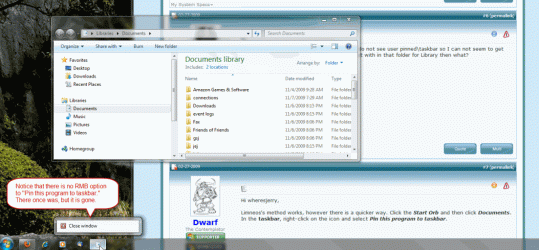
  • W7 unpinned explorer.gif
    W7 unpinned explorer.gif
    84.5 KB · Views: 118

My Computer

Computer Manufacturer/Model Number
Silent PC
OS
Windows 7 Pro (Retail)
CPU
2.13 GH Intel Core 2 Duo
Motherboard
ASUSTeK Computer INC. P5B-Deluxe Rev 1.xx
Memory
4 GB
Graphics Card(s)
NVIDIA GeForce 7600 GS
Sound Card
SoundMAX Integrated Digital HD Audio
Monitor(s) Displays
ViewSonic VX2025wm, VX715
Screen Resolution
1680x1050, 1280x1024
Hard Drives
Drive 0: 750.14 GB Raid 1, Drive 1: WDC WD1600JS-00NCB1 160.04 GB
Internet Speed
DSL
I would try system restore from a time before the problem. Does not work, I would go with system image. Thats what they are for, use them.
 

My Computer

Computer type
PC/Desktop
Computer Manufacturer/Model Number
Dell XPS 420
OS
Windows 10, Home Clean Install
CPU
Intel Core2 processsor Q8200(2.33Ghz 1333FSB) Quad Core Tech
Motherboard
Dell
Memory
6 gb
Graphics Card(s)
ATI Radeon 256MB HD3650
Sound Card
Intergrated 7.1 Channel Audio
Monitor(s) Displays
Dell SP2009W 20"
Hard Drives
640 GB Serial ATA Hard drive
Cooling
Fan
Keyboard
Dell USB Keyboard
Mouse
Dell Premium Optical USB
Internet Speed
DSL 2.85
Does this happen for all icons or just the one you diplayed in the screen sfot?
 

My Computer

Computer Manufacturer/Model Number
Cheap $399.00 E-Machine
OS
Windows 7 Pro & Vista Home Premium
CPU
Athlon 64 3800+ (Orleans) 2.40GHz
Motherboard
Winfast
Memory
2GB DDR2 RAM DIMM
Graphics Card(s)
NVIDIA GeForce 8500 GT 512 MB memory HDMI out
Sound Card
creative X-Fi Exteme 7..1 channel
Monitor(s) Displays
Acer V223W 22" widescreen DVI
Screen Resolution
1680x1050
Hard Drives
WDC WD5 500GB
WDC WD25 250GB
PSU
OCZ 550 watt
Case
Gateway
Cooling
2 fans
Keyboard
Dell
Mouse
Sony Vaio
Internet Speed
18MB/s down - .72MB /s up
@richc46 - Good point. I do have several restore points around that time. I don't have a system backup image, but I guess I'll make one once I get this fixed!

@reghakr - Yes, every other program still has the "pin to taskbar" menu item. It is only missing on the explorer/libraries icon.
 

My Computer

Computer Manufacturer/Model Number
Silent PC
OS
Windows 7 Pro (Retail)
CPU
2.13 GH Intel Core 2 Duo
Motherboard
ASUSTeK Computer INC. P5B-Deluxe Rev 1.xx
Memory
4 GB
Graphics Card(s)
NVIDIA GeForce 7600 GS
Sound Card
SoundMAX Integrated Digital HD Audio
Monitor(s) Displays
ViewSonic VX2025wm, VX715
Screen Resolution
1680x1050, 1280x1024
Hard Drives
Drive 0: 750.14 GB Raid 1, Drive 1: WDC WD1600JS-00NCB1 160.04 GB
Internet Speed
DSL
Open Windows Explore to the C:\Windows directory. Locate explorer.exe,. Drag it to the desktop and choose Create shortcut here. Try pinning that to the taskbar. If it works, you can choose Close Window on the non-working one.
 

My Computer

Computer Manufacturer/Model Number
Cheap $399.00 E-Machine
OS
Windows 7 Pro & Vista Home Premium
CPU
Athlon 64 3800+ (Orleans) 2.40GHz
Motherboard
Winfast
Memory
2GB DDR2 RAM DIMM
Graphics Card(s)
NVIDIA GeForce 8500 GT 512 MB memory HDMI out
Sound Card
creative X-Fi Exteme 7..1 channel
Monitor(s) Displays
Acer V223W 22" widescreen DVI
Screen Resolution
1680x1050
Hard Drives
WDC WD5 500GB
WDC WD25 250GB
PSU
OCZ 550 watt
Case
Gateway
Cooling
2 fans
Keyboard
Dell
Mouse
Sony Vaio
Internet Speed
18MB/s down - .72MB /s up
@reghakr - Nope, that's the problem. The "pin to taskbar" menu item is gone for explorer, no matter how I start it running. See attached.
 

Attachments

  • W7 No explorer.exe pin option.gif
    W7 No explorer.exe pin option.gif
    33.6 KB · Views: 61

My Computer

Computer Manufacturer/Model Number
Silent PC
OS
Windows 7 Pro (Retail)
CPU
2.13 GH Intel Core 2 Duo
Motherboard
ASUSTeK Computer INC. P5B-Deluxe Rev 1.xx
Memory
4 GB
Graphics Card(s)
NVIDIA GeForce 7600 GS
Sound Card
SoundMAX Integrated Digital HD Audio
Monitor(s) Displays
ViewSonic VX2025wm, VX715
Screen Resolution
1680x1050, 1280x1024
Hard Drives
Drive 0: 750.14 GB Raid 1, Drive 1: WDC WD1600JS-00NCB1 160.04 GB
Internet Speed
DSL
Even for rthe one that i suggested?
 

My Computer

Computer Manufacturer/Model Number
Cheap $399.00 E-Machine
OS
Windows 7 Pro & Vista Home Premium
CPU
Athlon 64 3800+ (Orleans) 2.40GHz
Motherboard
Winfast
Memory
2GB DDR2 RAM DIMM
Graphics Card(s)
NVIDIA GeForce 8500 GT 512 MB memory HDMI out
Sound Card
creative X-Fi Exteme 7..1 channel
Monitor(s) Displays
Acer V223W 22" widescreen DVI
Screen Resolution
1680x1050
Hard Drives
WDC WD5 500GB
WDC WD25 250GB
PSU
OCZ 550 watt
Case
Gateway
Cooling
2 fans
Keyboard
Dell
Mouse
Sony Vaio
Internet Speed
18MB/s down - .72MB /s up
Yup, that's where the explorer.exe shortcut came from that is shown in the image.
 

My Computer

Computer Manufacturer/Model Number
Silent PC
OS
Windows 7 Pro (Retail)
CPU
2.13 GH Intel Core 2 Duo
Motherboard
ASUSTeK Computer INC. P5B-Deluxe Rev 1.xx
Memory
4 GB
Graphics Card(s)
NVIDIA GeForce 7600 GS
Sound Card
SoundMAX Integrated Digital HD Audio
Monitor(s) Displays
ViewSonic VX2025wm, VX715
Screen Resolution
1680x1050, 1280x1024
Hard Drives
Drive 0: 750.14 GB Raid 1, Drive 1: WDC WD1600JS-00NCB1 160.04 GB
Internet Speed
DSL
Hello Finson,

Strange,

You might consider doing a repair install to fix this without losing anything.

Hope this helps,
Shawn
 

My Computer

Computer type
PC/Desktop
Computer Manufacturer/Model Number
Self built custom
OS
64-bit Windows 11 Pro for Workstations
CPU
Intel i7-8700K OC'd to 5 GHz
Motherboard
ASUS ROG Maximus XI Formula Z390
Memory
64 GB (4x16GB) G.SKILL TridentZ RGB DDR4 3600 MHz
Graphics Card(s)
ASUS ROG-STRIX-GTX1080TI-O11G-GAMING
Sound Card
Integrated
Monitor(s) Displays
2 x Samsung Odyssey G7 27"
Screen Resolution
2560x1440
Hard Drives
1TB Samsung 990 PRO M.2,
4TB Samsung 990 PRO PRO M.2,
TerraMaster F8 SSD Plus NAS
PSU
Seasonic Prime Titanium 850W
Case
Thermaltake Core P3
Cooling
Corsair Hydro H115i
Keyboard
Logitech wireless K800
Mouse
Logitech MX Master 4
Internet Speed
2 Gb/s Download and 100 Mb/s Upload
Antivirus
Malwarebyte Anti-Malware Premium
Browser
Google Chrome
Other Info
Logitech Z625 speaker system,
Logitech BRIO 4K Pro webcam,
HP Color LaserJet Pro MFP M477fdn,
APC SMART-UPS RT 1000 XL - SURT1000XLI,
Galaxy S23 Plus phone
Just for information, I to had upinned my library folder from the task bar and tryed everything I could think of, including everything mentioned in this thread, but the only way I was able to get it back was a repair install.
 

My Computer

Computer type
PC/Desktop
Computer Manufacturer/Model Number
Built by Dave!
OS
Windows 7 H.P. S.P.-1 32bit , Debian Linux 64bit
CPU
Intel Core i7-2600 3.4Ghz (Second generation)
Motherboard
Asus P8P67 Pro
Memory
Kingston 4GB DDR3 PC3-12800 1600MHZ
Graphics Card(s)
nVidia GeForce GTX 560 1GB
Sound Card
Realtek HD audio on motherboard
Monitor(s) Displays
Samsung 24" & Insignia 32"
Screen Resolution
1920x1080 & 1920x1080
Hard Drives
Samsung 840 EVO 750GB SSD - Windows 7 H.P. 32 bit
Seagate 500GB HDD - Debian Linux 64 bit
OCZ 120GB SSD - Data storage
Seagate 1.5TB HHD - Data storage
PSU
Xion 1000 Watt
Case
Cooler Master nVidia ATX
Cooling
Cooler Master Hyper T4
Keyboard
Hewlet Packard 5219 PS2
Mouse
Logitech M310 2.4Ghz wireless
Internet Speed
30 Mbps-Download, 2 Mbps-Upload
Antivirus
Windows Security Essentials
Browser
I.E.11, Chrome, Safari, Firefox
Where you're library appears on the start menu, simply drag it to the desktop where it will appear as a strange icon. When you drag it to the taskbar it turns into the same icon as before.
 

My Computer

Computer Manufacturer/Model Number
Home Built
OS
Windows7 beta 7000
CPU
Intel E6550
Motherboard
Intel DP35DP
Memory
8Gb
Graphics Card(s)
Nvidia 8500 GT
Sound Card
Intel onboard sound
Monitor(s) Displays
Two Gateway 22" LCD monitors
Screen Resolution
1680x1050
Hard Drives
Two 500Gb 7200rpm SATA
Thanks everyone for the help. I tried a system restore, but that didn't work ("unspecified error"). I then did a repair install, which just completed. That seems to have been successful and I now have a pinned copy of explorer on the taskbar again.

I have created a restore point manually. I have created a Windows Backup system image. I am in business again.

Now on to upgrading the server machine and the netbook!
 

My Computer

Computer Manufacturer/Model Number
Silent PC
OS
Windows 7 Pro (Retail)
CPU
2.13 GH Intel Core 2 Duo
Motherboard
ASUSTeK Computer INC. P5B-Deluxe Rev 1.xx
Memory
4 GB
Graphics Card(s)
NVIDIA GeForce 7600 GS
Sound Card
SoundMAX Integrated Digital HD Audio
Monitor(s) Displays
ViewSonic VX2025wm, VX715
Screen Resolution
1680x1050, 1280x1024
Hard Drives
Drive 0: 750.14 GB Raid 1, Drive 1: WDC WD1600JS-00NCB1 160.04 GB
Internet Speed
DSL
You're welcome Finson. I hope the upgrading goes smoothly. :)
 

My Computer

Computer type
PC/Desktop
Computer Manufacturer/Model Number
Self built custom
OS
64-bit Windows 11 Pro for Workstations
CPU
Intel i7-8700K OC'd to 5 GHz
Motherboard
ASUS ROG Maximus XI Formula Z390
Memory
64 GB (4x16GB) G.SKILL TridentZ RGB DDR4 3600 MHz
Graphics Card(s)
ASUS ROG-STRIX-GTX1080TI-O11G-GAMING
Sound Card
Integrated
Monitor(s) Displays
2 x Samsung Odyssey G7 27"
Screen Resolution
2560x1440
Hard Drives
1TB Samsung 990 PRO M.2,
4TB Samsung 990 PRO PRO M.2,
TerraMaster F8 SSD Plus NAS
PSU
Seasonic Prime Titanium 850W
Case
Thermaltake Core P3
Cooling
Corsair Hydro H115i
Keyboard
Logitech wireless K800
Mouse
Logitech MX Master 4
Internet Speed
2 Gb/s Download and 100 Mb/s Upload
Antivirus
Malwarebyte Anti-Malware Premium
Browser
Google Chrome
Other Info
Logitech Z625 speaker system,
Logitech BRIO 4K Pro webcam,
HP Color LaserJet Pro MFP M477fdn,
APC SMART-UPS RT 1000 XL - SURT1000XLI,
Galaxy S23 Plus phone
Back
Top