
Merging Logical drive in to Primary - Not working

ddzc

New member
Local time
11:20 PM
Messages
7
Hi everyone,

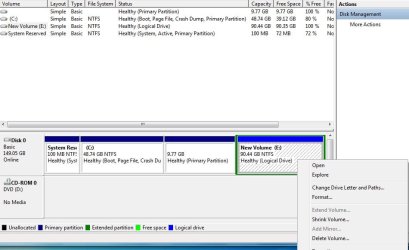
I need some help. I installed Windows 7 on the C root drive and I'm trying to merge the logical drive which is 90GB to make it one big C drive partition. I tried doing it during installation, after installation and I also tried a program called EaseUS Partition Master and every time I try to merge, the C drive is shaded out.

Any suggestions would be greatly appreciated.

Screenshot attached
 

Attachments
  • screen.jpg
    screen.jpg
    57 KB · Views: 1

My Computer My Computer

At a glance

Win 7 Pro 32B
Computer type
PC/Desktop
OS
Win 7 Pro 32B
You need to perform this operation from outside the Windows boot environment.

Do this:
1. Download FREE bootable version of Partition Wizard
2. Write it to a CD/DVD
3. Boot from the CD/DVD to start Partition Wizard
4. First merge the 9.77GB partition to C:
5. Now merge the logical partition to C:

Reboot - job done.
 

My Computer My Computer

At a glance

Windows 10 Pro x64 ; Xubuntu x64Intel i7 860 @ 2.80 GHz O/C'ed to 4.0GHz16GB Corsair Vengance DDR3 @ 661 MHz Dual Cha...EVGA NVidia GTX 560 1024MB
Computer type
PC/Desktop
Computer Manufacturer/Model Number
Golden Mk. I.4
OS
Windows 10 Pro x64 ; Xubuntu x64
CPU
Intel i7 860 @ 2.80 GHz O/C'ed to 4.0GHz
Motherboard
Gigabyte P55A-UD3R Rev.1. Award BIOS F13
Memory
16GB Corsair Vengance DDR3 @ 661 MHz Dual Channel (9-9-9-24)
Graphics Card(s)
EVGA NVidia GTX 560 1024MB
Sound Card
Realtek Integrated
Monitor(s) Displays
Dual Samsung SyncMaster 2494HS
Screen Resolution
1920*1080 and 1920*1080
Hard Drives
1*Samsung 840 EVO 120GB SSD;
1*OCZ Vertex 2 60GB SSD;
2*Samsung F3 SpinPoint 1TB in RAID0;
1*Samsung F1 SpinPoint 1TB;
2*Western Digital 1TB External USB 3.0
1*Western Digital 500GB External USB 3.0
1*Seagate 500GB External USB 2.0
PSU
Thermaltake ToughPower QFan 750W
Case
Thermaltake Element S VK60001W2Z
Cooling
Corsair H60 Water Cooling, 2*230mm and 2*80mm case fans
Keyboard
Logitech G110
Mouse
Logitech MX518
Hi Golden,

I did exactly as suggested, but I'm unable to merge the 9.7GB in to C...when I attempted, I got the following error: "Selected partition is a boot/system partition. Merge this partition into another will make your computer unable to boot". Unfortunately, I can only merge C and this 9.7GB volume...I cannot merge the E drive volume in to the C b/c E is shaded out.

Any thoughts? I can still proceed to do the merge but it will kill my system/boot files it seems..
 

My Computer My Computer

At a glance

Win 7 Pro 32B
Computer type
PC/Desktop
OS
Win 7 Pro 32B
Mmm. What is on the 9.77GB partition? Do you have more than 1 OS installed?
 

My Computer My Computer

At a glance

Windows 10 Pro x64 ; Xubuntu x64Intel i7 860 @ 2.80 GHz O/C'ed to 4.0GHz16GB Corsair Vengance DDR3 @ 661 MHz Dual Cha...EVGA NVidia GTX 560 1024MB
Computer type
PC/Desktop
Computer Manufacturer/Model Number
Golden Mk. I.4
OS
Windows 10 Pro x64 ; Xubuntu x64
CPU
Intel i7 860 @ 2.80 GHz O/C'ed to 4.0GHz
Motherboard
Gigabyte P55A-UD3R Rev.1. Award BIOS F13
Memory
16GB Corsair Vengance DDR3 @ 661 MHz Dual Channel (9-9-9-24)
Graphics Card(s)
EVGA NVidia GTX 560 1024MB
Sound Card
Realtek Integrated
Monitor(s) Displays
Dual Samsung SyncMaster 2494HS
Screen Resolution
1920*1080 and 1920*1080
Hard Drives
1*Samsung 840 EVO 120GB SSD;
1*OCZ Vertex 2 60GB SSD;
2*Samsung F3 SpinPoint 1TB in RAID0;
1*Samsung F1 SpinPoint 1TB;
2*Western Digital 1TB External USB 3.0
1*Western Digital 500GB External USB 3.0
1*Seagate 500GB External USB 2.0
PSU
Thermaltake ToughPower QFan 750W
Case
Thermaltake Element S VK60001W2Z
Cooling
Corsair H60 Water Cooling, 2*230mm and 2*80mm case fans
Keyboard
Logitech G110
Mouse
Logitech MX518
Well...here's what happened. Earlier, I had installed Win 7 on the 48GB partition. The 9.7GB in windows showed unallocated and it was unformatted, basically it was showing as nothing. I used EaseUS Partition Master and performed a merge between the 9GB and E drive, rebooted and I couldn't get in to Windows anymore - "BOOTMGR is missing press ctrl+alt+del to restart". I did a repair, and rebooted...gave me a bunch of other disk error messages so I decided to just re-install everything. It was a fresh install anyway with a couple things on it, no biggie.

When I boot up with the Win 7 CD, this is what I see:

Disk 0 Partition 1: System Reserved 100MB (Primary)
Disk 0 Partition 2: - 48.7GB (Primary)
Disc 0 Partition 3: - 9.8GB - New Volume (System)
Disc 0 Partition 4: 90.4GB - New Volume (Logical)

I cannot extend anything from this menu. I can install Windows on Part 2 or 4. The 9GB I merged was the system drive, that's probably what killed it earlier.

It doesn't seem like it's possible to merge the 90GB logical drive in to Partition 2 primary, correct? I may have to install Windows on the Logical drive due to heavier hdd capacity.
 

My Computer My Computer

At a glance

Win 7 Pro 32B
Computer type
PC/Desktop
OS
Win 7 Pro 32B
Back
Top