Messed up drives and partitions

angloman

New member
Local time
5:35 PM
Messages
4
Location
Vancouver, BC
Hi!

I seem to have messed up my drives big time.
I had Windows XP installed on C:\
Partitioned that drive, installed Windows 7 Beta on D:\
Bought a second hard drive
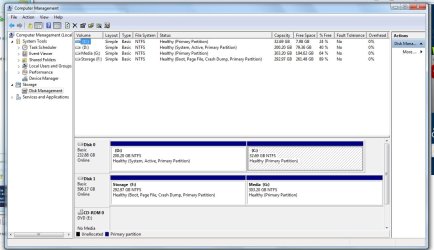
Partitioned it to to drives, E and F

I just bought the Windows 7 Pro Upgrade, made a fresh install on E:\ with the hopes that it would change E:\ to C:\ like the beta did on my primary drive.

It didn't, now my drive lettering looks awful and it's confusing me lol.

I don't need the Windows XP or the Windows 7 Beta installation (on disk0), I would like to combine those partitions back into 1 drive.

Is there any way I can fix this mess? maybe make my current windows location C: ?

Confused? I know I am... I've posted some pics, hope they can clarify what I'm talking about

Thanks for your help!
 

Attachments
  • partitions.jpg
    partitions.jpg
    94.5 KB · Views: 50

My Computer My Computer

At a glance

Windows 7 ProfessionalIntel Q66004 gb DDR2 800mhzBFG GeForce 8800
Computer Manufacturer/Model Number
Me
OS
Windows 7 Professional
CPU
Intel Q6600
Motherboard
Gigabyte GA-P35-DS3L
Memory
4 gb DDR2 800mhz
Graphics Card(s)
BFG GeForce 8800
Case
Antec
Hello Angloman,

Welcome to Seven Forums.

You can change the drive letters manually. Do you now have all three boot options at startup? If you manually changed the letters (in disk manager, rt. click on a partition and select 'change letter and path') then you could combine and format old C & D. Next you would have to remove the old boot options via 'msconfig'.

Hope this helps.

Gary
 

My Computer My Computer

At a glance

Vista Ult 64 bit Seven Ult RTM x64Intel Core2 Quad Q6600 2.40 gigahertzCrucial Ballistix 4x2GB PC2 6400NVIDIA GeForce 8600 GTS 256 MB
Computer Manufacturer/Model Number
Dell XPS420
OS
Vista Ult 64 bit Seven Ult RTM x64
CPU
Intel Core2 Quad Q6600 2.40 gigahertz
Memory
Crucial Ballistix 4x2GB PC2 6400
Graphics Card(s)
NVIDIA GeForce 8600 GTS 256 MB
Sound Card
Creative SB X-Fi audio
Monitor(s) Displays
HP w2207 + HPvs15
Screen Resolution
1680x1050 + 1024x768
Hard Drives
2-WD5000AAKS-500 GB
WD5000AAV-500 GB external
Keyboard
Microsoft Comfort Curve
Mouse
MX Revolution
Other Info
Wacom Intuos 2 Graphics Tablet
Experience Index=5.5
Thanks for the quick reply!

I do have all 3 boot options at startup, which I would like to get rid of. MSconfig only shows me the other windows 7 option, not XP but I'll get to fixing that later.

What I really want to do is transfer the bootloader to disk1, partiton 1 (F: Storage), and then completely reformat disk0.

Once that's done I can worry about clearing up the boot menu.

Any suggestions for how I can do that?
 

My Computer My Computer

At a glance

Windows 7 ProfessionalIntel Q66004 gb DDR2 800mhzBFG GeForce 8800
Computer Manufacturer/Model Number
Me
OS
Windows 7 Professional
CPU
Intel Q6600
Motherboard
Gigabyte GA-P35-DS3L
Memory
4 gb DDR2 800mhz
Graphics Card(s)
BFG GeForce 8800
Case
Antec
Every partition that is bootable will have a bootstrap so just make sure you are booted to the retail 7, and then delete both partitions on disk 0. Then you can repartion as you wish and remove the deleted OSes boot entries through boot in msconfig.

Weird the XP isn't listed and that it doesn't make the new 7 C: when it is the active OS.
 

My Computer My Computer

At a glance

7 RC
OS
7 RC
Okay problem solved.

Made Disk1 active, rebooted and got the bootmgr missing error msg.

Disconnected Disk0

Ran the recovery CD, fixed it

Booted up fine, reconnected Disk0, still booted fine... now going to reformat disk0

In the end, my drive letters will be F, G and H instead of C D and E but whatever... for the most part everything's working.

Thanks again!
 

My Computer My Computer

At a glance

Windows 7 ProfessionalIntel Q66004 gb DDR2 800mhzBFG GeForce 8800
Computer Manufacturer/Model Number
Me
OS
Windows 7 Professional
CPU
Intel Q6600
Motherboard
Gigabyte GA-P35-DS3L
Memory
4 gb DDR2 800mhz
Graphics Card(s)
BFG GeForce 8800
Case
Antec
Glad you've got it figured. You can change the letters to whatever you like anytime.

Gary
 

My Computer My Computer

At a glance

Vista Ult 64 bit Seven Ult RTM x64Intel Core2 Quad Q6600 2.40 gigahertzCrucial Ballistix 4x2GB PC2 6400NVIDIA GeForce 8600 GTS 256 MB
Computer Manufacturer/Model Number
Dell XPS420
OS
Vista Ult 64 bit Seven Ult RTM x64
CPU
Intel Core2 Quad Q6600 2.40 gigahertz
Memory
Crucial Ballistix 4x2GB PC2 6400
Graphics Card(s)
NVIDIA GeForce 8600 GTS 256 MB
Sound Card
Creative SB X-Fi audio
Monitor(s) Displays
HP w2207 + HPvs15
Screen Resolution
1680x1050 + 1024x768
Hard Drives
2-WD5000AAKS-500 GB
WD5000AAV-500 GB external
Keyboard
Microsoft Comfort Curve
Mouse
MX Revolution
Other Info
Wacom Intuos 2 Graphics Tablet
Experience Index=5.5
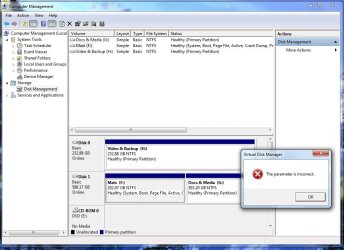
I tried, I get to the point where it warns me that changing the drive letter could mess some programs up, then when I click OK it tells me the parameter is incorrect
 

Attachments

  • drivechange.jpg
    drivechange.jpg
    82.6 KB · Views: 27

My Computer My Computer

At a glance

Windows 7 ProfessionalIntel Q66004 gb DDR2 800mhzBFG GeForce 8800
Computer Manufacturer/Model Number
Me
OS
Windows 7 Professional
CPU
Intel Q6600
Motherboard
Gigabyte GA-P35-DS3L
Memory
4 gb DDR2 800mhz
Graphics Card(s)
BFG GeForce 8800
Case
Antec
Back
Top