
Messed up MBR, How do I back up my system without copying the MBR?

Sporkalypse

New member
Local time
5:42 AM
Messages
17
Location
Charlotte, NC
Hey all, I recently tried to dual-boot Win7 and Fedora 17, but Fedora failed thus causing me to have to remove it. Well, that was a problem because Fedora put GRUB on my system. I successfully removed it and restored the original MBR so Windows boots. Now I have a bigger problem: the "bootrec.exe /ScanOS" command brings the result "Number of Windows Installations: 0." But during the initial start of the recovery disk, it finds Windows 7 Professional. And the command "ren c:\boot\bcd bcd.old" says there's 2 files or none at all.
I am looking for a way to clean my disk and restore from a system image without the screwy MBR. I was planning on using DBAN(Darik's Boot and Nuke) to wipe the disk and the Windows included system image creator. But after some research, it looks like the image creator will copy the partition arrangements and the MBR, so I would have then done a lot of work to be back where I started. I would like to do a clean install, but with 100GB+ of Steam games and valuable programs and saves, I don't think its the best option. I have a custom-built, so I have no included software and driver CD's, so re-installing everything would be a pain.
So, is there hope for my PC?
(P.S. my PC boots, so that's not a problem)
 

My Computer My Computer

At a glance

Windows 7 Professional x64AMD Phenom II X4 960T4GB Kingston HyperX 1600 DDR3EVGA GeForce GTX 560 DS SSC
Computer type
PC/Desktop
Computer Manufacturer/Model Number
Home-Built
OS
Windows 7 Professional x64
CPU
AMD Phenom II X4 960T
Motherboard
ASRock M3A770DE
Memory
4GB Kingston HyperX 1600 DDR3
Graphics Card(s)
EVGA GeForce GTX 560 DS SSC
Sound Card
VIA HD Audio
Monitor(s) Displays
Acer G215HV
Screen Resolution
1920x1080
Hard Drives
HITACHI 7200rpm 640GB
PSU
ePower E-Series 550w (Dead)
Case
NZXT Source 210
Cooling
Stock AMD
Keyboard
Rosewill X-Slim Chicklet Style
Mouse
Microsoft Wheel Mouse with IntelliPoint
Internet Speed
Broadband
Browser
Internet Explorer 10 | Google Chrome Beta
Other Info
Mobile Devices:
Microsoft Surface for Windows RT

Coming Upgrades:
-Gigabyte GA-990FXA-UD3
-NZXT Phantom 410
-AMD FX-8350
-Antec Kühler H2O 620
-SeaSonic S12II 620w
Not sure I follow what problem you are having.

If windows boots - the mbr is doing it's job fine.
How do I back up my system without copying the MBR

Try macrium free to make an image, it gives you option of whether to restore the mbr when applying the image.

http://www.macrium.com/reflectfree.aspx
 

My Computers My Computers

  • At a glance

    7 X64i5 84002x8gb 3200mhz
    Computer type
    PC/Desktop
    OS
    7 X64
    CPU
    i5 8400
    Motherboard
    gigabyte b365m ds3h
    Memory
    2x8gb 3200mhz
    Hard Drives
    various
    PSU
    pure power 11 400w cm
    Case
    Coolermaster
    Cooling
    cryorig m9i
  • At a glance

    7x64g54008gb ddr4 2400
    Computer type
    PC/Desktop
    OS
    7x64
    CPU
    g5400
    Motherboard
    ga b365m ds3h
    Memory
    8gb ddr4 2400
    PSU
    xfx pro 450w
Well, it isn't really a problem now, but I see it becoming one in the future if I ever need to use start-up repair.
 

My Computer My Computer

At a glance

Windows 7 Professional x64AMD Phenom II X4 960T4GB Kingston HyperX 1600 DDR3EVGA GeForce GTX 560 DS SSC
Computer type
PC/Desktop
Computer Manufacturer/Model Number
Home-Built
OS
Windows 7 Professional x64
CPU
AMD Phenom II X4 960T
Motherboard
ASRock M3A770DE
Memory
4GB Kingston HyperX 1600 DDR3
Graphics Card(s)
EVGA GeForce GTX 560 DS SSC
Sound Card
VIA HD Audio
Monitor(s) Displays
Acer G215HV
Screen Resolution
1920x1080
Hard Drives
HITACHI 7200rpm 640GB
PSU
ePower E-Series 550w (Dead)
Case
NZXT Source 210
Cooling
Stock AMD
Keyboard
Rosewill X-Slim Chicklet Style
Mouse
Microsoft Wheel Mouse with IntelliPoint
Internet Speed
Broadband
Browser
Internet Explorer 10 | Google Chrome Beta
Other Info
Mobile Devices:
Microsoft Surface for Windows RT

Coming Upgrades:
-Gigabyte GA-990FXA-UD3
-NZXT Phantom 410
-AMD FX-8350
-Antec Kühler H2O 620
-SeaSonic S12II 620w
When I perform a backup, what settings should I choose? Should I back-up the 100mb partition? And should I allow the saving of the MBR or not?
Thanks!
 

My Computer My Computer

At a glance

Windows 7 Professional x64AMD Phenom II X4 960T4GB Kingston HyperX 1600 DDR3EVGA GeForce GTX 560 DS SSC
Computer type
PC/Desktop
Computer Manufacturer/Model Number
Home-Built
OS
Windows 7 Professional x64
CPU
AMD Phenom II X4 960T
Motherboard
ASRock M3A770DE
Memory
4GB Kingston HyperX 1600 DDR3
Graphics Card(s)
EVGA GeForce GTX 560 DS SSC
Sound Card
VIA HD Audio
Monitor(s) Displays
Acer G215HV
Screen Resolution
1920x1080
Hard Drives
HITACHI 7200rpm 640GB
PSU
ePower E-Series 550w (Dead)
Case
NZXT Source 210
Cooling
Stock AMD
Keyboard
Rosewill X-Slim Chicklet Style
Mouse
Microsoft Wheel Mouse with IntelliPoint
Internet Speed
Broadband
Browser
Internet Explorer 10 | Google Chrome Beta
Other Info
Mobile Devices:
Microsoft Surface for Windows RT

Coming Upgrades:
-Gigabyte GA-990FXA-UD3
-NZXT Phantom 410
-AMD FX-8350
-Antec Kühler H2O 620
-SeaSonic S12II 620w
Yes, you would back up the system partition as well as the o/s partition.

I think it backs up the mbr automatically (last time I looked) - but gives you the option of restoring it,

I see they have just released an updated version. They seem to do that every couple of weeks.

I think there is a tutorial in the tut section - http://www.sevenforums.com/tutorials/73828-imaging-free-macrium.html

I don't think you will need it - pretty obvious how to do it.
 

My Computers My Computers

  • At a glance

    7 X64i5 84002x8gb 3200mhz
    Computer type
    PC/Desktop
    OS
    7 X64
    CPU
    i5 8400
    Motherboard
    gigabyte b365m ds3h
    Memory
    2x8gb 3200mhz
    Hard Drives
    various
    PSU
    pure power 11 400w cm
    Case
    Coolermaster
    Cooling
    cryorig m9i
  • At a glance

    7x64g54008gb ddr4 2400
    Computer type
    PC/Desktop
    OS
    7x64
    CPU
    g5400
    Motherboard
    ga b365m ds3h
    Memory
    8gb ddr4 2400
    PSU
    xfx pro 450w
Thank you so much! I have been in quite the tizzy for a few weeks now wondering what I should do about this! I never knew it was this simple :o
Now I know what to do! :orb:
 

My Computer My Computer

At a glance

Windows 7 Professional x64AMD Phenom II X4 960T4GB Kingston HyperX 1600 DDR3EVGA GeForce GTX 560 DS SSC
Computer type
PC/Desktop
Computer Manufacturer/Model Number
Home-Built
OS
Windows 7 Professional x64
CPU
AMD Phenom II X4 960T
Motherboard
ASRock M3A770DE
Memory
4GB Kingston HyperX 1600 DDR3
Graphics Card(s)
EVGA GeForce GTX 560 DS SSC
Sound Card
VIA HD Audio
Monitor(s) Displays
Acer G215HV
Screen Resolution
1920x1080
Hard Drives
HITACHI 7200rpm 640GB
PSU
ePower E-Series 550w (Dead)
Case
NZXT Source 210
Cooling
Stock AMD
Keyboard
Rosewill X-Slim Chicklet Style
Mouse
Microsoft Wheel Mouse with IntelliPoint
Internet Speed
Broadband
Browser
Internet Explorer 10 | Google Chrome Beta
Other Info
Mobile Devices:
Microsoft Surface for Windows RT

Coming Upgrades:
-Gigabyte GA-990FXA-UD3
-NZXT Phantom 410
-AMD FX-8350
-Antec Kühler H2O 620
-SeaSonic S12II 620w
Now, will I have to use the Windows Recovery disk to recreate the MBR or will it be there already?
 

My Computer My Computer

At a glance

Windows 7 Professional x64AMD Phenom II X4 960T4GB Kingston HyperX 1600 DDR3EVGA GeForce GTX 560 DS SSC
Computer type
PC/Desktop
Computer Manufacturer/Model Number
Home-Built
OS
Windows 7 Professional x64
CPU
AMD Phenom II X4 960T
Motherboard
ASRock M3A770DE
Memory
4GB Kingston HyperX 1600 DDR3
Graphics Card(s)
EVGA GeForce GTX 560 DS SSC
Sound Card
VIA HD Audio
Monitor(s) Displays
Acer G215HV
Screen Resolution
1920x1080
Hard Drives
HITACHI 7200rpm 640GB
PSU
ePower E-Series 550w (Dead)
Case
NZXT Source 210
Cooling
Stock AMD
Keyboard
Rosewill X-Slim Chicklet Style
Mouse
Microsoft Wheel Mouse with IntelliPoint
Internet Speed
Broadband
Browser
Internet Explorer 10 | Google Chrome Beta
Other Info
Mobile Devices:
Microsoft Surface for Windows RT

Coming Upgrades:
-Gigabyte GA-990FXA-UD3
-NZXT Phantom 410
-AMD FX-8350
-Antec Kühler H2O 620
-SeaSonic S12II 620w
It is there right now - unless you do something to it - it will stay there.
 

My Computers My Computers

  • At a glance

    7 X64i5 84002x8gb 3200mhz
    Computer type
    PC/Desktop
    OS
    7 X64
    CPU
    i5 8400
    Motherboard
    gigabyte b365m ds3h
    Memory
    2x8gb 3200mhz
    Hard Drives
    various
    PSU
    pure power 11 400w cm
    Case
    Coolermaster
    Cooling
    cryorig m9i
  • At a glance

    7x64g54008gb ddr4 2400
    Computer type
    PC/Desktop
    OS
    7x64
    CPU
    g5400
    Motherboard
    ga b365m ds3h
    Memory
    8gb ddr4 2400
    PSU
    xfx pro 450w
I meant after I cleaned the disk and after I restored from the disk image. Sorry for the confusion!
 

My Computer My Computer

At a glance

Windows 7 Professional x64AMD Phenom II X4 960T4GB Kingston HyperX 1600 DDR3EVGA GeForce GTX 560 DS SSC
Computer type
PC/Desktop
Computer Manufacturer/Model Number
Home-Built
OS
Windows 7 Professional x64
CPU
AMD Phenom II X4 960T
Motherboard
ASRock M3A770DE
Memory
4GB Kingston HyperX 1600 DDR3
Graphics Card(s)
EVGA GeForce GTX 560 DS SSC
Sound Card
VIA HD Audio
Monitor(s) Displays
Acer G215HV
Screen Resolution
1920x1080
Hard Drives
HITACHI 7200rpm 640GB
PSU
ePower E-Series 550w (Dead)
Case
NZXT Source 210
Cooling
Stock AMD
Keyboard
Rosewill X-Slim Chicklet Style
Mouse
Microsoft Wheel Mouse with IntelliPoint
Internet Speed
Broadband
Browser
Internet Explorer 10 | Google Chrome Beta
Other Info
Mobile Devices:
Microsoft Surface for Windows RT

Coming Upgrades:
-Gigabyte GA-990FXA-UD3
-NZXT Phantom 410
-AMD FX-8350
-Antec Kühler H2O 620
-SeaSonic S12II 620w
There is no point in re-imaging from an image you make now. Even if you clean the disk the image will replace what is there now.

What is it exactly that you're concerned about?
 
The "/ScanOS" command can't find a windows installation, which worries me. I've tried everything except switching the sata ports or doing a clean install.
 

My Computer My Computer

At a glance

Windows 7 Professional x64AMD Phenom II X4 960T4GB Kingston HyperX 1600 DDR3EVGA GeForce GTX 560 DS SSC
Computer type
PC/Desktop
Computer Manufacturer/Model Number
Home-Built
OS
Windows 7 Professional x64
CPU
AMD Phenom II X4 960T
Motherboard
ASRock M3A770DE
Memory
4GB Kingston HyperX 1600 DDR3
Graphics Card(s)
EVGA GeForce GTX 560 DS SSC
Sound Card
VIA HD Audio
Monitor(s) Displays
Acer G215HV
Screen Resolution
1920x1080
Hard Drives
HITACHI 7200rpm 640GB
PSU
ePower E-Series 550w (Dead)
Case
NZXT Source 210
Cooling
Stock AMD
Keyboard
Rosewill X-Slim Chicklet Style
Mouse
Microsoft Wheel Mouse with IntelliPoint
Internet Speed
Broadband
Browser
Internet Explorer 10 | Google Chrome Beta
Other Info
Mobile Devices:
Microsoft Surface for Windows RT

Coming Upgrades:
-Gigabyte GA-990FXA-UD3
-NZXT Phantom 410
-AMD FX-8350
-Antec Kühler H2O 620
-SeaSonic S12II 620w
This is not uncommon and can be disregarded if you have no other problems.

I would run Startup Repair a few times from the WIn7 installer or Repair disk to know that your boot files and MBR are sound. It runs many tests, commands and if necessary fixes. This is also the best way to recover from GRUB in the first place.

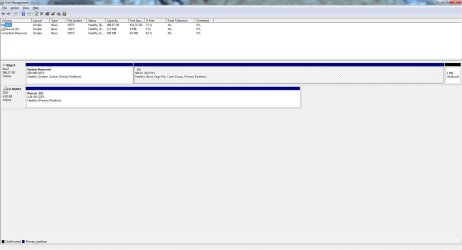
If you post back a screenshot of your Disk Mgmt drive map and listings using the Snipping TOol in Start Menu we can look it over for you.
 
Here's the screenshot from my disk manager, the 1mb partition formed after a few installations of Linux.
 

Attachments

  • diskmanager.jpg
    diskmanager.jpg
    88.4 KB · Views: 10

My Computer My Computer

At a glance

Windows 7 Professional x64AMD Phenom II X4 960T4GB Kingston HyperX 1600 DDR3EVGA GeForce GTX 560 DS SSC
Computer type
PC/Desktop
Computer Manufacturer/Model Number
Home-Built
OS
Windows 7 Professional x64
CPU
AMD Phenom II X4 960T
Motherboard
ASRock M3A770DE
Memory
4GB Kingston HyperX 1600 DDR3
Graphics Card(s)
EVGA GeForce GTX 560 DS SSC
Sound Card
VIA HD Audio
Monitor(s) Displays
Acer G215HV
Screen Resolution
1920x1080
Hard Drives
HITACHI 7200rpm 640GB
PSU
ePower E-Series 550w (Dead)
Case
NZXT Source 210
Cooling
Stock AMD
Keyboard
Rosewill X-Slim Chicklet Style
Mouse
Microsoft Wheel Mouse with IntelliPoint
Internet Speed
Broadband
Browser
Internet Explorer 10 | Google Chrome Beta
Other Info
Mobile Devices:
Microsoft Surface for Windows RT

Coming Upgrades:
-Gigabyte GA-990FXA-UD3
-NZXT Phantom 410
-AMD FX-8350
-Antec Kühler H2O 620
-SeaSonic S12II 620w
Another quick question: I recently looked in my System Reserved partition to find 2 BCD backup files, should I delete one both or none?
 

My Computer My Computer

At a glance

Windows 7 Professional x64AMD Phenom II X4 960T4GB Kingston HyperX 1600 DDR3EVGA GeForce GTX 560 DS SSC
Computer type
PC/Desktop
Computer Manufacturer/Model Number
Home-Built
OS
Windows 7 Professional x64
CPU
AMD Phenom II X4 960T
Motherboard
ASRock M3A770DE
Memory
4GB Kingston HyperX 1600 DDR3
Graphics Card(s)
EVGA GeForce GTX 560 DS SSC
Sound Card
VIA HD Audio
Monitor(s) Displays
Acer G215HV
Screen Resolution
1920x1080
Hard Drives
HITACHI 7200rpm 640GB
PSU
ePower E-Series 550w (Dead)
Case
NZXT Source 210
Cooling
Stock AMD
Keyboard
Rosewill X-Slim Chicklet Style
Mouse
Microsoft Wheel Mouse with IntelliPoint
Internet Speed
Broadband
Browser
Internet Explorer 10 | Google Chrome Beta
Other Info
Mobile Devices:
Microsoft Surface for Windows RT

Coming Upgrades:
-Gigabyte GA-990FXA-UD3
-NZXT Phantom 410
-AMD FX-8350
-Antec Kühler H2O 620
-SeaSonic S12II 620w
There is plenty of free space on the SysReserved so unless someone else knows better I would leave it alone.

If there are no performance problems, then it looks correct and should be good to go.

If there are performance problems, post back to let us help you resolve them.

Here are generalized Troubleshooting Steps for Windows 7 which you can practice now to become more familar with your System.
 
Back
Top