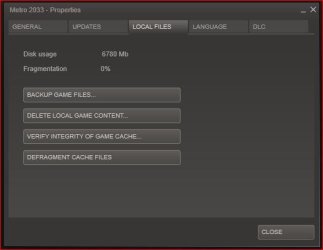
I tinkered with the user.cfg before, and I went back in to change it, but I can still see the taskbar when I open Metro. I when into Steam and verified the files, and it re-downloaded 1 thing at it didn't help.
I've tried F11 and Alt+Enter.
My Computer
Computer type
PC/Desktop
OS
10 Home x64
CPU
Intel Core i5 4670K
Motherboard
Gigabyte GA-Z87-D3HP
Memory
Corsair XMS3 8GB DDr3 1600MHz
Graphics Card(s)
Sapphire NITRO Radeon R9 Fury
Sound Card
Asus Xonar DX
Monitor(s) Displays
Acer H236HLbmjd
Screen Resolution
1920x1080
Hard Drives
Force GS 128GB - Seagate 320GB - WD Caviar Black 1TB - WD Caviar Blue 500GB
- What resolution are you usig for the game?
- What are you using for a monitor?
- Have you checked your video card's settings?
- Do you have the latest patch for the game?
BTW I too have a 6950 2GB unlocked to a 6970 and the game is running fullscreen at 1920x1080
My Computer
Computer type
PC/Desktop
Computer Manufacturer/Model Number
Custom built by me.
OS
Windows 10 Pro
CPU
Intel Core i7-4770K (3.5Ghz)
Motherboard
Gigabyte G1 Sniper 5 (F10 Bios)
Memory
32 gig Corsair Dominator Platinum (4x8Gig)
Graphics Card(s)
Sapphire Tri-X R9 Fury
Sound Card
Soundblaster ZXR
Monitor(s) Displays
NEC PA242W 24" LCD Monitor
Screen Resolution
1920 x 1200
Hard Drives
Primary - Samsung 850 Pro (512gig), Samsung 840 Pro (256gig), 2TB WD Caviar Black.
PSU
EVGA Supernova 1000 G2
Case
Cooler Master HAF X
Cooling
Corsair H100i with Corsair Air Series SP120 Quiet Fans
1080p on a 1080p monitor, 6950 with the enabled extra shaders, Catalyst 11.7 and it's only Metro this occurs to.
I'm not sure what version of the game I have.
My Computer
Computer type
PC/Desktop
OS
10 Home x64
CPU
Intel Core i5 4670K
Motherboard
Gigabyte GA-Z87-D3HP
Memory
Corsair XMS3 8GB DDr3 1600MHz
Graphics Card(s)
Sapphire NITRO Radeon R9 Fury
Sound Card
Asus Xonar DX
Monitor(s) Displays
Acer H236HLbmjd
Screen Resolution
1920x1080
Hard Drives
Force GS 128GB - Seagate 320GB - WD Caviar Black 1TB - WD Caviar Blue 500GB
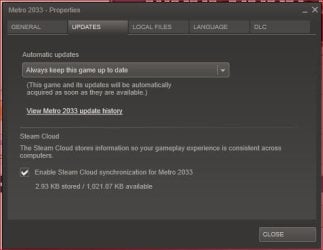
Anyway I'm not sure how to check for the latest update my self, but if you have the "Always keep this game up to date" the game will always be updated.
Also have you tried deleting the local content and having steam redownload the game?
And like I stated before, did you delete the user cfg file first?
Outside of those I'm running out out suggestions.
My Computer
Computer type
PC/Desktop
Computer Manufacturer/Model Number
Custom built by me.
OS
Windows 10 Pro
CPU
Intel Core i7-4770K (3.5Ghz)
Motherboard
Gigabyte G1 Sniper 5 (F10 Bios)
Memory
32 gig Corsair Dominator Platinum (4x8Gig)
Graphics Card(s)
Sapphire Tri-X R9 Fury
Sound Card
Soundblaster ZXR
Monitor(s) Displays
NEC PA242W 24" LCD Monitor
Screen Resolution
1920 x 1200
Hard Drives
Primary - Samsung 850 Pro (512gig), Samsung 840 Pro (256gig), 2TB WD Caviar Black.
PSU
EVGA Supernova 1000 G2
Case
Cooler Master HAF X
Cooling
Corsair H100i with Corsair Air Series SP120 Quiet Fans
Yes! Fixed it!
I fixed it myself though, deleting the correct data files and reinstalling it didn't work, but after turning on fullscreen in the user.cfg it worked. Just in case anyone looks at this thread about the same issue, I put a fullstop after r_fullscreen on.
My Computer
Computer type
PC/Desktop
OS
10 Home x64
CPU
Intel Core i5 4670K
Motherboard
Gigabyte GA-Z87-D3HP
Memory
Corsair XMS3 8GB DDr3 1600MHz
Graphics Card(s)
Sapphire NITRO Radeon R9 Fury
Sound Card
Asus Xonar DX
Monitor(s) Displays
Acer H236HLbmjd
Screen Resolution
1920x1080
Hard Drives
Force GS 128GB - Seagate 320GB - WD Caviar Black 1TB - WD Caviar Blue 500GB



 it says 'fullscreen on' in the user.cfg but it isn't fullscreen, I can still see the taskbar.