JavaScript is disabled. For a better experience, please enable JavaScript in your browser before proceeding.
You are using an out of date browser. It may not display this or other websites correctly.
You should upgrade or use an
alternative browser .
Solved Metro 2033 will not go fullscreen
I tinkered with the user.cfg before, and I went back in to change it, but I can still see the taskbar when I open Metro. I when into Steam and verified the files, and it re-downloaded 1 thing at it didn't help.
10 Home x64 Intel Core i5 4670K Corsair XMS3 8GB DDr3 1600MHz Sapphire NITRO Radeon R9 Fury PC/Desktop 10 Home x64 Intel Core i5 4670K Gigabyte GA-Z87-D3HP Corsair XMS3 8GB DDr3 1600MHz Sapphire NITRO Radeon R9 Fury Asus Xonar DX Acer H236HLbmjd 1920x1080 Force GS 128GB - Seagate 320GB - WD Caviar Black 1TB - WD Caviar Blue 500GB EVGA SuperNOVA 650 P2 Silverstone Raven 3 RV03B-W Topre Realforce 104UG-HiPro Mionix Naos 7000 76/4 On a good day SmartScreen Internet Explorer 11
New member
Guru
Gold Member
VIP
I would suggest you delete the config file and reinstall the game. See if that helps.
Windows 10 Pro Intel Core i7-4770K (3.5Ghz) 32 gig Corsair Dominator Platinum (4x8Gig) Sapphire Tri-X R9 Fury PC/Desktop Custom built by me. Windows 10 Pro Intel Core i7-4770K (3.5Ghz) Gigabyte G1 Sniper 5 (F10 Bios) 32 gig Corsair Dominator Platinum (4x8Gig) Sapphire Tri-X R9 Fury Soundblaster ZXR NEC PA242W 24" LCD Monitor 1920 x 1200 Primary - Samsung 850 Pro (512gig), Samsung 840 Pro (256gig), 2TB WD Caviar Black. EVGA Supernova 1000 G2 Cooler Master HAF X Corsair H100i with Corsair Air Series SP120 Quiet Fans Logitech Wireless Wave Logitech Performance MX High Speed Cable Norton Security IE11 Memory Timings - 1866MHz @ 9-9-9-27-1T @ 1.5 volts
Supra
Pro User
Thread Starter
10 Home x64 Intel Core i5 4670K Corsair XMS3 8GB DDr3 1600MHz Sapphire NITRO Radeon R9 Fury PC/Desktop 10 Home x64 Intel Core i5 4670K Gigabyte GA-Z87-D3HP Corsair XMS3 8GB DDr3 1600MHz Sapphire NITRO Radeon R9 Fury Asus Xonar DX Acer H236HLbmjd 1920x1080 Force GS 128GB - Seagate 320GB - WD Caviar Black 1TB - WD Caviar Blue 500GB EVGA SuperNOVA 650 P2 Silverstone Raven 3 RV03B-W Topre Realforce 104UG-HiPro Mionix Naos 7000 76/4 On a good day SmartScreen Internet Explorer 11
New member
Guru
Gold Member
VIP
I tinkered with the user.cfg
I would suggest you delete the config file and reinstall the game. See if that helps.
The one you "tinkered" with.
But fefore doing that try changing the resolution and see if that helps. If not, try the suggestion I posted.
Windows 10 Pro Intel Core i7-4770K (3.5Ghz) 32 gig Corsair Dominator Platinum (4x8Gig) Sapphire Tri-X R9 Fury PC/Desktop Custom built by me. Windows 10 Pro Intel Core i7-4770K (3.5Ghz) Gigabyte G1 Sniper 5 (F10 Bios) 32 gig Corsair Dominator Platinum (4x8Gig) Sapphire Tri-X R9 Fury Soundblaster ZXR NEC PA242W 24" LCD Monitor 1920 x 1200 Primary - Samsung 850 Pro (512gig), Samsung 840 Pro (256gig), 2TB WD Caviar Black. EVGA Supernova 1000 G2 Cooler Master HAF X Corsair H100i with Corsair Air Series SP120 Quiet Fans Logitech Wireless Wave Logitech Performance MX High Speed Cable Norton Security IE11 Memory Timings - 1866MHz @ 9-9-9-27-1T @ 1.5 volts
Supra
Pro User
Thread Starter
Still not fullscreen. I guess I have to re-install it.
10 Home x64 Intel Core i5 4670K Corsair XMS3 8GB DDr3 1600MHz Sapphire NITRO Radeon R9 Fury PC/Desktop 10 Home x64 Intel Core i5 4670K Gigabyte GA-Z87-D3HP Corsair XMS3 8GB DDr3 1600MHz Sapphire NITRO Radeon R9 Fury Asus Xonar DX Acer H236HLbmjd 1920x1080 Force GS 128GB - Seagate 320GB - WD Caviar Black 1TB - WD Caviar Blue 500GB EVGA SuperNOVA 650 P2 Silverstone Raven 3 RV03B-W Topre Realforce 104UG-HiPro Mionix Naos 7000 76/4 On a good day SmartScreen Internet Explorer 11
New member
Guru
Gold Member
VIP
Don't forget to delete the file first.
Windows 10 Pro Intel Core i7-4770K (3.5Ghz) 32 gig Corsair Dominator Platinum (4x8Gig) Sapphire Tri-X R9 Fury PC/Desktop Custom built by me. Windows 10 Pro Intel Core i7-4770K (3.5Ghz) Gigabyte G1 Sniper 5 (F10 Bios) 32 gig Corsair Dominator Platinum (4x8Gig) Sapphire Tri-X R9 Fury Soundblaster ZXR NEC PA242W 24" LCD Monitor 1920 x 1200 Primary - Samsung 850 Pro (512gig), Samsung 840 Pro (256gig), 2TB WD Caviar Black. EVGA Supernova 1000 G2 Cooler Master HAF X Corsair H100i with Corsair Air Series SP120 Quiet Fans Logitech Wireless Wave Logitech Performance MX High Speed Cable Norton Security IE11 Memory Timings - 1866MHz @ 9-9-9-27-1T @ 1.5 volts
New member
Guru
Gold Member
VIP
Mine has done that on occasion.
Windows 7 Home Premium 64bit Intel Core i7 2700k 8GB Mushkin Redline Ridgebacks @1866 EVGA GTX570 SC Custom (Self Build) Windows 7 Home Premium 64bit Intel Core i7 2700k eVGA P67 SLI 8GB Mushkin Redline Ridgebacks @1866 EVGA GTX570 SC XiFi Titanium HD LG W2453V 1920x1080 Intel 320 80GB -- Intel X25-V 40GB --WD Black 1TB x2 -- WD Blue 640GB Seasonic x750 Corsair 600T SE White eVGA Superclocked CPU Cooler Saitek Cyborg Kaspersky IE LG BD/DVD
New member
Guru
Gold Member
VIP
It's such an odd bug, though I'm lucky enough to never have gotten it (knocks on wood)
BTW I was a little bemused to see that there's no toggle switch in the options sections under video
Windows 10 Pro Intel Core i7-4770K (3.5Ghz) 32 gig Corsair Dominator Platinum (4x8Gig) Sapphire Tri-X R9 Fury PC/Desktop Custom built by me. Windows 10 Pro Intel Core i7-4770K (3.5Ghz) Gigabyte G1 Sniper 5 (F10 Bios) 32 gig Corsair Dominator Platinum (4x8Gig) Sapphire Tri-X R9 Fury Soundblaster ZXR NEC PA242W 24" LCD Monitor 1920 x 1200 Primary - Samsung 850 Pro (512gig), Samsung 840 Pro (256gig), 2TB WD Caviar Black. EVGA Supernova 1000 G2 Cooler Master HAF X Corsair H100i with Corsair Air Series SP120 Quiet Fans Logitech Wireless Wave Logitech Performance MX High Speed Cable Norton Security IE11 Memory Timings - 1866MHz @ 9-9-9-27-1T @ 1.5 volts
Supra
Pro User
Thread Starter
I just reinstalled it, and there's nothing different
it says 'fullscreen on' in the user.cfg but it isn't fullscreen, I can still see the taskbar.
10 Home x64 Intel Core i5 4670K Corsair XMS3 8GB DDr3 1600MHz Sapphire NITRO Radeon R9 Fury PC/Desktop 10 Home x64 Intel Core i5 4670K Gigabyte GA-Z87-D3HP Corsair XMS3 8GB DDr3 1600MHz Sapphire NITRO Radeon R9 Fury Asus Xonar DX Acer H236HLbmjd 1920x1080 Force GS 128GB - Seagate 320GB - WD Caviar Black 1TB - WD Caviar Blue 500GB EVGA SuperNOVA 650 P2 Silverstone Raven 3 RV03B-W Topre Realforce 104UG-HiPro Mionix Naos 7000 76/4 On a good day SmartScreen Internet Explorer 11
New member
Guru
Gold Member
VIP
- What resolution are you usig for the game?
Windows 10 Pro Intel Core i7-4770K (3.5Ghz) 32 gig Corsair Dominator Platinum (4x8Gig) Sapphire Tri-X R9 Fury PC/Desktop Custom built by me. Windows 10 Pro Intel Core i7-4770K (3.5Ghz) Gigabyte G1 Sniper 5 (F10 Bios) 32 gig Corsair Dominator Platinum (4x8Gig) Sapphire Tri-X R9 Fury Soundblaster ZXR NEC PA242W 24" LCD Monitor 1920 x 1200 Primary - Samsung 850 Pro (512gig), Samsung 840 Pro (256gig), 2TB WD Caviar Black. EVGA Supernova 1000 G2 Cooler Master HAF X Corsair H100i with Corsair Air Series SP120 Quiet Fans Logitech Wireless Wave Logitech Performance MX High Speed Cable Norton Security IE11 Memory Timings - 1866MHz @ 9-9-9-27-1T @ 1.5 volts
Supra
Pro User
Thread Starter
1080p on a 1080p monitor, 6950 with the enabled extra shaders, Catalyst 11.7 and it's only Metro this occurs to.
10 Home x64 Intel Core i5 4670K Corsair XMS3 8GB DDr3 1600MHz Sapphire NITRO Radeon R9 Fury PC/Desktop 10 Home x64 Intel Core i5 4670K Gigabyte GA-Z87-D3HP Corsair XMS3 8GB DDr3 1600MHz Sapphire NITRO Radeon R9 Fury Asus Xonar DX Acer H236HLbmjd 1920x1080 Force GS 128GB - Seagate 320GB - WD Caviar Black 1TB - WD Caviar Blue 500GB EVGA SuperNOVA 650 P2 Silverstone Raven 3 RV03B-W Topre Realforce 104UG-HiPro Mionix Naos 7000 76/4 On a good day SmartScreen Internet Explorer 11
New member
Guru
Gold Member
VIP
Monitor or TV?
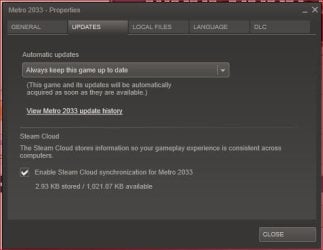
Anyway I'm not sure how to check for the latest update my self, but if you have the "Always keep this game up to date" the game will always be updated.
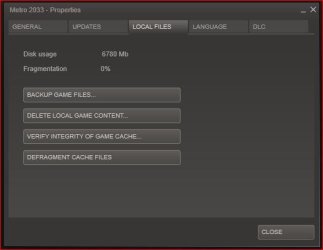
Also have you tried deleting the local content and having steam redownload the game?
And like I stated before, did you
delete the user cfg file first?
Outside of those I'm running out out suggestions.
Windows 10 Pro Intel Core i7-4770K (3.5Ghz) 32 gig Corsair Dominator Platinum (4x8Gig) Sapphire Tri-X R9 Fury PC/Desktop Custom built by me. Windows 10 Pro Intel Core i7-4770K (3.5Ghz) Gigabyte G1 Sniper 5 (F10 Bios) 32 gig Corsair Dominator Platinum (4x8Gig) Sapphire Tri-X R9 Fury Soundblaster ZXR NEC PA242W 24" LCD Monitor 1920 x 1200 Primary - Samsung 850 Pro (512gig), Samsung 840 Pro (256gig), 2TB WD Caviar Black. EVGA Supernova 1000 G2 Cooler Master HAF X Corsair H100i with Corsair Air Series SP120 Quiet Fans Logitech Wireless Wave Logitech Performance MX High Speed Cable Norton Security IE11 Memory Timings - 1866MHz @ 9-9-9-27-1T @ 1.5 volts
Supra
Pro User
Thread Starter
It looks like I have the game patch up to date, but I'm not sure I deleted the user.cfg file before uninstalling the game. I'll try that soon.
10 Home x64 Intel Core i5 4670K Corsair XMS3 8GB DDr3 1600MHz Sapphire NITRO Radeon R9 Fury PC/Desktop 10 Home x64 Intel Core i5 4670K Gigabyte GA-Z87-D3HP Corsair XMS3 8GB DDr3 1600MHz Sapphire NITRO Radeon R9 Fury Asus Xonar DX Acer H236HLbmjd 1920x1080 Force GS 128GB - Seagate 320GB - WD Caviar Black 1TB - WD Caviar Blue 500GB EVGA SuperNOVA 650 P2 Silverstone Raven 3 RV03B-W Topre Realforce 104UG-HiPro Mionix Naos 7000 76/4 On a good day SmartScreen Internet Explorer 11
New member
Guru
Gold Member
VIP
Windows 10 Pro Intel Core i7-4770K (3.5Ghz) 32 gig Corsair Dominator Platinum (4x8Gig) Sapphire Tri-X R9 Fury PC/Desktop Custom built by me. Windows 10 Pro Intel Core i7-4770K (3.5Ghz) Gigabyte G1 Sniper 5 (F10 Bios) 32 gig Corsair Dominator Platinum (4x8Gig) Sapphire Tri-X R9 Fury Soundblaster ZXR NEC PA242W 24" LCD Monitor 1920 x 1200 Primary - Samsung 850 Pro (512gig), Samsung 840 Pro (256gig), 2TB WD Caviar Black. EVGA Supernova 1000 G2 Cooler Master HAF X Corsair H100i with Corsair Air Series SP120 Quiet Fans Logitech Wireless Wave Logitech Performance MX High Speed Cable Norton Security IE11 Memory Timings - 1866MHz @ 9-9-9-27-1T @ 1.5 volts
Supra
Pro User
Thread Starter
Yes! Fixed it!
10 Home x64 Intel Core i5 4670K Corsair XMS3 8GB DDr3 1600MHz Sapphire NITRO Radeon R9 Fury PC/Desktop 10 Home x64 Intel Core i5 4670K Gigabyte GA-Z87-D3HP Corsair XMS3 8GB DDr3 1600MHz Sapphire NITRO Radeon R9 Fury Asus Xonar DX Acer H236HLbmjd 1920x1080 Force GS 128GB - Seagate 320GB - WD Caviar Black 1TB - WD Caviar Blue 500GB EVGA SuperNOVA 650 P2 Silverstone Raven 3 RV03B-W Topre Realforce 104UG-HiPro Mionix Naos 7000 76/4 On a good day SmartScreen Internet Explorer 11
New member
Guru
Gold Member
VIP
Glad to hear you got it fixed. Enjoy the game.
Peace
Windows 10 Pro Intel Core i7-4770K (3.5Ghz) 32 gig Corsair Dominator Platinum (4x8Gig) Sapphire Tri-X R9 Fury PC/Desktop Custom built by me. Windows 10 Pro Intel Core i7-4770K (3.5Ghz) Gigabyte G1 Sniper 5 (F10 Bios) 32 gig Corsair Dominator Platinum (4x8Gig) Sapphire Tri-X R9 Fury Soundblaster ZXR NEC PA242W 24" LCD Monitor 1920 x 1200 Primary - Samsung 850 Pro (512gig), Samsung 840 Pro (256gig), 2TB WD Caviar Black. EVGA Supernova 1000 G2 Cooler Master HAF X Corsair H100i with Corsair Air Series SP120 Quiet Fans Logitech Wireless Wave Logitech Performance MX High Speed Cable Norton Security IE11 Memory Timings - 1866MHz @ 9-9-9-27-1T @ 1.5 volts



 it says 'fullscreen on' in the user.cfg but it isn't fullscreen, I can still see the taskbar.