I'm getting nickel and dimed to death! I've been to Brother several times trying to get my printer to print. Want to charge me $150 to fix a printer that already should be working. It receives data and fades. I know I ask for help alot but this stuff shouldn't be so damned difficult.
I've loaded the printer disc and everything under the sun that I could do (not much anymore), but there's stuff I need my printer for... like researching a new place to live. Dallas is too damned complicated for me.
Blue what is the printer brand and model mate - personally I find as with most hardware one buys the disk that comes with whatever is quite out of date and I always use the manufacturers sites for driver / updates as the Windows feature is not my cup of tea.
My Computer
At a glance
Desk1 7 Home Prem / Desk2 10 Pro / Main lap A...Desk1 i5 3750K / Laptop i7 GTX 860M / Desk2 i...Desk1 8GB (1866) / Desk2 16GB (1333) / Laptop...Desk 1& 2NVidia GTX 650 & Laptops on board Intel
Computer type
PC/Desktop
Computer Manufacturer/Model Number
Own build (new) Desk1 / Asus ROG Win 7 / Desk2 1st build
OS
Desk1 7 Home Prem / Desk2 10 Pro / Main lap Asus ROG 10 Pro 2 laptop Toshiba 7 Pro Asus P2520 7 & 10
One other Desktop (tester) and spare Toshba laptop both with SSD's
Running Kaspersky 2016 ISS on all machines config'd identically
Logitec audio stereo systems on each machine (x3)
Canon MG5250MFC
Router/modem TP-Link running WPA2SK
One other Desktop (tester) and spare Toshba laptop both with SSD's
Running Kaspersky 2016 ISS on all machines config'd identically
Logitec audio stereo systems on each machine (x3)
Canon MG5250MFC
Router/modem TP-Link running WPA2SK
and just to absolutely sure can you check that model on the compliance label please - not that I am doubting you have it wrong but one digit or letter out of whack can make all the difference.
PS have just checked the Australian Brother site and that model is not listed can you recheck the model number as I asked just now/
My Computer
At a glance
Desk1 7 Home Prem / Desk2 10 Pro / Main lap A...Desk1 i5 3750K / Laptop i7 GTX 860M / Desk2 i...Desk1 8GB (1866) / Desk2 16GB (1333) / Laptop...Desk 1& 2NVidia GTX 650 & Laptops on board Intel
Computer type
PC/Desktop
Computer Manufacturer/Model Number
Own build (new) Desk1 / Asus ROG Win 7 / Desk2 1st build
OS
Desk1 7 Home Prem / Desk2 10 Pro / Main lap Asus ROG 10 Pro 2 laptop Toshiba 7 Pro Asus P2520 7 & 10
One other Desktop (tester) and spare Toshba laptop both with SSD's
Running Kaspersky 2016 ISS on all machines config'd identically
Logitec audio stereo systems on each machine (x3)
Canon MG5250MFC
Router/modem TP-Link running WPA2SK
Now on pain of being repetitive have you made sure of the model number/ s of that printer? If possible can you please send a picture of the compliance label.
Now as Shotas has asked how is this device connected up - not that if you have got the right driver it is still not going to work though.
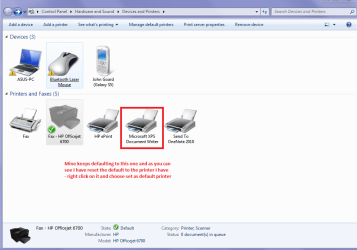
When you are trying to print go to Start > Devices and Printers > make sure it is connected as the defalt printer > right click > See what is printing.
Now I am saying this because my new laptop has a nasty habit of defaulting back to the stuff (a printer I have not got) that loads with the OS install. see pic
Attachments
PRINTER.PNG
40.6 KB
· Views: 0
My Computer
At a glance
Desk1 7 Home Prem / Desk2 10 Pro / Main lap A...Desk1 i5 3750K / Laptop i7 GTX 860M / Desk2 i...Desk1 8GB (1866) / Desk2 16GB (1333) / Laptop...Desk 1& 2NVidia GTX 650 & Laptops on board Intel
Computer type
PC/Desktop
Computer Manufacturer/Model Number
Own build (new) Desk1 / Asus ROG Win 7 / Desk2 1st build
OS
Desk1 7 Home Prem / Desk2 10 Pro / Main lap Asus ROG 10 Pro 2 laptop Toshiba 7 Pro Asus P2520 7 & 10
One other Desktop (tester) and spare Toshba laptop both with SSD's
Running Kaspersky 2016 ISS on all machines config'd identically
Logitec audio stereo systems on each machine (x3)
Canon MG5250MFC
Router/modem TP-Link running WPA2SK