Mic Jack as Line-In

snakebeard

New member
Local time
1:44 PM
Messages
22
My laptop doesn't have a line-in jack. It does, however, have a microphone jack.
And I've heard that you can make it so your computer recognizes your mic jack as a line-in jack.
Does anybody know how to do this?
 

My Computer

OS
Windows 7. 64-bit
If your laptop will allow it, then the audio driver will have the settings to do so. Some are even auto-sensing, but I would check the driver's program first.

On my tower, the Realtek sound let's you specifiy what port is what.
 

My Computer

OS
Windows 7 Ultimate x64 SP1
CPU
Intel Core i7-2600
Motherboard
Gigabyte GA-P67A-UD3P-B3
Memory
12 GB Patriot Extreme DDR3-1333
Graphics Card(s)
Nvidia GTX 470
Monitor(s) Displays
Dell UltraSharp 2209WA
Hard Drives
OCZ Agility3 240 GB, WD5001AALS, WD7501AALS
PSU
OCZ ModStream 700W
Case
CoolerMaster HAF 912 Advanced
Cooling
CoolerMaster Hyper 212 Plus
how do I open up whatever thing I need to get into to change it?
 

My Computer

OS
Windows 7. 64-bit
That all depends on what type of audio card you have, and if it has a program associated with it. That's way too general of a question to answer. You'd likely see something on the control panel, the system tray, start menu list of programs...etc.
 

My Computer

OS
Windows 7 Ultimate x64 SP1
CPU
Intel Core i7-2600
Motherboard
Gigabyte GA-P67A-UD3P-B3
Memory
12 GB Patriot Extreme DDR3-1333
Graphics Card(s)
Nvidia GTX 470
Monitor(s) Displays
Dell UltraSharp 2209WA
Hard Drives
OCZ Agility3 240 GB, WD5001AALS, WD7501AALS
PSU
OCZ ModStream 700W
Case
CoolerMaster HAF 912 Advanced
Cooling
CoolerMaster Hyper 212 Plus
So if I don't have a specific program for it, is there one I can download somewhere?
 

My Computer

OS
Windows 7. 64-bit
No, it would have to be included with your audio driver. Did you read somewhere that your mic-in can't be a line-in? Have you tried it? Did you look through Windows' audio settings?
 

My Computer

OS
Windows 7 Ultimate x64 SP1
CPU
Intel Core i7-2600
Motherboard
Gigabyte GA-P67A-UD3P-B3
Memory
12 GB Patriot Extreme DDR3-1333
Graphics Card(s)
Nvidia GTX 470
Monitor(s) Displays
Dell UltraSharp 2209WA
Hard Drives
OCZ Agility3 240 GB, WD5001AALS, WD7501AALS
PSU
OCZ ModStream 700W
Case
CoolerMaster HAF 912 Advanced
Cooling
CoolerMaster Hyper 212 Plus
Yeah, I've done all that. Not working. :(
 

My Computer

OS
Windows 7. 64-bit
Make and full model number of the laptop?
 

My Computer

Computer type
PC/Desktop
Computer Manufacturer/Model Number
Me
OS
Win 7 Ultimate x64
CPU
FX-8350 @ 4.6 GHz so far
Motherboard
Asus M5A97 EVO
Memory
ADATA XPG V1 Series Black 8GB DDR3 1600
Graphics Card(s)
Sapphire R9 270x Dual-X
Sound Card
Xonar DGX w/ Corsair Vengence 1300
Monitor(s) Displays
Acer S232HL Abid
Screen Resolution
1920x1080
Hard Drives
120 GB OCZ Vertex 3
500 GB Seagate 7200.12
PSU
Antec Earthwatts 650W Green
Case
Antec Three Hundred
Cooling
Cooler Master 212 EVO
Keyboard
Logitech G510
Mouse
Logitech G500s
Internet Speed
35000/3000

My Computer

Computer type
PC/Desktop
Computer Manufacturer/Model Number
Me
OS
Win 7 Ultimate x64
CPU
FX-8350 @ 4.6 GHz so far
Motherboard
Asus M5A97 EVO
Memory
ADATA XPG V1 Series Black 8GB DDR3 1600
Graphics Card(s)
Sapphire R9 270x Dual-X
Sound Card
Xonar DGX w/ Corsair Vengence 1300
Monitor(s) Displays
Acer S232HL Abid
Screen Resolution
1920x1080
Hard Drives
120 GB OCZ Vertex 3
500 GB Seagate 7200.12
PSU
Antec Earthwatts 650W Green
Case
Antec Three Hundred
Cooling
Cooler Master 212 EVO
Keyboard
Logitech G510
Mouse
Logitech G500s
Internet Speed
35000/3000
Almost but not quite. That number leads here,

ENERGY STAR

which shows it to be from the ID49C series, which in turn leads here,

Gateway Support - ID49C*Gateway ID49C Notebook Series

Let's start with the basics. The audio driver installed and not using the default Windows driver? If not,

Conexant Audio Driver Version 4.121.0.50

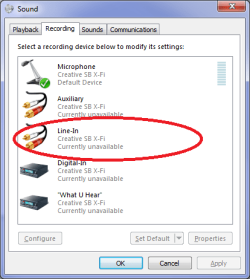
also if the driver isn't installed then you won't see an option like this in the Windows recording properties,

View attachment 101101
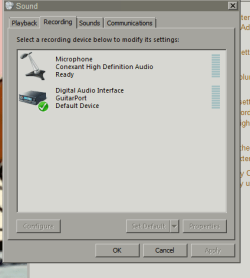
I downloaded and installed that Conexant thing. Then I restarted the computer.
This is what I get:
7.PNG

P.S. It is Windows 7. I just like running the old school graphics.
 

My Computer

OS
Windows 7. 64-bit
Guitar port? New one on me.

When the drivers installed, it should have also installed a control panel for it as well (or at least all others i can think of; Creative, Realtek, Via, etc; do). Check the Start menu, Control Panel, Notification are (clock in the corner), and see if there is anything Contexant related and if there is see if there is the option to set it to Line In.
 

My Computer

Computer type
PC/Desktop
Computer Manufacturer/Model Number
Me
OS
Win 7 Ultimate x64
CPU
FX-8350 @ 4.6 GHz so far
Motherboard
Asus M5A97 EVO
Memory
ADATA XPG V1 Series Black 8GB DDR3 1600
Graphics Card(s)
Sapphire R9 270x Dual-X
Sound Card
Xonar DGX w/ Corsair Vengence 1300
Monitor(s) Displays
Acer S232HL Abid
Screen Resolution
1920x1080
Hard Drives
120 GB OCZ Vertex 3
500 GB Seagate 7200.12
PSU
Antec Earthwatts 650W Green
Case
Antec Three Hundred
Cooling
Cooler Master 212 EVO
Keyboard
Logitech G510
Mouse
Logitech G500s
Internet Speed
35000/3000
Guitar port? New one on me.

When the drivers installed, it should have also installed a control panel for it as well (or at least all others i can think of; Creative, Realtek, Via, etc; do). Check the Start menu, Control Panel, Notification are (clock in the corner), and see if there is anything Contexant related and if there is see if there is the option to set it to Line In.

Yeah, I run my electric guitar and mics and everything through this GuitarPort. On my old desktop, I was able to run the monitor part of the GuitarPort interface through the line-in so I could hear it on the computer speakers without unplugging them from the computer and plugging them exclusively into the GuitarPort headphone jack.
So basically i could hear all the computer system sounds AND monitor my guitar at the same time.
If that makes any sense.
And if it does, I hope it's offers you some useful information...?
Anyway, that's why I need a line in.

But there's nothing new on the notifications or the start menu or the control panel.
....Do you think I should try installing it again?
 

My Computer

OS
Windows 7. 64-bit
Back
Top