mic not working on front panel

arnieboy

New member
Local time
1:08 PM
Messages
4
Hi

I bought my wife a new pc as the old one was a single processor and very slow. It has 2 issues. The new one seemed straight forward, quad core much faster but two issues are annoying enough to make my wife not want it.

1. The front panel seems to be wired differently to the old pc - my wife uses headphones with a mic for skype. Plugging in the phones did not get any sound. When I fixed this (I ticked the disable jack detection box which makes the phones part work but the mic does not work) the muting of the rear did not work. I swapped the old front panel from the old pc which includes a firewire port - so I am guessing the cables to the motherboard are digital rather than analogue? - and with this auto detection works. So is this an analogue vs digital issue? Trouble is the old panel won't fit the new case so I am stuck with the new front panel. As I say I can get the phones to work, the mic generally not but it did seem to work one time my wife played with setting (I was absent) and the auto mute does not work. I read some threads about ac'97 but nothing seems definitive.

2. I added in the hard disks from the old pc. One of them is recognised but after a while disappears. Explorer just does not show it and you have to reboot. The other is ok all the time.

Any help appreciated - I am semi techy by the way but not very. I can get the processor/motherboard spec if needed - it's Gigabyte I believe. Running Windows 7 64 bit.

Thanks
 

My Computer My Computer

At a glance

windows 7 home premium 64 bit8gb ddr3
Computer Manufacturer/Model Number
gigabyte
OS
windows 7 home premium 64 bit
Memory
8gb ddr3
Hard Drives
500gb sata
hi there :)
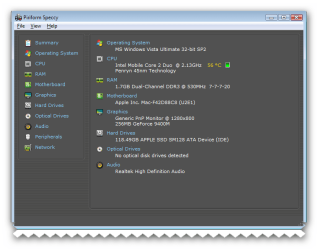
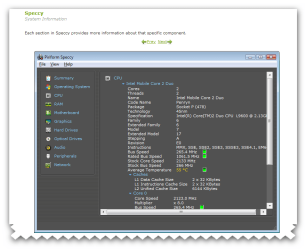
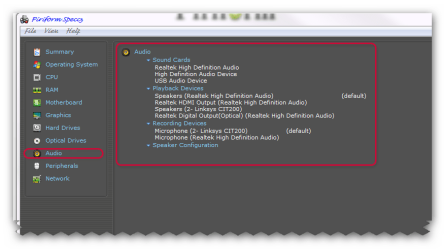
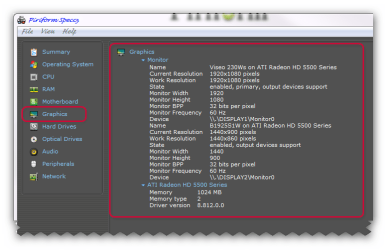
to help diagnose the pc could you download a program and show the results partially the sound/Graphics etc that will show the details its very safe and secure used by many members on this forum its called speccy by piriform. link is here :ar: Speccy - Standard

:ar: Speccy - System Information - Free Download


Overview
What's in your computer? If you're like most of us, you can probably name the processor (Intel or AMD, Celeron or Pentium), maybe how much RAM it has, and maybe how big the hard drive is.
When you go to a computer store and see all the bright shiny PCs laid out next to each other, most will have tags or stickers indicating the:
Processor brand and model
Hard drive size and speed
Amount of memory (RAM)
Graphics card
Operating system
Two or three years later, when it comes time to upgrade your computer, that tag or sticker may be long gone. Speccy was designed as a free electronic "what's inside" sticker for your PC.
 

Attachments

  • brys snap ?03 ?February ?2011 16h04m14s.png
    brys snap ?03 ?February ?2011 16h04m14s.png
    19 KB · Views: 164
  • brys snap ?03 ?February ?2011 16h04m43s.png
    brys snap ?03 ?February ?2011 16h04m43s.png
    26.4 KB · Views: 87
  • brys snap ?03 ?February ?2011 16h10m44s.png
    brys snap ?03 ?February ?2011 16h10m44s.png
    22.3 KB · Views: 155
  • brys snap ?03 ?February ?2011 16h11m30s.png
    brys snap ?03 ?February ?2011 16h11m30s.png
    25.2 KB · Views: 92
  • brys snap ?03 ?February ?2011 16h16m00s.png
    brys snap ?03 ?February ?2011 16h16m00s.png
    26.2 KB · Views: 75

My Computer My Computer

At a glance

Operating System : Windows 7 Home Premium Edi...Processor : Intel Core 2 Quad Q8300 @ 2500 MHzPhysical Memory :8GB Corsair4x 2GB 800MHz C5 ...Video Card : XFX 6700 AMD
Computer Manufacturer/Model Number
packard bell IXTREME M5722
OS
Operating System : Windows 7 Home Premium Edition 6.01.7600 SP1 (x64)
CPU
Processor : Intel Core 2 Quad Q8300 @ 2500 MHz
Motherboard
Mainboard : Packard Bell (Acer EG43M )
Memory
Physical Memory :8GB Corsair4x 2GB 800MHz C5 DDR2
Graphics Card(s)
Video Card : XFX 6700 AMD
Monitor(s) Displays
Maestro 234DL - BenQ V2220 - BenQ VW2420H
Screen Resolution
Current Display :1920x1080p pixels at 60 Hz in HD LED
Hard Drives
Hard Disks : WDC (1000 GB)
Drive C: (Hard Disk) : 428 GB available on 491 GB
Drive D: (Hard Disk) : 426 GB available on 492 GB
SAMSUNG spinpoint HD103SJ 1000.2 GB
(X 2) KINGSTON SSD NOW V 30GB
PSU
XFX ProSeries 550W PSU
Case
PACKARD BELL IXTREME
Cooling
System Blower Current: 150mA Air Flow16CFM ;Akasa 90mm rear
Keyboard
Gigabyte Aivia K8100
Mouse
TRUST-Wireless Laser Mouse - Carbon edition MI-7770C
Internet Speed
TP-LINK > TL-WN951N / AV500 Gigabit Powerline Adapters
Browser
chrome dev
Other Info
EXTRA COOLING>(FAN CONTROLLER) PC Bay Cooler 3 x 40mm fans; Akasa AK-HD-BL Blue hard drive cooler 2 x 40 mm fan 4500 rpm 29.7 dBA
Bios> American Megatrends Inc.
Version : P01-A1
Date : 08/31/2009
Thanks for the suggestion - I have realised that this may be related to a Skype specific issue - the mic is ok, it's the phones part of the headset which does not work, yet when playing music it does. Hence I think it's Skype, which shows two Realtek options for phones, I assume one is the front panel.

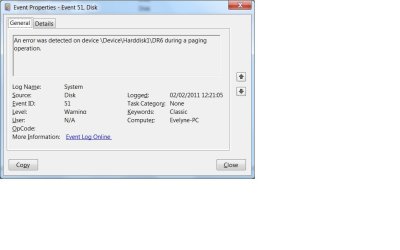
As for the hard disk I looked at the event viewer and it showed a paging error - not sure what could cause this? Overheating?

Rgds
 

My Computer My Computer

At a glance

windows 7 home premium 64 bit8gb ddr3
Computer Manufacturer/Model Number
gigabyte
OS
windows 7 home premium 64 bit
Memory
8gb ddr3
Hard Drives
500gb sata
paging error can you post the details of this has windows gave you any pop ups like Limited Virtual Memory
Your system has no paging file, or the paging file is too small.


To fix this problem, go to System in Control Panel, click the Advanced tab, and under Performance, click Settings. On the Advanced tab, click Change. Click 'Custom size,' and then type an initial or maximum paging file size.

Paging is an important part of virtual memory implementation in most contemporary general-purpose operating systems, allowing them to use disk storage for data that does not fit into physical random-access memory (RAM).
 

My Computer My Computer

At a glance

Operating System : Windows 7 Home Premium Edi...Processor : Intel Core 2 Quad Q8300 @ 2500 MHzPhysical Memory :8GB Corsair4x 2GB 800MHz C5 ...Video Card : XFX 6700 AMD
Computer Manufacturer/Model Number
packard bell IXTREME M5722
OS
Operating System : Windows 7 Home Premium Edition 6.01.7600 SP1 (x64)
CPU
Processor : Intel Core 2 Quad Q8300 @ 2500 MHz
Motherboard
Mainboard : Packard Bell (Acer EG43M )
Memory
Physical Memory :8GB Corsair4x 2GB 800MHz C5 DDR2
Graphics Card(s)
Video Card : XFX 6700 AMD
Monitor(s) Displays
Maestro 234DL - BenQ V2220 - BenQ VW2420H
Screen Resolution
Current Display :1920x1080p pixels at 60 Hz in HD LED
Hard Drives
Hard Disks : WDC (1000 GB)
Drive C: (Hard Disk) : 428 GB available on 491 GB
Drive D: (Hard Disk) : 426 GB available on 492 GB
SAMSUNG spinpoint HD103SJ 1000.2 GB
(X 2) KINGSTON SSD NOW V 30GB
PSU
XFX ProSeries 550W PSU
Case
PACKARD BELL IXTREME
Cooling
System Blower Current: 150mA Air Flow16CFM ;Akasa 90mm rear
Keyboard
Gigabyte Aivia K8100
Mouse
TRUST-Wireless Laser Mouse - Carbon edition MI-7770C
Internet Speed
TP-LINK > TL-WN951N / AV500 Gigabit Powerline Adapters
Browser
chrome dev
Other Info
EXTRA COOLING>(FAN CONTROLLER) PC Bay Cooler 3 x 40mm fans; Akasa AK-HD-BL Blue hard drive cooler 2 x 40 mm fan 4500 rpm 29.7 dBA
Bios> American Megatrends Inc.
Version : P01-A1
Date : 08/31/2009
Hi please see the screenshot of an example warning
 

Attachments

  • event log.jpg
    event log.jpg
    33.7 KB · Views: 140

My Computer My Computer

At a glance

windows 7 home premium 64 bit8gb ddr3
Computer Manufacturer/Model Number
gigabyte
OS
windows 7 home premium 64 bit
Memory
8gb ddr3
Hard Drives
500gb sata
Perform a SFC Scan

1. Click Start, click All Programs, click Accessories, right-click Command Prompt, and then click Run as administrator. If you are prompted for an administrator password or for a confirmation, type the password, or click Allow

2. Type the following command, and then press ENTER:

sfc /scannow

A message will appear stating that 'The system scan will begin'. Be patient because the scan may take some time

3. If any files require a replace SFC will replace them. You may be asked to insert your Windows 7 DVD for this process to continue

4. If everything is okay you should, after the scan, see the following message "Windows resource protection did not find any integrity violations"

5. After the scan has completed, close the command prompt window, restart the computer and check.

more information here :ar: How to use the System File Checker tool to troubleshoot missing or corrupted system files on Windows Vista or on Windows 7

ALSO DO THIS :ar: (brinks tutorial) How to Run Disk Check in Windows 7 LINK :ar: http://www.sevenforums.com/tutorials/433-disk-check.html
 

My Computer My Computer

At a glance

Operating System : Windows 7 Home Premium Edi...Processor : Intel Core 2 Quad Q8300 @ 2500 MHzPhysical Memory :8GB Corsair4x 2GB 800MHz C5 ...Video Card : XFX 6700 AMD
Computer Manufacturer/Model Number
packard bell IXTREME M5722
OS
Operating System : Windows 7 Home Premium Edition 6.01.7600 SP1 (x64)
CPU
Processor : Intel Core 2 Quad Q8300 @ 2500 MHz
Motherboard
Mainboard : Packard Bell (Acer EG43M )
Memory
Physical Memory :8GB Corsair4x 2GB 800MHz C5 DDR2
Graphics Card(s)
Video Card : XFX 6700 AMD
Monitor(s) Displays
Maestro 234DL - BenQ V2220 - BenQ VW2420H
Screen Resolution
Current Display :1920x1080p pixels at 60 Hz in HD LED
Hard Drives
Hard Disks : WDC (1000 GB)
Drive C: (Hard Disk) : 428 GB available on 491 GB
Drive D: (Hard Disk) : 426 GB available on 492 GB
SAMSUNG spinpoint HD103SJ 1000.2 GB
(X 2) KINGSTON SSD NOW V 30GB
PSU
XFX ProSeries 550W PSU
Case
PACKARD BELL IXTREME
Cooling
System Blower Current: 150mA Air Flow16CFM ;Akasa 90mm rear
Keyboard
Gigabyte Aivia K8100
Mouse
TRUST-Wireless Laser Mouse - Carbon edition MI-7770C
Internet Speed
TP-LINK > TL-WN951N / AV500 Gigabit Powerline Adapters
Browser
chrome dev
Other Info
EXTRA COOLING>(FAN CONTROLLER) PC Bay Cooler 3 x 40mm fans; Akasa AK-HD-BL Blue hard drive cooler 2 x 40 mm fan 4500 rpm 29.7 dBA
Bios> American Megatrends Inc.
Version : P01-A1
Date : 08/31/2009
Hi

The cmd prompt gave this

Microsoft Windows [Version 6.1.7600]
Copyright (c) 2009 Microsoft Corporation. All rights reserved.

C:\Windows\system32>sfc /scannow

Beginning system scan. This process will take some time.

Beginning verification phase of system scan.
Verification 100% complete.

Windows Resource Protection did not find any integrity violations.

C:\Windows\system32>

Thanks
 

My Computer My Computer

At a glance

windows 7 home premium 64 bit8gb ddr3
Computer Manufacturer/Model Number
gigabyte
OS
windows 7 home premium 64 bit
Memory
8gb ddr3
Hard Drives
500gb sata
Back
Top