Microphone/Earphone jack not working

Martinec92

New member
Local time
1:26 PM
Messages
5
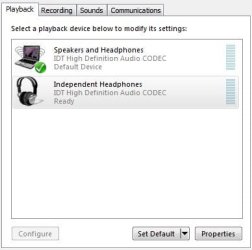
All sounds only go through the built-in speakers... even when I plug in an earphone, nothing changes and sounds continue to play through the speaker.
I've tried uninstalling IDT High Definition Audio Codec and Intel(R) High Definition Audio HDMI (since they are the only drivers I found on Device manager) but nothing changed.
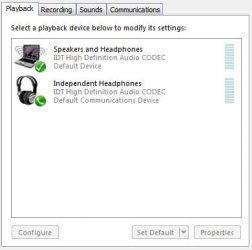
All my drivers are already updated and I don't know any other issues about this. I've read somewhere to make the Independent Headphones as the 'Default Device' (in the Playback Devices) but it's not working, I couldn't change it, it can just be changed to 'Default Communications Device'. (Do you guys think that is a problem?)

By the way, I have Compaq Presario CQ40-551TU, Windows 7 - 32 bit. I badly need your help, guys.. :( I've already read a looooot of forums that has somewhat the same issue, but to no avail. Please help.. :(
 

Attachments

  • 1.JPG
    1.JPG
    23.1 KB · Views: 22
  • 2.JPG
    2.JPG
    23.1 KB · Views: 22

My Computer

Computer type
Laptop
Computer Manufacturer/Model Number
Compaq Presario CQ40-551TU
OS
Windows 7 - 32 bit
Is this a problem that NEVER worked or a recent problem? If it NEVER worked, I would suspect a PC hardware problem, since there is an extra contact in the headphone jack that controls the sensing and switching.

Do you have any other IDT audio panel, in the Control Panel/Hardware and sounds? If you do check that for possible configuration issues.
 

My Computer

Computer type
PC/Desktop
Computer Manufacturer/Model Number
My Own Build
OS
Windows 10 64 bit
CPU
Intel i7 6700K
Motherboard
ASUS ROG Maximus VIII Hero
Memory
16GB Corsair Dominator
Graphics Card(s)
Intel CPU Graphics
Sound Card
RealTek
Monitor(s) Displays
27" Dell S2719dgf
Screen Resolution
2560X1440
Hard Drives
1 TB Samsung 850 EVO SSD for Win 10 Pro
500GB Samsung 850 EVO SSD for Win 10 Insider
2 TB drive for backup
PSU
EVGA Supernova 750G2
Case
BeQuiet Silent Base 600
Cooling
Deepcool Captain 120EX
Keyboard
Microsoft Wireless 2000
Mouse
Microsoft wireless
Internet Speed
100 MB/sec (Cable)
Antivirus
Microsoft Defender and Malwarebytes
Browser
Edge/Firefox
Other Info
Cakewalk (Sonar) by BandLab and Studio One 4.1 Pro recording studio software. MOTU 896Mk3 Hybrid recording interface, Frontier Tranzport wireless control unit, Behringer X-Touch Control Surface.
Five USB connected optical drives for CD Audio production using Nero BurningROM
No, it wasn't originally like this. But I've been having this problem for a few months now.

There are also no other Audio panel in Hardware and Sounds.. I've been trying a lot of configuration/troubleshooting but nothing worked. :confused: I've totally no idea what the problem might be...
 

My Computer

Computer type
Laptop
Computer Manufacturer/Model Number
Compaq Presario CQ40-551TU
OS
Windows 7 - 32 bit
From what you have described, I would suspect a hardware problem with the headphone jack.
 

My Computer

Computer type
PC/Desktop
Computer Manufacturer/Model Number
My Own Build
OS
Windows 10 64 bit
CPU
Intel i7 6700K
Motherboard
ASUS ROG Maximus VIII Hero
Memory
16GB Corsair Dominator
Graphics Card(s)
Intel CPU Graphics
Sound Card
RealTek
Monitor(s) Displays
27" Dell S2719dgf
Screen Resolution
2560X1440
Hard Drives
1 TB Samsung 850 EVO SSD for Win 10 Pro
500GB Samsung 850 EVO SSD for Win 10 Insider
2 TB drive for backup
PSU
EVGA Supernova 750G2
Case
BeQuiet Silent Base 600
Cooling
Deepcool Captain 120EX
Keyboard
Microsoft Wireless 2000
Mouse
Microsoft wireless
Internet Speed
100 MB/sec (Cable)
Antivirus
Microsoft Defender and Malwarebytes
Browser
Edge/Firefox
Other Info
Cakewalk (Sonar) by BandLab and Studio One 4.1 Pro recording studio software. MOTU 896Mk3 Hybrid recording interface, Frontier Tranzport wireless control unit, Behringer X-Touch Control Surface.
Five USB connected optical drives for CD Audio production using Nero BurningROM
i have an acer aspire 4741 notebook with a "realtek high definition audio" and a few months back i decided to update the driver.

i went to acer's support site and realised the driver update they had for my model was way behind the the latest driver realtek had on their site. so i decided to download the latest one from the realtek site.

after install, the sound was playing alright but a few minuets later, i realised that even with my headset plugged in, the sound was still coming from the speakers and not the headset.

then i remembered a warning notice i had seen on the realtek site that their audio drivers are "general drivers" and the best thing to do is to download driver updates from your system manufacturers site, as most computers come with customized audio drivers.

so i went back to acer's site and searched through their aspire notebook models till i found a realtek hd driver that was more recent than the one they had for my model. downloaded, installed and everything started working great again. when headset is plugged in, the sound comes from the headset and not the speakers.

so if incase, like me, you downloaded a driver from your driver manufacturers site, then perhaps you might want to try downloading one from your system manufacturers site to see if it solves the problem.

please this is just a suggestion and in no way a professional fix.
 
Last edited:

My Computer

Computer type
Laptop
Computer Manufacturer/Model Number
Acer Aspire 4741
OS
Microsoft Windows 7 Ultimate 64-bit 7601 Multiprocessor Free Service Pack 1
CPU
Intel(R) Core(TM) i3 CPU M 350 @ 2.27GHz
Motherboard
Acer JE40_CP
Memory
8.00 GB
Graphics Card(s)
Intel(R) HD Graphics
Sound Card
(1) Realtek High Definition Audio (2) Intel(R) Display Aud
Monitor(s) Displays
14.0" HD LED LCD (Generic PnP Monitor)
Screen Resolution
1366 x 768 x 32 bits (4294967296 colors) @ 59 Hz
Hard Drives
WDC WD2500BEVT-22A23T0
Keyboard
Standard PS/2 Keyboard
Mouse
HP 3D Optical Mouse
Antivirus
Microsoft Security Essentials
Browser
Internet Explorer 11
Thank you so much for your suggestions sandpd and fireberd.

I've already tried to download drivers from different trusted sites, but it didn't work. I'm not really sure about what you suggested sandpd, since I have IDT Audio Codec and not Realtek. I've browsed through HP/Compaq Presario's site but wasn't able to find any specific audio driver for my laptop.

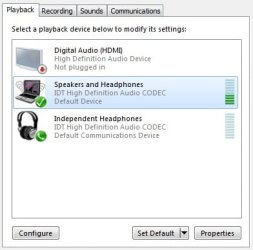
And something worse happened.. This is ridiculous (and I also find it hilarious. haha) Since I've been trying a lot to fix this, now there's no sound coming out of my laptop. I think I installed an older version of the audio codec before, then that happened. I already uninstalled it and reinstalled the previous one I have, but still no sound coming at all. :shock: All settings are still the same and when I try to test it, there's still green bars playing showing that there are sound coming. I'm sooooo confused. :confused: If you can please help me.. I admit I totally suck with this kind of stuffs. haha
 

Attachments

  • 1.jpg
    1.jpg
    21.1 KB · Views: 17

My Computer

Computer type
Laptop
Computer Manufacturer/Model Number
Compaq Presario CQ40-551TU
OS
Windows 7 - 32 bit
Oww I just did a System Restore so now I'm back with the same old problem. :( Any other suggestions pleeease? Thanks!
 

My Computer

Computer type
Laptop
Computer Manufacturer/Model Number
Compaq Presario CQ40-551TU
OS
Windows 7 - 32 bit
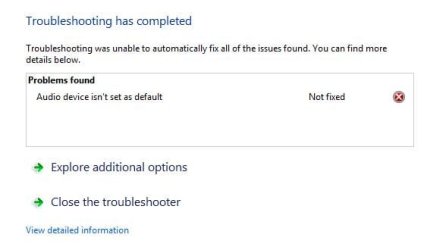
I think I found the problem. Like what I've mentioned before, I cannot change the Independent Headphones as the Default Device. Do you guys have any idea how to fix these? :(
 

Attachments

  • 1.JPG
    1.JPG
    21.5 KB · Views: 17

My Computer

Computer type
Laptop
Computer Manufacturer/Model Number
Compaq Presario CQ40-551TU
OS
Windows 7 - 32 bit
Nothing other than doing a complete reinstall, and even that may not fix it.
 

My Computer

Computer type
PC/Desktop
Computer Manufacturer/Model Number
My Own Build
OS
Windows 10 64 bit
CPU
Intel i7 6700K
Motherboard
ASUS ROG Maximus VIII Hero
Memory
16GB Corsair Dominator
Graphics Card(s)
Intel CPU Graphics
Sound Card
RealTek
Monitor(s) Displays
27" Dell S2719dgf
Screen Resolution
2560X1440
Hard Drives
1 TB Samsung 850 EVO SSD for Win 10 Pro
500GB Samsung 850 EVO SSD for Win 10 Insider
2 TB drive for backup
PSU
EVGA Supernova 750G2
Case
BeQuiet Silent Base 600
Cooling
Deepcool Captain 120EX
Keyboard
Microsoft Wireless 2000
Mouse
Microsoft wireless
Internet Speed
100 MB/sec (Cable)
Antivirus
Microsoft Defender and Malwarebytes
Browser
Edge/Firefox
Other Info
Cakewalk (Sonar) by BandLab and Studio One 4.1 Pro recording studio software. MOTU 896Mk3 Hybrid recording interface, Frontier Tranzport wireless control unit, Behringer X-Touch Control Surface.
Five USB connected optical drives for CD Audio production using Nero BurningROM
Back
Top