
Solved Microphone not working on Windows 7 Home Premium 64 Bit.

zyst

New member
Local time
6:28 AM
Messages
4
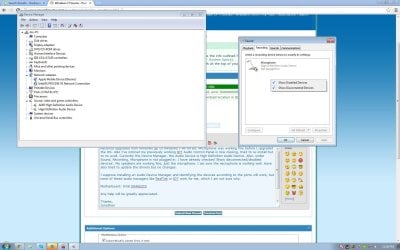
Recently upgraded from Windows XP to Windows 7 HP 64 Bit. Microphone was working fine before I upgraded the OS. Also I've noticed my previously working IDT Audio Control Panel is now missing, tried to re-install but to no avail. Currently in the Device Manager, the Audio Device is High Definition Audio Device. Also, under Sound, Recording, Microphone is not plugged in. I have already checked 'Show disconnected/disabled devices'. My speakers are working fine, just the microphone. It is plugged into the 3.5mm pink jack, I do not have any front microphone jacks. Have also tried to update the drivers but no changes.

I suppose installing an Audio Device Manager and identifying the devices according to the ports will work, but none of these audio managers like RealTek or IDT work for me, which I am not sure why.

Motherboard: Intel D946GZIS
Untitled.jpg
Any help will be greatly appreciated.

Thanks,
Jonathan
 

My Computer My Computer

At a glance

Windows 7 Home Premium 64 Bit
OS
Windows 7 Home Premium 64 Bit

My Computer My Computer

At a glance

Windows 10 64 bitIntel i7 6700K16GB Corsair DominatorIntel CPU Graphics
Computer type
PC/Desktop
Computer Manufacturer/Model Number
My Own Build
OS
Windows 10 64 bit
CPU
Intel i7 6700K
Motherboard
ASUS ROG Maximus VIII Hero
Memory
16GB Corsair Dominator
Graphics Card(s)
Intel CPU Graphics
Sound Card
RealTek
Monitor(s) Displays
27" Dell S2719dgf
Screen Resolution
2560X1440
Hard Drives
1 TB Samsung 850 EVO SSD for Win 10 Pro
500GB Samsung 850 EVO SSD for Win 10 Insider
2 TB drive for backup
PSU
EVGA Supernova 750G2
Case
BeQuiet Silent Base 600
Cooling
Deepcool Captain 120EX
Keyboard
Microsoft Wireless 2000
Mouse
Microsoft wireless
Internet Speed
100 MB/sec (Cable)
Antivirus
Microsoft Defender and Malwarebytes
Browser
Edge/Firefox
Other Info
Cakewalk (Sonar) by BandLab and Studio One 4.1 Pro recording studio software. MOTU 896Mk3 Hybrid recording interface, Frontier Tranzport wireless control unit, Behringer X-Touch Control Surface.
Five USB connected optical drives for CD Audio production using Nero BurningROM
Hi, fireberd. Thanks for the reply, however I received an error 'The hardware detected is not supported by this IDT package. The install will be aborted.' I believe I do not have any soundcards other than the built-in one.
 

My Computer My Computer

At a glance

Windows 7 Home Premium 64 Bit
OS
Windows 7 Home Premium 64 Bit

My Computer My Computer

At a glance

Windows 10 64 bitIntel i7 6700K16GB Corsair DominatorIntel CPU Graphics
Computer type
PC/Desktop
Computer Manufacturer/Model Number
My Own Build
OS
Windows 10 64 bit
CPU
Intel i7 6700K
Motherboard
ASUS ROG Maximus VIII Hero
Memory
16GB Corsair Dominator
Graphics Card(s)
Intel CPU Graphics
Sound Card
RealTek
Monitor(s) Displays
27" Dell S2719dgf
Screen Resolution
2560X1440
Hard Drives
1 TB Samsung 850 EVO SSD for Win 10 Pro
500GB Samsung 850 EVO SSD for Win 10 Insider
2 TB drive for backup
PSU
EVGA Supernova 750G2
Case
BeQuiet Silent Base 600
Cooling
Deepcool Captain 120EX
Keyboard
Microsoft Wireless 2000
Mouse
Microsoft wireless
Internet Speed
100 MB/sec (Cable)
Antivirus
Microsoft Defender and Malwarebytes
Browser
Edge/Firefox
Other Info
Cakewalk (Sonar) by BandLab and Studio One 4.1 Pro recording studio software. MOTU 896Mk3 Hybrid recording interface, Frontier Tranzport wireless control unit, Behringer X-Touch Control Surface.
Five USB connected optical drives for CD Audio production using Nero BurningROM
Yes, it lists down my motherboard D946GZIS. Do I need to run the Audio Driver setup in compatibility mode or anything?
 

My Computer My Computer

At a glance

Windows 7 Home Premium 64 Bit
OS
Windows 7 Home Premium 64 Bit
No, it should work as is. Vista drivers are valid for Win 7. Try the chipset drivers that I referenced first as that may make a difference.
 

My Computer My Computer

At a glance

Windows 10 64 bitIntel i7 6700K16GB Corsair DominatorIntel CPU Graphics
Computer type
PC/Desktop
Computer Manufacturer/Model Number
My Own Build
OS
Windows 10 64 bit
CPU
Intel i7 6700K
Motherboard
ASUS ROG Maximus VIII Hero
Memory
16GB Corsair Dominator
Graphics Card(s)
Intel CPU Graphics
Sound Card
RealTek
Monitor(s) Displays
27" Dell S2719dgf
Screen Resolution
2560X1440
Hard Drives
1 TB Samsung 850 EVO SSD for Win 10 Pro
500GB Samsung 850 EVO SSD for Win 10 Insider
2 TB drive for backup
PSU
EVGA Supernova 750G2
Case
BeQuiet Silent Base 600
Cooling
Deepcool Captain 120EX
Keyboard
Microsoft Wireless 2000
Mouse
Microsoft wireless
Internet Speed
100 MB/sec (Cable)
Antivirus
Microsoft Defender and Malwarebytes
Browser
Edge/Firefox
Other Info
Cakewalk (Sonar) by BandLab and Studio One 4.1 Pro recording studio software. MOTU 896Mk3 Hybrid recording interface, Frontier Tranzport wireless control unit, Behringer X-Touch Control Surface.
Five USB connected optical drives for CD Audio production using Nero BurningROM
Hello, I have tried updating my chipset drivers and then the IDT drivers. Now everything works, thank you!
 

My Computer My Computer

At a glance

Windows 7 Home Premium 64 Bit
OS
Windows 7 Home Premium 64 Bit
hello, i am pretty much a noob. i bought a hp dv6700 used. it has windows 7 ultimate. my microphone does not work and i get the same messages as the original poster. i tried the first link, and i also received the same error. so i tried installing the chipset and i get an error that says - "this computer does not meet the minimum requirements..." I'm not sure where to go from here. I really need my built in mic to work for skype. thanks in advance
 

My Computer My Computer

At a glance

windows 7 ultimate
Computer type
PC/Desktop
Computer Manufacturer/Model Number
hp dv6700
OS
windows 7 ultimate
Back
Top