

Silvera
New member
- Local time
- 1:41 PM
- Messages
- 16
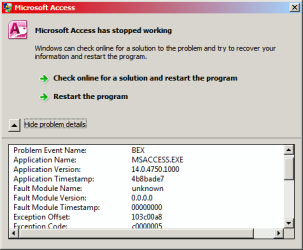
I have a simple document tracking database that I wrote in the late '80's and have migrated up through the newer versions of MS Access. Recently when I am editing a date entry form it will crash while I'm working. The error message is always similar in that only the "Exception Offset" changes. I have never gotten a response in any form MicroSoft regarding the error that one would receive for an error message being forwarded. [See 1st attachment]
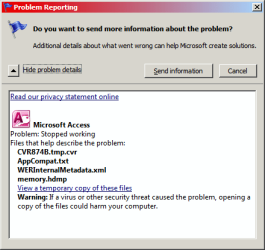
Today I got a notification saying that I was not forwarding information to MS - so I did. This time a get a different "Problem Reporting" message. [See 2nd attachment]. I was looking at the temp files it created and decided to "Send information" and clicked the button. Again no response from MS. I went back to the temp files folder and now it was empty! A lot of good they did luckily [maybe] I had the AppCompat.txt open so I was able to save if someone can understand the code.
Today I got a notification saying that I was not forwarding information to MS - so I did. This time a get a different "Problem Reporting" message. [See 2nd attachment]. I was looking at the temp files it created and decided to "Send information" and clicked the button. Again no response from MS. I went back to the temp files folder and now it was empty! A lot of good they did luckily [maybe] I had the AppCompat.txt open so I was able to save if someone can understand the code.
Attachments
My Computer
At a glance
Windows 7 Home Premium 64bitAMD Phenom II X6 1075T 3.0GHz4 GB
- Computer type
- PC/Desktop
- Computer Manufacturer/Model Number
- Home built
- OS
- Windows 7 Home Premium 64bit
- CPU
- AMD Phenom II X6 1075T 3.0GHz
- Motherboard
- ASUS M4A88T-M
- Memory
- 4 GB


