Solved Microsoft Bluetooth Mouse Not Detected

jsquareg

New member
Power User
Local time
4:06 PM
Messages
400
This is my first experience with trying to use a bluetooth device, a Microsoft Sculpt Comfort Mouse, on my Dell X8500 running Win 7 SP1. I thought it would be simple but, boy, was I wrong. I went to Add a Device as instructed but the system didn't detect it. After trying the several things suggested by the system I finally took a look at Devices and Printers and fount the Bluetooth USB Host Controller had a yellow exclamation point with it. I found the following message for the Bluetooth LWFLT Device and the Virtual Bluetooth Device.

"This device is not working properly because Windows cannot load the drivers required for this device. (Code 31)".

I had chased down one or two other avenues and got a message saying something like, "Windows update is not configured to download the driver."

Anyone have a way to get my Bluetooth mouse to be recognized?

Thank you very much.


Thank you.
 

My Computer

Computer type
PC/Desktop
Computer Manufacturer/Model Number
Dell XPS-8500
OS
Windows 7 Home Premium (Retail) Full version - With SP1
CPU
3.10 Gig Intel Core i5-3350P
Motherboard
Dell 0NW73C A00
Memory
8192 Megabytes Usable Installed Memory
Monitor(s) Displays
Samsung SyncMaster [Monitor] (19.1"vis, s/n HVELA10194, Octo
Screen Resolution
1024 X 768
Hard Drives
INTEL SSDSA2CW120G3 ATA Device [Hard drive] (120.03 GB)
INTEL SSDSA2CW080G3 ATA Device [Hard drive] (80.02 GB)
Keyboard
HID Keyboard Device (HP)
Mouse
Dell (came with computer)
Internet Speed
cox high speed
Other Info
The above taken with Bel Arc Advisor
This is my first experience with trying to use a bluetooth device, a Microsoft Sculpt Comfort Mouse, on my Dell X8500 running Win 7 SP1. I thought it would be simple but, boy, was I wrong. I went to Add a Device as instructed but the system didn't detect it. After trying the several things suggested by the system I finally took a look at Devices and Printers and fount the Bluetooth USB Host Controller had a yellow exclamation point with it. I found the following message for the Bluetooth LWFLT Device and the Virtual Bluetooth Device.

"This device is not working properly because Windows cannot load the drivers required for this device. (Code 31)".

I had chased down one or two other avenues and got a message saying something like, "Windows update is not configured to download the driver."

Anyone have a way to get my Bluetooth mouse to be recognized?

Thank you very much.


Thank you.

Hi jsquareg,

Please let me know which bluetooth card is installed on the system. If it is bluetooth/wireless card then let us know the model of the same.

You would need to install bluetooth driver and application for the system. You can also check this video for updating the same on your own:

Updating Dell Drivers

Keep us posted with the results so we can advise you further.
 

My Computer

Computer type
PC/Desktop
OS
Winndows 7 32 bit
Thank you very much for your reply.

The Bluetooth card is the built in one on the x8500. I believe it is made my Atheros or something like that. Will try to track down exactly what it is.

Will look at the article as soon as possible.


This is my first experience with trying to use a bluetooth device, a Microsoft Sculpt Comfort Mouse, on my Dell X8500 running Win 7 SP1. I thought it would be simple but, boy, was I wrong. I went to Add a Device as instructed but the system didn't detect it. After trying the several things suggested by the system I finally took a look at Devices and Printers and fount the Bluetooth USB Host Controller had a yellow exclamation point with it. I found the following message for the Bluetooth LWFLT Device and the Virtual Bluetooth Device.

"This device is not working properly because Windows cannot load the drivers required for this device. (Code 31)".

I had chased down one or two other avenues and got a message saying something like, "Windows update is not configured to download the driver."

Anyone have a way to get my Bluetooth mouse to be recognized?

Thank you very much.


Thank you.

Hi jsquareg,

Please let me know which bluetooth card is installed on the system. If it is bluetooth/wireless card then let us know the model of the same.

You would need to install bluetooth driver and application for the system. You can also check this video for updating the same on your own:

Updating Dell Drivers

Keep us posted with the results so we can advise you further.
 

My Computer

Computer type
PC/Desktop
Computer Manufacturer/Model Number
Dell XPS-8500
OS
Windows 7 Home Premium (Retail) Full version - With SP1
CPU
3.10 Gig Intel Core i5-3350P
Motherboard
Dell 0NW73C A00
Memory
8192 Megabytes Usable Installed Memory
Monitor(s) Displays
Samsung SyncMaster [Monitor] (19.1"vis, s/n HVELA10194, Octo
Screen Resolution
1024 X 768
Hard Drives
INTEL SSDSA2CW120G3 ATA Device [Hard drive] (120.03 GB)
INTEL SSDSA2CW080G3 ATA Device [Hard drive] (80.02 GB)
Keyboard
HID Keyboard Device (HP)
Mouse
Dell (came with computer)
Internet Speed
cox high speed
Other Info
The above taken with Bel Arc Advisor
This is my first experience with trying to use a bluetooth device, a Microsoft Sculpt Comfort Mouse, on my Dell X8500 running Win 7 SP1. I thought it would be simple but, boy, was I wrong. I went to Add a Device as instructed but the system didn't detect it. After trying the several things suggested by the system I finally took a look at Devices and Printers and fount the Bluetooth USB Host Controller had a yellow exclamation point with it. I found the following message for the Bluetooth LWFLT Device and the Virtual Bluetooth Device.

"This device is not working properly because Windows cannot load the drivers required for this device. (Code 31)".

I had chased down one or two other avenues and got a message saying something like, "Windows update is not configured to download the driver."

Anyone have a way to get my Bluetooth mouse to be recognized?

Thank you very much.


Thank you.

Hi jsquareg,

Please let me know which bluetooth card is installed on the system. If it is bluetooth/wireless card then let us know the model of the same.

You would need to install bluetooth driver and application for the system. You can also check this video for updating the same on your own:

Updating Dell Drivers

Keep us posted with the results so we can advise you further.

Well, I followed the link, downloaded the chipset driver, installed it and the problem exists.

I could not find any driver that seemed to apply to wireless/bluetooth. Could you point me to it?

Thanks again for your help.
 

My Computer

Computer type
PC/Desktop
Computer Manufacturer/Model Number
Dell XPS-8500
OS
Windows 7 Home Premium (Retail) Full version - With SP1
CPU
3.10 Gig Intel Core i5-3350P
Motherboard
Dell 0NW73C A00
Memory
8192 Megabytes Usable Installed Memory
Monitor(s) Displays
Samsung SyncMaster [Monitor] (19.1"vis, s/n HVELA10194, Octo
Screen Resolution
1024 X 768
Hard Drives
INTEL SSDSA2CW120G3 ATA Device [Hard drive] (120.03 GB)
INTEL SSDSA2CW080G3 ATA Device [Hard drive] (80.02 GB)
Keyboard
HID Keyboard Device (HP)
Mouse
Dell (came with computer)
Internet Speed
cox high speed
Other Info
The above taken with Bel Arc Advisor
This is my first experience with trying to use a bluetooth device, a Microsoft Sculpt Comfort Mouse, on my Dell X8500 running Win 7 SP1. I thought it would be simple but, boy, was I wrong. I went to Add a Device as instructed but the system didn't detect it. After trying the several things suggested by the system I finally took a look at Devices and Printers and fount the Bluetooth USB Host Controller had a yellow exclamation point with it. I found the following message for the Bluetooth LWFLT Device and the Virtual Bluetooth Device.

"This device is not working properly because Windows cannot load the drivers required for this device. (Code 31)".

I had chased down one or two other avenues and got a message saying something like, "Windows update is not configured to download the driver."

Anyone have a way to get my Bluetooth mouse to be recognized?

Thank you very much.


Thank you.

Hi jsquareg,

Please let me know which bluetooth card is installed on the system. If it is bluetooth/wireless card then let us know the model of the same.

You would need to install bluetooth driver and application for the system. You can also check this video for updating the same on your own:

Updating Dell Drivers

Keep us posted with the results so we can advise you further.

Thank you

Under Windows 7 SP1 64bit, I right clicked Devices and Printers/Bluetooth USB Host Controller and ran Troubleshoot. It reported several problems as it ran and each time I chose 'Apply fix.' At the end I received the following messages:

1. Blootooth Audio Devices has a driver problem -- Not fixed
2. Virtual Blootooth Support has a driver problem -- Not fixed
3. Blootooth LWFLT has a driver problem -- Not fixed

I looked all over Dell Support and could find NO Bluetooth drivers. I also searched Altheros's site and found a multitude of drivers but I didn't know the model to choose. Where can I get drivers to correct this problem?
 

My Computer

Computer type
PC/Desktop
Computer Manufacturer/Model Number
Dell XPS-8500
OS
Windows 7 Home Premium (Retail) Full version - With SP1
CPU
3.10 Gig Intel Core i5-3350P
Motherboard
Dell 0NW73C A00
Memory
8192 Megabytes Usable Installed Memory
Monitor(s) Displays
Samsung SyncMaster [Monitor] (19.1"vis, s/n HVELA10194, Octo
Screen Resolution
1024 X 768
Hard Drives
INTEL SSDSA2CW120G3 ATA Device [Hard drive] (120.03 GB)
INTEL SSDSA2CW080G3 ATA Device [Hard drive] (80.02 GB)
Keyboard
HID Keyboard Device (HP)
Mouse
Dell (came with computer)
Internet Speed
cox high speed
Other Info
The above taken with Bel Arc Advisor
Thank you

Under Windows 7 SP1 64bit, I right clicked Devices and Printers/Bluetooth USB Host Controller and ran Troubleshoot. It reported several problems as it ran and each time I chose 'Apply fix.' At the end I received the following messages:

1. Blootooth Audio Devices has a driver problem -- Not fixed
2. Virtual Blootooth Support has a driver problem -- Not fixed
3. Blootooth LWFLT has a driver problem -- Not fixed

I looked all over Dell Support and could find NO Bluetooth drivers. I also searched Altheros's site and found a multitude of drivers but I didn't know the model to choose. Where can I get drivers to correct this problem?

Hi jsquareg,

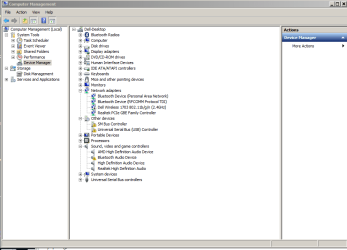
Thanks for your reply. Please let me know which wireless card is installed on the same as bluetooth and wireless card would be the same.

You would need to update the network drivers for your system which should resolve this issue. If you are not sure which wireless card that you have on the system, then post a screenshot for your device manager with network adapters expanded:

http://www.sevenforums.com/tutorials/9733-screenshots-files-upload-post-seven-forums.html

Keep us posted with the results so we can advise you further.
 

My Computer

Computer type
PC/Desktop
OS
Winndows 7 32 bit
OK, here is the screen shot created with the snipping tool
 

Attachments

  • Capture.PNG
    Capture.PNG
    22.7 KB · Views: 2

My Computer

Computer type
PC/Desktop
Computer Manufacturer/Model Number
Dell XPS-8500
OS
Windows 7 Home Premium (Retail) Full version - With SP1
CPU
3.10 Gig Intel Core i5-3350P
Motherboard
Dell 0NW73C A00
Memory
8192 Megabytes Usable Installed Memory
Monitor(s) Displays
Samsung SyncMaster [Monitor] (19.1"vis, s/n HVELA10194, Octo
Screen Resolution
1024 X 768
Hard Drives
INTEL SSDSA2CW120G3 ATA Device [Hard drive] (120.03 GB)
INTEL SSDSA2CW080G3 ATA Device [Hard drive] (80.02 GB)
Keyboard
HID Keyboard Device (HP)
Mouse
Dell (came with computer)
Internet Speed
cox high speed
Other Info
The above taken with Bel Arc Advisor
I just updated the first three drivers shown in the network adapters. In each case I was informed the drivers were the best available.

What now?
 

My Computer

Computer type
PC/Desktop
Computer Manufacturer/Model Number
Dell XPS-8500
OS
Windows 7 Home Premium (Retail) Full version - With SP1
CPU
3.10 Gig Intel Core i5-3350P
Motherboard
Dell 0NW73C A00
Memory
8192 Megabytes Usable Installed Memory
Monitor(s) Displays
Samsung SyncMaster [Monitor] (19.1"vis, s/n HVELA10194, Octo
Screen Resolution
1024 X 768
Hard Drives
INTEL SSDSA2CW120G3 ATA Device [Hard drive] (120.03 GB)
INTEL SSDSA2CW080G3 ATA Device [Hard drive] (80.02 GB)
Keyboard
HID Keyboard Device (HP)
Mouse
Dell (came with computer)
Internet Speed
cox high speed
Other Info
The above taken with Bel Arc Advisor
I just updated the first three drivers shown in the network adapters. In each case I was informed the drivers were the best available.

What now?

Hi jsquareg,

Thanks for providing us this information. I see it needs many drivers to be updated. Please let me know how you updated the driver through windows or installing it from our website.

Please download and install the below drivers on the system and then post the screenshot again:

Driver Details | Dell US

Driver Details | Dell US

Driver Details | Dell US

Driver Details | Dell US

Keep us posted with the results so we can advise you further.
 

My Computer

Computer type
PC/Desktop
OS
Winndows 7 32 bit
Thank you very, very much SandeepP.

After installing all the drivers you mentioned my system still didn't detect the mouse. Dumb me! I forgot that I had put it in the 'discovery' mode for it to be detected. I did that and now things are working like I thought they should

Thanks again.
 

My Computer

Computer type
PC/Desktop
Computer Manufacturer/Model Number
Dell XPS-8500
OS
Windows 7 Home Premium (Retail) Full version - With SP1
CPU
3.10 Gig Intel Core i5-3350P
Motherboard
Dell 0NW73C A00
Memory
8192 Megabytes Usable Installed Memory
Monitor(s) Displays
Samsung SyncMaster [Monitor] (19.1"vis, s/n HVELA10194, Octo
Screen Resolution
1024 X 768
Hard Drives
INTEL SSDSA2CW120G3 ATA Device [Hard drive] (120.03 GB)
INTEL SSDSA2CW080G3 ATA Device [Hard drive] (80.02 GB)
Keyboard
HID Keyboard Device (HP)
Mouse
Dell (came with computer)
Internet Speed
cox high speed
Other Info
The above taken with Bel Arc Advisor
Thank you very, very much SandeepP.

After installing all the drivers you mentioned my system still didn't detect the mouse. Dumb me! I forgot that I had put it in the 'discovery' mode for it to be detected. I did that and now things are working like I thought they should

Thanks again.

Hi jsquareg,

Its great to hear that issue with the system has been resolved to your satisfaction. If you have any queries in future feel free to reach out to us.
 

My Computer

Computer type
PC/Desktop
OS
Winndows 7 32 bit
"

Windows 7 Home Premium (Retail) Full version - With SP1
372 posts


Thank you very, very much SandeepP.

After installing all the drivers you mentioned my system still didn't detect the mouse. Dumb me! I forgot that I had put it in the 'discovery' mode for it to be detected. I did that and now things are working like I thought they should"

WHAT IS THIS DISCOVERY MODE AND HOW TO AVOID IT? Maybe it is my problem also..
 

My Computer

Computer type
Laptop
Computer Manufacturer/Model Number
Dell Vostro 3700
OS
Windows 7 Home Premium 32 bit
CPU
Intel Core I5 M450
Memory
4GB
Graphics Card(s)
NVIDIA Geforce 330M
Hard Drives
300GB
Antivirus
ESET NOD32
Browser
Firefox
Back
Top