microsoft date formats

pson

New member
Member
Local time
5:53 AM
Messages
35
I like to have my regional settings as follows:
dd-mmm-yy (or yyyy), such as today: 04-nov-13 (this is because I live overseas, and constantly get confused about what I'm seeing between US/UK format).

however, I want to always input as US format (eg. 11/4 for the above example). in other words, I want US settings, but just only to tinker with display format.

my regional settings are "english (united states)", and short date "dd-MMM-yy" for example.
and in excel, the default date format is "*14-03-01".

how to accomplish this without having to change settings everytime I open a new worksheet?

thank you
-patrick
 

My Computer

OS
windows 7 home premium x64
The easiest way is to have the date format set for the US. As far as I know there is no multi date format available in Windows.
You could write a macro to set the date format the way you want for Excel but you would have to remember to run it every time you open a new worksheet.
 

My Computer

Computer type
PC/Desktop
Computer Manufacturer/Model Number
Self built using existing case
OS
Windows 7 Home Premium 64 bit sp1
CPU
Intel i5 3570 3.4Ghz Ivy Bridge SKT 1155 quad core
Motherboard
Gigabyte Z77-HD3 SKT 1155 2xSata 3, 4x USB 3.0
Memory
G-Skill Rip Jaws 16Gb (8x2) DDR3 -1600 PC3 12800 CL 10 red
Graphics Card(s)
Gigabyte NVIDIA GT610 1Gb DDR3 810/1200 PCI-E 2.0 Silent
Sound Card
NVIDIA High Definition & Realtech High Definition Audio
Monitor(s) Displays
2 x Philips 226V4L 16:9 aspect ratio
Screen Resolution
1920 x 1080 HD
Hard Drives
Samsung 840 Pro 256gb SSD, SATA 3.
Hitachi Touro Portable 1tb, USB 3.0 HDD used for image b/ups.
PSU
Corsair VS450
Case
Codeng
Cooling
PSU fan & CPU fan
Keyboard
Logitech
Mouse
Logitech Wireless trackball M570
Internet Speed
Wireless 3G. 3mg down & 550kb up.
Antivirus
Bitdefender Internet Security 2020
Browser
Opera (Current Version) & Firefox
Other Info
MS Office 2013 Pro. Davis weather station software. MGE Nova 600 avr UPS.
As Ranger already mentioned, Excel takes the formatting info from Windows regional settings. However, you can modify the Excel number formatting (including date) and set it to differ from Windows regional settings simply with context menu > Format Cells option:

2013-11-04_120331.jpg
Kari
 

My Computer

Computer type
Laptop
Computer Manufacturer/Model Number
HP ENVY 17-1150eg
OS
Windows 10 Pro x64 EN-GB
CPU
1.6 GHz Intel Core i7-720QM Processor
Memory
6 GB
Graphics Card(s)
ATI Mobility Radeon HD 5850 Graphics
Sound Card
Beats sound system with integrated subwoofer
Monitor(s) Displays
17" laptop display, 22" LED and 32" Full HD TV through HDMI
Screen Resolution
1600*900 (1), 1920*1080 (2&3)
Hard Drives
Internal: 2 x 500 GB SATA Hard Disk Drive 7200 rpm
External: 2TB for backups, 3TB USB3 network drive for media
Cooling
As Envy runs a bit warm, I have it on a Cooler Master pad
Keyboard
Logitech diNovo Media Desktop Laser (bluetooth)
Mouse
Logitech Performance Mouse MX
Internet Speed
50/10 Mbps VDSL
Antivirus
Windows Defender 4.3.9431.0
Browser
Maxthon 3.5.2., IE11
thank you
the problem is that both settings (windows and office/excel) appear to deal with the display format.
what I am troubled by is the input format...for example, I want march 14 to display as 14-mar, but to input/type as "3/14".
my regional settings are "english (united states)".
 

My Computer

OS
windows 7 home premium x64
thank you
the problem is that both settings (windows and office/excel) appear to deal with the display format.
what I am troubled by is the input format
...for example, I want march 14 to display as 14-mar, but to input/type as "3/14".
my regional settings are "english (united states)".
Lets see if I understand you correctly,

When you select a cell and type in 3/14, you are expecting to see 14-mar as the result in that cell??
What version of Excel do you have??

This link explains Excel 2010, and expands on Kari's suggestion: Format numbers as dates or times | Office-Microsoft-Support; Click on Create a custom date or time format at "In this article" to see more.

Actually, the format you desire should be listed in the Format Cells function, it doesn't show in Kari's tutorial, maybe because the choices weren't scrolled down far enough, but it should be there, it is in the Support article.
If it isn't, make sure you are on the cell you want then go to Format Cells, click on User-Defined and type in dd-mmm. Make sure you use the hyphen, and not the slant! Then click on Apply and or OK.

I use Libre Office and that's what I had to do; my examples from Calc:
You can use either the Input line or enter directly into the cell:
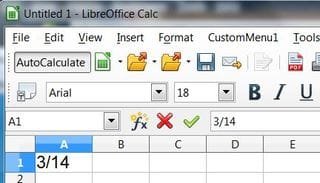
pson1.JPG

The result after touching the Enter key or moving off of the cell:
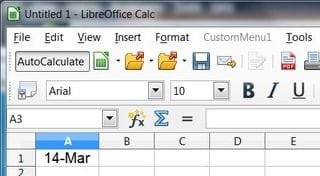
pson2.JPG

It looks like what you are after should be set as: ddmmm or dd-mmm in user defined to give you 14-mar, but because March is a proper noun Windows and Libre treats it as such and you will see 14-Mar.

Make sure you save the workbook or you will lose the user-defined setting.

~~~ ~~~~ ~~~

If that still doesn't work for you, you may be able to do what you want with Windows PowerShell (How to Open)

Disclaimer:
I am not proficient with Windows Power Shell (WPS), but I do know enough to be considered "dangerous". :p

Following this Technet Blog: How Can I Create a Custom Date Format in Microsoft Excel? - TechNet Blogs it shows how to set specific dates in Excel with WPS.

The two lines highlighted in these WPS CMDs from "How can I create...." would be the ones you would "tinker" with.

Code:
Set objExcel = CreateObject("Excel.Application")  
objExcel.Visible = True    

objExcel.Workbooks.Add    [B][COLOR=Blue]

objExcel.Cells(1,1).Value = "01/01/2006"[/COLOR]
[/B][COLOR=Navy][B]objExcel.Cells(1,1).NumberFormat = "yyyymmdd"[/B][/COLOR]
   Warning
Before you begin I would hope you have backups to your OS and Apps, it is possible to corrupt either your OS or an app when using incorrect Power Shell CMDs. Some CMDs won't be recognized by Power Shell and it will tell you so just like a CMD prompt will so your okay there, but if you enter an incorrect one in the wrong place that it does recognize, oh-well.......:shock:

This would be a possible alternative while "tinkering"
http://www.sevenforums.com/tutorials/8254-windows-virtual-pc-create-virtual-machine.html


More:
Scripting for Microsoft Office

Scripting with Windows PowerShell

Windows PowerShell Owner's Manual

Windows PowerShell Tip: Formatting Dates and Times

Windows PowerShell Tip: More Fun with Dates (and Times)


Apply Windows Power Shell to Excel Time and Date Formats | Google Search

Scripting for Microsoft Office | Google Search

 

My Computer

Computer type
PC/Desktop
Computer Manufacturer/Model Number
Gateway DX4831-01e (Mid-Tower Desktop)
OS
Originally Win 7 Hm Prem x64 Ver 6.1.7600 Build 7601-SP1 | Upgraded to Windows 10 December 14, 2019
CPU
Intel i3 530 2.93GHz, 2933MHz 2 Cores 4 Logical Processors
Motherboard
Gateway H57M01 133 megahertz
Memory
6GB of 1,333MHz DDR3 SDRAM
Graphics Card(s)
32MB Intel Graphics Media Accelerator HD IGChip
Sound Card
Realtek High Definition Audio
Monitor(s) Displays
Gateway HX2000 20inch TFT active matrix TN
Screen Resolution
1600 x 900 x 59 hertz
Hard Drives
WDC WD10EADS-00M2B0 [HDD] (1000.20 GB) -- drive 0,
HL-DT-ST DVDRAM GH41N [CD-ROM dr]
Four card readers, and Four USB 2.0
PSU
300watts.
Case
Mid-Tower Desktop
Cooling
Stock from Gateway
Keyboard
Natural Ergonomic Keyboard 4000, see Other Info
Mouse
Orig. Gateway wore out now using Insignia USB wired optical
Internet Speed
Vz FIOS 10ms png 57.64Mbps down 65.53Mbps up Speedtest.org
Antivirus
Zamana Anti-logger with Anti-malware, MSE, Windows Firewall,
Browser
IE11.0.9600.19399-Upd ver11.0.135, Firefox 68.0.1 x64
Other Info
System Specs by Belarc.

BIOS: American Megatrends Inc. P01-A0 11/17/2009

Replaced the MS 'Natural' Standard PS/2 Enhanced 101-102 Keyboard with a new Natural Ergonomic Keyboard 4000 on August 1st 2014.

Canon Pixma MG3222 Printer.

Updated to IE11 on 12102015 | Fios Quantum Router g1100

Additional AV: SpywareBlaster, manual Mbam, SAS
thank you, anak
you are correct, I want to type "3/14" and see the date formatted as "14-mar-2014" ("14-Mar-14" less desirable, but also acceptable).
the problem seems to lie not in the date format, but in how excel recognises my input:
no matter what the date format in excel (even dd-mmm-yy), typing "3/14" always gives me "01-Mar-2014";
just as typing "3/12" (intended as march 12) causes "03-Dec-14" to be displayed.
excel is always interpreting the first number as the day (or month*) and the second as the month (or year, *if not logical).

that's where I'm stuck.
 

My Computer

OS
windows 7 home premium x64
You may have to use a date such as 3/14/14 so that you have all 3 there for Excel to translate you date situation. Just using 2 date numbers will probably always result in what is now happening to you. In other words Excel is executing your command correctly but it just does not have enough information to do what you want it to.
 

My Computer

Computer type
PC/Desktop
Computer Manufacturer/Model Number
Self built using existing case
OS
Windows 7 Home Premium 64 bit sp1
CPU
Intel i5 3570 3.4Ghz Ivy Bridge SKT 1155 quad core
Motherboard
Gigabyte Z77-HD3 SKT 1155 2xSata 3, 4x USB 3.0
Memory
G-Skill Rip Jaws 16Gb (8x2) DDR3 -1600 PC3 12800 CL 10 red
Graphics Card(s)
Gigabyte NVIDIA GT610 1Gb DDR3 810/1200 PCI-E 2.0 Silent
Sound Card
NVIDIA High Definition & Realtech High Definition Audio
Monitor(s) Displays
2 x Philips 226V4L 16:9 aspect ratio
Screen Resolution
1920 x 1080 HD
Hard Drives
Samsung 840 Pro 256gb SSD, SATA 3.
Hitachi Touro Portable 1tb, USB 3.0 HDD used for image b/ups.
PSU
Corsair VS450
Case
Codeng
Cooling
PSU fan & CPU fan
Keyboard
Logitech
Mouse
Logitech Wireless trackball M570
Internet Speed
Wireless 3G. 3mg down & 550kb up.
Antivirus
Bitdefender Internet Security 2020
Browser
Opera (Current Version) & Firefox
Other Info
MS Office 2013 Pro. Davis weather station software. MGE Nova 600 avr UPS.
Are you using the "User defined" option as described earlier?

3/14 giving you 01-Mar-2014, and 3/12 giving you 03-Dec-14, shows me you may have a corrupt Excel program because it is recognizing different aspects of the format.

If forcing the user defined option doesn't help, you may want to consider a repair of your Office Suite, with a possible SFC /scannow before the repair.
If the repair doesn't help you may need to re-install the Office Suite.

More graphical explanations:
http://www.sevenforums.com/tutorials/110909-office-2010-perform-repairs.html

Repair Microsoft Office 2010 - Help Desk Geek

Less:
Repair-office-programs-office.microsoft.com

Edit:
I missed Ranger4's reply, that is another possibility, but not if you're using "user defined".
 

My Computer

Computer type
PC/Desktop
Computer Manufacturer/Model Number
Gateway DX4831-01e (Mid-Tower Desktop)
OS
Originally Win 7 Hm Prem x64 Ver 6.1.7600 Build 7601-SP1 | Upgraded to Windows 10 December 14, 2019
CPU
Intel i3 530 2.93GHz, 2933MHz 2 Cores 4 Logical Processors
Motherboard
Gateway H57M01 133 megahertz
Memory
6GB of 1,333MHz DDR3 SDRAM
Graphics Card(s)
32MB Intel Graphics Media Accelerator HD IGChip
Sound Card
Realtek High Definition Audio
Monitor(s) Displays
Gateway HX2000 20inch TFT active matrix TN
Screen Resolution
1600 x 900 x 59 hertz
Hard Drives
WDC WD10EADS-00M2B0 [HDD] (1000.20 GB) -- drive 0,
HL-DT-ST DVDRAM GH41N [CD-ROM dr]
Four card readers, and Four USB 2.0
PSU
300watts.
Case
Mid-Tower Desktop
Cooling
Stock from Gateway
Keyboard
Natural Ergonomic Keyboard 4000, see Other Info
Mouse
Orig. Gateway wore out now using Insignia USB wired optical
Internet Speed
Vz FIOS 10ms png 57.64Mbps down 65.53Mbps up Speedtest.org
Antivirus
Zamana Anti-logger with Anti-malware, MSE, Windows Firewall,
Browser
IE11.0.9600.19399-Upd ver11.0.135, Firefox 68.0.1 x64
Other Info
System Specs by Belarc.

BIOS: American Megatrends Inc. P01-A0 11/17/2009

Replaced the MS 'Natural' Standard PS/2 Enhanced 101-102 Keyboard with a new Natural Ergonomic Keyboard 4000 on August 1st 2014.

Canon Pixma MG3222 Printer.

Updated to IE11 on 12102015 | Fios Quantum Router g1100

Additional AV: SpywareBlaster, manual Mbam, SAS
Back
Top