

Search in Sidebar is one of the many in-context search features that Microsoft Edge users love when performing text search. However, we know that some users have asked for equivalent search features for those wishing to perform a visual search - searching using an image as their input.
We are glad to introduce Search in Sidebar for Images, an in-context visual search experience that can be invoked from any page. Here is how it works:
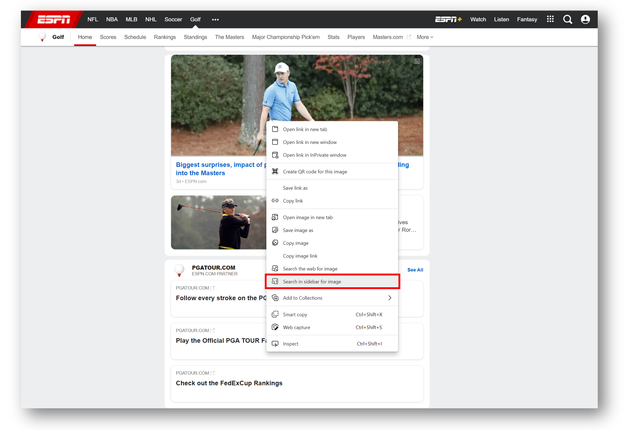
When browsing on a webpage, just right-click any image to see the "Search in sidebar for image", which will appear if the embedded image is supported.
Clicking on this option will perform a Bing visual search, displaying the results in a sidebar:
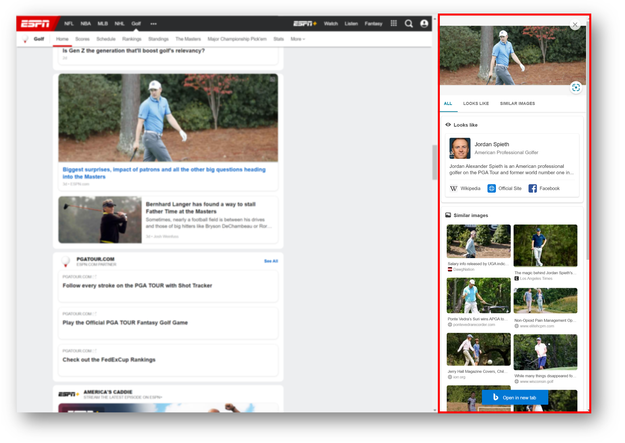
Depending on the image, different results types will appear - from landmark identification to shopping results - so do try out different images to learn about everything searching with an image can do!

Search in sidebar for image is a Bing-only search feature. Learn more about Bing visual search here.
The feature has been rolled out to the Dev and Canary channels as part of the CFR, available from 91.0.846.0. Please leave us your valuable feedback around new in-browser search features like this one by leaving a comment below or sending us feedback via the browser (… menu > Help and feedback > Send feedback). We hope you enjoy Search in Sidebar for Image and look forward to hearing from you!
Source: Identify plants, landmarks, products and more, using Search in Sidebar for Image! - Microsoft Tech Community
My Computer
At a glance
64-bit Windows 11 Pro for WorkstationsIntel i7-8700K OC'd to 5 GHz64 GB (4x16GB) G.SKILL TridentZ RGB DDR4 3600...ASUS ROG-STRIX-GTX1080TI-O11G-GAMING
- Computer type
- PC/Desktop
- Computer Manufacturer/Model Number
- Self built custom
- OS
- 64-bit Windows 11 Pro for Workstations
- CPU
- Intel i7-8700K OC'd to 5 GHz
- Motherboard
- ASUS ROG Maximus XI Formula Z390
- Memory
- 64 GB (4x16GB) G.SKILL TridentZ RGB DDR4 3600 MHz
- Graphics Card(s)
- ASUS ROG-STRIX-GTX1080TI-O11G-GAMING
- Sound Card
- Integrated
- Monitor(s) Displays
- 2 x Samsung Odyssey G7 27"
- Screen Resolution
- 2560x1440
- Hard Drives
- 1TB Samsung 990 PRO M.2,
4TB Samsung 990 PRO PRO M.2,
TerraMaster F8 SSD Plus NAS
- PSU
- Seasonic Prime Titanium 850W
- Case
- Thermaltake Core P3
- Cooling
- Corsair Hydro H115i
- Keyboard
- Logitech wireless K800
- Mouse
- Logitech MX Master 4
- Internet Speed
- 2 Gb/s Download and 100 Mb/s Upload
- Antivirus
- Malwarebyte Anti-Malware Premium
- Browser
- Google Chrome
- Other Info
- Logitech Z625 speaker system,
Logitech BRIO 4K Pro webcam,
HP Color LaserJet Pro MFP M477fdn,
APC SMART-UPS RT 1000 XL - SURT1000XLI,
Galaxy S23 Plus phone


