GTAUSTRALIA
New member
- Local time
- 5:24 AM
- Messages
- 10
I have current a problem driving me mad trying to re install intel gfx display and so I was making some screenshots to attatch to my post that was then going to get posted here in the sevenforums....
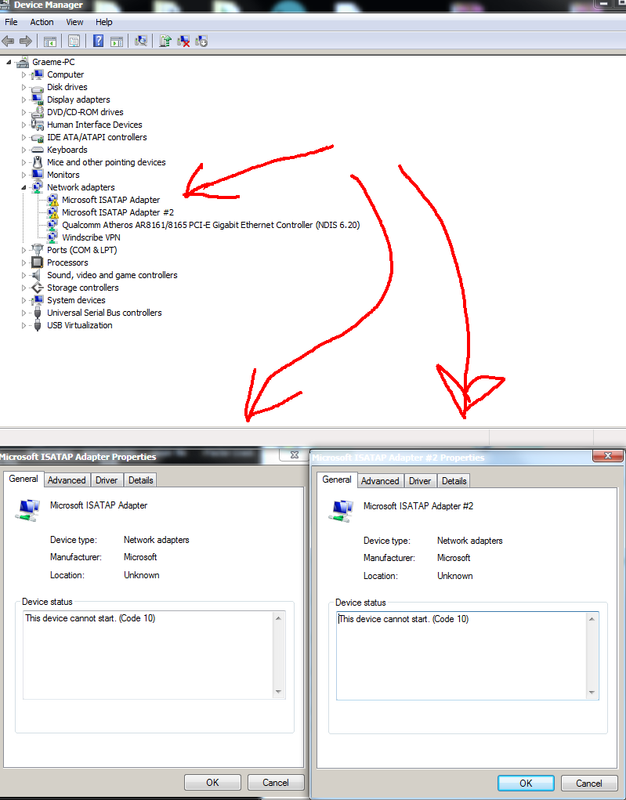
But Thats when I discovered this error in device manager. I have not noticed this before, but i also dont venture into device manager often.
Before I post my other problem i thought I would do this one first.....and so was wondering what this error is, what it it means and just maybe, find out how to fix it ?
Microsoft ISATAP Adapter
Microsoft ISATAP Adapter #2
The device cannot start (Code 10)
But Thats when I discovered this error in device manager. I have not noticed this before, but i also dont venture into device manager often.
Before I post my other problem i thought I would do this one first.....and so was wondering what this error is, what it it means and just maybe, find out how to fix it ?
Microsoft ISATAP Adapter
Microsoft ISATAP Adapter #2
The device cannot start (Code 10)
My Computer
At a glance
Windows 7 Professional (x64) Service Pack 1 (...Intel Core i5 3330 ivy bridge 3ghz 6mbG.Skill 8GB kit (2X4GB) DDR3 Ripjaws X C9 160...XFX Radeon HD7850 Dual Fan Black Edition 975M...
- Computer type
- PC/Desktop
- Computer Manufacturer/Model Number
- Custom Build
- OS
- Windows 7 Professional (x64) Service Pack 1 (build 7601)
- CPU
- Intel Core i5 3330 ivy bridge 3ghz 6mb
- Motherboard
- Gigabyte Z77X-D3H (ATX) Motherboard
- Memory
- G.Skill 8GB kit (2X4GB) DDR3 Ripjaws X C9 1600MHZ
- Graphics Card(s)
- XFX Radeon HD7850 Dual Fan Black Edition 975M/5000M 2GB/2xDV
- Hard Drives
- Drive 0 = Samsung SSD 840 PRO Series [Hard drive] (128.04 GB)
Drive 1 = WDC WD10EZEX-00RKKA0 [Hard drive] (1000.20 GB)
Drive 2 = WDC WD5000AAKX-00ERMA0 [Hard drive] (500.11 GB)
- Browser
- FIREFOX