Solved Microsoft Mouse zooming not scrolling

Thumper427

New member
Local time
4:39 PM
Messages
18
Hi guys n girls,

This is so annoying as it has happened before but I cannot remember how on earth I fixed it!!

I have a Microsoft wireless mouse (mobile mouse 6000), had it for 2 years and it's worked fine (except this issue once before). All of sudden tonight the mouse centre wheel starts zooming in and out instead of scrolling and left click is opening everything in a new window. My trackpad on the laptop is working fine.

Sony Vaio laptop, Win 7 Home, 64bit.

No software or hardware updates have happened, nothing in particular happened, I was scrolling through eBay and all of a sudden it stopped scrolling and started zooming!

My keys are fine, the ctrl keys are not stuck down. I have reset the mouse to default, re-installed the mouse, sworn at it, threatened it with violence, nothing, still the same.

Oh and my trackpad is doing the same thing, swiping it is zooming and when I try to left or right click it just freezes.

I have Googled the issue and all I can see is people giving stupid responses like changing things in the registry which I am not going to entertain, clearly this is something 'simple' that has happened so I am not going to mess up my laptop and start re-writing things on it!!

Any help would be greatly appreciated, I know it was something simple before but I really am so frustrated because I cannot remember what it was :(
 
Last edited:

My Computer My Computer

Computer type
Laptop
Computer Manufacturer/Model Number
Sony Vaio
OS
Windows 7 Home 64bit
Often Malware exhibits odd behavior, it's an easy thing to scan for.


AdwCleaner is a two step process. Scan then Clean

Step 1: Download and Scan

Click here to download AdwCleaner (author: Xplode)
>> save the application to your Desktop.

  • Right-click AdwCleaner.exe on your Desktop and select Run As Administrator to run the scanner with full privilege rights.
    :info: AdwCleaner is a standalone executable, there is no install.
  • Click on the Scan button.
    >> AdwCleaner begins scanning your system. It might take some time to complete, be patient
  • When the scan has finished, click on the Report button
    >> the AdwCleaner log: AdwCleaner[R#].txt is opened in your default Text editor.
    :info: [R#] gets incremented every time you run AdwCleaner - the highest number is the most recent.
  • Look through the log for any recognizable entries - don't worry about other details in the log.
    Unitck any that you are certain about. Then clean the system

  • Click on the Scan button.
    >> AdwCleaner begins scanning your system. It might take some time to complete.
    >> You can review the objects that will be cleaned at this point of the process. Objects are grouped under the tabs. If there is something you KNOW should not be cleaned, untick the box [_] next to the object. Otherwise, go to the next step.
    .
  • After the scan has finished... click on the Clean button.
    • Answer OK to the "close all programs" prompt, then follow the onscreen prompts.
    • Answer OK to the "restart the computer" prompt to complete the removal process.
      >> The AdwCleaner[S#].txt log is opened in your default Text editor when the machine has restarted.
      :info: [R#] gets incremented every time you run AdwCleaner - the highest number is the most recent.
    .
  • Paste the entire AdwCleaner log in your next post.
    :info: AdwCleaner logs are located in the C:\AdwCleaner folder if you need to reference them again
 

My Computer My Computer

Computer type
Laptop
Computer Manufacturer/Model Number
HP Pavilion dv6-6c10us
OS
x64 (6.3.9600) Win8.1 Pro & soon dual boot x64 (6.1.7601) Win7_SP1 HomePrem
CPU
AMD A6-3420M APU with Radeon(tm) HD Graphics
Motherboard
Hewlett-Packard 1805
Memory
6.00 GB
Graphics Card(s)
AMD Radeon(TM) HD 6520G
Sound Card
(1) AMD High Definition Audio Device (2) IDT High Definiti
Monitor(s) Displays
HP W2072a 20" LCD (1600 x 900) @ 60 Hz
Screen Resolution
1366 x 768 x 32 bits (4294967296 colors) @ 60 Hz
Hard Drives
ST640LM0 00 HM641JI SATA Disk Device
Keyboard
Logitech k520 wireless KB
Mouse
Logitech m320 wireless mouse (bundled with KB)
Internet Speed
15/5 | 54 MB Wireless 'n'
Antivirus
Realtime: Defender or Avast | On-demand: Malwarebytes, ESET
Browser
IE 11 on Win8, IE 10 on win 7
Other Info
Media: [Gimp, Audacity, VLC] || Comm: [WEmail 2012, Skype] || Productivity: [OpenOffice,| Textpad] || Utils: [Sysinternals, cCleaner, Speccy, Defraggler]
Thanks for responding, I had already run CCleaner and I have Malwarebytes and Microsoft Security Essentials which I used to scan and it brought up nothing so I followed your instructions for Adwcleaner and that was also clear. I shut the laptop down and it was still fubar this morning and then randomly it all went back to normal this afternoon. I cannot figure it out at all! Pleased it's sorted though but I bet it'll happen again as this is the second time now. I'm wondering if that's what happened the first time, it just randomly 'fixed itself'!!
 

My Computer My Computer

Computer type
Laptop
Computer Manufacturer/Model Number
Sony Vaio
OS
Windows 7 Home 64bit
Thanks for responding, I had already run CCleaner and I have Malwarebytes and Microsoft Security Essentials which I used to scan and it brought up nothing so I followed your instructions for Adwcleaner and that was also clear. I shut the laptop down and it was still fubar this morning and then randomly it all went back to normal this afternoon. I cannot figure it out at all! Pleased it's sorted though but I bet it'll happen again as this is the second time now. I'm wondering if that's what happened the first time, it just randomly 'fixed itself'!!

I'm glad you got the issue sorted out. This is the 2nd thread today that the issue "resolved itself".
As I mentioned in the other thread, a win is a win.

A few followups:
  • I had a MS KB & mouse set (MS Wireless Laser Mouse 6000) that gave my Win7 system fits. The mouse was erratic and the KB was sometimes unresponsive or I world get double keystrokes. I tried reinstalling the ipoint & itype software, tried running without the software using native drivers, but found no resolution.

    The support for my devices was unclear, in one area MS said it wasn't Win7 supported HW and in the actual download sections for ipoint and itype, it said Win7 was supported, and pointed to the driver update.

    I can't locate the Win7 HW supported page, everything is changing with Win8 so pages now use that OS as the base. But when I looked I came across this:
    Mouse, touchpad, and keyboard problems in Windows - Windows Help
    and this
    Troubleshoot a wireless mouse that does not function correctly

    I gave up trying and used the touchpad on my laptop until a sale came around on new wireless devices. 'm running a Logitec set now with no issues.
    .
  • Sometimes a shut down helps, but you said that did not change the issue
  • Sometimes it's the other component, the Touchpad, that needs an update to avoid a conflict
  • Curiosity: Was is only on eBay that tis occurred? I doubt it was, but thought I'd ask anyway.

Bill
 

My Computer My Computer

Computer type
Laptop
Computer Manufacturer/Model Number
HP Pavilion dv6-6c10us
OS
x64 (6.3.9600) Win8.1 Pro & soon dual boot x64 (6.1.7601) Win7_SP1 HomePrem
CPU
AMD A6-3420M APU with Radeon(tm) HD Graphics
Motherboard
Hewlett-Packard 1805
Memory
6.00 GB
Graphics Card(s)
AMD Radeon(TM) HD 6520G
Sound Card
(1) AMD High Definition Audio Device (2) IDT High Definiti
Monitor(s) Displays
HP W2072a 20" LCD (1600 x 900) @ 60 Hz
Screen Resolution
1366 x 768 x 32 bits (4294967296 colors) @ 60 Hz
Hard Drives
ST640LM0 00 HM641JI SATA Disk Device
Keyboard
Logitech k520 wireless KB
Mouse
Logitech m320 wireless mouse (bundled with KB)
Internet Speed
15/5 | 54 MB Wireless 'n'
Antivirus
Realtime: Defender or Avast | On-demand: Malwarebytes, ESET
Browser
IE 11 on Win8, IE 10 on win 7
Other Info
Media: [Gimp, Audacity, VLC] || Comm: [WEmail 2012, Skype] || Productivity: [OpenOffice,| Textpad] || Utils: [Sysinternals, cCleaner, Speccy, Defraggler]
Thanks Slarty, interesting articles, I have bookmarked them in case it happens again!

It wasn't just eBay no, it was on forums, other web pages and Google and even not on the internet, the scroll wheel zoomed in and out my desktop/screen resolution as well. Very strange. Even stranger how it just resolved without me doing anything 24 hours later!

I am wondering if it's possibly a conflict between the touchpad and the wireless mouse so I have now disabled my touchpad as I don't really use it anyway so I'll have to wait and see if it happens again with that being disabled!
 

My Computer My Computer

Computer type
Laptop
Computer Manufacturer/Model Number
Sony Vaio
OS
Windows 7 Home 64bit
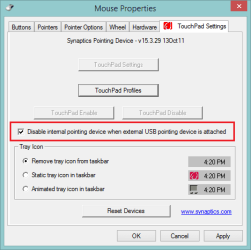
If it a Synaptics touchpad, there is an option to disable the touchpad if a wireless mouse is connected.

The option has moved around with new releases, but it should be available.
Mine is on the mouse properties page in control panel - Touchpad Settings tab
Capture.PNG

It makes a sound when it turns on or off, so I disabled sounds for the device
open sound control on the system tray, click mixer, mute Synaptics
If Synaptics isn't shown, try opening the mouse page again and click the Touchpad Settings tab - then try muting the Synaptics sounds.

Just a tip - nothing to do with a resolution.
 

My Computer My Computer

Computer type
Laptop
Computer Manufacturer/Model Number
HP Pavilion dv6-6c10us
OS
x64 (6.3.9600) Win8.1 Pro & soon dual boot x64 (6.1.7601) Win7_SP1 HomePrem
CPU
AMD A6-3420M APU with Radeon(tm) HD Graphics
Motherboard
Hewlett-Packard 1805
Memory
6.00 GB
Graphics Card(s)
AMD Radeon(TM) HD 6520G
Sound Card
(1) AMD High Definition Audio Device (2) IDT High Definiti
Monitor(s) Displays
HP W2072a 20" LCD (1600 x 900) @ 60 Hz
Screen Resolution
1366 x 768 x 32 bits (4294967296 colors) @ 60 Hz
Hard Drives
ST640LM0 00 HM641JI SATA Disk Device
Keyboard
Logitech k520 wireless KB
Mouse
Logitech m320 wireless mouse (bundled with KB)
Internet Speed
15/5 | 54 MB Wireless 'n'
Antivirus
Realtime: Defender or Avast | On-demand: Malwarebytes, ESET
Browser
IE 11 on Win8, IE 10 on win 7
Other Info
Media: [Gimp, Audacity, VLC] || Comm: [WEmail 2012, Skype] || Productivity: [OpenOffice,| Textpad] || Utils: [Sysinternals, cCleaner, Speccy, Defraggler]
Hi Slarty,

Yes it's a Synaptics touchpad. I opened up the mouse properties in control panel and clicked every option, settings button etc and I cannot find the option to disable the touchpad when a wireless mouse is connected so I have left it disabled for now.

mouse.jpg
 

My Computer My Computer

Computer type
Laptop
Computer Manufacturer/Model Number
Sony Vaio
OS
Windows 7 Home 64bit
Yeah, Like I said, they moved it around a few times. It was at one time in the Synaptics CPL, then it moved to Mouse CPL, and one version (might have been 16.xx - you're on a 16 version) I never did find it.

Leaving it disabled works too. You might need to launch the Mouse CPL if you ever start the machine without the wireless mouse. Go to CPL and create a mouse shortcut - just in case you ever need it :)

If that feature (selective disable) seems important to you:
Try downgrading the driver: Uninstall the Synaptics driver in Dev mgr (answer or check - remove software)
Run Windows Update and check the optional offers - device drivers are there, select the Synaptics driver.

Try upgrading the driver: v17 is on the Synaptics site

There were some allusions to having the external mouse connected when installing - you might want to disconnect the wireless mouse receiver if you change the Synaptics driver. I don't think it's necessary, but you never know.

If you just want leave it as it is and try figuring it out later - this might be the place to start
Synaptics FAQs & Troubleshotting

I've never had an issue with Synaptic driver updates, except that one version where a feature I used disappeared. In every other case, the upgrade solved an issue and added more functionality to the hardware (gestures, scrolling, etc).
Results might be different on your machine - they're all the same and all different at the same time.

How or if you want to address this is up to you, at least I've given you some options to think about.

Bill
.
 

My Computer My Computer

Computer type
Laptop
Computer Manufacturer/Model Number
HP Pavilion dv6-6c10us
OS
x64 (6.3.9600) Win8.1 Pro & soon dual boot x64 (6.1.7601) Win7_SP1 HomePrem
CPU
AMD A6-3420M APU with Radeon(tm) HD Graphics
Motherboard
Hewlett-Packard 1805
Memory
6.00 GB
Graphics Card(s)
AMD Radeon(TM) HD 6520G
Sound Card
(1) AMD High Definition Audio Device (2) IDT High Definiti
Monitor(s) Displays
HP W2072a 20" LCD (1600 x 900) @ 60 Hz
Screen Resolution
1366 x 768 x 32 bits (4294967296 colors) @ 60 Hz
Hard Drives
ST640LM0 00 HM641JI SATA Disk Device
Keyboard
Logitech k520 wireless KB
Mouse
Logitech m320 wireless mouse (bundled with KB)
Internet Speed
15/5 | 54 MB Wireless 'n'
Antivirus
Realtime: Defender or Avast | On-demand: Malwarebytes, ESET
Browser
IE 11 on Win8, IE 10 on win 7
Other Info
Media: [Gimp, Audacity, VLC] || Comm: [WEmail 2012, Skype] || Productivity: [OpenOffice,| Textpad] || Utils: [Sysinternals, cCleaner, Speccy, Defraggler]
Check both Ctrl keys on the keyboard. If one is stuck your scroll wheel will act that way.

To test: Hold down a Ctrl key and scroll with the wheel.
 

My Computer My Computer

Computer type
PC/Desktop
Computer Manufacturer/Model Number
Home made Desktop
OS
Windows 10 Pro. 64/ version 1709 Windows 7 Pro/64
CPU
Intel i7-6800K @ 4.3
Motherboard
ASUS X-99 Deluxe II
Memory
Corsair Platinum 16 gig @2400
Graphics Card(s)
EVGA GTX 1070 OC
Monitor(s) Displays
Asus 27" LED LCD/VE278Q
Screen Resolution
1920-1080 or 1280-720 HDMI
Hard Drives
INTEL SSD 730-240 Gb Sata 3.0/
PSU
EVGA Platium 1200W
Case
Phanteks Luxe Tempered Glass 8 fans/ one radiator
Cooling
XSPC/ Water Cooled CPU
Keyboard
Das 4 Professional
Mouse
Logitech M705/MX Anywhere 2-S
Internet Speed
100 mbits
Antivirus
Microsoft Security Essentials/ Malwarebytes Premium 3.0/ SAS
Browser
I.E. 11 default/Firefox/ ISP Time Warner Cable/Spectrum
Other Info
LG BluRay Burner/
Sound system-KLipsch-THX/
Icy Dock ssd Hot Swap bays.
Thanks Bill that's great advice and I have bookmarked all those links so I will have them all to hand if anything goes wrong again, thank you again for taking the time to explain all this to me it's really appreciated :)

Layback Bear, good suggestion, it was one of the first I read when I Googled the issue so I took the ctrl keys out, cleaned the laptop keyboard and put it all back together and nothing was stuck down. If I held the ctrl key and scrolled the behaviour was still the same, it zoomed. Thanks for the tip though :)
 

My Computer My Computer

Computer type
Laptop
Computer Manufacturer/Model Number
Sony Vaio
OS
Windows 7 Home 64bit
You're welcome Thumper.

If the issue does crop up again and none of the links help resolve it and you're tired of banging your head against the wall as I was, don't forget "try a different mouse". Mice are cheap.

Good luck,

Bill
 

My Computer My Computer

Computer type
Laptop
Computer Manufacturer/Model Number
HP Pavilion dv6-6c10us
OS
x64 (6.3.9600) Win8.1 Pro & soon dual boot x64 (6.1.7601) Win7_SP1 HomePrem
CPU
AMD A6-3420M APU with Radeon(tm) HD Graphics
Motherboard
Hewlett-Packard 1805
Memory
6.00 GB
Graphics Card(s)
AMD Radeon(TM) HD 6520G
Sound Card
(1) AMD High Definition Audio Device (2) IDT High Definiti
Monitor(s) Displays
HP W2072a 20" LCD (1600 x 900) @ 60 Hz
Screen Resolution
1366 x 768 x 32 bits (4294967296 colors) @ 60 Hz
Hard Drives
ST640LM0 00 HM641JI SATA Disk Device
Keyboard
Logitech k520 wireless KB
Mouse
Logitech m320 wireless mouse (bundled with KB)
Internet Speed
15/5 | 54 MB Wireless 'n'
Antivirus
Realtime: Defender or Avast | On-demand: Malwarebytes, ESET
Browser
IE 11 on Win8, IE 10 on win 7
Other Info
Media: [Gimp, Audacity, VLC] || Comm: [WEmail 2012, Skype] || Productivity: [OpenOffice,| Textpad] || Utils: [Sysinternals, cCleaner, Speccy, Defraggler]
Funny you should mention that Bill, I ordered a new mouse from Maplins yesterday as my backup plan in case it does happen again. This time I've gone for a Logitech wired mouse instead of a wireless/bluetooth.
 

My Computer My Computer

Computer type
Laptop
Computer Manufacturer/Model Number
Sony Vaio
OS
Windows 7 Home 64bit
Pefect!

I forgot to say thanks for marking the thread solved, so
Thanks for marking the thread solved.

Bill
 

My Computer My Computer

Computer type
Laptop
Computer Manufacturer/Model Number
HP Pavilion dv6-6c10us
OS
x64 (6.3.9600) Win8.1 Pro & soon dual boot x64 (6.1.7601) Win7_SP1 HomePrem
CPU
AMD A6-3420M APU with Radeon(tm) HD Graphics
Motherboard
Hewlett-Packard 1805
Memory
6.00 GB
Graphics Card(s)
AMD Radeon(TM) HD 6520G
Sound Card
(1) AMD High Definition Audio Device (2) IDT High Definiti
Monitor(s) Displays
HP W2072a 20" LCD (1600 x 900) @ 60 Hz
Screen Resolution
1366 x 768 x 32 bits (4294967296 colors) @ 60 Hz
Hard Drives
ST640LM0 00 HM641JI SATA Disk Device
Keyboard
Logitech k520 wireless KB
Mouse
Logitech m320 wireless mouse (bundled with KB)
Internet Speed
15/5 | 54 MB Wireless 'n'
Antivirus
Realtime: Defender or Avast | On-demand: Malwarebytes, ESET
Browser
IE 11 on Win8, IE 10 on win 7
Other Info
Media: [Gimp, Audacity, VLC] || Comm: [WEmail 2012, Skype] || Productivity: [OpenOffice,| Textpad] || Utils: [Sysinternals, cCleaner, Speccy, Defraggler]
Back
Top