Microsoft Office 2010 Beta Installation Issues

Peaches

New member
Power User
Local time
7:41 PM
Messages
91
Location
Mass
Hi everyone,
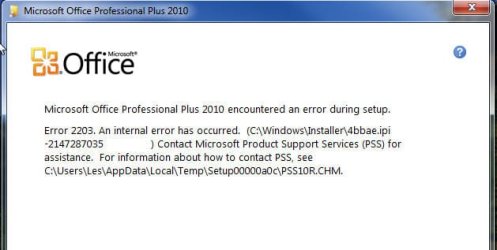
I downloaded the MS Office 2010 Beta today, and when I installed it, it gave me an error, so I un-installed it, deleted the MS Office files, and tried again.
This time, it finished installing, but when I click "Change Product Key" like the website tells you to in order to activate it, it gives me an installation error message.
Does anyone know how to fix this?
Thanks in advance!
 

My Computer

Computer Manufacturer/Model Number
Hewlett Packard / Dv4-1120us
OS
Windows 7 Final
CPU
Intel Core 2 Duo @ 2.0Ghz
Memory
4GB DDR2 @ 800Mhz
Graphics Card(s)
Mobile Intel(R) 4 Series Express Chipset Family
Monitor(s) Displays
Generic PnP Monitor
Screen Resolution
1280 x 800
PSU
6-Cell Battery
Keyboard
Standard PS/2 Keyboard
Mouse
Synaptics PS/2 Port Touchpad
Internet Speed
Anywhere Between 11.0 and 48.0 Mbps
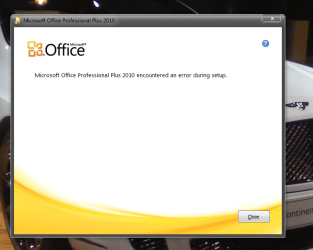
unfortunately i cant help you out but im responding to this thread because i am having a similar problem. When i go to install MS office 2010 beta i get a message that an error has occurred during the install. i do not know what to do and for some reason i have lost several gb's of space on my hard drive despite the fact that i can not find any files of significant size that have been added since i tried the install. any help would be greatly appreciated. On a somewhat related note i cannot run my office 2007 setup file nor can i uninstall office 2007 yet everything else works fine. i am unsure if this ties into my 2010 problem but i suspect it does. thanks
 

My Computer

Computer Manufacturer/Model Number
Gateway T-1628
OS
windows 7 home premium sp1 x86
CPU
AMD Turion 64 x2 Mobile Technology 2.0 GHz
Motherboard
GATEWAY (Socket M2/S1G1) ATI RS690/RS690M Chipset
Memory
3gb DDR2 RAM
Graphics Card(s)
ATI Radeon x1200 series
Sound Card
SigmaTel High Def audio
Monitor(s) Displays
Generic PnP Monitor
Screen Resolution
1280x800
Hard Drives
250gb Western Digital
Hi everyone,
I downloaded the MS Office 2010 Beta today, and when I installed it, it gave me an error, so I un-installed it, deleted the MS Office files, and tried again.
This time, it finished installing, but when I click "Change Product Key" like the website tells you to in order to activate it, it gives me an installation error message.
Does anyone know how to fix this?
Thanks in advance!

unfortunately i cant help you out but im responding to this thread because i am having a similar problem. When i go to install MS office 2010 beta i get a message that an error has occurred during the install. i do not know what to do and for some reason i have lost several gb's of space on my hard drive despite the fact that i can not find any files of significant size that have been added since i tried the install. any help would be greatly appreciated. thanks

What was the error code that you got during install? Also, did you have another version of Office installed before?
 

My Computer

Computer type
PC/Desktop
Computer Manufacturer/Model Number
SuperBeast
OS
Windows 10 Tech Preview 9926 x64
CPU
AMD FX-8350
Motherboard
Gigabyte GA-990FXA-UD3
Memory
16GB DDR3 1333
Graphics Card(s)
Asus R9 290 DirectCU II OC, Gigabyte Windforce R9 290 OC
Sound Card
Integrated w/ Creative A250 2.1 speakers
Monitor(s) Displays
Main: Asus VN289H 28" Secondary: Acer G246HL 24"
Screen Resolution
1920x1080
Hard Drives
128 GB SanDisk Ultra Plus (Windows drive)

240 GB Crucial M500 SSD (Games drive)

1 TB WDC WD10EACS 7200RPM HDD (Data drive)

2 TB Seagate Expansion Desktop external HDD (Backup drive)
PSU
900w Antec HCG-900
Case
Raidmax Agusta Full ATX
Cooling
Corsair H80
Keyboard
Cooler Master Devastator MB24
Mouse
Cooler Master Devastator MS2K 1000/1600/2000 DPI
Internet Speed
100Mbps cable
Antivirus
Avast!
Browser
Chrome
I also had an error when installing, what worked for me was to install as "administrator" - worked with no errors...
 

Attachments

  • Snap1.jpg
    Snap1.jpg
    24.3 KB · Views: 135

My Computer

Computer Manufacturer/Model Number
Dell XPS 630i
OS
Windows 7 RTM
CPU
Intel(R) Core(TM)2 Duo CPU E8500 @3.16GHz 3.16GHz
Motherboard
Dell XPS 6301
Memory
3GB
Graphics Card(s)
ATI Radeon HD 3870 x2
Sound Card
Creative X-Fi-Audio Processor
Monitor(s) Displays
Dell 2208WFP(Digital) x 2
Screen Resolution
1680 x 1050
Hard Drives
Dual 500 Gig
Keyboard
Logitech G15
Mouse
Logitech MX518
Internet Speed
20MB Cable
Hi everyone,
I downloaded the MS Office 2010 Beta today, and when I installed it, it gave me an error, so I un-installed it, deleted the MS Office files, and tried again.
This time, it finished installing, but when I click "Change Product Key" like the website tells you to in order to activate it, it gives me an installation error message.
Does anyone know how to fix this?
Thanks in advance!

unfortunately i cant help you out but im responding to this thread because i am having a similar problem. When i go to install MS office 2010 beta i get a message that an error has occurred during the install. i do not know what to do and for some reason i have lost several gb's of space on my hard drive despite the fact that i can not find any files of significant size that have been added since i tried the install. any help would be greatly appreciated. thanks

What was the error code that you got during install? Also, did you have another version of Office installed before?

It didn't give me a code. I completely uninstalled the office I had and deleted all of it's files.
EDIT: I will try to install as admin, allthough I am the admin on this computer, but I'll see if it gives me the option.
 

My Computer

Computer Manufacturer/Model Number
Hewlett Packard / Dv4-1120us
OS
Windows 7 Final
CPU
Intel Core 2 Duo @ 2.0Ghz
Memory
4GB DDR2 @ 800Mhz
Graphics Card(s)
Mobile Intel(R) 4 Series Express Chipset Family
Monitor(s) Displays
Generic PnP Monitor
Screen Resolution
1280 x 800
PSU
6-Cell Battery
Keyboard
Standard PS/2 Keyboard
Mouse
Synaptics PS/2 Port Touchpad
Internet Speed
Anywhere Between 11.0 and 48.0 Mbps
It didn't give me a code. I completely uninstalled the office I had and deleted all of it's files.

Try searching for a program called RipOutOffice2007. It will stop the Office Source Engine and completely delete the reg entries and .dll files. It will also reboot your machine when it's done. Then try installing the 2010 beta again and see if you get the same problem.

Even though it says Office 2007 in the title of the program, I have found it to work on all Office products.
 

My Computer

Computer type
PC/Desktop
Computer Manufacturer/Model Number
SuperBeast
OS
Windows 10 Tech Preview 9926 x64
CPU
AMD FX-8350
Motherboard
Gigabyte GA-990FXA-UD3
Memory
16GB DDR3 1333
Graphics Card(s)
Asus R9 290 DirectCU II OC, Gigabyte Windforce R9 290 OC
Sound Card
Integrated w/ Creative A250 2.1 speakers
Monitor(s) Displays
Main: Asus VN289H 28" Secondary: Acer G246HL 24"
Screen Resolution
1920x1080
Hard Drives
128 GB SanDisk Ultra Plus (Windows drive)

240 GB Crucial M500 SSD (Games drive)

1 TB WDC WD10EACS 7200RPM HDD (Data drive)

2 TB Seagate Expansion Desktop external HDD (Backup drive)
PSU
900w Antec HCG-900
Case
Raidmax Agusta Full ATX
Cooling
Corsair H80
Keyboard
Cooler Master Devastator MB24
Mouse
Cooler Master Devastator MS2K 1000/1600/2000 DPI
Internet Speed
100Mbps cable
Antivirus
Avast!
Browser
Chrome
It didn't give me a code. I completely uninstalled the office I had and deleted all of it's files.

Try searching for a program called RipOutOffice2007. It will stop the Office Source Engine and completely delete the reg entries and .dll files. It will also reboot your machine when it's done. Then try installing the 2010 beta again and see if you get the same problem.

Even though it says Office 2007 in the title of the program, I have found it to work on all Office products.

Should I uninstall Office before I use that or will it uninstall it too?
 

My Computer

Computer Manufacturer/Model Number
Hewlett Packard / Dv4-1120us
OS
Windows 7 Final
CPU
Intel Core 2 Duo @ 2.0Ghz
Memory
4GB DDR2 @ 800Mhz
Graphics Card(s)
Mobile Intel(R) 4 Series Express Chipset Family
Monitor(s) Displays
Generic PnP Monitor
Screen Resolution
1280 x 800
PSU
6-Cell Battery
Keyboard
Standard PS/2 Keyboard
Mouse
Synaptics PS/2 Port Touchpad
Internet Speed
Anywhere Between 11.0 and 48.0 Mbps
I would go ahead and uninstall it first, then go in and delete the Office folders from Program Files (and Program Files (x86) if you are running 64 bit) and then run it.
 

My Computer

Computer type
PC/Desktop
Computer Manufacturer/Model Number
SuperBeast
OS
Windows 10 Tech Preview 9926 x64
CPU
AMD FX-8350
Motherboard
Gigabyte GA-990FXA-UD3
Memory
16GB DDR3 1333
Graphics Card(s)
Asus R9 290 DirectCU II OC, Gigabyte Windforce R9 290 OC
Sound Card
Integrated w/ Creative A250 2.1 speakers
Monitor(s) Displays
Main: Asus VN289H 28" Secondary: Acer G246HL 24"
Screen Resolution
1920x1080
Hard Drives
128 GB SanDisk Ultra Plus (Windows drive)

240 GB Crucial M500 SSD (Games drive)

1 TB WDC WD10EACS 7200RPM HDD (Data drive)

2 TB Seagate Expansion Desktop external HDD (Backup drive)
PSU
900w Antec HCG-900
Case
Raidmax Agusta Full ATX
Cooling
Corsair H80
Keyboard
Cooler Master Devastator MB24
Mouse
Cooler Master Devastator MS2K 1000/1600/2000 DPI
Internet Speed
100Mbps cable
Antivirus
Avast!
Browser
Chrome
Hi everyone,
I downloaded the MS Office 2010 Beta today, and when I installed it, it gave me an error, so I un-installed it, deleted the MS Office files, and tried again.
This time, it finished installing, but when I click "Change Product Key" like the website tells you to in order to activate it, it gives me an installation error message.
Does anyone know how to fix this?
Thanks in advance!

unfortunately i cant help you out but im responding to this thread because i am having a similar problem. When i go to install MS office 2010 beta i get a message that an error has occurred during the install. i do not know what to do and for some reason i have lost several gb's of space on my hard drive despite the fact that i can not find any files of significant size that have been added since i tried the install. any help would be greatly appreciated. thanks

What was the error code that you got during install? Also, did you have another version of Office installed before?
as you can see there is no code. and yes i have parts of both office 2000 and 2007
 

Attachments

  • Capture.PNG
    Capture.PNG
    50.9 KB · Views: 100

My Computer

Computer Manufacturer/Model Number
Gateway T-1628
OS
windows 7 home premium sp1 x86
CPU
AMD Turion 64 x2 Mobile Technology 2.0 GHz
Motherboard
GATEWAY (Socket M2/S1G1) ATI RS690/RS690M Chipset
Memory
3gb DDR2 RAM
Graphics Card(s)
ATI Radeon x1200 series
Sound Card
SigmaTel High Def audio
Monitor(s) Displays
Generic PnP Monitor
Screen Resolution
1280x800
Hard Drives
250gb Western Digital
as you can see there is no code. and yes i have parts of both office 2000 and 2007

I would recommend the same as I did with Peaches. Use RipOutOffice2007 to get rid of the leftovers of those Office installs, and then try reinstalling the beta.
 

My Computer

Computer type
PC/Desktop
Computer Manufacturer/Model Number
SuperBeast
OS
Windows 10 Tech Preview 9926 x64
CPU
AMD FX-8350
Motherboard
Gigabyte GA-990FXA-UD3
Memory
16GB DDR3 1333
Graphics Card(s)
Asus R9 290 DirectCU II OC, Gigabyte Windforce R9 290 OC
Sound Card
Integrated w/ Creative A250 2.1 speakers
Monitor(s) Displays
Main: Asus VN289H 28" Secondary: Acer G246HL 24"
Screen Resolution
1920x1080
Hard Drives
128 GB SanDisk Ultra Plus (Windows drive)

240 GB Crucial M500 SSD (Games drive)

1 TB WDC WD10EACS 7200RPM HDD (Data drive)

2 TB Seagate Expansion Desktop external HDD (Backup drive)
PSU
900w Antec HCG-900
Case
Raidmax Agusta Full ATX
Cooling
Corsair H80
Keyboard
Cooler Master Devastator MB24
Mouse
Cooler Master Devastator MS2K 1000/1600/2000 DPI
Internet Speed
100Mbps cable
Antivirus
Avast!
Browser
Chrome
I did the ripoutoffice and got this error:
idk.PNG

EDIT: Then I just clicked it again and it said it finished successfully, so I will re-try the installation.
 

My Computer

Computer Manufacturer/Model Number
Hewlett Packard / Dv4-1120us
OS
Windows 7 Final
CPU
Intel Core 2 Duo @ 2.0Ghz
Memory
4GB DDR2 @ 800Mhz
Graphics Card(s)
Mobile Intel(R) 4 Series Express Chipset Family
Monitor(s) Displays
Generic PnP Monitor
Screen Resolution
1280 x 800
PSU
6-Cell Battery
Keyboard
Standard PS/2 Keyboard
Mouse
Synaptics PS/2 Port Touchpad
Internet Speed
Anywhere Between 11.0 and 48.0 Mbps
Did you right-click > Run as admin? If not, try that...or try running it in compatibility mode for Vista.
 

My Computer

Computer type
PC/Desktop
Computer Manufacturer/Model Number
SuperBeast
OS
Windows 10 Tech Preview 9926 x64
CPU
AMD FX-8350
Motherboard
Gigabyte GA-990FXA-UD3
Memory
16GB DDR3 1333
Graphics Card(s)
Asus R9 290 DirectCU II OC, Gigabyte Windforce R9 290 OC
Sound Card
Integrated w/ Creative A250 2.1 speakers
Monitor(s) Displays
Main: Asus VN289H 28" Secondary: Acer G246HL 24"
Screen Resolution
1920x1080
Hard Drives
128 GB SanDisk Ultra Plus (Windows drive)

240 GB Crucial M500 SSD (Games drive)

1 TB WDC WD10EACS 7200RPM HDD (Data drive)

2 TB Seagate Expansion Desktop external HDD (Backup drive)
PSU
900w Antec HCG-900
Case
Raidmax Agusta Full ATX
Cooling
Corsair H80
Keyboard
Cooler Master Devastator MB24
Mouse
Cooler Master Devastator MS2K 1000/1600/2000 DPI
Internet Speed
100Mbps cable
Antivirus
Avast!
Browser
Chrome
Ok I will do that, thank you very much again.
 

My Computer

Computer Manufacturer/Model Number
Hewlett Packard / Dv4-1120us
OS
Windows 7 Final
CPU
Intel Core 2 Duo @ 2.0Ghz
Memory
4GB DDR2 @ 800Mhz
Graphics Card(s)
Mobile Intel(R) 4 Series Express Chipset Family
Monitor(s) Displays
Generic PnP Monitor
Screen Resolution
1280 x 800
PSU
6-Cell Battery
Keyboard
Standard PS/2 Keyboard
Mouse
Synaptics PS/2 Port Touchpad
Internet Speed
Anywhere Between 11.0 and 48.0 Mbps

My Computer

Computer type
PC/Desktop
Computer Manufacturer/Model Number
SuperBeast
OS
Windows 10 Tech Preview 9926 x64
CPU
AMD FX-8350
Motherboard
Gigabyte GA-990FXA-UD3
Memory
16GB DDR3 1333
Graphics Card(s)
Asus R9 290 DirectCU II OC, Gigabyte Windforce R9 290 OC
Sound Card
Integrated w/ Creative A250 2.1 speakers
Monitor(s) Displays
Main: Asus VN289H 28" Secondary: Acer G246HL 24"
Screen Resolution
1920x1080
Hard Drives
128 GB SanDisk Ultra Plus (Windows drive)

240 GB Crucial M500 SSD (Games drive)

1 TB WDC WD10EACS 7200RPM HDD (Data drive)

2 TB Seagate Expansion Desktop external HDD (Backup drive)
PSU
900w Antec HCG-900
Case
Raidmax Agusta Full ATX
Cooling
Corsair H80
Keyboard
Cooler Master Devastator MB24
Mouse
Cooler Master Devastator MS2K 1000/1600/2000 DPI
Internet Speed
100Mbps cable
Antivirus
Avast!
Browser
Chrome
it needs a clean install....
i uninstall office 2010 mondo uisng revo uninstaller
clean the registry file using ccleaner
reboot
the installed the new office pro beta
change product key
reboot
a-ok
 

My Computer

Computer Manufacturer/Model Number
dell latitude e6400
OS
windows 7 64bit
CPU
p8600
Motherboard
dell
Memory
2x2gb samsung hynix ddr2 800
Graphics Card(s)
intel g4500 chipset
Hard Drives
seagate 7200 rpm 500gb
as you can see there is no code. and yes i have parts of both office 2000 and 2007

I would recommend the same as I did with Peaches. Use RipOutOffice2007 to get rid of the leftovers of those Office installs, and then try reinstalling the beta.

approximately how long is ripout supposed to say stopping the office source engine service? it stays like that and when i click it it tells me the application cannot be completed because it is busy and needs to switch to the busy program. is it not running right or am i too impatient
 

My Computer

Computer Manufacturer/Model Number
Gateway T-1628
OS
windows 7 home premium sp1 x86
CPU
AMD Turion 64 x2 Mobile Technology 2.0 GHz
Motherboard
GATEWAY (Socket M2/S1G1) ATI RS690/RS690M Chipset
Memory
3gb DDR2 RAM
Graphics Card(s)
ATI Radeon x1200 series
Sound Card
SigmaTel High Def audio
Monitor(s) Displays
Generic PnP Monitor
Screen Resolution
1280x800
Hard Drives
250gb Western Digital
For me it usually completed in about 45 seconds. Try rebooting and running it again as admin.
 

My Computer

Computer type
PC/Desktop
Computer Manufacturer/Model Number
SuperBeast
OS
Windows 10 Tech Preview 9926 x64
CPU
AMD FX-8350
Motherboard
Gigabyte GA-990FXA-UD3
Memory
16GB DDR3 1333
Graphics Card(s)
Asus R9 290 DirectCU II OC, Gigabyte Windforce R9 290 OC
Sound Card
Integrated w/ Creative A250 2.1 speakers
Monitor(s) Displays
Main: Asus VN289H 28" Secondary: Acer G246HL 24"
Screen Resolution
1920x1080
Hard Drives
128 GB SanDisk Ultra Plus (Windows drive)

240 GB Crucial M500 SSD (Games drive)

1 TB WDC WD10EACS 7200RPM HDD (Data drive)

2 TB Seagate Expansion Desktop external HDD (Backup drive)
PSU
900w Antec HCG-900
Case
Raidmax Agusta Full ATX
Cooling
Corsair H80
Keyboard
Cooler Master Devastator MB24
Mouse
Cooler Master Devastator MS2K 1000/1600/2000 DPI
Internet Speed
100Mbps cable
Antivirus
Avast!
Browser
Chrome
I got the same error I did last time it installed correctly, then when I click "Change Product Key" an error comes up.
 

My Computer

Computer Manufacturer/Model Number
Hewlett Packard / Dv4-1120us
OS
Windows 7 Final
CPU
Intel Core 2 Duo @ 2.0Ghz
Memory
4GB DDR2 @ 800Mhz
Graphics Card(s)
Mobile Intel(R) 4 Series Express Chipset Family
Monitor(s) Displays
Generic PnP Monitor
Screen Resolution
1280 x 800
PSU
6-Cell Battery
Keyboard
Standard PS/2 Keyboard
Mouse
Synaptics PS/2 Port Touchpad
Internet Speed
Anywhere Between 11.0 and 48.0 Mbps
Hmm...well, I'm pretty much out of ideas. You could try using an unistaller like Revo Uninstaller and then a reg cleaner like CCcleaner, but I've never really trusted reg cleaners.

Sorry I couldn't get it working for you. :(
 

My Computer

Computer type
PC/Desktop
Computer Manufacturer/Model Number
SuperBeast
OS
Windows 10 Tech Preview 9926 x64
CPU
AMD FX-8350
Motherboard
Gigabyte GA-990FXA-UD3
Memory
16GB DDR3 1333
Graphics Card(s)
Asus R9 290 DirectCU II OC, Gigabyte Windforce R9 290 OC
Sound Card
Integrated w/ Creative A250 2.1 speakers
Monitor(s) Displays
Main: Asus VN289H 28" Secondary: Acer G246HL 24"
Screen Resolution
1920x1080
Hard Drives
128 GB SanDisk Ultra Plus (Windows drive)

240 GB Crucial M500 SSD (Games drive)

1 TB WDC WD10EACS 7200RPM HDD (Data drive)

2 TB Seagate Expansion Desktop external HDD (Backup drive)
PSU
900w Antec HCG-900
Case
Raidmax Agusta Full ATX
Cooling
Corsair H80
Keyboard
Cooler Master Devastator MB24
Mouse
Cooler Master Devastator MS2K 1000/1600/2000 DPI
Internet Speed
100Mbps cable
Antivirus
Avast!
Browser
Chrome
For me it usually completed in about 45 seconds. Try rebooting and running it again as admin.
i tried restarting and running it again. i am the admin on my computer so thats not a problem. it seems to be working but its taking a very long time.
 

My Computer

Computer Manufacturer/Model Number
Gateway T-1628
OS
windows 7 home premium sp1 x86
CPU
AMD Turion 64 x2 Mobile Technology 2.0 GHz
Motherboard
GATEWAY (Socket M2/S1G1) ATI RS690/RS690M Chipset
Memory
3gb DDR2 RAM
Graphics Card(s)
ATI Radeon x1200 series
Sound Card
SigmaTel High Def audio
Monitor(s) Displays
Generic PnP Monitor
Screen Resolution
1280x800
Hard Drives
250gb Western Digital
Back
Top