Microsoft Office 2010 - Excel problem

bugmeso

New member
Local time
5:33 PM
Messages
20
Location
Pittsburgh, PA
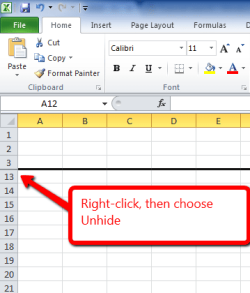
Well not really a problem with Excel, more of a memory problem with me. A few years back (in '03 Office) I collapsed the Excel file by way of a phone conversation. And now I forget nor find the way to un-collapse and get my lines 1 thru 95 back. Although I have used info on lines 96 and on. Any help would be appreciated.
 

My Computer

OS
Win 7
Do you mean you hide them? Use the Unhide function:
Capture.PNG
 

My Computer

Computer type
PC/Desktop
Computer Manufacturer/Model Number
Golden Mk. I.4
OS
Windows 10 Pro x64 ; Xubuntu x64
CPU
Intel i7 860 @ 2.80 GHz O/C'ed to 4.0GHz
Motherboard
Gigabyte P55A-UD3R Rev.1. Award BIOS F13
Memory
16GB Corsair Vengance DDR3 @ 661 MHz Dual Channel (9-9-9-24)
Graphics Card(s)
EVGA NVidia GTX 560 1024MB
Sound Card
Realtek Integrated
Monitor(s) Displays
Dual Samsung SyncMaster 2494HS
Screen Resolution
1920*1080 and 1920*1080
Hard Drives
1*Samsung 840 EVO 120GB SSD;
1*OCZ Vertex 2 60GB SSD;
2*Samsung F3 SpinPoint 1TB in RAID0;
1*Samsung F1 SpinPoint 1TB;
2*Western Digital 1TB External USB 3.0
1*Western Digital 500GB External USB 3.0
1*Seagate 500GB External USB 2.0
PSU
Thermaltake ToughPower QFan 750W
Case
Thermaltake Element S VK60001W2Z
Cooling
Corsair H60 Water Cooling, 2*230mm and 2*80mm case fans
Keyboard
Logitech G110
Mouse
Logitech MX518
Yes hide and unhide. I tried your mentioned suggestion and can only do one line at a time. I will work with this to see if I can do from the 54 line to the 1 line.
 

My Computer

OS
Win 7
Yes hide and unhide. I tried your mentioned suggestion and can only do one line at a time. I will work with this to see if I can do from the 54 line to the 1 line.

I would start at row 60 and drag/select all the way up until your mouse is just to the left of Column A (a little down/right arrow is there(select all)) and then move your mouse away from the row numbers and right click and choose unhide. OR just select all, right click and unhide
 

My Computer

Computer type
PC/Desktop
Computer Manufacturer/Model Number
Self Build
OS
Windows 7 Professional X64 Service Pack 1
CPU
AMD Phenom II X4 955 3.20GHz
Motherboard
Gigabyte GA-MA790X-UD4P
Memory
8G
Graphics Card(s)
GX550 Ti
Sound Card
On board
Monitor(s) Displays
Asus VW246H & Syncmaster 2243swx
Screen Resolution
1920x1080 & 1920x1080
Hard Drives
M4-CT128 SSD2, Samsung 840 256GB, 1 WDC 1TB
PSU
Corsair TX750W-V2
Case
Antec
Cooling
2 120mm fan
Keyboard
Microsoft Wireless 3050
Mouse
Microsoft Wireless 5000
Internet Speed
72/6Mbs (Cable)
Other Info
Asus AC1900 router, 8 port Trendnet Switch - Logitech Webcam Pro 9000
Back
Top