Microsoft Office 2010 SP1 Released

Downloaded the SP1 32-bit yesterday, installed it this morning on my Win7 Pro laptop -- works fine. No problems.
 

My Computer My Computer

Computer type
PC/Desktop
Computer Manufacturer/Model Number
Custom
OS
Win7 Pro 32-bit, Win8 Pro 32-bit
CPU
AMD Phenom II X6 1090T
Motherboard
Gigabyte
Memory
4GB ddr3 1300
Graphics Card(s)
AMD HD 4290 onboard
Sound Card
Builtin Realtek HD Audio
Monitor(s) Displays
Samsung 24" widescreen, LG 23" widescreen
Screen Resolution
1920x1200/1920x1080
Hard Drives
Kingston 256GB SSD
Keyboard
Logitech Illuminated Keyboard
Mouse
Logitech M705 wireless mouse
Antivirus
Norton Av 2013
Browser
IE v10
for some strange reason, i got a 78F error the first time i tried to update, but the second one went smoothly.

thanks for the slipstreaming link G1LLY - i keep meaning to do a clean install of 7 sp1, i may as well clean install office too - when i find the time, or urgent need!
 

My Computer My Computer

Computer Manufacturer/Model Number
mickey megabyte 1234
OS
ultimate 64 sp1
CPU
i5 2500K [email protected]
Motherboard
MSI P67A-GD53
Memory
8 gigs GSkill Ripjaws 1600
Graphics Card(s)
amd hd6950
Sound Card
creative x-fi gamer
Monitor(s) Displays
samsung 24"
Screen Resolution
1920x1080
Hard Drives
ocz vertex 2e 60 gig, samsung f3 1tb, buffalo 2tb ext
PSU
antec 550
Case
antec three hundred
Cooling
i'm a cooling fan
Keyboard
saitek eclipse ii
Mouse
logitech g3
Internet Speed
about 4 Mbps
Other Info
i love win7
arrrggh

Tried 4 times to install it now..twice via windows update and twice from the downloaded file.
Fails everytime.
When from windows update, if fails with a meaningless 78F error.
When installed from downloaded file it just says it failed to install...even less informative.

I've even tried installing straight after a reboot with virus checker turned off and run as admin and it still fails.
Maybe a more helpful error message microsoft??

mwa
 

My Computer My Computer

Computer Manufacturer/Model Number
Home Build
OS
win 7 64bit
CPU
i5 750
Motherboard
asus p7p55d
Memory
4GB DDR3
Graphics Card(s)
Sapphire 4670
Hard Drives
3x WDC SATA AHCI (320GB, 500GB & 1TB)
PSU
500W
Any major changes?

Few ....:


With the release of the service pack itself, Microsoft also made available KB2460049, offering insight into the evolution of Office 2010 for each component in part:

"Access 2010 SP1

- Access 2010 SP1 adds a new feature to integrate community content in the [COLOR=#0054a6! important][COLOR=#0054a6! important]Application[/COLOR][/COLOR] Parts gallery.

- Fixes an issue that occurs when you try to export an Access file to an Excel workbook.

- Improves the performance when publishing client forms from Access that contains embedded images

Excel 2010 SP1

- Improves the overall stability, performance and backward compatibility with earlier versions by addressing bugs that affect lots of users. For specific [COLOR=#0054a6! important][COLOR=#0054a6! important]bugs [COLOR=#0054a6! important]fixes[/COLOR][/COLOR][/COLOR], download the "Microsoft Office 2010 Service Pack 1 Changes" workbook discussed later in this article.

- Function names now maintain backward compatibility with earlier versions of Excel for the Czech, Dutch, Danish, Italian, Norwegian, Portuguese, Brazilian Portuguese, Spanish, Swedish, and Turkish languages.

OneNote 2010 SP1

- Added a new Open from web option that is located under the File Open menu. This enables you to open OneNote notebooks from Windows Live SkyDrive.

- The Web option and the Network option are now added under the [COLOR=#0054a6! important][COLOR=#0054a6! important]File [COLOR=#0054a6! important]Share[/COLOR][/COLOR][/COLOR] menu. This makes it easier to share a [COLOR=#0054a6! important][COLOR=#0054a6! important]notebook[/COLOR][/COLOR].

- You can use the Quik Filling feature to save your local Unfiled Notes section to another section, or to Windows Live SkyDrive. To do this, click File, Options, Save and Backup, and then click Modify.

- Improves how OneNote synchronizes with SharePoint or Windows Live SkyDrive.

- OneNote 2010 SP1 now uses Windows Live Essentials to log on to Windows Live SkyDrive.

- Fixes an issue that occurred when you applied a bullet or a numbered list to an empty line, or lines.

- Fixes an issue where notebooks are visible in the navigation bar when you open or create lots of notebooks, and then minimize them.

- Fixes an issue in which the incorrect style is used for the next line after a pasted link.

- Fixes an issue in which the marked as read pages in OneNote 2010 changes to mark as unread.

- Improves performance when a shared notebook is used by lots of users who use section groups.

- OneNote 2010 SP1 now highlights items within the search results.

- Fixes an issue that an ink may not move correctly when you share a notebook.

- OneNote 2010 SP1 corrects the highlighting feature when you perform a search for certain text that is located inside a multipage XPS file.

- Fixes an issue where the ink may not move as expected when you use the Insert Space command. Additionally, various other ink moving issues are addressed.

- OneNote 2010 SP1 fixes the highlighting feature when you review a page that uses the highlighter tool.

- A detailed error message is now when you use OneNote on a computer while other users are using Windows Live SkyDrive OneNote on the same computer.

- Improves performance when you use SharePoint 2010 to share a notebook on a slow network.

- Fixes an issue in which you receive a "Exception 0x80042001(InvalidXML)" error message when you use the OneNote object model to export, and then import a page that contains Swedish content.

- When you open OneNote 2010 for the first time, OneNote prompts you to set up your first notebook on Windows Live SkyDrive or on a local location. OneNote 2010 SP1 adds a new DisableSkydriveSetupOnFirstBoot registry value to turn this feature off, and create the notebook locally.

- Improved performance when you create a new page by using a template.

- Fixes an issue in which the printout is displayed as a red X when you copy or move a page that contains a printout in OneNote 2010 format to OneNote 2007 format.

- Fixes an author issue on a page when you use the OneNote object model to export and then import the page.

- OneNote 2010 SP1 now correctly scrolls when the mouse pointer is near the edges of the screen.

- OneNote 2010 SP1 can now open or synchronize notebooks created on Windows Live SkyDrive that contains any of the following characters: , ",", &, %, #, ~, +

- Fixes certain issues that Windows 7 users or Windows Vista users experience when they connect to Windows Live SkyDrive, or use Windows Live SkyDrive.

- Fixes an issue in which you may lose customized note flags when an Add-in prevents OneNote 2010 from closing.

- Fixes an issue an issue with the object model UpdateHierarchy method.


Outlook 2010 SP1

- Outlook 2010 SP1 includes Office 365 support.

- Outlook 2010 SP1 can be set to always use the default sending account.

- Fixes an issue in which the snooze time does not between appointments.

PowerPoint 2010 SP1

- The default behavior for the Use Presenter View option is changed to display the slide show on the secondary monitor, and display the notes on the primary monitor.

- Fixes an issue in which an incorrect animation state occurs after you browse through all the slides.

- Fixes an issue in which the mouse pointer disappears when you select the Second Monitor option from the Show On list.

- PowerPoint Viewer is now included with the Package for CD option.

- Fixes an issue in which you receive the following error message when you edit or enable an Excel object that contains Visual Basic for Applications (VBA) code.

Error accessing file. Network connection may have been lost.

Microsoft PowerPoint can't start the application required to open this object. An error occurred and this feature is no longer functioning properly. Would you like to repair this feature now?

- Fixes an issue in which an incorrect Runs.Count value is returned when a PowerPoint 2003 format presentation runs a PowerPoint 2010 object model command.

- Fixes an issue in which audio or video media that was created on a [COLOR=#0054a6! important][COLOR=#0054a6! important]Mac[/COLOR][/COLOR]-based computer does not play back on a Windows-based computer.

- Fixes an issue in which the images in an Enhanced Windows Medafile (EMF) file displays incorrectly when you save a slide as an Enhanced Windows Medafile (EMF) file, and then use a high resolution to print it.

- Fixes an issue in which a pen cannot persist through the Slide Show mode when you use the pen as a pointer.

- Fixes an issue that a default language change is not propagated to new slides or to new presentations.

- Fixes an issue in which a linked image is not saved when you insert the linked image in a presentation, and then save the presentation an Open Document Format (ODF) file.


Word 2010 SP1

- Word 2010 SP1 includes a dialog box that warns users that the custom XML will be lost when files that use custom XML markups are saved in XML-based file formats.

- Now, certain fields are available when you use the APA 6th and MLA 7th edition styles in the Bibliography feature.

- Fixes an issue in which users receive the following error message when opening a Word 2010 document.

The file <file name> cannot be opened because there are problems with the contents.

The name in the end tag of the element must match the element type in the start tag.

- Fixes an issue in which users receive the following error message when opening a Word 2010 document:

Microsoft Office Word has encountered a problem and needs to close.

- Fixes a font display problem when you open landscape documents that use a font that is installed on the system with PostScript outlines.

- Fixes several editing conflict issues that occur when you use the Word Coauthoring feature.

- Word 2010 SP1 now displays the map correctly when you use the Display Map function.

- Paragraph indents are no longer lost when you edit other paragraph properties.

- Word 2010 SP1 now saves a linked image correctly when you insert the linked image in a presentation, and then save the presentation as an Open Document Format (ODF) file.

- When you copy some Excel data that includes cells and a chart, and then paste them as a linked Excel Worksheet Object (OLE) object in a Word document, the size of the chart may not be correct. Or, the chart may be corrupt. This issue occurs because Word uses the printer information to display the chart. Word 2010 SP1 adds an OleIgnorePrintPict registry value to 1 to ignore the printer information.

- Fixes an issue in which a chart resizes fully when you use yellow resizing handles to change a shape inside the chart.

- Fixes a rendering problem that occurs when you insert a graphic into a Word document, and then save the document as a HTML file.

- Fixes an issue in which the whole Word group is flipped when you try to flip a child share inside a Word group by using the Word object model.

- Fixes an issue in which the whole Word group is scaled when the ScaleHeight and ScaleWidth command use the Word object model to scale the height or scale the width of a child shape inside a Word group."

June 29th, 2011, 10:53 GMT| By Marius Oiaga

 

My Computer My Computer

Computer type
Laptop
Computer Manufacturer/Model Number
Sony Vaio VPC-SE23FXS
OS
WDS 7 Home Pre.x64
CPU
Intel Core i5 2450M @ 2.50GHz
Memory
8GB Kingston[2x4] Dual-Channel DDR3 @ 1333MHz
Graphics Card(s)
AMD Radeon(TM) HD 6470M + Intel(R) HD Graph 3000
Hard Drives
TOSHIBA MK6459GSXP 600GB x 5400RPM (SATA)
Have installed, from updates, on x64 desktop and laptop, went smoothly on both.
 

My Computer My Computer

Computer type
PC/Desktop
Computer Manufacturer/Model Number
76~2.0
OS
Windows 7 Ult x64 - SP1/ Windows 8 Pro x64
CPU
Intel Core i5-3570K 4.6GHz
Motherboard
Gigabyte GA-Z77X UD3H, f18
Memory
8GB (2X4GB) DDR3 1600 Corsair Vengeance CL8 1.5v
Graphics Card(s)
Sapphire HD 7770 Vapor-X OC 1GB DDR5
Sound Card
Onboard VIA VT2021
Monitor(s) Displays
22" LCD Dell
Screen Resolution
1680x1050
Hard Drives
Samsung 840Pro 128GB SSD,
Seagate Barracuda 500GB SATA2 7200rpm 32MB cache, Seagate Barracuda 1TB SATA2 7200rpm 32MB cache,
PSU
Corsair HX650W
Case
Cooler Master Storm Scout
Cooling
Corsair H80 2x12cm Noctua NF P12 , 2x14cm case fans
Keyboard
Logitech Wave
Mouse
CM Sentinel
Internet Speed
Dismal
Antivirus
Avast
Browser
Opera Next
Other Info
Haswell laptop: HP Envy 17t-j, i7-4700MQ, GeForce 740M 2GB DDR3, 17.3" Full HD 1920x1080, 16GB RAM, Samsung 840 Pro 128GB, 1TB Hitachi 7200 HDD,
Desktop: eSATA ports,
External eSATA Seagate 500GB SATA2 7200rpm,
External WD USB 500GB
Did a clean install earlier today with SP1 slipstreamed into the setup, installed quite fast :)
 

My Computer My Computer

Computer Manufacturer/Model Number
Acer Aspire 5742
OS
Windows 7 Ultimate x64 SP1
CPU
Intel Core i3-370M @ 2.4GHz
Motherboard
Mobile Intel HM55 Express Chipset
Memory
6GB 1333MHz DDR3
Graphics Card(s)
Intel GMA HD
Monitor(s) Displays
15.6" HD Acer CineCrystal LED LCD
Screen Resolution
1366×768
Hard Drives
320GB (5400 RPM) SATA
PSU
65W
Mouse
Microsoft Wireless Optical Mouse 3000
Internet Speed
6Mbps
Other Info
WEI Score: 4.6
As has been for weeks now, I can't download it from the website, just like I can't download anything else from Microsoft's Download Center. What the ****, is this ever gonna stop?
 

My Computer My Computer

Computer type
Laptop
Computer Manufacturer/Model Number
Custom
OS
Windows 7 Home Premium x64
CPU
Intel Core i5 2500K
Motherboard
MSI MS-7750
Memory
8GB DDR3
Graphics Card(s)
nVidia GeForce GTX650 Ti BOOST
Sound Card
Realtek
Monitor(s) Displays
21' Philips
Screen Resolution
Full HD
Hard Drives
1TB
PSU
500W
SP1 Office 2010

Can't install SP!. Installation progress bar finalizes and "failed to install" message appears. Tried from two different sources. Dl'd .exe file and via Win 7 update.

Tried with firewall and AV off. Ran Fixit on Installer. Tried from elevated prompt. Tried from safe mode. Tweaked some group policy settings hoping to loosen up security (no go). Updater works with everything else.

I see the link for making a slipstream disk. I could try that. That means a complete uninstall and reinstall. What is the chance of technet putting up an iso with sp1 in it for dl?

Another option for me would be to unload professional and load the standard version and then add Access and One Note and Outlook. I am not sure if that would decrease the footprint or not.

How about a little advice?
 

My Computer My Computer

Computer Manufacturer/Model Number
BGC (Bob's Garage Crew)
OS
win 7 X64 Ultimate SP1
CPU
I3770K
Motherboard
Asus P8Z77-V Deluxe
Memory
G Skill F3-14900CL9-4GBXL x 4
Graphics Card(s)
NVIDIA GeForce GTX670 + Intel 4000
Sound Card
Realtek HD 5.1 (MOB)
Monitor(s) Displays
Asus VW224T (1)
Screen Resolution
1920 x 1080
Hard Drives
SATA Corsair Force GT 2.5" 180GB (System) Sata 3
OCZ Vertex3 120GB
OCZ Vertex 2 120GB 2.5" SATA II
ST31000524AS 1000.2GB
WD15EARS (External)
PSU
CoolerMaster 1000 Watt
Case
CoolerMaster HAF X
Cooling
CPU -- CoolerMaster 520N
Keyboard
MS Wireless 3000 V2
Mouse
MS Wireless 3000 V2
Internet Speed
Cable
Antivirus
Norton Internet Security
Browser
IE9
Other Info
AMI Bios 1805
OC'd 3%
Updated via Windows update without any trouble.
 

My Computer My Computer

Computer type
PC/Desktop
Computer Manufacturer/Model Number
Golden Mk. I.4
OS
Windows 10 Pro x64 ; Xubuntu x64
CPU
Intel i7 860 @ 2.80 GHz O/C'ed to 4.0GHz
Motherboard
Gigabyte P55A-UD3R Rev.1. Award BIOS F13
Memory
16GB Corsair Vengance DDR3 @ 661 MHz Dual Channel (9-9-9-24)
Graphics Card(s)
EVGA NVidia GTX 560 1024MB
Sound Card
Realtek Integrated
Monitor(s) Displays
Dual Samsung SyncMaster 2494HS
Screen Resolution
1920*1080 and 1920*1080
Hard Drives
1*Samsung 840 EVO 120GB SSD;
1*OCZ Vertex 2 60GB SSD;
2*Samsung F3 SpinPoint 1TB in RAID0;
1*Samsung F1 SpinPoint 1TB;
2*Western Digital 1TB External USB 3.0
1*Western Digital 500GB External USB 3.0
1*Seagate 500GB External USB 2.0
PSU
Thermaltake ToughPower QFan 750W
Case
Thermaltake Element S VK60001W2Z
Cooling
Corsair H60 Water Cooling, 2*230mm and 2*80mm case fans
Keyboard
Logitech G110
Mouse
Logitech MX518
Can't install SP!. Installation progress bar finalizes and "failed to install" message appears. Tried from two different sources. Dl'd .exe file and via Win 7 update.

Tried with firewall and AV off. Ran Fixit on Installer. Tried from elevated prompt. Tried from safe mode. Tweaked some group policy settings hoping to loosen up security (no go). Updater works with everything else.

I see the link for making a slipstream disk. I could try that. That means a complete uninstall and reinstall. What is the chance of technet putting up an iso with sp1 in it for dl?

Another option for me would be to unload professional and load the standard version and then add Access and One Note and Outlook. I am not sure if that would decrease the footprint or not.

How about a little advice?

Having the same issue. Win 7 x64 64 bit office 2010 install cannot get it to install workied fine on my laptop with the same OS and Office version. Please help.
 

My Computer My Computer

Computer Manufacturer/Model Number
Too many to list
OS
Windows 7 Ultimate X64
hi, sorry if I interupted a thread. I have win 7, 64 bit. I installed MS Office from school.( paid for from school). How can I find out what Bit it is? 32 or 64
 

My Computer My Computer

OS
win7
I have win 7, 64 bit. I installed MS Office from school.( paid for from school). How can I find out what Bit it is? 32 or 64

Hi,

See the image below.

Regards,
Golden
 

Attachments

  • Capture.PNG
    Capture.PNG
    84.7 KB · Views: 105

My Computer My Computer

Computer type
PC/Desktop
Computer Manufacturer/Model Number
Golden Mk. I.4
OS
Windows 10 Pro x64 ; Xubuntu x64
CPU
Intel i7 860 @ 2.80 GHz O/C'ed to 4.0GHz
Motherboard
Gigabyte P55A-UD3R Rev.1. Award BIOS F13
Memory
16GB Corsair Vengance DDR3 @ 661 MHz Dual Channel (9-9-9-24)
Graphics Card(s)
EVGA NVidia GTX 560 1024MB
Sound Card
Realtek Integrated
Monitor(s) Displays
Dual Samsung SyncMaster 2494HS
Screen Resolution
1920*1080 and 1920*1080
Hard Drives
1*Samsung 840 EVO 120GB SSD;
1*OCZ Vertex 2 60GB SSD;
2*Samsung F3 SpinPoint 1TB in RAID0;
1*Samsung F1 SpinPoint 1TB;
2*Western Digital 1TB External USB 3.0
1*Western Digital 500GB External USB 3.0
1*Seagate 500GB External USB 2.0
PSU
Thermaltake ToughPower QFan 750W
Case
Thermaltake Element S VK60001W2Z
Cooling
Corsair H60 Water Cooling, 2*230mm and 2*80mm case fans
Keyboard
Logitech G110
Mouse
Logitech MX518
where do or how do I find that info? I'm a novice at this. what do I open first? thanks
 

My Computer My Computer

OS
win7
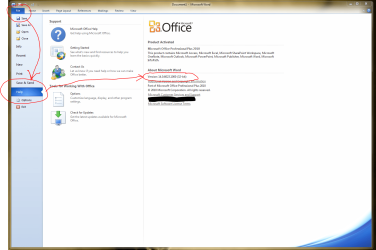
1. Open Word or Excel as normal
2. Click File, then go down to Help and click that.

The screen will open as shown.
 

My Computer My Computer

Computer type
PC/Desktop
Computer Manufacturer/Model Number
Golden Mk. I.4
OS
Windows 10 Pro x64 ; Xubuntu x64
CPU
Intel i7 860 @ 2.80 GHz O/C'ed to 4.0GHz
Motherboard
Gigabyte P55A-UD3R Rev.1. Award BIOS F13
Memory
16GB Corsair Vengance DDR3 @ 661 MHz Dual Channel (9-9-9-24)
Graphics Card(s)
EVGA NVidia GTX 560 1024MB
Sound Card
Realtek Integrated
Monitor(s) Displays
Dual Samsung SyncMaster 2494HS
Screen Resolution
1920*1080 and 1920*1080
Hard Drives
1*Samsung 840 EVO 120GB SSD;
1*OCZ Vertex 2 60GB SSD;
2*Samsung F3 SpinPoint 1TB in RAID0;
1*Samsung F1 SpinPoint 1TB;
2*Western Digital 1TB External USB 3.0
1*Western Digital 500GB External USB 3.0
1*Seagate 500GB External USB 2.0
PSU
Thermaltake ToughPower QFan 750W
Case
Thermaltake Element S VK60001W2Z
Cooling
Corsair H60 Water Cooling, 2*230mm and 2*80mm case fans
Keyboard
Logitech G110
Mouse
Logitech MX518
hey THANKS, your the best.....from Jupiter, fl , previously BROOKLYN , NY
 

My Computer My Computer

OS
win7
Installed via WU no problems at all
 

My Computer My Computer

Computer Manufacturer/Model Number
HP p6680t
OS
Windows 7 Home Premium 64bit-HP OEM SP1 Installed
CPU
Intel Core i5-650 3.2GHz
Motherboard
MS-7613 (Iona-GL8E) Intel H57 Express Chipset
Memory
6GB DDR3 1333Mhz SDRAM
Graphics Card(s)
Intergrated Intel H57
Sound Card
Intergrated Realtek 7/1
Monitor(s) Displays
HP 3310m 23" diagonal widescreen flat panel monitor
Screen Resolution
1920 x 1080
Hard Drives
1 TB (7,200) SATA 3Gb/s
1.5 TB External
PSU
300W
Case
HP Piano Black
Cooling
Couple Fans
Keyboard
HP USB
Mouse
HP Optical
Internet Speed
3-6.0 Mbps Average around 5.0 Mbps AT&T DSL
Other Info
Security Includes NIS 2011, Malwarebytes, Superantispyware, & SpywareBlaster. Acronis True Home Image 2011 for Backup
Still using 2007 from the contest I won here after the release of Win7 in 2009. Since I don't use it that much, I don't know I should bother getting 2010...
 

My Computer My Computer

Computer type
PC/Desktop
Computer Manufacturer/Model Number
Custom build
OS
Windows 10 Professional 64-bit
CPU
Ryzen 9 5900X
Motherboard
Gigabyte X570 Aorus Master
Memory
G.Skill 3600Mhz CL16 16GB × 4
Graphics Card(s)
EVGA GeForce RTX 3070 Ti FTW3 Ultra Gaming
Sound Card
On-board
Monitor(s) Displays
Dell Alienware AW3418DW
Screen Resolution
3440x1440
Hard Drives
1×Sabrent Rocket 4 Plus 2TB nvme SSD (System, internal)
2x4TB Western Digital Blue (Internal)
1x4TB HDST 7200RPM (Internal)
PSU
Seasonic Focus Plus 850W Platinum
Case
Corsair 680X
Cooling
Stock fans + 3× Corsair QL120, Corsair H100i Platinum
Keyboard
Logitech K350
Mouse
Logitech M510
Internet Speed
120Mbits dl - 20Mbits up
Antivirus
ESET NOD32 Antivirus
Browser
Firefox (latest version)
Other Info
Headphones : Audio-Technica ATH-M50x
Scanner : Canon Canoscan LiDE 220 + Plustek OptiBook 4800
Still using 2007 from the contest I won here after the release of Win7 in 2009. Since I don't use it that much, I don't know I should bother getting 2010...

If you can get it cheap through work or school it might be worth it otherwise keep what you have.
 

My Computer My Computer

OS
Windows 7 Pro x64
CPU
i7 870
Motherboard
asrock h55
Memory
8gb
Graphics Card(s)
gts450
Sound Card
onboard
Monitor(s) Displays
logik 22"
Hard Drives
1TB
Case
Achilles
Unfortunately I cannot install the SP1 for Microsoft Office 2010 (32-bit) due to the installer not finding GrooveMUI.msi on my hard drive. I read some posts where folks either reinstalled the whole suite and it worked, or were able to copy the entire contents of the DVD onto their hard drives in order for the installer to find this file (for some reason it would not work by pointing to the DVD itself).

I would try this second solution but I downloaded the program from Microsoft, so I only have a single .exe file stored on my external drive. Is there a Microsoft website I can go to to download GrooveMUI.msi?
 

My Computer My Computer

Computer Manufacturer/Model Number
Dell Studio Desktop
OS
Windows 7 Home Premium 64-bit
CPU
Intel Core 2 Quad Processor Q9550 (12MB, 2.83GHz, 1333FSB)
Motherboard
Intel G45 Express Chipset
Memory
8GB Dual Channel DDR2 @800 MHz
Graphics Card(s)
nVidia GeForce GTS 240 1024MB
Sound Card
SoundBlaster X-Fi Xtreme Audio
Monitor(s) Displays
23" Dell ST2310 Widescreen
Hard Drives
1TB Serial ATA (7200 RPM)
1TB Seagate Expansion Drive
PSU
350 Watt DC Power Supply
If you don't have it download and install 7zip,

7-Zip

and you can use it to extract the Office exe. Then you can just copy (or point to it if available) the file(s) needed.
 

My Computer My Computer

Computer type
PC/Desktop
Computer Manufacturer/Model Number
Me
OS
Win 7 Ultimate x64
CPU
FX-8350 @ 4.6 GHz so far
Motherboard
Asus M5A97 EVO
Memory
ADATA XPG V1 Series Black 8GB DDR3 1600
Graphics Card(s)
Sapphire R9 270x Dual-X
Sound Card
Xonar DGX w/ Corsair Vengence 1300
Monitor(s) Displays
Acer S232HL Abid
Screen Resolution
1920x1080
Hard Drives
120 GB OCZ Vertex 3
500 GB Seagate 7200.12
PSU
Antec Earthwatts 650W Green
Case
Antec Three Hundred
Cooling
Cooler Master 212 EVO
Keyboard
Logitech G510
Mouse
Logitech G500s
Internet Speed
35000/3000
Back
Top