Solved Microsoft Security Essentials Acting Strange

powderday

New member
Local time
6:19 PM
Messages
11
Hello All,

I am running MSE on my Windows 7 machine - It has been working fine, up until two days ago -

The Icon is amber, as opposed to the usual green when everything is humming along nicely-

When I open it, the top banner says:
PC Status: Potentially Unprotected

However, the checks marks below affirm that 1) Real Time Protection is ON
and 2) Virus and spyware definitions are up to date -

I have run several Quick scans, and a Full scan last night (always scheduled for Sunday's at 1 am) :
>> The results of ALL of those scans say: No threats were detected on your PC during scan:
However, under that is a message that states:
You haven't run a scan on your PC for a while. This could put your PC at risk ( ???!!! - Really, I just ran several in the past 24 hours!!!)

Something is strange here: can anyone please enlighten me as to what the issue(s) may be?? -
It leaves me with an unsettled feeling, as you can appreciate, I am sure-

Thank you for all suggestions/help, I am grateful -
 

My Computers

System One System Two

  • Computer type
    PC/Desktop
    Computer Manufacturer/Model Number
    Dell Optiplex 980
    OS
    7 professional - 64 bit
    Antivirus
    windows defender
    Browser
    chrome
  • Computer type
    PC/Desktop
Sorry nobody has responded. I would try reinstalling MSE.
 

My Computer

Computer type
PC/Desktop
Computer Manufacturer/Model Number
Gateway GT5656
OS
Windows 7 x64 SP1
CPU
AMD Athlon 64 X2 6000+ / 3.0 GHz
Motherboard
NVIDIA GeForce 6150 SE
Memory
6 GB
Monitor(s) Displays
Lenovo LED
Screen Resolution
1920 X 1080
Hard Drives
Windows on 500 GB spinner; Ubuntu 16 on Sandisk 250GB SSD; Bodhi5 on Samsung 250GB SSD; another old spinner for fooling around.
PSU
Original that came with computer
Keyboard
Logitech wireless
Mouse
Logitech wireless
Antivirus
Microsoft Sec Essentials
Browser
Vivaldi
I am running MSE on my Windows 7 machine - It has been working fine, up until two days ago -
The Icon is amber, as opposed to the usual green when everything is humming along nicely-
...the checks marks below affirm that
1) Real Time Protection is ON and
2) Virus and spyware definitions are up to date
How up to date?

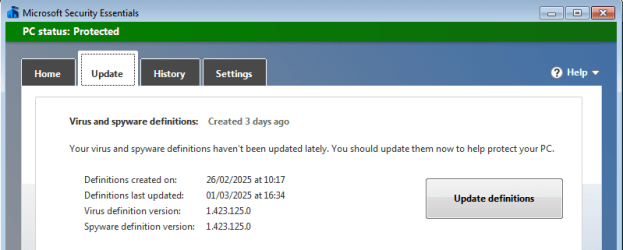
This may be just a coincidence, but neither Windows Update or checking for updates in MSE can find anything newer than 1.423.125.0 from three days ago.

image.png

Manually installing the latest definitions from https://www.microsoft.com/en-us/wdsi/defenderupdates gets this:

Definitions created on: 01/03/2025 at 10:21
Virus definition version: 1.423.180.0
 

My Computers

System One System Two

  • Computer type
    Laptop
    Computer Manufacturer/Model Number
    Toshiba satellite C650D
    OS
    Windows 7 Home Premium x64
    CPU
    AMD V120
    Memory
    4GB
    Internet Speed
    150 Mbps
    Antivirus
    MSE
    Browser
    IE11, Edge, Firefox
    Other Info
    I also have W7 Pro on my System Two, and several W7 Hyper-V VMs. My other machines run Windows 10/11. Their specs are in my Ten Forums & Eleven Forum profiles.
  • Computer type
    Laptop
    System Manufacturer/Model Number
    Lenovo Thinkpad T430
    OS
    Windows 7 Pro x64
    CPU
    Intel i5-3320M
    Memory
    8 GB
    Hard Drives
    250GB Samsung SSD 860 EVO
    Other Info
    Antivirus: MSE
Windows Update or checking for updates in MSE can find anything newer than 1.423.125.0 from three days ago.

1.423.180 on mine. Is something wrong with your system?
 
Last edited:

My Computers

System One System Two

  • Computer type
    PC/Desktop
    OS
    7 X64
    CPU
    i5 8400
    Motherboard
    gigabyte b365m ds3h
    Memory
    2x8gb 3200mhz
    Hard Drives
    various
    PSU
    pure power 11 400w cm
    Case
    Coolermaster
    Cooling
    cryorig m9i
  • Computer type
    PC/Desktop
    OS
    7x64
    CPU
    g5400
    Motherboard
    ga b365m ds3h
    Memory
    8gb ddr4 2400
    PSU
    xfx pro 450w
mines on 182
 

My Computer

Computer type
PC/Desktop
Computer Manufacturer/Model Number
medionl/Aspire 6930G/acer x55a
OS
W7 home premium 32bit/W7HP 64bit/w10 tp insider ring
CPU
E5300 dual core
Motherboard
medion MS7366
Memory
3gb
Graphics Card(s)
Nvidia Geforce 7100 Nforce 630i
Monitor(s) Displays
avixc
Internet Speed
n (isp resticted to 72)
Antivirus
mse/pands
Browser
palemoon
Other Info
Belkin Fd7050 n USB using Railink RT2870 drivers, more upto date
Just updated on my W7 to:
3/1/25, 11:51 am

Definitions: 1.423.184.0

MSE specs:

Clinet Version: 4.10.209.0

Engine: 1.1.25010.7
 

My Computer

Computer type
PC/Desktop
Computer Manufacturer/Model Number
Gateway GT5656
OS
Windows 7 x64 SP1
CPU
AMD Athlon 64 X2 6000+ / 3.0 GHz
Motherboard
NVIDIA GeForce 6150 SE
Memory
6 GB
Monitor(s) Displays
Lenovo LED
Screen Resolution
1920 X 1080
Hard Drives
Windows on 500 GB spinner; Ubuntu 16 on Sandisk 250GB SSD; Bodhi5 on Samsung 250GB SSD; another old spinner for fooling around.
PSU
Original that came with computer
Keyboard
Logitech wireless
Mouse
Logitech wireless
Antivirus
Microsoft Sec Essentials
Browser
Vivaldi
1.423.180 on mine. Is something wrong with your system?
It's a real puzzle. I have four Win7 machines, two are VMs and two are the laptops in my specs below. Of the four, three of them don't find any AV update beyond 1.423.125.0, while one of the laptops (System One) always finds the latest update. This when checking for updates in Windows Update and in MSE. The three can be manually updated though.
 

My Computers

System One System Two

  • Computer type
    Laptop
    Computer Manufacturer/Model Number
    Toshiba satellite C650D
    OS
    Windows 7 Home Premium x64
    CPU
    AMD V120
    Memory
    4GB
    Internet Speed
    150 Mbps
    Antivirus
    MSE
    Browser
    IE11, Edge, Firefox
    Other Info
    I also have W7 Pro on my System Two, and several W7 Hyper-V VMs. My other machines run Windows 10/11. Their specs are in my Ten Forums & Eleven Forum profiles.
  • Computer type
    Laptop
    System Manufacturer/Model Number
    Lenovo Thinkpad T430
    OS
    Windows 7 Pro x64
    CPU
    Intel i5-3320M
    Memory
    8 GB
    Hard Drives
    250GB Samsung SSD 860 EVO
    Other Info
    Antivirus: MSE
It's a real puzzle. I have four Win7 machines, two are VMs and two are the laptops in my specs below. Of the four, three of them don't find any AV update beyond 1.423.125.0, while one of the laptops (System One) always finds the latest update. This when checking for updates in Windows Update and in MSE. The three can be manually updated though.

I also have found that on some machines, only a manual update works, while on others MSE is still able to update itself.
fortunately, manual updating always works.
 

My Computer

Computer type
PC/Desktop
Computer Manufacturer/Model Number
Gateway GT5656
OS
Windows 7 x64 SP1
CPU
AMD Athlon 64 X2 6000+ / 3.0 GHz
Motherboard
NVIDIA GeForce 6150 SE
Memory
6 GB
Monitor(s) Displays
Lenovo LED
Screen Resolution
1920 X 1080
Hard Drives
Windows on 500 GB spinner; Ubuntu 16 on Sandisk 250GB SSD; Bodhi5 on Samsung 250GB SSD; another old spinner for fooling around.
PSU
Original that came with computer
Keyboard
Logitech wireless
Mouse
Logitech wireless
Antivirus
Microsoft Sec Essentials
Browser
Vivaldi
I also have found that on some machines, only a manual update works, while on others MSE is still able to update itself.
fortunately, manual updating always works.
Thanks, I was beginning to think it was just me ;)
 

My Computers

System One System Two

  • Computer type
    Laptop
    Computer Manufacturer/Model Number
    Toshiba satellite C650D
    OS
    Windows 7 Home Premium x64
    CPU
    AMD V120
    Memory
    4GB
    Internet Speed
    150 Mbps
    Antivirus
    MSE
    Browser
    IE11, Edge, Firefox
    Other Info
    I also have W7 Pro on my System Two, and several W7 Hyper-V VMs. My other machines run Windows 10/11. Their specs are in my Ten Forums & Eleven Forum profiles.
  • Computer type
    Laptop
    System Manufacturer/Model Number
    Lenovo Thinkpad T430
    OS
    Windows 7 Pro x64
    CPU
    Intel i5-3320M
    Memory
    8 GB
    Hard Drives
    250GB Samsung SSD 860 EVO
    Other Info
    Antivirus: MSE
I also have the same issue on Windows 7 Home 64bit

Versione client antimalware: 4.10.209.0Versione motore: 1.1.25010.7Definizione antivirus: 1.423.125.0Definizione antispyware: 1.423.125.0Versione motore Network Inspection System: 2.1.14600.4Versione definizione Network Inspection System: 119.0.0.0

Downloading and installing "Microsoft Security Essentials" 64-bit from https://www.microsoft.com/en-us/wdsi/defenderupdates updates the virus definitions.

Versione client antimalware: 4.10.209.0Versione motore: 1.1.25010.7Definizione antivirus: 1.423.242.0Definizione antispyware: 1.423.242.0Versione motore Network Inspection System: 2.1.14600.4Versione definizione Network Inspection System: 119.0.0.0

Does this mean I will always manually download the virus definition from now on?

Andrea
 

My Computers

System One System Two

  • Computer type
    PC/Desktop
    Computer Manufacturer/Model Number
    HP
    OS
    Window 7 Home 64bit
  • Computer type
    PC/Desktop
I also have the same issue on Windows 7 Home 64bit...
...Does this mean I will always manually download the virus definition from now on?

I'm afraid so, that's what I do now. :(
 

My Computers

System One System Two

  • Computer type
    Laptop
    Computer Manufacturer/Model Number
    Toshiba satellite C650D
    OS
    Windows 7 Home Premium x64
    CPU
    AMD V120
    Memory
    4GB
    Internet Speed
    150 Mbps
    Antivirus
    MSE
    Browser
    IE11, Edge, Firefox
    Other Info
    I also have W7 Pro on my System Two, and several W7 Hyper-V VMs. My other machines run Windows 10/11. Their specs are in my Ten Forums & Eleven Forum profiles.
  • Computer type
    Laptop
    System Manufacturer/Model Number
    Lenovo Thinkpad T430
    OS
    Windows 7 Pro x64
    CPU
    Intel i5-3320M
    Memory
    8 GB
    Hard Drives
    250GB Samsung SSD 860 EVO
    Other Info
    Antivirus: MSE
andreaerdna said:

"I also have the same issue on Windows 7 Home 64bit...

...Does this mean I will always manually download the virus definition from now on?"


It's worth it. Same definitions as Windows 10/11, for free.
 

My Computer

Computer type
PC/Desktop
Computer Manufacturer/Model Number
Gateway GT5656
OS
Windows 7 x64 SP1
CPU
AMD Athlon 64 X2 6000+ / 3.0 GHz
Motherboard
NVIDIA GeForce 6150 SE
Memory
6 GB
Monitor(s) Displays
Lenovo LED
Screen Resolution
1920 X 1080
Hard Drives
Windows on 500 GB spinner; Ubuntu 16 on Sandisk 250GB SSD; Bodhi5 on Samsung 250GB SSD; another old spinner for fooling around.
PSU
Original that came with computer
Keyboard
Logitech wireless
Mouse
Logitech wireless
Antivirus
Microsoft Sec Essentials
Browser
Vivaldi
Thanks Andrea

Thanks for the tip on how to manually update security essentials. I am still using a Windows 7 machine I built 14 years ago that I use as an HTPC with a cable card and (knock on wood) it still runs like a champ. Thanks again,
 

My Computers

System One System Two

  • Computer type
    PC/Desktop
    Computer Manufacturer/Model Number
    Intel
    OS
    Windows 7 64bit Home Premium
    CPU
    Intel
    Motherboard
    Intel
    Memory
    8 gig
    Graphics Card(s)
    onboard
    Hard Drives
    SSD Boot
    HDD Storage
    Antivirus
    Security Essentials
    Browser
    Chrome
  • Computer type
    PC/Desktop
Hi All - I originally generated this post 2 weeks ago - I thought I had resolved this issue, yet here I am again back to square one wit the same issue everyone is having - I was away for a few days, and up[on my return, my MSE has not been updated since 2/27/25 - going on 8 days now - I took the advice of one fella, Unistalled MSE, and then went about installing it again, straight the designated Microsoft website page- HOWEVER, this time, after running the .exe file, it just disappears, nowhere to be found, not listed under installed programs, nothing!! WTF! Anyhow,l so as to have some type of defense, I re-activated Windows Defender - not thrilled with it, but better than nothing-
Can anyone please help me get MSE back on my machine: per other folks advice, I don't mind updating manually if that's what it takes, it's just that I trust MSE - please let em know your thoughts on this quagmire I/we are in - Thank you kindly!!

- - - Updated - - -

By way of update, I was able to get MSE re-installed, and it is currently running a quick scan -
As per other folks advice, I will manually update MSE - Normally, my machine informs me that there is an update available, usually everyday, then I grant permission to install it -
Now This may sound silly, yet how do I manually update MSE??- Please advise, thanks!
 

My Computers

System One System Two

  • Computer type
    PC/Desktop
    Computer Manufacturer/Model Number
    Dell Optiplex 980
    OS
    7 professional - 64 bit
    Antivirus
    windows defender
    Browser
    chrome
  • Computer type
    PC/Desktop
Powderday response

Use the following link and you'll find this list of exe files that contain updated definitions. Download and run. This worked for me on the 5th and when I checked on the 6th there were no new definitions: https://www.microsoft.com/en-us/wdsi/defenderupdates

[TABLE="width: 705"]
[TR]
[TD]Microsoft Defender Antivirus for Windows 11, Windows 10, Windows 8.1, and Windows Server[/TD]
[TD]32-bit | 64-bit | ARM[/TD]
[/TR]
[TR]
[TD]Microsoft Security Essentials[/TD]
[TD]32-bit | 64-bit[/TD]
[/TR]
[TR]
[TD]Windows Defender in Windows 7 and Windows Vista[/TD]
[TD]32-bit | 64-bit[/TD]
[/TR]
[TR]
[TD]Microsoft Diagnostics and Recovery Toolset (DaRT)[/TD]
[TD]32-bit | 64-bit[/TD]
[/TR]
[TR]
[TD]System Center 2012 Configuration Manager[/TD]
[TD]32-bit | 64-bit[/TD]
[/TR]
[TR]
[TD]System Center 2012 Endpoint Protection[/TD]
[TD]32-bit | 64-bit[/TD]
[/TR]
[TR]
[TD]Windows Intune[/TD]
[TD]32-bit | 64-bit[/TD]
[/TR]
[/TABLE]

I just tried again and updated with the March 6th definitions. It looks like I'll be downloading the Windows Security Essentials exe daily from now on until the automatic update feature begins working again (fingers crossed.)
 
Last edited:

My Computers

System One System Two

  • Computer type
    PC/Desktop
    Computer Manufacturer/Model Number
    Intel
    OS
    Windows 7 64bit Home Premium
    CPU
    Intel
    Motherboard
    Intel
    Memory
    8 gig
    Graphics Card(s)
    onboard
    Hard Drives
    SSD Boot
    HDD Storage
    Antivirus
    Security Essentials
    Browser
    Chrome
  • Computer type
    PC/Desktop
Followed your advice, and I am told my system is now protected and definitions are up to date!!

Thank you kind sir!
 

My Computers

System One System Two

  • Computer type
    PC/Desktop
    Computer Manufacturer/Model Number
    Dell Optiplex 980
    OS
    7 professional - 64 bit
    Antivirus
    windows defender
    Browser
    chrome
  • Computer type
    PC/Desktop
Had same issue here. When I ran the Update check, it just never came back with anything. I downloaded the update manually, ran it (odd there is no screen or any UI element telling you it is running) and a few moments later MSE turned green and I was updated

Is https://www.microsoft.com/en-us/wdsi/defenderupdates always the URL to check for MSE updates?
 

My Computer

Computer type
PC/Desktop
OS
Windows 7 Pro 32 & 64 bit
Use the following link and you'll find this list of exe files that contain updated definitions. Download and run. This worked for me on the 5th and when I checked on the 6th there were no new definitions: https://www.microsoft.com/en-us/wdsi/defenderupdates

[TABLE="width: 705"]
[TR]
[TD]Microsoft Defender Antivirus for Windows 11, Windows 10, Windows 8.1, and Windows Server[/TD]
[TD]32-bit | 64-bit | ARM[/TD]
[/TR]
[TR]
[TD]Microsoft Security Essentials[/TD]
[TD]32-bit | 64-bit[/TD]
[/TR]
[TR]
[TD]Windows Defender in Windows 7 and Windows Vista[/TD]
[TD]32-bit | 64-bit[/TD]
[/TR]
[TR]
[TD]Microsoft Diagnostics and Recovery Toolset (DaRT)[/TD]
[TD]32-bit | 64-bit[/TD]
[/TR]
[TR]
[TD]System Center 2012 Configuration Manager[/TD]
[TD]32-bit | 64-bit[/TD]
[/TR]
[TR]
[TD]System Center 2012 Endpoint Protection[/TD]
[TD]32-bit | 64-bit[/TD]
[/TR]
[TR]
[TD]Windows Intune[/TD]
[TD]32-bit | 64-bit[/TD]
[/TR]
[/TABLE]

I just tried again and updated with the March 6th definitions. It looks like I'll be downloading the Windows Security Essentials exe daily from now on until the automatic update feature begins working again (fingers crossed.)
Thank you very much for that. I downloaded Microsoft Security Essentials, 64 bit, ran it, and MSE updated.
:D
 

My Computer

Computer Manufacturer/Model Number
Acer Aspire 5733
OS
Windows 7 Home Premium 64bit
CPU
13-380M
Memory
4gb
Hard Drives
500gb

My Computers

System One System Two

  • Computer type
    PC/Desktop
    Computer Manufacturer/Model Number
    Apple
    OS
    Windows 7 Home Premium 32-bit
  • Computer type
    PC/Desktop
EasyFix really works :-) ! After install I can check for new definitions in MSE itself again, after many years :-D !
 

My Computer

Computer type
Laptop
Computer Manufacturer/Model Number
Lenovo Y50-70 (20378)
OS
Windows 7 Professional x64
CPU
Intel Core i5-4210H
Memory
2x Kingston 8GB DDR3 1600 CL11
Graphics Card(s)
Nvidia GeForce GTX960M 4GB
Sound Card
Sound Blaster PLAY! 3
Monitor(s) Displays
2
Screen Resolution
2x 1920x1080
Hard Drives
Crucial MX500 500GB SSD
Cooling
Deepcool Multi Core X6
Keyboard
Yenkee YKB 1002 CS USB
Mouse
Crono CM645 Wired optical mouse
Internet Speed
95 Mb/s Down 95 Mb/s Up
Antivirus
MSE
Browser
Firefox 91.13.0esr x64bit
Back
Top