Solved Microsoft Security Essentials Acting Strange

I had to manually update again but it worked fine.

I downloaded the EasyFix thing, next time there is a definition update I will install it and see if it gets auto update working.
 

My Computer

Computer type
PC/Desktop
OS
Windows 7 Pro 32 & 64 bit
Easyfix51044 works. MSE can now find the latest updates. Windows Update still doesn't see them though, so always check for updates in MSE.

If you are curious as to what exactly this fix does, this is article about it....

Microsoft said:
Update to enable TLS 1.1 and TLS 1.2 as default secure protocols in WinHTTP in Windows

About this update

Applications and services that are written by using WinHTTP for Secure Sockets Layer (SSL) connections that use the WINHTTP_OPTION_SECURE_PROTOCOLS flag can't use TLS 1.1 or TLS 1.2 protocols. This is because the definition of this flag doesn't include these applications and services.

This update adds support for DefaultSecureProtocols registry entry that allows the system administrator to specify which SSL protocols should be used when the WINHTTP_OPTION_SECURE_PROTOCOLS flag is used.

This can allow certain applications that were built to use the WinHTTP default flag to be able to leverage the newer TLS 1.2 or TLS 1.1 protocols natively without any need for updates to the application.
Update to enable TLS 1.1 and TLS 1.2 as default secure protocols in WinHTTP in Windows - Microsoft Support
 

My Computers

System One System Two

  • Computer type
    Laptop
    Computer Manufacturer/Model Number
    Toshiba satellite C650D
    OS
    Windows 7 Home Premium x64
    CPU
    AMD V120
    Memory
    4GB
    Internet Speed
    150 Mbps
    Antivirus
    MSE
    Browser
    IE11, Edge, Firefox
    Other Info
    I also have W7 Pro on my System Two, and several W7 Hyper-V VMs. My other machines run Windows 10/11. Their specs are in my Ten Forums & Eleven Forum profiles.
  • Computer type
    Laptop
    System Manufacturer/Model Number
    Lenovo Thinkpad T430
    OS
    Windows 7 Pro x64
    CPU
    Intel i5-3320M
    Memory
    8 GB
    Hard Drives
    250GB Samsung SSD 860 EVO
    Other Info
    Antivirus: MSE

My Computer

Computer Manufacturer/Model Number
Acer Aspire 5733
OS
Windows 7 Home Premium 64bit
CPU
13-380M
Memory
4gb
Hard Drives
500gb
Reply to Powerday...

I also received the same message, so I clicked on scan the computer, when completed, clicked on update and now all is well. The program has a strange way of telling you to scan your computer.
 

My Computer

Computer type
PC/Desktop
Computer Manufacturer/Model Number
Custom built
OS
Windows 7 Ultimate x64 SP1
CPU
Intel i7 6700
Motherboard
Asus H170-Pro
Memory
Crucial 16 GB (x1)
Graphics Card(s)
Nvidia GeForce GTX1050Ti
Sound Card
(incorporated with Nvidia Graphics Card)
Monitor(s) Displays
LG HDR WFHD 29" Model 705948
Screen Resolution
3840 x 2160
Hard Drives
1 x M.2 2TB, 1 x WD black 1TB
PSU
650 W
Case
traditional design
Cooling
2 fans
Keyboard
Wireless
Mouse
Wireless
Internet Speed
NBN fixed wireless
Antivirus
Microsoft Security Essentials
Browser
Mozilla
Other Info
*Acer Ultrabook, 500GB M.2, 8GB RAM - partitioned Win7 & Linux Mint
*Gigabyte Mini-PC (x64) 1TB HDD, 8GB RAM Windows7

*Windows7 setup identical to Main computer*
Ran the Easyfix and it works now. It also resolved an earlier problem where I would get an error message after the definitions updated
 

My Computer

Computer type
PC/Desktop
OS
Windows 7 Pro 32 & 64 bit
Easyfix51044 works for me.
So still i have to update MSE manually every day?
 

My Computer

Computer type
PC/Desktop
OS
98SE/XP/windows7 32bit/ win10
Easyfix51044 works for me.
So still i have to update MSE manually every day?
No, the EasyFix also fixes MSE's ability to update itself automatically.
 

My Computers

System One System Two

  • Computer type
    Laptop
    Computer Manufacturer/Model Number
    Toshiba satellite C650D
    OS
    Windows 7 Home Premium x64
    CPU
    AMD V120
    Memory
    4GB
    Internet Speed
    150 Mbps
    Antivirus
    MSE
    Browser
    IE11, Edge, Firefox
    Other Info
    I also have W7 Pro on my System Two, and several W7 Hyper-V VMs. My other machines run Windows 10/11. Their specs are in my Ten Forums & Eleven Forum profiles.
  • Computer type
    Laptop
    System Manufacturer/Model Number
    Lenovo Thinkpad T430
    OS
    Windows 7 Pro x64
    CPU
    Intel i5-3320M
    Memory
    8 GB
    Hard Drives
    250GB Samsung SSD 860 EVO
    Other Info
    Antivirus: MSE
thanks Bree.
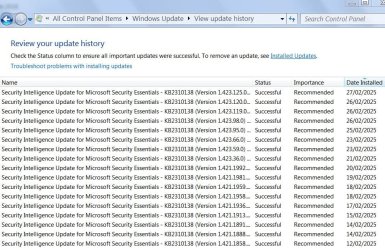
though mse updated are not shown since 27/2/25 on windows update as they used to ?!?

Capre.JPG

- - - Updated - - -

No, the EasyFix also fixes MSE's ability to update itself automatically.
so to be clear- MSE update itself not via windows update as it used to?
 

My Computer

Computer type
PC/Desktop
OS
98SE/XP/windows7 32bit/ win10
Hi, sorry if this seems like an obvious question, but did you reboot after running EasyFix?

thanks Bree.
though mse updated are not shown since 27/2/25 on windows update as they used to ?!?

View attachment 424712

- - - Updated - - -


so to be clear- MSE update itself not via windows update as it used to?
 

My Computers

System One System Two

  • Computer type
    PC/Desktop
    Computer Manufacturer/Model Number
    Apple
    OS
    Windows 7 Home Premium 32-bit
  • Computer type
    PC/Desktop
Hi, sorry if this seems like an obvious question, but did you reboot after running EasyFix?
Yap. can you see mse updates on WU history?

for me still not shown in update histoty, thats why i think MSE update itself and not via windows update....
 

My Computer

Computer type
PC/Desktop
OS
98SE/XP/windows7 32bit/ win10
Ah, yes, my mistake. That's correct, it will update through MSE only. It won't use Windows update any more. Is that a problem?

Yap. can you see mse updates on WU history?

for me still not shown in update histoty, thats why i think MSE update itself and not via windows update....
 

My Computers

System One System Two

  • Computer type
    PC/Desktop
    Computer Manufacturer/Model Number
    Apple
    OS
    Windows 7 Home Premium 32-bit
  • Computer type
    PC/Desktop
Is there any way to get MSE to auto update anymore, or is it manual only from now on?
 

My Computer

Computer type
PC/Desktop
OS
Windows 7 Pro 32 & 64 bit
MSE update itself automatically after applying the EasyFix (once a day or 2 days)
 

My Computer

Computer type
PC/Desktop
OS
98SE/XP/windows7 32bit/ win10
MSE update itself automatically after applying the EasyFix (once a day or 2 days)
Mine is not

I'm just going to set up a task in Task Scheduler to run "C:\Program Files\Microsoft Security Client>mpcmdrun -SignatureUpdate" once a day.
 

My Computer

Computer type
PC/Desktop
OS
Windows 7 Pro 32 & 64 bit
that's a good idea sluggerb ,
though i don't know why easyfix didn't do the job...
 

My Computer

Computer type
PC/Desktop
OS
98SE/XP/windows7 32bit/ win10

My Computer

OS
Windows 7 Ultimate x64
On Windows 7 Ultimate 32-bit just not possible to update.
 

My Computer

OS
Windows 7 Ultimate 64-bit
CPU
Intel Core 2 Duo CPU E8400 3.00 GHz
Motherboard
S775 ASUS Maximus Formula x38 PCIe
Memory
2x OCZ 1066 MHz DDR2 No-ECC 4096MO Reaper Kit
Graphics Card(s)
BFG PCIe GF9 GeForce 9800 GX2 1024M
Sound Card
PCI Express X-Fi Titanium Fatal1ty Pro Series
Monitor(s) Displays
SamSung SyncMaster 2493 HM
Hard Drives
4 x Seagate ST3500320AS
PSU
Antec Sonata Plus 550 Watts
Case
Antec Sonata Plus 550
Cooling
Passive (Motherboard)
Back
Top