
Microsoft Security Essentials and Windows 7

sygnus21

New member
Guru
Gold Member
VIP
Local time
3:54 AM
Messages
7,684
Location
Hampton VA
Anybody running Microsoft's Security Essentials on Windows 7 x64?

I did a clean install of Windows 7 Ultimate x64 (retail upgrade) and after doing all my installs I installed Microsoft's Security Essentials. At first I did a "quick scan and it took like 10 minutes, however doing a full scan took at least 8.5 hours! This is going through 10 partitions on 3 hard drives.
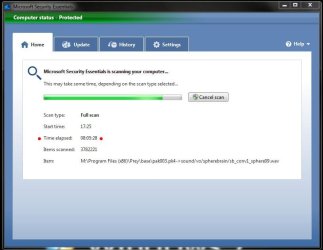
MSE Run Time.JPG

By contrast Kaspersky takes about 60 minutes or less to do a full system scan the same system.

Is there a problem with MSE doing full scans and has anyone else noticed this.

On the positive side I visited a website posted by a forum member on one of the game forums I visit and MSE flag a file trying to install itself on my computer. Good job.
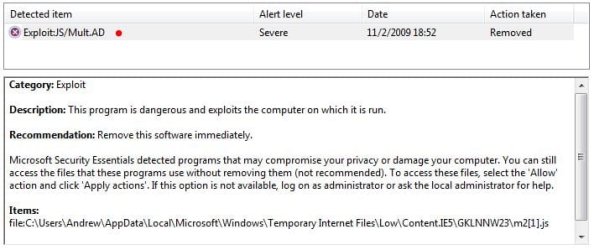
MSE detected exploit..JPG
 

My Computer

Computer type
PC/Desktop
Computer Manufacturer/Model Number
Custom built by me.
OS
Windows 10 Pro
CPU
Intel Core i7-4770K (3.5Ghz)
Motherboard
Gigabyte G1 Sniper 5 (F10 Bios)
Memory
32 gig Corsair Dominator Platinum (4x8Gig)
Graphics Card(s)
Sapphire Tri-X R9 Fury
Sound Card
Soundblaster ZXR
Monitor(s) Displays
NEC PA242W 24" LCD Monitor
Screen Resolution
1920 x 1200
Hard Drives
Primary - Samsung 850 Pro (512gig), Samsung 840 Pro (256gig), 2TB WD Caviar Black.
PSU
EVGA Supernova 1000 G2
Case
Cooler Master HAF X
Cooling
Corsair H100i with Corsair Air Series SP120 Quiet Fans
Keyboard
Logitech Wireless Wave
Mouse
Logitech Performance MX
Internet Speed
High Speed Cable
Antivirus
Norton Security
Browser
IE11
Other Info
Memory Timings - 1866MHz @ 9-9-9-27-1T @ 1.5 volts
10 partitions and 3 drives. Thats whats taking so long. You might try adding some exclusions. MSSE>Settings>Exclude File Types.

I added quite a few exclusions since there arent any be default. Every other virus scanner has a default set. So you will need to add some to MSSE. Thsi will speed up scanning... Here are some to get you started..

AVI, BMP, CHM, INI, ICO, JPG, HXW, MPG, MP3, PNG, TXT, WMV, XML

You can also exclude know safe folders under the Excluded Files & Locations.
 

My Computer

Computer Manufacturer/Model Number
Dell Dimension E520
OS
Windows 7 Ultimate (x86)
CPU
Intel 2.20 Dual Core
Memory
4 GB
Graphics Card(s)
nVidia 9400 GT (512 MB)
Sound Card
Sigmatel C Major HD
Monitor(s) Displays
22" Samsung 2232 bw
Screen Resolution
1680x1050
Mouse
Microsoft Arc
Other Info
Wacom Graphire 4 (6x8) Tablet
@ Disk4mat, while I acknowledge what you say, it doesn't really answer my question.

What I wanted to know was why is it taking way longer than Kaspersky as it scans under the exact same conditions, that is, no exclusions. Again, without exclusions, Kaspersky takes about an hour to do a full system scan, MSE took about 8.5 under the same conditions!

Also, i'm aware that some Anti-Virus programs take a little longer during an initial scan, but given that, Kaspersky took a little less the 80 minutes to do a full system scan, compared to MSE's 8 hours :eek:

And to answer some basic questions...

No, I don't have two Anti-Virus scanners running on the same OS. What I have is one hard drive running Windows Vista which has Kaspersky installed, and my W7 hard drive which has MSE installed. I don't dual boot, I access the HDs through the BIOS. Just to clear those questions up.

So, has anyone else noticed MSE taking a long time for full system scans? 8 hours seems mighterly excessive, especially compared to Kaspersky, and Norton, which i've used for years until moving to Vista x64 and now Windows 7 x64.

Thanks
 

My Computer

Computer type
PC/Desktop
Computer Manufacturer/Model Number
Custom built by me.
OS
Windows 10 Pro
CPU
Intel Core i7-4770K (3.5Ghz)
Motherboard
Gigabyte G1 Sniper 5 (F10 Bios)
Memory
32 gig Corsair Dominator Platinum (4x8Gig)
Graphics Card(s)
Sapphire Tri-X R9 Fury
Sound Card
Soundblaster ZXR
Monitor(s) Displays
NEC PA242W 24" LCD Monitor
Screen Resolution
1920 x 1200
Hard Drives
Primary - Samsung 850 Pro (512gig), Samsung 840 Pro (256gig), 2TB WD Caviar Black.
PSU
EVGA Supernova 1000 G2
Case
Cooler Master HAF X
Cooling
Corsair H100i with Corsair Air Series SP120 Quiet Fans
Keyboard
Logitech Wireless Wave
Mouse
Logitech Performance MX
Internet Speed
High Speed Cable
Antivirus
Norton Security
Browser
IE11
Other Info
Memory Timings - 1866MHz @ 9-9-9-27-1T @ 1.5 volts
Did you run the full scan for the 2nd time? Usually, initial scan takes time. But the next full scan should reduce the scan time to a some extent.
 

My Computer

Computer Manufacturer/Model Number
Samsung NP530U4B-S02IN
OS
Windows® 8 Pro (64-bit)
CPU
Intel® Core™ i5 Processor 2467M (1.60GHz, 3MB L3 Cache)
Motherboard
Samsung Electronics
Memory
6GB DDR3 System Memory at 1,333MHz (on BD 4GB + 2GB x 1)
Graphics Card(s)
AMD Radeon™ HD7550M 1GB DDR3 (Ext. Graphic)
Sound Card
Realtek High Definition Audio
Monitor(s) Displays
35.56cm (14.0) SuperBright 300nit HD LED Display
Screen Resolution
1366x768
Hard Drives
1TB S-ATA II Hard Drive (5400RPM) with ExpressCache 16GB SSD
Internet Speed
sucks
Antivirus
Microsoft Security Essentials
Browser
Google Chrome (Sync enabled)
It could be any number of reasons from Kasp has a faster scanning engine to MSSE scans more file types to Kasp runs faster under Vista.

I just did a complete scan and it took 21 minutes.
C: 48 GB (11.5 in use)
D: 100 GB (17.8 in use)
X: 250 GB (117 in use)
 

My Computer

Computer Manufacturer/Model Number
Dell Dimension E520
OS
Windows 7 Ultimate (x86)
CPU
Intel 2.20 Dual Core
Memory
4 GB
Graphics Card(s)
nVidia 9400 GT (512 MB)
Sound Card
Sigmatel C Major HD
Monitor(s) Displays
22" Samsung 2232 bw
Screen Resolution
1680x1050
Mouse
Microsoft Arc
Other Info
Wacom Graphire 4 (6x8) Tablet
What I wanted to know was why is it taking way longer than Kaspersky...

Were you doing or running other I/O bound applications? MSE runs in a background thread with low priority so it won't interfere with anything you the user is running or doing. That can count for the longer period. MSE will instantly withdraw if a higher priority task is requesting the same I/O resources it has a hold of.
 

My Computer

Computer type
PC/Desktop
Computer Manufacturer/Model Number
Alienware Aurora ALX R4
OS
Windows 10 Pro (x64)
CPU
Intel Core i7-3930K (3.2GHz - 4.5GHz)
Motherboard
Alienware Aurora-R4 x79
Memory
4x Samsung 4GB PC3-12800 DDR3 (16GB 1600MHz)
Graphics Card(s)
Nvidia Geforce GTX 690
Sound Card
SteelSeries Siberia Elite
Monitor(s) Displays
Dell UltraSharp U3011
Screen Resolution
2560x1600
Hard Drives
Samsung 850 Pro 256 GB, Seagate 1TB Desktop Hybrid HDD, 2x Western Digital 4TB Green HDD
PSU
875W Some Dell PSU <.<
Case
Alienware Aurora ALX
Cooling
Custom Liquid Cooling (EK CPU & GPU blocks) dual EK 480RAD
Keyboard
Logitech G710+ Mechanical
Mouse
Logitech G700s
Internet Speed
Verizon Fios (50 mbps average)
Other Info
Server: Intel NUC D54250WYK: i5-4250U, 16GB, 256 GB mSATA, Windows Server 2012 R2
@Dinesh,

I'll run a second scan later to see if the problem still exists; and now that I think about it, logicearth might have a point about doing other tasks while the system was running as I was doing other tasks, so we'll see what a second scan brings without me doing anything else.

Still 8+ hours is excessive, even while doing other tasks.

Will post back later.

Thanks.
 

My Computer

Computer type
PC/Desktop
Computer Manufacturer/Model Number
Custom built by me.
OS
Windows 10 Pro
CPU
Intel Core i7-4770K (3.5Ghz)
Motherboard
Gigabyte G1 Sniper 5 (F10 Bios)
Memory
32 gig Corsair Dominator Platinum (4x8Gig)
Graphics Card(s)
Sapphire Tri-X R9 Fury
Sound Card
Soundblaster ZXR
Monitor(s) Displays
NEC PA242W 24" LCD Monitor
Screen Resolution
1920 x 1200
Hard Drives
Primary - Samsung 850 Pro (512gig), Samsung 840 Pro (256gig), 2TB WD Caviar Black.
PSU
EVGA Supernova 1000 G2
Case
Cooler Master HAF X
Cooling
Corsair H100i with Corsair Air Series SP120 Quiet Fans
Keyboard
Logitech Wireless Wave
Mouse
Logitech Performance MX
Internet Speed
High Speed Cable
Antivirus
Norton Security
Browser
IE11
Other Info
Memory Timings - 1866MHz @ 9-9-9-27-1T @ 1.5 volts
Back
Top