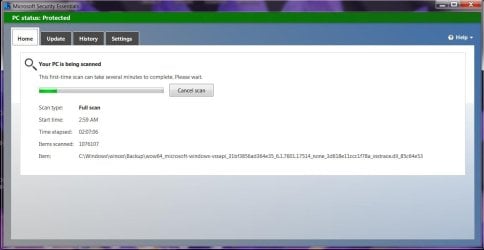
Solved Microsoft Security Essentials doesn't finish full scan

Nelson35

New member
Member
Local time
6:51 AM
Messages
91
Lately when I try to do a full scan with MSE it gets stuck at the same spot and doesn't finish the scan. I ran sfc / scannow and got this: Microsoft Windows [Version 6.1.7601]
Copyright (c) 2009 Microsoft Corporation. All rights reserved.

C:\Windows\system32>sfc /scannow

Beginning system scan. This process will take some time.

Beginning verification phase of system scan.
Verification 100% complete.
Windows Resource Protection found corrupt files but was unable to fix some of th
em.
Details are included in the CBS.Log windir\Logs\CBS\CBS.log. For example
C:\Windows\Logs\CBS\CBS.log

C:\Windows\system32>

I've attached it wasn't able to repair in a txt file
 

Attachments

My Computer

Computer type
PC/Desktop
Computer Manufacturer/Model Number
Puget Systems
OS
Windows 7 Home Premium 64bit
CPU
Intel core i5
Motherboard
ASUSTeK Computer INC. P8Z68-V PRO GEN3 (LGA1155)
Memory
8GB
Graphics Card(s)
AMD Radeo HD 7700 series
Sound Card
Realtek High Definition Audio
Monitor(s) Displays
Acer Al2002W
Screen Resolution
1680x1050
Hard Drives
500GB
298GB Western Digital WD 3200AAJ External
2794GB Western Digital WD My Book 1230
PSU
Antec TruePower New Series 650W
Case
Lancool C-K7B
Cooling
Cooler Master Hyper TX3
Antivirus
windows security essentials
Browser
IE10, Firefox
Remove KB3068708 and reboot.
Check Windows Updates again. It will offer you KB3068708 again.
Right tick on it and select hide.

Reboot and run sfc /scannow again.

If you still have a problem with MSE remove it and reinstall it again.
 

My Computer

Computer type
PC/Desktop
Computer Manufacturer/Model Number
Home made Desktop
OS
Windows 10 Pro. 64/ version 1709 Windows 7 Pro/64
CPU
Intel i7-6800K @ 4.3
Motherboard
ASUS X-99 Deluxe II
Memory
Corsair Platinum 16 gig @2400
Graphics Card(s)
EVGA GTX 1070 OC
Monitor(s) Displays
Asus 27" LED LCD/VE278Q
Screen Resolution
1920-1080 or 1280-720 HDMI
Hard Drives
INTEL SSD 730-240 Gb Sata 3.0/
PSU
EVGA Platium 1200W
Case
Phanteks Luxe Tempered Glass 8 fans/ one radiator
Cooling
XSPC/ Water Cooled CPU
Keyboard
Das 4 Professional
Mouse
Logitech M705/MX Anywhere 2-S
Internet Speed
100 mbits
Antivirus
Microsoft Security Essentials/ Malwarebytes Premium 3.0/ SAS
Browser
I.E. 11 default/Firefox/ ISP Time Warner Cable/Spectrum
Other Info
LG BluRay Burner/
Sound system-KLipsch-THX/
Icy Dock ssd Hot Swap bays.

My Computer

Computer type
PC/Desktop
Computer Manufacturer/Model Number
Custom assembled by me :}
OS
Win-7-Pro64bit 7-H-Prem-64bit
CPU
i7-5930K 2nd i9-9940x both water blocked VRM's too
Motherboard
ASUS SABERTOOTH X99 2nd ASUS x299 Apex
Memory
Trident-z 3200C14 2nd Trident-z 3600C16
Graphics Card(s)
EVGA 1080ti ftw3 2nd Titan Xp both water blocked
Sound Card
Built-in Realtek
Monitor(s) Displays
1-AOC G2460PG 24"G-Sync 144Hz/ 2nd 1-ASUS VG248QE 24" 144Hz
Screen Resolution
1920 x 1080 144Hz
Hard Drives
2-Samsung M.2 Evo & Evo Plus
2-Samsung 850 EVO 500GB SSD's/ 3-2.5 W.D. Black 1tb-&3-1tb/3-3.5 WD Black 1tb hdd's
PSU
EVGA SuperNOVA 1000-P2 2nd 1200-P2
Case
2-Corsair Obsidian Series 450D Black ATX Mid Tower
Cooling
Custom water loops
Keyboard
Logitech G710+/ 2nd Logitech G910
Mouse
2-RedDragon M901 Perdition 16400 dpi Gaming mouse = wired
Internet Speed
Comcast Ping 19ms 89.31mbps download speed 6.12mbps upload
Antivirus
Malwarebytes Pro/ Superantispyware Pro
Browser
FireFox & Pale moon
Other Info
2nd ASUS X299 Apex/Intel i9-9940x with Custom water loop/7H-Prem-x64/Corsair 450D case/Ram Trident-z 3600C16 4x8gb / Samsung970Evo plus 500gb SSD/Dual ssd EZ swap evo/PSU EVGA SuperNova 1200w-P2 80+Platinum/GPU Titan Xp /8-ML-140 on push-pull on 2-280GTX rads
Remove KB3068708 and reboot.
Check Windows Updates again. It will offer you KB3068708 again.
Right tick on it and select hide.

Reboot and run sfc /scannow again.

If you still have a problem with MSE remove it and reinstall it again.

I removed and reinstalled it. I got it to upgrade, which it wouldn't do before, but it became stuck again when I tried a full scan. Here's a pic.
 

Attachments

  • MSE.jpg
    MSE.jpg
    55 KB · Views: 6

My Computer

Computer type
PC/Desktop
Computer Manufacturer/Model Number
Puget Systems
OS
Windows 7 Home Premium 64bit
CPU
Intel core i5
Motherboard
ASUSTeK Computer INC. P8Z68-V PRO GEN3 (LGA1155)
Memory
8GB
Graphics Card(s)
AMD Radeo HD 7700 series
Sound Card
Realtek High Definition Audio
Monitor(s) Displays
Acer Al2002W
Screen Resolution
1680x1050
Hard Drives
500GB
298GB Western Digital WD 3200AAJ External
2794GB Western Digital WD My Book 1230
PSU
Antec TruePower New Series 650W
Case
Lancool C-K7B
Cooling
Cooler Master Hyper TX3
Antivirus
windows security essentials
Browser
IE10, Firefox
If it's stuck on that one file in the winsxs folder for hours i would
Go to the VirusTotal site
https://www.virustotal.com/en/

Click on Choose file
"Navigate" to that file in the winsxs folder
Select/Open it
Click Scan it

See what VirusTotal does with the file
 

My Computer

Computer type
PC/Desktop
Computer Manufacturer/Model Number
home built
OS
Multi-Boot W7_Pro_x64 W8.1_Pro_x64 W10_Pro_x64 +Linux_VMs +Chromium_VM
CPU
AMD Athlon II x4 620
Motherboard
Gigabyte GA-MA785G-UD3H
Memory
6GB GSkill DDR2 800
Graphics Card(s)
AMD 4670 GPU + AMD 4200 IGP
Sound Card
on board Realtek ALC889A
Monitor(s) Displays
RCA 40" LCD TV, Insignia 32" LCD TV, HP 15" LCD monitor
Screen Resolution
1680 x 1050
Hard Drives
OCZ Vertex 3 120GB,
Samsung F3 1TB (3),
Several others - WD, Seagate, Hitachi, ...
PSU
Corsair 500 W
Case
Rosewill mid tower
Cooling
CM 90mm rifle
Keyboard
Gyration wireless, Logitech wireless, Dell USB wired
Mouse
Gyration wireless, Logitech wireless, V7 USB wired
Internet Speed
Spectrum - 100Mbps D / 10Mbps U
Antivirus
Avast, MBAM3, EMET, WinPatrol
Browser
Pale Moon, Firefox, IE
Other Info
2 multi-boot PC's
Mainly HTPC/Office/Gen purpose (no gaming).
Trendnet USB KVM.
LG DVD burner/Blue Ray Player.
Tray system for removable SATA backup drives.

Not currently OCd, under-volted.
I use Hybrid sleep, rarely re-boot or shutdown.

Hauppauge HD-PVR, Avermedia PCIe TV Tuner, Hauppauge PCI TV Tuner.
If it's stuck on that one file in the winsxs folder for hours i would
Go to the VirusTotal site
https://www.virustotal.com/en/

Click on Choose file
"Navigate" to that file in the winsxs folder
Select/Open it
Click Scan it

See what VirusTotal does with the file

It said it was from Microsoft:

Copyright
© Microsoft Corporation. All rights reserved.


Product Microsoft® Windows® Operating System
Original name vsstrace.dll
Internal name vsstrace.dll
File version 6.1.7600.16385 (win7_rtm.090713-1255)
Description Microsoft® Volume Shadow Copy Service Tracing Library
Signature verification Signed file, verified signature
Signing date 4:17 AM 7/14/2009

:confused:
 

My Computer

Computer type
PC/Desktop
Computer Manufacturer/Model Number
Puget Systems
OS
Windows 7 Home Premium 64bit
CPU
Intel core i5
Motherboard
ASUSTeK Computer INC. P8Z68-V PRO GEN3 (LGA1155)
Memory
8GB
Graphics Card(s)
AMD Radeo HD 7700 series
Sound Card
Realtek High Definition Audio
Monitor(s) Displays
Acer Al2002W
Screen Resolution
1680x1050
Hard Drives
500GB
298GB Western Digital WD 3200AAJ External
2794GB Western Digital WD My Book 1230
PSU
Antec TruePower New Series 650W
Case
Lancool C-K7B
Cooling
Cooler Master Hyper TX3
Antivirus
windows security essentials
Browser
IE10, Firefox
Anytime MSE has stalled or seemed frozen all I did was close it and go to windows updates and see if there was anything there waiting to be installed security wise relating to MSE
If nothing there I'd manually search for windows updates

After all said and done I'd do what I already posted = switch to Panda and uninstall MSE :)
 

My Computer

Computer type
PC/Desktop
Computer Manufacturer/Model Number
Custom assembled by me :}
OS
Win-7-Pro64bit 7-H-Prem-64bit
CPU
i7-5930K 2nd i9-9940x both water blocked VRM's too
Motherboard
ASUS SABERTOOTH X99 2nd ASUS x299 Apex
Memory
Trident-z 3200C14 2nd Trident-z 3600C16
Graphics Card(s)
EVGA 1080ti ftw3 2nd Titan Xp both water blocked
Sound Card
Built-in Realtek
Monitor(s) Displays
1-AOC G2460PG 24"G-Sync 144Hz/ 2nd 1-ASUS VG248QE 24" 144Hz
Screen Resolution
1920 x 1080 144Hz
Hard Drives
2-Samsung M.2 Evo & Evo Plus
2-Samsung 850 EVO 500GB SSD's/ 3-2.5 W.D. Black 1tb-&3-1tb/3-3.5 WD Black 1tb hdd's
PSU
EVGA SuperNOVA 1000-P2 2nd 1200-P2
Case
2-Corsair Obsidian Series 450D Black ATX Mid Tower
Cooling
Custom water loops
Keyboard
Logitech G710+/ 2nd Logitech G910
Mouse
2-RedDragon M901 Perdition 16400 dpi Gaming mouse = wired
Internet Speed
Comcast Ping 19ms 89.31mbps download speed 6.12mbps upload
Antivirus
Malwarebytes Pro/ Superantispyware Pro
Browser
FireFox & Pale moon
Other Info
2nd ASUS X299 Apex/Intel i9-9940x with Custom water loop/7H-Prem-x64/Corsair 450D case/Ram Trident-z 3600C16 4x8gb / Samsung970Evo plus 500gb SSD/Dual ssd EZ swap evo/PSU EVGA SuperNova 1200w-P2 80+Platinum/GPU Titan Xp /8-ML-140 on push-pull on 2-280GTX rads
Anytime MSE has stalled or seemed frozen all I did was close it and go to windows updates and see if there was anything there waiting to be installed security wise relating to MSE
If nothing there I'd manually search for windows updates

After all said and done I'd do what I already posted = switch to Panda and uninstall MSE :)

Panda eh? There are so many programs out there, I've never heard of that one. I have the pro version of Malwarebytes and the free version of Super anti spyware installed on here. I'll have to check out Panda if I can't get MSE back to working right.
 

My Computer

Computer type
PC/Desktop
Computer Manufacturer/Model Number
Puget Systems
OS
Windows 7 Home Premium 64bit
CPU
Intel core i5
Motherboard
ASUSTeK Computer INC. P8Z68-V PRO GEN3 (LGA1155)
Memory
8GB
Graphics Card(s)
AMD Radeo HD 7700 series
Sound Card
Realtek High Definition Audio
Monitor(s) Displays
Acer Al2002W
Screen Resolution
1680x1050
Hard Drives
500GB
298GB Western Digital WD 3200AAJ External
2794GB Western Digital WD My Book 1230
PSU
Antec TruePower New Series 650W
Case
Lancool C-K7B
Cooling
Cooler Master Hyper TX3
Antivirus
windows security essentials
Browser
IE10, Firefox

My Computer

Computer type
PC/Desktop
Computer Manufacturer/Model Number
Custom assembled by me :}
OS
Win-7-Pro64bit 7-H-Prem-64bit
CPU
i7-5930K 2nd i9-9940x both water blocked VRM's too
Motherboard
ASUS SABERTOOTH X99 2nd ASUS x299 Apex
Memory
Trident-z 3200C14 2nd Trident-z 3600C16
Graphics Card(s)
EVGA 1080ti ftw3 2nd Titan Xp both water blocked
Sound Card
Built-in Realtek
Monitor(s) Displays
1-AOC G2460PG 24"G-Sync 144Hz/ 2nd 1-ASUS VG248QE 24" 144Hz
Screen Resolution
1920 x 1080 144Hz
Hard Drives
2-Samsung M.2 Evo & Evo Plus
2-Samsung 850 EVO 500GB SSD's/ 3-2.5 W.D. Black 1tb-&3-1tb/3-3.5 WD Black 1tb hdd's
PSU
EVGA SuperNOVA 1000-P2 2nd 1200-P2
Case
2-Corsair Obsidian Series 450D Black ATX Mid Tower
Cooling
Custom water loops
Keyboard
Logitech G710+/ 2nd Logitech G910
Mouse
2-RedDragon M901 Perdition 16400 dpi Gaming mouse = wired
Internet Speed
Comcast Ping 19ms 89.31mbps download speed 6.12mbps upload
Antivirus
Malwarebytes Pro/ Superantispyware Pro
Browser
FireFox & Pale moon
Other Info
2nd ASUS X299 Apex/Intel i9-9940x with Custom water loop/7H-Prem-x64/Corsair 450D case/Ram Trident-z 3600C16 4x8gb / Samsung970Evo plus 500gb SSD/Dual ssd EZ swap evo/PSU EVGA SuperNova 1200w-P2 80+Platinum/GPU Titan Xp /8-ML-140 on push-pull on 2-280GTX rads
If it's stuck on that one file in the winsxs folder for hours i would
Go to the VirusTotal site
https://www.virustotal.com/en/

Click on Choose file
"Navigate" to that file in the winsxs folder
Select/Open it
Click Scan it

See what VirusTotal does with the file

It said it was from Microsoft:

Copyright
© Microsoft Corporation. All rights reserved.


Product Microsoft® Windows® Operating System
Original name vsstrace.dll
Internal name vsstrace.dll
File version 6.1.7600.16385 (win7_rtm.090713-1255)
Description Microsoft® Volume Shadow Copy Service Tracing Library
Signature verification Signed file, verified signature
Signing date 4:17 AM 7/14/2009

:confused:

I suggested VirusTotal to see if any of the scanners find malware in that file, or couldn't scan the file.
From your post, it looks like the file is clean and can be scanned.
 

My Computer

Computer type
PC/Desktop
Computer Manufacturer/Model Number
home built
OS
Multi-Boot W7_Pro_x64 W8.1_Pro_x64 W10_Pro_x64 +Linux_VMs +Chromium_VM
CPU
AMD Athlon II x4 620
Motherboard
Gigabyte GA-MA785G-UD3H
Memory
6GB GSkill DDR2 800
Graphics Card(s)
AMD 4670 GPU + AMD 4200 IGP
Sound Card
on board Realtek ALC889A
Monitor(s) Displays
RCA 40" LCD TV, Insignia 32" LCD TV, HP 15" LCD monitor
Screen Resolution
1680 x 1050
Hard Drives
OCZ Vertex 3 120GB,
Samsung F3 1TB (3),
Several others - WD, Seagate, Hitachi, ...
PSU
Corsair 500 W
Case
Rosewill mid tower
Cooling
CM 90mm rifle
Keyboard
Gyration wireless, Logitech wireless, Dell USB wired
Mouse
Gyration wireless, Logitech wireless, V7 USB wired
Internet Speed
Spectrum - 100Mbps D / 10Mbps U
Antivirus
Avast, MBAM3, EMET, WinPatrol
Browser
Pale Moon, Firefox, IE
Other Info
2 multi-boot PC's
Mainly HTPC/Office/Gen purpose (no gaming).
Trendnet USB KVM.
LG DVD burner/Blue Ray Player.
Tray system for removable SATA backup drives.

Not currently OCd, under-volted.
I use Hybrid sleep, rarely re-boot or shutdown.

Hauppauge HD-PVR, Avermedia PCIe TV Tuner, Hauppauge PCI TV Tuner.
I used safe mode and was able to do a full scan and it found one virus. It was something called TrojanClicker:js/chroject.a I haven't tried a full scan in normal mode yet, hopefully it will work now.
 

My Computer

Computer type
PC/Desktop
Computer Manufacturer/Model Number
Puget Systems
OS
Windows 7 Home Premium 64bit
CPU
Intel core i5
Motherboard
ASUSTeK Computer INC. P8Z68-V PRO GEN3 (LGA1155)
Memory
8GB
Graphics Card(s)
AMD Radeo HD 7700 series
Sound Card
Realtek High Definition Audio
Monitor(s) Displays
Acer Al2002W
Screen Resolution
1680x1050
Hard Drives
500GB
298GB Western Digital WD 3200AAJ External
2794GB Western Digital WD My Book 1230
PSU
Antec TruePower New Series 650W
Case
Lancool C-K7B
Cooling
Cooler Master Hyper TX3
Antivirus
windows security essentials
Browser
IE10, Firefox
You might want to try a scan with WDO.

I use WDO with a USB stick instead of a CD/DVD.

There are some infections that hide from scans once Windows has started.
 

My Computer

Computer type
Laptop
Computer Manufacturer/Model Number
Employer provided Dell Latitude
OS
W7 Pro SP1 64bit
CPU
i7
Memory
8GB
Graphics Card(s)
Intel HD Graphics
Hard Drives
crappy SSD
Antivirus
Employer mandated Symantec Endpoint Protection
Browser
Pale Moon 64bit, IE11 64bit & Chrome 64bit

My Computer

Computer type
PC/Desktop
Computer Manufacturer/Model Number
Home made Desktop
OS
Windows 10 Pro. 64/ version 1709 Windows 7 Pro/64
CPU
Intel i7-6800K @ 4.3
Motherboard
ASUS X-99 Deluxe II
Memory
Corsair Platinum 16 gig @2400
Graphics Card(s)
EVGA GTX 1070 OC
Monitor(s) Displays
Asus 27" LED LCD/VE278Q
Screen Resolution
1920-1080 or 1280-720 HDMI
Hard Drives
INTEL SSD 730-240 Gb Sata 3.0/
PSU
EVGA Platium 1200W
Case
Phanteks Luxe Tempered Glass 8 fans/ one radiator
Cooling
XSPC/ Water Cooled CPU
Keyboard
Das 4 Professional
Mouse
Logitech M705/MX Anywhere 2-S
Internet Speed
100 mbits
Antivirus
Microsoft Security Essentials/ Malwarebytes Premium 3.0/ SAS
Browser
I.E. 11 default/Firefox/ ISP Time Warner Cable/Spectrum
Other Info
LG BluRay Burner/
Sound system-KLipsch-THX/
Icy Dock ssd Hot Swap bays.

My Computer

Computer type
PC/Desktop
Computer Manufacturer/Model Number
Bruce ... somewhere in his 40's
OS
Windows 7 Ultimate 32bit SP1
CPU
Intel(R) Core(TM)2 Quad CPU @ 2.40GHz, 2400 MHz
Motherboard
INTEL/D975XBX2
Memory
4 GB
Graphics Card(s)
ATI Radeon HD 2600 Pro
Monitor(s) Displays
Samsung SyncMaster 914v
Screen Resolution
1280 x 1024
Hard Drives
2/500GB each ... ST3500630AS ATA Device.
One is not connected
PSU
Rocketfish 700 W
Case
G.Skill Gigabyte Chassis
Keyboard
Standard PS/2 Keyboard
Mouse
Microsoft PS/2 Mouse
Internet Speed
DSL
Antivirus
Avira Internet Security
Browser
IE 11
Other Info
ATI HDMI Audio
Let's flush the 'dirty DNS cache' by:

Copy and paste these lines in Note pad.

@Echo on
pushd\windows\system32\drivers\etc
attrib -h -s -r hosts
echo 127.0.0.1 localhost>HOSTS
attrib +r +h +s hosts
popd
ipconfig /release
ipconfig /renew
ipconfig /flushdns
netsh winsock reset all
netsh int ip reset all
shutdown -r -t 1
del %0


Save as flush.bat to your desktop. Right click on the flush.bat file to run it as Administrator.
Your computer will reboot itself.

Next, Please download AdwCleaner by Xplode and save to your Desktop.

Step 1.
  • Double click on AdwCleaner.exe to run the tool.
    Vista/Windows 7/8 users right-click and select Run As Administrator.
  • Click on the Scan button.
  • AdwCleaner will begin...be patient as the scan may take some time to complete.
  • After the scan has finished, click on the Report button...a logfile (AdwCleaner[R#].txt) will open in Notepad for review (where the largest value of # represents the most recent report).
  • The contents of the log file may be confusing. Unless you see a program name that you know should not be removed, don't worry about it. If you see an entry you want to keep, let me know about it.
  • Copy and paste the contents of that logfile in your next reply.
  • A copy of all logfiles are saved in the C:\AdwCleaner folder which was created when running the tool.

Step 2.
Using AdwCleaner: Scan & Clean:
This time click on the Clean button.
Press OK when asked to close all programs and follow the onscreen prompts.
Press OK again to allow AdwCleaner to restart the computer and complete the removal process.
After rebooting, a logfile report (AdwCleaner[S#].txt) will open automatically (where the largest value of # represents the most recent report).
Copy and paste the contents of that logfile in your next reply.

A copy of that logfile will also be saved in the C:\AdwCleaner folder

******Post both .txt logs
 

My Computer

Computer type
PC/Desktop
Computer Manufacturer/Model Number
Bruce ... somewhere in his 40's
OS
Windows 7 Ultimate 32bit SP1
CPU
Intel(R) Core(TM)2 Quad CPU @ 2.40GHz, 2400 MHz
Motherboard
INTEL/D975XBX2
Memory
4 GB
Graphics Card(s)
ATI Radeon HD 2600 Pro
Monitor(s) Displays
Samsung SyncMaster 914v
Screen Resolution
1280 x 1024
Hard Drives
2/500GB each ... ST3500630AS ATA Device.
One is not connected
PSU
Rocketfish 700 W
Case
G.Skill Gigabyte Chassis
Keyboard
Standard PS/2 Keyboard
Mouse
Microsoft PS/2 Mouse
Internet Speed
DSL
Antivirus
Avira Internet Security
Browser
IE 11
Other Info
ATI HDMI Audio
Let's flush the 'dirty DNS cache' by:

Copy and paste these lines in Note pad.

@Echo on
pushd\windows\system32\drivers\etc
attrib -h -s -r hosts
echo 127.0.0.1 localhost>HOSTS
attrib +r +h +s hosts
popd
ipconfig /release
ipconfig /renew
ipconfig /flushdns
netsh winsock reset all
netsh int ip reset all
shutdown -r -t 1
del %0


Save as flush.bat to your desktop. Right click on the flush.bat file to run it as Administrator.
Your computer will reboot itself.

Next, Please download AdwCleaner by Xplode and save to your Desktop.

Step 1.
  • Double click on AdwCleaner.exe to run the tool.
    Vista/Windows 7/8 users right-click and select Run As Administrator.
  • Click on the Scan button.
  • AdwCleaner will begin...be patient as the scan may take some time to complete.
  • After the scan has finished, click on the Report button...a logfile (AdwCleaner[R#].txt) will open in Notepad for review (where the largest value of # represents the most recent report).
  • The contents of the log file may be confusing. Unless you see a program name that you know should not be removed, don't worry about it. If you see an entry you want to keep, let me know about it.
  • Copy and paste the contents of that logfile in your next reply.
  • A copy of all logfiles are saved in the C:\AdwCleaner folder which was created when running the tool.

Step 2.
Using AdwCleaner: Scan & Clean:
This time click on the Clean button.
Press OK when asked to close all programs and follow the onscreen prompts.
Press OK again to allow AdwCleaner to restart the computer and complete the removal process.
After rebooting, a logfile report (AdwCleaner[S#].txt) will open automatically (where the largest value of # represents the most recent report).
Copy and paste the contents of that logfile in your next reply.

A copy of that logfile will also be saved in the C:\AdwCleaner folder

******Post both .txt logs

Here's the 1st .txt log. I didn't want to clean it until you've seen it.
 

Attachments

My Computer

Computer type
PC/Desktop
Computer Manufacturer/Model Number
Puget Systems
OS
Windows 7 Home Premium 64bit
CPU
Intel core i5
Motherboard
ASUSTeK Computer INC. P8Z68-V PRO GEN3 (LGA1155)
Memory
8GB
Graphics Card(s)
AMD Radeo HD 7700 series
Sound Card
Realtek High Definition Audio
Monitor(s) Displays
Acer Al2002W
Screen Resolution
1680x1050
Hard Drives
500GB
298GB Western Digital WD 3200AAJ External
2794GB Western Digital WD My Book 1230
PSU
Antec TruePower New Series 650W
Case
Lancool C-K7B
Cooling
Cooler Master Hyper TX3
Antivirus
windows security essentials
Browser
IE10, Firefox
Follow the second step to "clean" ... reboot.

Tell me if you can run a full scan with MSE now.
 

My Computer

Computer type
PC/Desktop
Computer Manufacturer/Model Number
Bruce ... somewhere in his 40's
OS
Windows 7 Ultimate 32bit SP1
CPU
Intel(R) Core(TM)2 Quad CPU @ 2.40GHz, 2400 MHz
Motherboard
INTEL/D975XBX2
Memory
4 GB
Graphics Card(s)
ATI Radeon HD 2600 Pro
Monitor(s) Displays
Samsung SyncMaster 914v
Screen Resolution
1280 x 1024
Hard Drives
2/500GB each ... ST3500630AS ATA Device.
One is not connected
PSU
Rocketfish 700 W
Case
G.Skill Gigabyte Chassis
Keyboard
Standard PS/2 Keyboard
Mouse
Microsoft PS/2 Mouse
Internet Speed
DSL
Antivirus
Avira Internet Security
Browser
IE 11
Other Info
ATI HDMI Audio
Follow the second step to "clean" ... reboot.

Tell me if you can run a full scan with MSE now.

No it still wouldn't complete a full scan unless in safe mode. ThrashZone suggested I try a program called Panda; I guess I'll try it for a little while and see how it goes.
 

Attachments

My Computer

Computer type
PC/Desktop
Computer Manufacturer/Model Number
Puget Systems
OS
Windows 7 Home Premium 64bit
CPU
Intel core i5
Motherboard
ASUSTeK Computer INC. P8Z68-V PRO GEN3 (LGA1155)
Memory
8GB
Graphics Card(s)
AMD Radeo HD 7700 series
Sound Card
Realtek High Definition Audio
Monitor(s) Displays
Acer Al2002W
Screen Resolution
1680x1050
Hard Drives
500GB
298GB Western Digital WD 3200AAJ External
2794GB Western Digital WD My Book 1230
PSU
Antec TruePower New Series 650W
Case
Lancool C-K7B
Cooling
Cooler Master Hyper TX3
Antivirus
windows security essentials
Browser
IE10, Firefox
Post the results from Panda.
 

My Computer

Computer type
PC/Desktop
Computer Manufacturer/Model Number
Bruce ... somewhere in his 40's
OS
Windows 7 Ultimate 32bit SP1
CPU
Intel(R) Core(TM)2 Quad CPU @ 2.40GHz, 2400 MHz
Motherboard
INTEL/D975XBX2
Memory
4 GB
Graphics Card(s)
ATI Radeon HD 2600 Pro
Monitor(s) Displays
Samsung SyncMaster 914v
Screen Resolution
1280 x 1024
Hard Drives
2/500GB each ... ST3500630AS ATA Device.
One is not connected
PSU
Rocketfish 700 W
Case
G.Skill Gigabyte Chassis
Keyboard
Standard PS/2 Keyboard
Mouse
Microsoft PS/2 Mouse
Internet Speed
DSL
Antivirus
Avira Internet Security
Browser
IE 11
Other Info
ATI HDMI Audio
Follow the second step to "clean" ... reboot.

Tell me if you can run a full scan with MSE now.

No it still wouldn't complete a full scan unless in safe mode. ThrashZone suggested I try a program called Panda; I guess I'll try it for a little while and see how it goes.
Hi it's about time :p
You won't regret leaving MSE's problems behind you ;)
Remember you really don't have to enter a email address just click later....
 

My Computer

Computer type
PC/Desktop
Computer Manufacturer/Model Number
Custom assembled by me :}
OS
Win-7-Pro64bit 7-H-Prem-64bit
CPU
i7-5930K 2nd i9-9940x both water blocked VRM's too
Motherboard
ASUS SABERTOOTH X99 2nd ASUS x299 Apex
Memory
Trident-z 3200C14 2nd Trident-z 3600C16
Graphics Card(s)
EVGA 1080ti ftw3 2nd Titan Xp both water blocked
Sound Card
Built-in Realtek
Monitor(s) Displays
1-AOC G2460PG 24"G-Sync 144Hz/ 2nd 1-ASUS VG248QE 24" 144Hz
Screen Resolution
1920 x 1080 144Hz
Hard Drives
2-Samsung M.2 Evo & Evo Plus
2-Samsung 850 EVO 500GB SSD's/ 3-2.5 W.D. Black 1tb-&3-1tb/3-3.5 WD Black 1tb hdd's
PSU
EVGA SuperNOVA 1000-P2 2nd 1200-P2
Case
2-Corsair Obsidian Series 450D Black ATX Mid Tower
Cooling
Custom water loops
Keyboard
Logitech G710+/ 2nd Logitech G910
Mouse
2-RedDragon M901 Perdition 16400 dpi Gaming mouse = wired
Internet Speed
Comcast Ping 19ms 89.31mbps download speed 6.12mbps upload
Antivirus
Malwarebytes Pro/ Superantispyware Pro
Browser
FireFox & Pale moon
Other Info
2nd ASUS X299 Apex/Intel i9-9940x with Custom water loop/7H-Prem-x64/Corsair 450D case/Ram Trident-z 3600C16 4x8gb / Samsung970Evo plus 500gb SSD/Dual ssd EZ swap evo/PSU EVGA SuperNova 1200w-P2 80+Platinum/GPU Titan Xp /8-ML-140 on push-pull on 2-280GTX rads
Back
Top