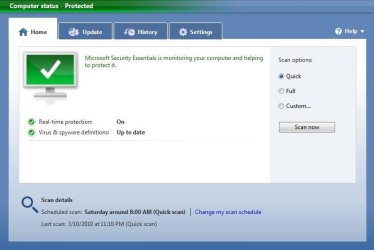
Solved Microsoft Security Essentials Final Available!

  • Thread starter Thread starter mattburles
  • Start date Start date
It's a great AV ever create, I already try the other such as Panda, KAV, NOD, Avira but still rob by virus but since I use MSE It's totally free
 

Attachments

  • MSE.JPG
    MSE.JPG
    49.1 KB · Views: 13
  • MSE1.JPG
    MSE1.JPG
    37 KB · Views: 19

My Computer

OS
windows 7
I do find the new WU update format for MSE to be annoying. I liked downloading the files whenever I wanted, rather than having an annoying pop=up show up every morning I start my computer.

I have been following a thread at DSL reports about this topic - A user there got this from MS ' I had sent an email to the MSE support team and got a reply back today. In part, here's what they said....

From your case description, I understand that you are concerned about Definition updates on Microsoft Security Essentials which is done using Windows update. If I have misunderstood, please do not hesitate to let me know.

Tony, please be assured our developers do recognize this issue and are working on it. As this issue has been hard-coded in the program, it will take us some time to modify it. We appreciate your patience and understanding while we are working on this.


Main thread Microsoft Security Essentials only using Windows Update now? - dslreports.com
 

My Computer

Computer type
PC/Desktop
Computer Manufacturer/Model Number
HP ENVY Phoenix 810-150se
OS
Win 8.1 Pro
CPU
3rd Generation Intel® Core™ i7-4820K processor quad-core [3
Motherboard
HP
Memory
12GB DDR3-1600MHz [2 DIMMs]
Graphics Card(s)
4GB Nvidia GeForce GT640
Sound Card
HP Beats Audio
Monitor(s) Displays
Dual Samsung 2343 & 2233RZ
Screen Resolution
2048 x 1152 / 1680 x 1050
Hard Drives
2TB 7200 RPM SATA Hard Drive & 1TB 7200 RPM SATA Hard Drive
PSU
600 W
Case
HP
Cooling
Liquid cooled (CPU/GPU)
Keyboard
HP
Mouse
HP
Internet Speed
40GB
Other Info
Blu-ray Reader & SuperMulti DVD burner
I do find the new WU update format for MSE to be annoying. I liked downloading the files whenever I wanted, rather than having an annoying pop=up show up every morning I start my computer.

I have been following a thread at DSL reports about this topic - A user there got this from MS ' I had sent an email to the MSE support team and got a reply back today. In part, here's what they said....

From your case description, I understand that you are concerned about Definition updates on Microsoft Security Essentials which is done using Windows update. If I have misunderstood, please do not hesitate to let me know.

Tony, please be assured our developers do recognize this issue and are working on it. As this issue has been hard-coded in the program, it will take us some time to modify it. We appreciate your patience and understanding while we are working on this.

Main thread Microsoft Security Essentials only using Windows Update now? - dslreports.com

Hmmm...I didn't even realize Microsoft changed this because I have Windows Update set to download and install critical updates automatically.


And before we go there, I've been doing the auto updates for years (since XP) and never had an issue.
 

My Computer

Computer type
PC/Desktop
Computer Manufacturer/Model Number
Custom built by me.
OS
Windows 10 Pro
CPU
Intel Core i7-4770K (3.5Ghz)
Motherboard
Gigabyte G1 Sniper 5 (F10 Bios)
Memory
32 gig Corsair Dominator Platinum (4x8Gig)
Graphics Card(s)
Sapphire Tri-X R9 Fury
Sound Card
Soundblaster ZXR
Monitor(s) Displays
NEC PA242W 24" LCD Monitor
Screen Resolution
1920 x 1200
Hard Drives
Primary - Samsung 850 Pro (512gig), Samsung 840 Pro (256gig), 2TB WD Caviar Black.
PSU
EVGA Supernova 1000 G2
Case
Cooler Master HAF X
Cooling
Corsair H100i with Corsair Air Series SP120 Quiet Fans
Keyboard
Logitech Wireless Wave
Mouse
Logitech Performance MX
Internet Speed
High Speed Cable
Antivirus
Norton Security
Browser
IE11
Other Info
Memory Timings - 1866MHz @ 9-9-9-27-1T @ 1.5 volts
I like to read the info on the updates when they're available.
 

My Computer

Computer Manufacturer/Model Number
Zen Productions
OS
Windows 7 Ultimate x64
CPU
Intel i7-860
Motherboard
Gigabyte GA-P55A-UD4P
Memory
Corsair Dominator 1600Mhz, 8-8-8-24 1.65v 2x2GB
Graphics Card(s)
ATI Radeon 5770 HD
Sound Card
Intel High Definition Sound
Monitor(s) Displays
Samsung P2570HD
Screen Resolution
1920x1080
Hard Drives
Western Digital Caviar Black 500gb
PSU
Corsair CMPSU-750HX 750W
Case
Antec p183
Cooling
Corsair H50 Water Cooler
Keyboard
Logitech G110
Mouse
Logitech MX Revolution
Internet Speed
768 mb/s
Since I upgraded I have been getting this error in Event Viewer.

Session "Microsoft Security Essentials OOBE" stopped due to following error; 0xC000000D

Looks like other people getting same error

Session "Microsoft Security Essentials OOBE" stopped message in Event Viewer after recent Upgrade.

I uninstalled MSE and re-downloaded and installed but same error on startup.

Anybody else getting this error?

Jim :geek:


Jim I have the same error message.
Have you learned anything new about the error?
I know for sure it stated with the upgrade to 1.0.1961.0
 
Last edited:

My Computer

Computer type
PC/Desktop
Computer Manufacturer/Model Number
Self Built
OS
Windows 10 Pro
CPU
Intel i5
Motherboard
I have a fatherboard
Memory
I'm old and lost a few chips
Graphics Card(s)
Yup
Sound Card
Yup
Monitor(s) Displays
Samsung 32" UHD
Screen Resolution
3840 x 2160
Hard Drives
Samsung 860 EVO drives
PSU
450 Watt and some fans that blow
Case
Small tower
Cooling
Yes I am cool. lol
Keyboard
Who needs a keyboard?
Mouse
Logitech Laser G7 wireless
Internet Speed
Zippy fast UP and DOWN
Antivirus
I got a shot
Browser
The new Improved EDGE 2020
Since I upgraded I have been getting this error in Event Viewer.

Session "Microsoft Security Essentials OOBE" stopped due to following error; 0xC000000D

Looks like other people getting same error

Session "Microsoft Security Essentials OOBE" stopped message in Event Viewer after recent Upgrade.

I uninstalled MSE and re-downloaded and installed but same error on startup.

Anybody else getting this error?

Jim :geek:


Jim I have the same error message.
Have you learned anything new about the error?
I know for sure it stated with the upgrade to 1.0.1961.0

I opened a ticket with MS and got a reply from Pakistan???
wanted me to download some 3rd party program to remove .NET Framework 2.0 and reload with a link that was for 32bit.
I have .NET Framework 3.5.1 that is built into the OS as a feature. Then they wanted me to copy the Application Log and send it to them. The errors are not in the Application Log so I don't know what they want. but I will send it to them.

Jim :geek:
 

My Computer

Computer type
PC/Desktop
Computer Manufacturer/Model Number
Home Built
OS
Windows 8.1 Pro w/Media Center 64bit, Windows 7 HP 64bit
CPU
Phenom II X6 1100T
Motherboard
ASUS M5A99X EVO
Memory
Crucial Balistic 8gb DDR3-1866 CL9
Graphics Card(s)
MSI R6850 Cyclone IGD5 PE
Sound Card
On Board
Monitor(s) Displays
ASUS VE258Q 25" LED with DVI-HDMI-DisplayPort
Screen Resolution
1920 x 1080
Hard Drives
Two WD Cavier Black 2TB Sata III, WD My Book Essential 2TB USB 3.0
PSU
Seasonic X650 80 Plus GOLD Modular
Case
Corsair 400R
Cooling
Antec Kuhler H2O 620, Two 120mm and four 140mm
Keyboard
Logitech K120
Mouse
Logitech Marble Mouse USB, Logitech Precision Game Pad
Internet Speed
15MB
Antivirus
Norton IS 2013, Malwarebytes Pro Beta 2
Browser
IE-11, FF-27
Other Info
APC UPS ES 750, Netgear WNR3500L Gigabit & Wireless N Router with SamKnows Test Program, Motorola SB6120 Gigabit Cable Modem. Brother HL-2170W Laser Printer, Epson V300 Scanner
Since I upgraded I have been getting this error in Event Viewer.

Session "Microsoft Security Essentials OOBE" stopped due to following error; 0xC000000D

Looks like other people getting same error

Session "Microsoft Security Essentials OOBE" stopped message in Event Viewer after recent Upgrade.

I uninstalled MSE and re-downloaded and installed but same error on startup.

Anybody else getting this error?

Jim :geek:


Jim I have the same error message.
Have you learned anything new about the error?
I know for sure it stated with the upgrade to 1.0.1961.0

I opened a ticket with MS and got a reply from Pakistan???
wanted me to download some 3rd party program to remove .NET Framework 2.0 and reload with a link that was for 32bit.
I have .NET Framework 3.5.1 that is built into the OS as a feature. Then they wanted me to copy the Application Log and send it to them. The errors are not in the Application Log so I don't know what they want. but I will send it to them.

Jim :geek:

Interesting they linked it to .NET Framework 2.0
I do not have any .Net Framework installed as far as I can see.
Maybe it needs it at least 2.0 to work prorperly. Is that possible?
 

My Computer

Computer type
PC/Desktop
Computer Manufacturer/Model Number
Self Built
OS
Windows 10 Pro
CPU
Intel i5
Motherboard
I have a fatherboard
Memory
I'm old and lost a few chips
Graphics Card(s)
Yup
Sound Card
Yup
Monitor(s) Displays
Samsung 32" UHD
Screen Resolution
3840 x 2160
Hard Drives
Samsung 860 EVO drives
PSU
450 Watt and some fans that blow
Case
Small tower
Cooling
Yes I am cool. lol
Keyboard
Who needs a keyboard?
Mouse
Logitech Laser G7 wireless
Internet Speed
Zippy fast UP and DOWN
Antivirus
I got a shot
Browser
The new Improved EDGE 2020
Jim I have the same error message.
Have you learned anything new about the error?
I know for sure it stated with the upgrade to 1.0.1961.0

I opened a ticket with MS and got a reply from Pakistan???
wanted me to download some 3rd party program to remove .NET Framework 2.0 and reload with a link that was for 32bit.
I have .NET Framework 3.5.1 that is built into the OS as a feature. Then they wanted me to copy the Application Log and send it to them. The errors are not in the Application Log so I don't know what they want. but I will send it to them.

Jim :geek:

Interesting they linked it to .NET Framework 2.0
I do not have any .Net Framework installed as far as I can see.
Maybe it needs it at least 2.0 to work prorperly. Is that possible?

.NET Framework is now a Feature included with Windows 7

Go to Control Panel, Programs & Features and on the left click on Turn Windows Features on and off and you should see a selection for Microsoft .NET Framework 3.5.1 and if the tab is BLUE it means it is installed.

Don't know why it would have changed the requirements with the upgrade especially to an older version of .NET Framework. Other people are having trouble also with the upgrade saying that Windows is not Genuine but I think that is with XP. I think they needed more Beta testing for these upgrades. From what I can find on the web it seems to indicate that OOBE has something to do with validating that Windows is genuine but can't really pin it down.

Jim :geek:
 

My Computer

Computer type
PC/Desktop
Computer Manufacturer/Model Number
Home Built
OS
Windows 8.1 Pro w/Media Center 64bit, Windows 7 HP 64bit
CPU
Phenom II X6 1100T
Motherboard
ASUS M5A99X EVO
Memory
Crucial Balistic 8gb DDR3-1866 CL9
Graphics Card(s)
MSI R6850 Cyclone IGD5 PE
Sound Card
On Board
Monitor(s) Displays
ASUS VE258Q 25" LED with DVI-HDMI-DisplayPort
Screen Resolution
1920 x 1080
Hard Drives
Two WD Cavier Black 2TB Sata III, WD My Book Essential 2TB USB 3.0
PSU
Seasonic X650 80 Plus GOLD Modular
Case
Corsair 400R
Cooling
Antec Kuhler H2O 620, Two 120mm and four 140mm
Keyboard
Logitech K120
Mouse
Logitech Marble Mouse USB, Logitech Precision Game Pad
Internet Speed
15MB
Antivirus
Norton IS 2013, Malwarebytes Pro Beta 2
Browser
IE-11, FF-27
Other Info
APC UPS ES 750, Netgear WNR3500L Gigabit & Wireless N Router with SamKnows Test Program, Motorola SB6120 Gigabit Cable Modem. Brother HL-2170W Laser Printer, Epson V300 Scanner
MSE error msg after update installed to V1.0.1961.0

Thanks Jim.
I do have it marked and installed but the 2 sub parts are not highlighted.
I have uninstalled MSE and reinstalled. All updates install with no problem.
When do you see the error happening on your system?
It happens randomly on mine.

Anyway I will keep watching to see if MS has a true answer.
It doesn't slow my systeme down in anyway other than it annoys me to have an error on my machine. :D
How dare that happen. :p

Anyway I hope a solution will arise .
Thanks
 

My Computer

Computer type
PC/Desktop
Computer Manufacturer/Model Number
Self Built
OS
Windows 10 Pro
CPU
Intel i5
Motherboard
I have a fatherboard
Memory
I'm old and lost a few chips
Graphics Card(s)
Yup
Sound Card
Yup
Monitor(s) Displays
Samsung 32" UHD
Screen Resolution
3840 x 2160
Hard Drives
Samsung 860 EVO drives
PSU
450 Watt and some fans that blow
Case
Small tower
Cooling
Yes I am cool. lol
Keyboard
Who needs a keyboard?
Mouse
Logitech Laser G7 wireless
Internet Speed
Zippy fast UP and DOWN
Antivirus
I got a shot
Browser
The new Improved EDGE 2020
Iggy,
My error just shows up when I boot my system. I hate seeing errors and between this one and the one for the Photo Gallery just bugs me. I am also getting one for FoxIt PDF add on for Firefox. Everything works fine but still get these stupid errors and then I have to go look at them and its always the same ones.
Maybe SP1 will correct some of these.

Jim :geek:
 

My Computer

Computer type
PC/Desktop
Computer Manufacturer/Model Number
Home Built
OS
Windows 8.1 Pro w/Media Center 64bit, Windows 7 HP 64bit
CPU
Phenom II X6 1100T
Motherboard
ASUS M5A99X EVO
Memory
Crucial Balistic 8gb DDR3-1866 CL9
Graphics Card(s)
MSI R6850 Cyclone IGD5 PE
Sound Card
On Board
Monitor(s) Displays
ASUS VE258Q 25" LED with DVI-HDMI-DisplayPort
Screen Resolution
1920 x 1080
Hard Drives
Two WD Cavier Black 2TB Sata III, WD My Book Essential 2TB USB 3.0
PSU
Seasonic X650 80 Plus GOLD Modular
Case
Corsair 400R
Cooling
Antec Kuhler H2O 620, Two 120mm and four 140mm
Keyboard
Logitech K120
Mouse
Logitech Marble Mouse USB, Logitech Precision Game Pad
Internet Speed
15MB
Antivirus
Norton IS 2013, Malwarebytes Pro Beta 2
Browser
IE-11, FF-27
Other Info
APC UPS ES 750, Netgear WNR3500L Gigabit & Wireless N Router with SamKnows Test Program, Motorola SB6120 Gigabit Cable Modem. Brother HL-2170W Laser Printer, Epson V300 Scanner
Since I upgraded I have been getting this error in Event Viewer.

Session "Microsoft Security Essentials OOBE" stopped due to following error; 0xC000000D

Looks like other people getting same error

Session "Microsoft Security Essentials OOBE" stopped message in Event Viewer after recent Upgrade.

I uninstalled MSE and re-downloaded and installed but same error on startup.

Anybody else getting this error?

Jim :geek:

Yes! I am getting it on every boot now....I have submitted a ticket to Microsoft, but as of yet no answer from them. If and when I get a reply I will post it.
 

My Computer

Computer Manufacturer/Model Number
HP-Pavilion p6230f
OS
Windows 7
CPU
ACPI x64
Motherboard
Foxconn Aloe 1.01
Memory
8GB
Graphics Card(s)
ATI Radeon 4200
Sound Card
Realtek HD
Monitor(s) Displays
Dell 198WFP
Hard Drives
Seagate ST3750528AS SCSI
FV-U35 WDC WD3200AAJS-00B4A0
I do find the new WU update format for MSE to be annoying. I liked downloading the files whenever I wanted, rather than having an annoying pop=up show up every morning I start my computer.

I have been following a thread at DSL reports about this topic - A user there got this from MS ' I had sent an email to the MSE support team and got a reply back today. In part, here's what they said....

From your case description, I understand that you are concerned about Definition updates on Microsoft Security Essentials which is done using Windows update. If I have misunderstood, please do not hesitate to let me know.

Tony, please be assured our developers do recognize this issue and are working on it. As this issue has been hard-coded in the program, it will take us some time to modify it. We appreciate your patience and understanding while we are working on this.


Main thread Microsoft Security Essentials only using Windows Update now? - dslreports.com

And to add to the fire :devil:

see How can I get MSSE to update on its own instead of using Windows Update?

The moderator does state I'm just a volunteer and MS does NOT sanction what I say.
 

My Computer

Computer type
PC/Desktop
Computer Manufacturer/Model Number
HP ENVY Phoenix 810-150se
OS
Win 8.1 Pro
CPU
3rd Generation Intel® Core™ i7-4820K processor quad-core [3
Motherboard
HP
Memory
12GB DDR3-1600MHz [2 DIMMs]
Graphics Card(s)
4GB Nvidia GeForce GT640
Sound Card
HP Beats Audio
Monitor(s) Displays
Dual Samsung 2343 & 2233RZ
Screen Resolution
2048 x 1152 / 1680 x 1050
Hard Drives
2TB 7200 RPM SATA Hard Drive & 1TB 7200 RPM SATA Hard Drive
PSU
600 W
Case
HP
Cooling
Liquid cooled (CPU/GPU)
Keyboard
HP
Mouse
HP
Internet Speed
40GB
Other Info
Blu-ray Reader & SuperMulti DVD burner
Iggy,
My error just shows up when I boot my system. I hate seeing errors and between this one and the one for the Photo Gallery just bugs me. I am also getting one for FoxIt PDF add on for Firefox. Everything works fine but still get these stupid errors and then I have to go look at them and its always the same ones.
Maybe SP1 will correct some of these.

Jim :geek:

I just checked and the MSE happens on bootup. I have FoxIt and I don'e get an error. Oh well.
 

My Computer

Computer type
PC/Desktop
Computer Manufacturer/Model Number
Self Built
OS
Windows 10 Pro
CPU
Intel i5
Motherboard
I have a fatherboard
Memory
I'm old and lost a few chips
Graphics Card(s)
Yup
Sound Card
Yup
Monitor(s) Displays
Samsung 32" UHD
Screen Resolution
3840 x 2160
Hard Drives
Samsung 860 EVO drives
PSU
450 Watt and some fans that blow
Case
Small tower
Cooling
Yes I am cool. lol
Keyboard
Who needs a keyboard?
Mouse
Logitech Laser G7 wireless
Internet Speed
Zippy fast UP and DOWN
Antivirus
I got a shot
Browser
The new Improved EDGE 2020
And to add to the fire :devil:

see How can I get MSSE to update on its own instead of using Windows Update?

The moderator does state I'm just a volunteer and MS does NOT sanction what I say.

I was not suggesting anything of the sort. I was responding to someone who equated providing product updates with taking liberties with your personal property. Let me also clarify a few things. Microsoft does not sanction what I or any of the moderators say. The MVP moderators here are just MSE users who volunteer their time in the forums.
Source - How can I get MSSE to update on its own instead of using Windows Update?

That's a reasonable response from the moderator and one I agree with. I would also add that this would be true here or any other "unofficial" Microsoft/Windows forums.

As to the MSE updates being done through Windows Updates, yeah, maybe Microsoft should have made it part of MSE's update process instead of Windows. I can see it being an annoyance for those that turn auto updates off, for those like me who leave it on, it's not an issue, so... And do note that Windows Defender works the same way (updates are done thorugh Windows Update).

I'll also add that I agree with this statement with regards to turning off auto updates (at least the critical ones)....

Regarding Windows Update, with the exception of corporate clients, for most it should be set to automatically check and install updates. I really don't understand why some people are opposed to having updates installed automatically. Most peoiple don't have a clue as to what is contained in an update so what on earth are they basing their decisions on as to whether or not to install them?

Jim
Source -How can I get MSSE to update on its own instead of using Windows Update?

My two cents
 

My Computer

Computer type
PC/Desktop
Computer Manufacturer/Model Number
Custom built by me.
OS
Windows 10 Pro
CPU
Intel Core i7-4770K (3.5Ghz)
Motherboard
Gigabyte G1 Sniper 5 (F10 Bios)
Memory
32 gig Corsair Dominator Platinum (4x8Gig)
Graphics Card(s)
Sapphire Tri-X R9 Fury
Sound Card
Soundblaster ZXR
Monitor(s) Displays
NEC PA242W 24" LCD Monitor
Screen Resolution
1920 x 1200
Hard Drives
Primary - Samsung 850 Pro (512gig), Samsung 840 Pro (256gig), 2TB WD Caviar Black.
PSU
EVGA Supernova 1000 G2
Case
Cooler Master HAF X
Cooling
Corsair H100i with Corsair Air Series SP120 Quiet Fans
Keyboard
Logitech Wireless Wave
Mouse
Logitech Performance MX
Internet Speed
High Speed Cable
Antivirus
Norton Security
Browser
IE11
Other Info
Memory Timings - 1866MHz @ 9-9-9-27-1T @ 1.5 volts
Since I upgraded I have been getting this error in Event Viewer.

Session "Microsoft Security Essentials OOBE" stopped due to following error; 0xC000000D

Looks like other people getting same error

Session "Microsoft Security Essentials OOBE" stopped message in Event Viewer after recent Upgrade.

I uninstalled MSE and re-downloaded and installed but same error on startup.

Anybody else getting this error?

Jim :geek:

Yes! I am getting it on every boot now....I have submitted a ticket to Microsoft, but as of yet no answer from them. If and when I get a reply I will post it.

OK we have a fix. After MS worked on my PC for 4 hrs they got it fixed. Go to C:\ProgramData\Microsoft\Microsoft Security Essentials\Support and delete MSSEOOBE.etl and reboot. After reboot this file should be recreated and the error should be gone. I have found that when you delete MSE this folder remains and the files get updated when you run MSE. It looks like the one file was not updating properly and causing the failure. After it was working I did another test. I deleted MSE and also all the files in the Support directory. I then reinstalled MSE and everything is still fine. If you look at the error under Detail it will point to this file.

Jim :geek:
 

My Computer

Computer type
PC/Desktop
Computer Manufacturer/Model Number
Home Built
OS
Windows 8.1 Pro w/Media Center 64bit, Windows 7 HP 64bit
CPU
Phenom II X6 1100T
Motherboard
ASUS M5A99X EVO
Memory
Crucial Balistic 8gb DDR3-1866 CL9
Graphics Card(s)
MSI R6850 Cyclone IGD5 PE
Sound Card
On Board
Monitor(s) Displays
ASUS VE258Q 25" LED with DVI-HDMI-DisplayPort
Screen Resolution
1920 x 1080
Hard Drives
Two WD Cavier Black 2TB Sata III, WD My Book Essential 2TB USB 3.0
PSU
Seasonic X650 80 Plus GOLD Modular
Case
Corsair 400R
Cooling
Antec Kuhler H2O 620, Two 120mm and four 140mm
Keyboard
Logitech K120
Mouse
Logitech Marble Mouse USB, Logitech Precision Game Pad
Internet Speed
15MB
Antivirus
Norton IS 2013, Malwarebytes Pro Beta 2
Browser
IE-11, FF-27
Other Info
APC UPS ES 750, Netgear WNR3500L Gigabit & Wireless N Router with SamKnows Test Program, Motorola SB6120 Gigabit Cable Modem. Brother HL-2170W Laser Printer, Epson V300 Scanner
Phone Man - same here - except it didn't take them 4 hours in my case - only about 30 minutes. Deleted MSSEOOBE.etl and rebooted - no Event Viewer error. Thanks for post - you beat me to it!
 

My Computer

Computer Manufacturer/Model Number
HP-Pavilion p6230f
OS
Windows 7
CPU
ACPI x64
Motherboard
Foxconn Aloe 1.01
Memory
8GB
Graphics Card(s)
ATI Radeon 4200
Sound Card
Realtek HD
Monitor(s) Displays
Dell 198WFP
Hard Drives
Seagate ST3750528AS SCSI
FV-U35 WDC WD3200AAJS-00B4A0
They finished with my PC about 5pm CDT so I guess they have put the word out to the other techs.

Jim :geek:
 

My Computer

Computer type
PC/Desktop
Computer Manufacturer/Model Number
Home Built
OS
Windows 8.1 Pro w/Media Center 64bit, Windows 7 HP 64bit
CPU
Phenom II X6 1100T
Motherboard
ASUS M5A99X EVO
Memory
Crucial Balistic 8gb DDR3-1866 CL9
Graphics Card(s)
MSI R6850 Cyclone IGD5 PE
Sound Card
On Board
Monitor(s) Displays
ASUS VE258Q 25" LED with DVI-HDMI-DisplayPort
Screen Resolution
1920 x 1080
Hard Drives
Two WD Cavier Black 2TB Sata III, WD My Book Essential 2TB USB 3.0
PSU
Seasonic X650 80 Plus GOLD Modular
Case
Corsair 400R
Cooling
Antec Kuhler H2O 620, Two 120mm and four 140mm
Keyboard
Logitech K120
Mouse
Logitech Marble Mouse USB, Logitech Precision Game Pad
Internet Speed
15MB
Antivirus
Norton IS 2013, Malwarebytes Pro Beta 2
Browser
IE-11, FF-27
Other Info
APC UPS ES 750, Netgear WNR3500L Gigabit & Wireless N Router with SamKnows Test Program, Motorola SB6120 Gigabit Cable Modem. Brother HL-2170W Laser Printer, Epson V300 Scanner
They finished with my PC about 5pm CDT so I guess they have put the word out to the other techs.

Jim :geek:

I think your are correct - I received a call from them around 6:30pm CDT. I feel better about Microsoft, their follow-up and response - at least they seem to be trying to help the users.

Now if I could get rid of the Warning in Event Viewer for Event ID 4001 "WLAN AutoConfig service has successfully stopped", I would be 100% satisfied. I believe it's just a warning, saying, "Dummy, this is happening but don't worry about it!" lol!
 

My Computer

Computer Manufacturer/Model Number
HP-Pavilion p6230f
OS
Windows 7
CPU
ACPI x64
Motherboard
Foxconn Aloe 1.01
Memory
8GB
Graphics Card(s)
ATI Radeon 4200
Sound Card
Realtek HD
Monitor(s) Displays
Dell 198WFP
Hard Drives
Seagate ST3750528AS SCSI
FV-U35 WDC WD3200AAJS-00B4A0
Since I upgraded I have been getting this error in Event Viewer.

Session "Microsoft Security Essentials OOBE" stopped due to following error; 0xC000000D

Looks like other people getting same error

Session "Microsoft Security Essentials OOBE" stopped message in Event Viewer after recent Upgrade.

I uninstalled MSE and re-downloaded and installed but same error on startup.

Anybody else getting this error?

Jim :geek:

Yes! I am getting it on every boot now....I have submitted a ticket to Microsoft, but as of yet no answer from them. If and when I get a reply I will post it.

OK we have a fix. After MS worked on my PC for 4 hrs they got it fixed. Go to C:\ProgramData\Microsoft\Microsoft Security Essentials\Support and delete MSSEOOBE.etl and reboot. After reboot this file should be recreated and the error should be gone. I have found that when you delete MSE this folder remains and the files get updated when you run MSE. It looks like the one file was not updating properly and causing the failure. After it was working I did another test. I deleted MSE and also all the files in the Support directory. I then reinstalled MSE and everything is still fine. If you look at the error under Detail it will point to this file.

Jim :geek:


Thanks Jim
This will go down in my special notebook for Win7
Iggy
 

My Computer

Computer type
PC/Desktop
Computer Manufacturer/Model Number
Self Built
OS
Windows 10 Pro
CPU
Intel i5
Motherboard
I have a fatherboard
Memory
I'm old and lost a few chips
Graphics Card(s)
Yup
Sound Card
Yup
Monitor(s) Displays
Samsung 32" UHD
Screen Resolution
3840 x 2160
Hard Drives
Samsung 860 EVO drives
PSU
450 Watt and some fans that blow
Case
Small tower
Cooling
Yes I am cool. lol
Keyboard
Who needs a keyboard?
Mouse
Logitech Laser G7 wireless
Internet Speed
Zippy fast UP and DOWN
Antivirus
I got a shot
Browser
The new Improved EDGE 2020
I like to read the info on the updates when they're available.

Yeah, me too. For instance, I have completely removed Windows Live from my PC. Why would I want to automatically install updates for it? Obviously, I don't. Another instance would be the update for validation that was recently released. I opted out from installing it, and about a week later it was removed from MS updates. Why would I want obsolete software on my PC? That drives me crazy!
 

My Computer

Computer Manufacturer/Model Number
NVIDIA
OS
Windows 7 Enterprise x64
CPU
AMD Athlon 64X2 Dual Core 3800+
Motherboard
GeForce 6100-M9
Memory
OCZ Platinum Dual Channel - 4x1Gb
Graphics Card(s)
NVIDIA GeForce 8800 GT PCI Express x16
Sound Card
Creative Audigy Sound Blaster Extreme PCI
Monitor(s) Displays
Compaq 7500
Screen Resolution
1024x768
Hard Drives
C: Seagate ST3250318AS SataII - 250Gb

D: Seagate ST3500418AS SataII - 500Gb
PSU
OCZ 600w Dual 12v Rails
Case
Thermaltake
Cooling
OCZ Heatsinks, Fans, and Thermal Paste on CPU & Chipsets
Keyboard
Logitech
Mouse
Radio Shack PS2
Internet Speed
Cable
Other Info
Dual Pioneer DVD/RW optical drives. LG CD/RW optical drive.
Back
Top