Microsoft Security Essentials is a great program!

IggyAZ

A Sr. Senior Member
Guru
VIP
Local time
2:15 PM
Messages
846
Location
Desert SW
I have been using Microsoft Security Essentials on Windows 7 Ultimate and it have proven to me over many tests that it can hold its own against all the rest. I'm not saying it is better or worse but I have felt more confident each day I use it.

Trust me when I say I have tested it to the maximum in trying to comprimise my HD by downloading the really bad stuff. Each time it has stopped whatever came from outside dead in its tracks. Told me in easy to understand terms what MSE was doing and what I had to do to help. Many times I had to reboot because the virus was in memory and or hiding on my HD and couldn't be deleted while Win7 was running.

I'm sure many of you will burn me at the stake for saying that I like MSE. Let it go. I'm not telling you to change. I'm just making a statement that I believe is true.

I'd like to hear from folks that have more knowledge than I about how MSE works differently and uses less overhead to do it.
 

My Computer

Computer type
PC/Desktop
Computer Manufacturer/Model Number
Self Built
OS
Windows 10 Pro
CPU
Intel i5
Motherboard
I have a fatherboard
Memory
I'm old and lost a few chips
Graphics Card(s)
Yup
Sound Card
Yup
Monitor(s) Displays
Samsung 32" UHD
Screen Resolution
3840 x 2160
Hard Drives
Samsung 860 EVO drives
PSU
450 Watt and some fans that blow
Case
Small tower
Cooling
Yes I am cool. lol
Keyboard
Who needs a keyboard?
Mouse
Logitech Laser G7 wireless
Internet Speed
Zippy fast UP and DOWN
Antivirus
I got a shot
Browser
The new Improved EDGE 2020
MSE is a great program and has passed all my tests i have done on it i feel safe when i download content from the web.
 

My Computer

Computer Manufacturer/Model Number
HP Pavilion p6795a
OS
windows 7 64 bit
CPU
intel core i5 3.30GHz Quad Core
Motherboard
HP
Memory
6gb
Graphics Card(s)
AMD RADEON HD 6450 1GB Dedicated
Sound Card
ATI HIGH DEFINITION SOUND
Monitor(s) Displays
LG
Screen Resolution
16:9 Hd
Hard Drives
1TB
Cooling
Fan
Keyboard
Wireless
Mouse
HP wireless keyboard and mouse
Internet Speed
fast enough
Other Info
Beast Of A Machine!
I have only heard great things about MSE, except that they are not the most current with virus updates.
 

My Computer

Computer type
PC/Desktop
Computer Manufacturer/Model Number
Dell XPS 420
OS
Windows 10, Home Clean Install
CPU
Intel Core2 processsor Q8200(2.33Ghz 1333FSB) Quad Core Tech
Motherboard
Dell
Memory
6 gb
Graphics Card(s)
ATI Radeon 256MB HD3650
Sound Card
Intergrated 7.1 Channel Audio
Monitor(s) Displays
Dell SP2009W 20"
Hard Drives
640 GB Serial ATA Hard drive
Cooling
Fan
Keyboard
Dell USB Keyboard
Mouse
Dell Premium Optical USB
Internet Speed
DSL 2.85
Nice report, I feel vindicated in using it.
 

My Computer

Computer Manufacturer/Model Number
self built
OS
Windows 7 Professional 64-bit
CPU
Intel E8400 3GHz
Motherboard
Intel DX48BT2
Memory
Kingston PC3-10700H 4Gb
Graphics Card(s)
XFX Radeon HD 5850 BlackEd.
Sound Card
Asus Xonar DG
Monitor(s) Displays
2x Samsung SM-T220HD 22"
Screen Resolution
1680x1050 on two monitors
Hard Drives
OCZ Vertex 2 120gb 3.5" (OS)
Seagate Momentus XT 500gb
Samsung F3 1Tb (games)
2x Samsung F1 1Tb
PSU
Thermaltake ToughPower 850w
Case
Thermaltake Armor
Cooling
Scythe Mugen II
Keyboard
Microsoft Comfort Curve USB
Mouse
Razer Diamondback 3G
Internet Speed
8128/443
Glad I'm not the only one using it :D
 

My Computer

Computer Manufacturer/Model Number
made by me!
OS
win7 Pro
CPU
q9300 @ 3Ghz
Motherboard
dfi p35 bloodiron
Memory
4 gig patriot
Graphics Card(s)
9800gtx
Sound Card
onboard
Monitor(s) Displays
22" w/s DGM LCD (cheap!)
Screen Resolution
1680x1040
Hard Drives
2x50Gb WD
PSU
750w coolermaster realpower modular
Case
thermaltake soprano
Cooling
noctua
Keyboard
ms media pro
Mouse
mx518
Internet Speed
6500k bras
I have removed all my AV and installed this MSSE. One great AV from MS. I think, MS has rejuvenated drastically. Some wonderful software are on their shelves now. On the downside, MSSE has false positives and also lacks auto update for definitions. Is this true? or am I the only one missing the feature?
 

My Computer

Computer Manufacturer/Model Number
MacBook Pro
OS
Lion
CPU
i5
Memory
4GB
Graphics Card(s)
Intel
Screen Resolution
1200x800
Hard Drives
Seagate FreeAgent GO 250GB Ext. HDD
Ahh, MSE, used to be an AVG fanatic, then went to Avira, and now stopped at MSE, does the job, and won't bother me unless it needs user input, one of the better AV's ive used. Fantastic piece of software, and runs on little crumbs of RAM.
 

My Computer

Computer Manufacturer/Model Number
Custom Build
OS
W7 RTM Ultimate x64
CPU
Intel Q8400 @ 2.66GHZ
Motherboard
Gigabyte GA-EG45M-UD2H
Memory
4GB DDR2-800
Graphics Card(s)
Gainward GTS 450 GLH 1GB Edition
Sound Card
Integrated 8 Channel
Monitor(s) Displays
AOC 23.6 Inch Widescreen LCD
Screen Resolution
1920x1080
Hard Drives
Seagate 500GB Internal
Western Digital 1TB Internal

Hitachi 1TB External
PSU
Apevia Java Power 500W
Case
Cooler Master HAF 922 Black
Cooling
Stock Intel CPU Fan
Keyboard
HP SK-2960 Multimedia Keyboard
Mouse
Logitech M350 Wireless Gaming Mouse
Internet Speed
1.5MB
mse

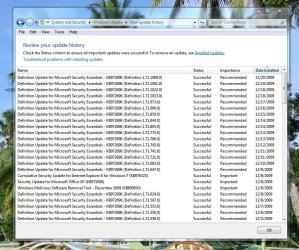
on virus updates i have updated my definitions manually every day(see attached)

but my auto scan does not scan everyday
 

Attachments

  • mse def.JPG
    mse def.JPG
    171.4 KB · Views: 45

My Computer

Computer Manufacturer/Model Number
home grown
OS
windows 7 ultimate 32 bit
CPU
intel core2 quad Q6600 2.4ghz
Motherboard
gigiabyte x38t-dq6.0
Memory
4gb ddr3 corsair-twin3x2048-1333c9dhx
Graphics Card(s)
nvidia geforce 8600gt 512mb
Sound Card
realtek onboard alc889a
Monitor(s) Displays
samsung 21.3
Screen Resolution
1024 by 768
Hard Drives
500gb wd

250gb wd
PSU
corsair cmpsu-750tx
Case
standard tower
Cooling
arctic cooling freezer 7 pro
Keyboard
microsoft wireless keyboard 7000
Mouse
microsoft wireless mouse 7000
Internet Speed
cable 850
Other Info
pioneer dvd-rw dvr215d

lite-on cd-rw sohr

creative inspire pt7800 7.1

hp officejet pro 8500 wireless
I have removed all my AV and installed this MSSE. One great AV from MS. I think, MS has rejuvenated drastically. Some wonderful software are on their shelves now. On the downside, MSSE has false positives and also lacks auto update for definitions. Is this true? or am I the only one missing the feature?

So far I have not had any false positives while using MSE.
The updates are coming quickly sometimes multiple times during the day but I have to manually update. It says it gets updates automatically but I haven't seen it. I wish it would update like Win7 does.

Anyway great job everyone on adding your thoughts about MSE.
 

My Computer

Computer type
PC/Desktop
Computer Manufacturer/Model Number
Self Built
OS
Windows 10 Pro
CPU
Intel i5
Motherboard
I have a fatherboard
Memory
I'm old and lost a few chips
Graphics Card(s)
Yup
Sound Card
Yup
Monitor(s) Displays
Samsung 32" UHD
Screen Resolution
3840 x 2160
Hard Drives
Samsung 860 EVO drives
PSU
450 Watt and some fans that blow
Case
Small tower
Cooling
Yes I am cool. lol
Keyboard
Who needs a keyboard?
Mouse
Logitech Laser G7 wireless
Internet Speed
Zippy fast UP and DOWN
Antivirus
I got a shot
Browser
The new Improved EDGE 2020
I have removed all my AV and installed this MSSE. One great AV from MS. I think, MS has rejuvenated drastically. Some wonderful software are on their shelves now. On the downside, MSSE has false positives and also lacks auto update for definitions. Is this true? or am I the only one missing the feature?

So far I have not had any false positives while using MSE.
The updates are coming quickly sometimes multiple times during the day but I have to manually update. It says it gets updates automatically but I haven't seen it. I wish it would update like Win7 does.

Anyway great job everyone on adding your thoughts about MSE.


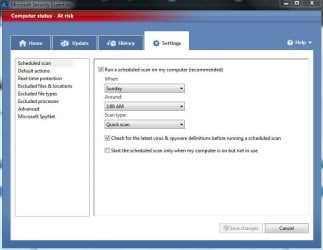
just use these setting for auto updates.. c the pic. its showing red because its in snoozed stage[realtime off]
 

Attachments

  • Capture.JPG
    Capture.JPG
    49.9 KB · Views: 53

My Computer

OS
Windows 7 ultimate 32bit OEM 6.1 Build7600
CPU
Core 2 Duo CPU E7400 2.8GHz
Motherboard
Mercury PIG31T
Memory
2 GB RAM
Graphics Card(s)
NVIDIA GeForce 8400 GS
Sound Card
VIA HD
Monitor(s) Displays
Samsung SyncMaster 2033
Screen Resolution
1600*900
Hard Drives
500 GB
Iggy:

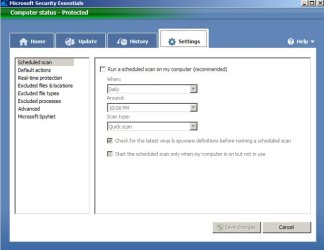
I am getting auto updates every 24 to 48 hours with NO auto scans:
 

Attachments

  • Untitled-1.jpg
    Untitled-1.jpg
    37.6 KB · Views: 34

My Computer

Computer type
PC/Desktop
Computer Manufacturer/Model Number
Ignatz Special; 4 speed manual gearbox; factory air conditioning; one of one
OS
Windows 7 Home Premium SP1, 64-bit
CPU
Intel Skylake i5-6600K, not overclocked
Motherboard
AsRock Z170M Extreme 4, micro ATX
Memory
8 GB HyperX DDR4-2666 (2 x 4 GB)
Graphics Card(s)
none; graphics are integrated on CPU
Sound Card
onboard: Realtek ALC1150; external: USB Behringer UF0-202
Monitor(s) Displays
Dell S2340M 23 inch IPS
Screen Resolution
1600 x 900
Hard Drives
System: Crucial MX100 series SSD, 128 GB;
Data: Samsung Spinpoint 103SJ, 1 TB;
Backup: WD Caviar Green WD30EZRX-00D8PB0, 3 TB
PSU
Rosewill SilentNight 500 watt fanless, semi-modular
Case
Antec Solo II
Cooling
Noctua NH-U12S; Noctua F12 intake, Noctua S12A exhaust
Keyboard
Microsoft 200 6JH-00001 USB
Mouse
Dell or Microsoft optical wired; USB
Antivirus
Microsoft Security Essentials and Malwarebytes Premium
Browser
Pale Moon
Other Info
All fans PWM; speeds at idle: CPU circa 500 rpm; intake circa 600 rpm; exhaust circa 600 rpm; CPU temps 27 idle and 47 C load in a warm room (27 C/81 F) when running Intel Extreme Tuning Utility stress test.
Why do I want to run a scan for getting auto updates? Strange why MS thinks like this. I have never seen MSSE updating on its own. Same case with Malwarebytes too. Not an issue though, but thought of pointing it out.
 

My Computer

Computer Manufacturer/Model Number
MacBook Pro
OS
Lion
CPU
i5
Memory
4GB
Graphics Card(s)
Intel
Screen Resolution
1200x800
Hard Drives
Seagate FreeAgent GO 250GB Ext. HDD
Iggy:

I am getting auto updates every 24 to 48 hours with NO auto scans:

The screen you show is for scanning schedule. Where does it control definition updates? That is my question.

I just manually checked for an update and it installed.
So the question is how and where is the updates for MSE controlled. I can't find it.
And I know I can add it to my task scheduler but that is so 20th century. lol
 

My Computer

Computer type
PC/Desktop
Computer Manufacturer/Model Number
Self Built
OS
Windows 10 Pro
CPU
Intel i5
Motherboard
I have a fatherboard
Memory
I'm old and lost a few chips
Graphics Card(s)
Yup
Sound Card
Yup
Monitor(s) Displays
Samsung 32" UHD
Screen Resolution
3840 x 2160
Hard Drives
Samsung 860 EVO drives
PSU
450 Watt and some fans that blow
Case
Small tower
Cooling
Yes I am cool. lol
Keyboard
Who needs a keyboard?
Mouse
Logitech Laser G7 wireless
Internet Speed
Zippy fast UP and DOWN
Antivirus
I got a shot
Browser
The new Improved EDGE 2020
I too have removed all AV software from my computer and replaced it with MSE. It is very streamlined and lightweight. It should be installed with Windows 7 and manufacturers should stop putting on that garbage Norton that bogs down your system.
 
Try Malwarebytes, update the definitions and try a scan... You maybe surprised... gl :)
 

My Computer

Computer Manufacturer/Model Number
Toshiba Satellite
OS
Windows 7 Home Premium 64-bit
CPU
Pentium(R) Dual-Core T4300 @ 2.10GHz
Motherboard
Toshiba Model KSWAA - Chipset Intel GL40 Rev 07
Memory
3 GB DDR2 PC2-6400 (400 MHz) Samsung M4 70T2864Q23-CF7
Graphics Card(s)
Mobile Intel GMA4500M 32bit OS (64bit OS) dynamically
Sound Card
Realtek ALC272-GR Software Sound
Monitor(s) Displays
16.0" HD TFT with TrueBrite Matrix colour LCD display
Screen Resolution
1366 x 768
Hard Drives
FUJITSU MJA2320BH G2-(S2) 320GB (5400RPM) Serial-ATA
Keyboard
Canadian Bilingual Keyboard 105 keys with 13 Function keys
Mouse
Touchpad Point device & Lexma USB Mouse
Internet Speed
Walking is Faster
Other Info
Wireless LAN Realtek RTL89191SE 802.11n PCI-E NIC + a
LAN Realek PCIe FE Family Controller and
TOSHIBA Software Modem
Iggy:

As far as I know, there is no direct way to control when or how frequently you get updates other than by setting a scheduled scan or scanning manually.

But you DO get updates nonetheless--just not ALL of them. I have not done a scan or a manual update in several weeks. I am automatically updated about every 36 hours. I have never gone more than about 45 hours without an update and I don't think I have been updated more than once in any 24 hour period.

That's fine with me. I don't care if I don't get each and every update. I think they come out several times a day, but you don't get all of them by default. If you want all of them, you have to do a manual update or a scheduled scan.

Microsoft uses a cloud technology which is designed to protect you from threats not in your database. They say that this technology makes it unnecessary to get each and every update.

As far as I know, the cloud technology works fine--I have had no sign of any threats using just the auto updates.

If you insist on updating manually several times per day, then obviously you won't get any auto updates----you are already updated and there is nothing more to send over the wire to your PC.

I run Malware Bytes every couple of weeks and it has not picked up anything either.
 

My Computer

Computer type
PC/Desktop
Computer Manufacturer/Model Number
Ignatz Special; 4 speed manual gearbox; factory air conditioning; one of one
OS
Windows 7 Home Premium SP1, 64-bit
CPU
Intel Skylake i5-6600K, not overclocked
Motherboard
AsRock Z170M Extreme 4, micro ATX
Memory
8 GB HyperX DDR4-2666 (2 x 4 GB)
Graphics Card(s)
none; graphics are integrated on CPU
Sound Card
onboard: Realtek ALC1150; external: USB Behringer UF0-202
Monitor(s) Displays
Dell S2340M 23 inch IPS
Screen Resolution
1600 x 900
Hard Drives
System: Crucial MX100 series SSD, 128 GB;
Data: Samsung Spinpoint 103SJ, 1 TB;
Backup: WD Caviar Green WD30EZRX-00D8PB0, 3 TB
PSU
Rosewill SilentNight 500 watt fanless, semi-modular
Case
Antec Solo II
Cooling
Noctua NH-U12S; Noctua F12 intake, Noctua S12A exhaust
Keyboard
Microsoft 200 6JH-00001 USB
Mouse
Dell or Microsoft optical wired; USB
Antivirus
Microsoft Security Essentials and Malwarebytes Premium
Browser
Pale Moon
Other Info
All fans PWM; speeds at idle: CPU circa 500 rpm; intake circa 600 rpm; exhaust circa 600 rpm; CPU temps 27 idle and 47 C load in a warm room (27 C/81 F) when running Intel Extreme Tuning Utility stress test.
Try Malwarebytes, update the definitions and try a scan... You maybe surprised... gl :)

MSE is not the only thing I have. MSN is live but Malwarebytes, Search & Destroy are also available when I need them.
MSE is good but most of the problems people get into is they download garbage and go to sites that attack your computer. Most people that have common sense don't need any more.

Don't get me wrong, if you want another antivirus go ahead. I've used them all and at this moment I like MSE.

Have a great day and a super 2010
 

My Computer

Computer type
PC/Desktop
Computer Manufacturer/Model Number
Self Built
OS
Windows 10 Pro
CPU
Intel i5
Motherboard
I have a fatherboard
Memory
I'm old and lost a few chips
Graphics Card(s)
Yup
Sound Card
Yup
Monitor(s) Displays
Samsung 32" UHD
Screen Resolution
3840 x 2160
Hard Drives
Samsung 860 EVO drives
PSU
450 Watt and some fans that blow
Case
Small tower
Cooling
Yes I am cool. lol
Keyboard
Who needs a keyboard?
Mouse
Logitech Laser G7 wireless
Internet Speed
Zippy fast UP and DOWN
Antivirus
I got a shot
Browser
The new Improved EDGE 2020
mse

microsoft security essentials i will say is the best free one ive had so far very stable dropped avg free for it a while ago very happy with it indeed its on my hard drive to stay-would recommend :D:cool: if you don't have it i would say give it a whirl the best ive had yet and yes i have tryed them all -the free ones that is.
 

My Computer

OS
windows seven
Try Malwarebytes, update the definitions and try a scan... You maybe surprised... gl :)

MSE is not the only thing I have. MSN is live but Malwarebytes, Search & Destroy are also available when I need them.
MSE is good but most of the problems people get into is they download garbage and go to sites that attack your computer. Most people that have common sense don't need any more.

Don't get me wrong, if you want another antivirus go ahead. I've used them all and at this moment I like MSE.

Have a great day and a super 2010

I use the same set-up you do plus SuperAntiSpyware and SpywareBlaster.
I do a weekly update and scan and so far I have yet to have any problems.
It still comes down to the person sitting in front of the monitor and using good judgement of sites he/she visits.
 

My Computer

Computer Manufacturer/Model Number
HP M9077c
OS
Windows 7 Home Premium 64bit
CPU
Intel(R)Core(TM)2 quad [email protected] 2.39GHz
Motherboard
ASUSeK
Memory
6GB DDR2 6400
Graphics Card(s)
GeForce 8500/512MB
Sound Card
Realtek High Def Audio
Monitor(s) Displays
HP w2408 LCD 24" widescreen
Screen Resolution
1920x1200
Cooling
6 pack of Bud
Keyboard
MS wireless Inteli
Mouse
MS wireless Inteli
Back
Top