Solved Microsoft Security Essentials Problem

brato92

New member
Member
Local time
5:35 PM
Messages
76
Hy guys, i have a strange problem with my antivirus, MSE. Today i noticed that MSE's icon is missing from taskbar.
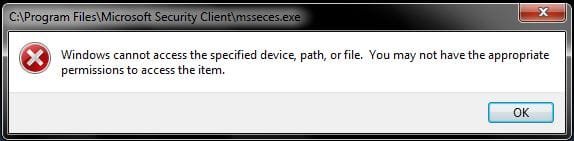
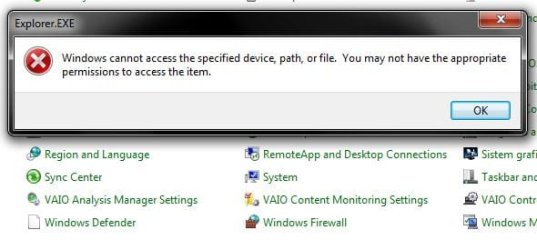
I tried to open the program from Start, but i get this error: 'Windows cannot access the specified device, path, or file. You may not have the appropriate permissions to access the item'.
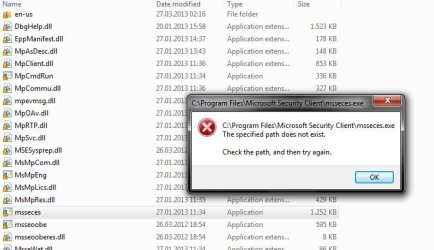
Next thing i tried to open the .exe from Program Files\Microsoft Security Client\msseces.exe, but again, i get an error: 'C:\Program Files\Microsoft Security Client\msseces.exe The specified path does not exist. Check the path, and then try again.' Strange enough ?
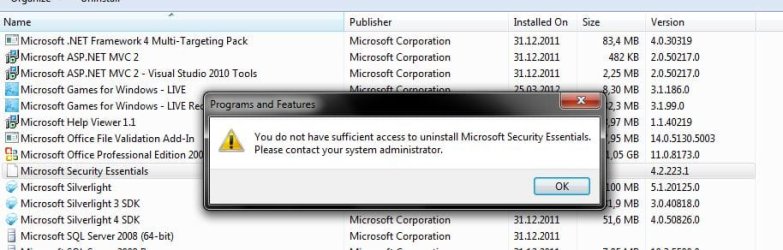
I went to Control Panel -> Programs and features to uninstall the MSE, but again, got an error: 'You do not gave sufficient access to uninstall MSE. Please contact your system administrator.'
Also, the Windows Defender icon from Control Panel is blank (like MSE's icon from Programs and features), when i try to open it i get this: 'Windows cannot acces the specified device, path, or file. You May not have the appropriate permissions to access the item.'.

The strange thing is that i haven't installed or modified anything on my OS on the last month. Also, my user account is set to Administrator.

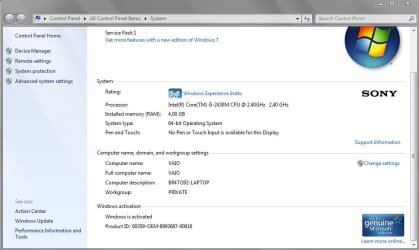
I have to mention that i'm running a Genuine Windows 7 Home Premium 64-bit on my Laptop.

What should i do now ? Is it a virus that doesn't lets me to access my antivirus ? Any advice would help me. Thanks !
 

Attachments
  • Capture1.JPG
    Capture1.JPG
    39 KB · Views: 44
  • Capture2.JPG
    Capture2.JPG
    25 KB · Views: 44
  • Capture3.JPG
    Capture3.JPG
    64.6 KB · Views: 10
  • Capture4.JPG
    Capture4.JPG
    77.7 KB · Views: 6

My Computer

Computer type
Laptop
Computer Manufacturer/Model Number
SONY VAIO
OS
Windows 7 Home Premium x64
CPU
Intel i5
Memory
4GB
Hard Drives
TOSHIBA 500GB
Antivirus
MSE
Browser
Mozilla Firefox
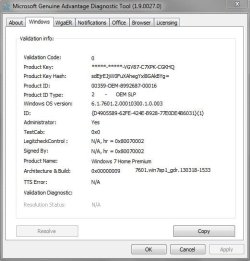
I bought the laptop with Windows already installed, genuine. I've attached a print-screen.

Capture1.JPG
 

My Computer

Computer type
Laptop
Computer Manufacturer/Model Number
SONY VAIO
OS
Windows 7 Home Premium x64
CPU
Intel i5
Memory
4GB
Hard Drives
TOSHIBA 500GB
Antivirus
MSE
Browser
Mozilla Firefox
brato92 try to run the tool below

Click here DDS

:ar: Click on Download Now button

:ar: When the download is complete . Drag the DDS program from the Downloads folder to your Desktop

:ar: Right-click the DDS icon on the Desktop choose Run as administrator to run the tool.

:ar: Place a check next to attact.txt and click Start . When done, DDS will open two logs
DDS.txt
Attach.txt

:ar: Save two logs onto your desktop and upload them with your reply
 

My Computer

Computer Manufacturer/Model Number
Custom Built
OS
Windows 7 Ultimate 32-Bit & Windows 7 Ultimate 64-Bit
CPU
Intel Core i7 CPU 950 @ 3.07GHz
Motherboard
ASUS P6T DELUXE V2
Memory
OCZ 6GB (3 x 2GB) 240-Pin DDR3 SDRAM DDR3 1600 OCZ3X1600R2
Graphics Card(s)
ATI Radeon HD 5700 Series
Sound Card
OnBoard
Hard Drives
WD6400AACS-00M3B0 (640GB SATA )
PSU
CORSAIR 850w
Case
NZXT LEXA
Cooling
Intel Stock Heatsink Fan
Keyboard
Microsoft Wireless Laser Keyboard 7000
Mouse
Microsoft Wireless Laser Mouse 7000
Sorry brato92 I have removed my post. I just noticed I was in the Security Thread. Their will be much wiser than me that will come along to help you. You could be infected.
Sorry for the bother.
 

My Computer

Computer type
PC/Desktop
Computer Manufacturer/Model Number
Home made Desktop
OS
Windows 10 Pro. 64/ version 1709 Windows 7 Pro/64
CPU
Intel i7-6800K @ 4.3
Motherboard
ASUS X-99 Deluxe II
Memory
Corsair Platinum 16 gig @2400
Graphics Card(s)
EVGA GTX 1070 OC
Monitor(s) Displays
Asus 27" LED LCD/VE278Q
Screen Resolution
1920-1080 or 1280-720 HDMI
Hard Drives
INTEL SSD 730-240 Gb Sata 3.0/
PSU
EVGA Platium 1200W
Case
Phanteks Luxe Tempered Glass 8 fans/ one radiator
Cooling
XSPC/ Water Cooled CPU
Keyboard
Das 4 Professional
Mouse
Logitech M705/MX Anywhere 2-S
Internet Speed
100 mbits
Antivirus
Microsoft Security Essentials/ Malwarebytes Premium 3.0/ SAS
Browser
I.E. 11 default/Firefox/ ISP Time Warner Cable/Spectrum
Other Info
LG BluRay Burner/
Sound system-KLipsch-THX/
Icy Dock ssd Hot Swap bays.
I see VistaKing has come to help. You are in good hands.
 

My Computer

Computer type
PC/Desktop
Computer Manufacturer/Model Number
Home made Desktop
OS
Windows 10 Pro. 64/ version 1709 Windows 7 Pro/64
CPU
Intel i7-6800K @ 4.3
Motherboard
ASUS X-99 Deluxe II
Memory
Corsair Platinum 16 gig @2400
Graphics Card(s)
EVGA GTX 1070 OC
Monitor(s) Displays
Asus 27" LED LCD/VE278Q
Screen Resolution
1920-1080 or 1280-720 HDMI
Hard Drives
INTEL SSD 730-240 Gb Sata 3.0/
PSU
EVGA Platium 1200W
Case
Phanteks Luxe Tempered Glass 8 fans/ one radiator
Cooling
XSPC/ Water Cooled CPU
Keyboard
Das 4 Professional
Mouse
Logitech M705/MX Anywhere 2-S
Internet Speed
100 mbits
Antivirus
Microsoft Security Essentials/ Malwarebytes Premium 3.0/ SAS
Browser
I.E. 11 default/Firefox/ ISP Time Warner Cable/Spectrum
Other Info
LG BluRay Burner/
Sound system-KLipsch-THX/
Icy Dock ssd Hot Swap bays.
Hy again VistaKing ! Last time you did a good job helpin' me get rid of a trojan alureon.
So, i've done a Restart, still the same, MSE doesn't work.
Right now i'm doing your steps.
 

My Computer

Computer type
Laptop
Computer Manufacturer/Model Number
SONY VAIO
OS
Windows 7 Home Premium x64
CPU
Intel i5
Memory
4GB
Hard Drives
TOSHIBA 500GB
Antivirus
MSE
Browser
Mozilla Firefox
Brato92, I have to leave right now but I will see what I could do when I get back . My apology .
 

My Computer

Computer Manufacturer/Model Number
Custom Built
OS
Windows 7 Ultimate 32-Bit & Windows 7 Ultimate 64-Bit
CPU
Intel Core i7 CPU 950 @ 3.07GHz
Motherboard
ASUS P6T DELUXE V2
Memory
OCZ 6GB (3 x 2GB) 240-Pin DDR3 SDRAM DDR3 1600 OCZ3X1600R2
Graphics Card(s)
ATI Radeon HD 5700 Series
Sound Card
OnBoard
Hard Drives
WD6400AACS-00M3B0 (640GB SATA )
PSU
CORSAIR 850w
Case
NZXT LEXA
Cooling
Intel Stock Heatsink Fan
Keyboard
Microsoft Wireless Laser Keyboard 7000
Mouse
Microsoft Wireless Laser Mouse 7000

My Computer

Computer type
Laptop
Computer Manufacturer/Model Number
SONY VAIO
OS
Windows 7 Home Premium x64
CPU
Intel i5
Memory
4GB
Hard Drives
TOSHIBA 500GB
Antivirus
MSE
Browser
Mozilla Firefox
Same thing

Hey guys just chiming in with some more info on this problem. OP check your Windows update tool i bet it is disabled and cant be re enabled.

Here is my story: I contracted the Internet Antivirus Pro (virus) today somehow. This virus installs secretly and diables MSE/Defender/Windows update. I restarted in safe mode w/ networking and used Malwarbytes (as suggested on a couple forums) to remove the threat.

MSE/Defender/Updater still couldnt be run (same messages OP had except WU says it cant be re-enabled) and couldnt be installed or reinstalled either...I managed to get MSE reinstaled using a FIX-IT solution on microsoft support page...but continued to get the same error messages unable to start it and messages saying install is possibly unsucessful.

I restored my PC to almost a month back...still same messages on all programs.

Some things I think might be going on but have no way to fix.....I think that the virus edited the regristry for MSE...the wsvcsc(sp?) key (and folder) is missing from where it should be but for some reason I am unable to install any registry keys I download.

Also I have considered the possibility the virus still has some files that are telling MSE there is an antivirus installed but I can't find them...this (a second antivirus program) seems to be the bigest interference for MSE during normal computer operations.

I have no idea what to do as I am a decent computer operator but the higher level of computer functions elude me (lol)..oh sorry about spelling...hopefully this extra info might give someone an idea on how to fix it.

Thanks for the help ahead of time!
 

My Computer

Computer type
Laptop
Computer Manufacturer/Model Number
Samsung
OS
Windows 7 64bit Home Premium
CPU
i7 Core
Memory
6GB Ram 600GB solid
Graphics Card(s)
Nividia 550M w/Optimus
Antivirus
MSE/Defender
Browser
IE9,Firefox for some things
brato92,

Please go to the Farbar Recovery Scan Tool Download
Select the 64-bit version.
Save it to your Desktop.
Double-click the downloaded file to run it.

When the tool opens click Yes to the disclaimer.
Press the Scan button.

FRST64 makes a log (FRST.txt) in the same directory from which the tool is run (Desktop).

Please provide the FRST.txt in your reply. <<---
The first time the tool is run, it also makes another log: Addition.txt
Also post the: Addition.txt in your reply. <<---


~~~~
Next, download Farbar Service Scanner

Save to the Desktop
  • Make sure the following options are checked:
    • Internet Services
    • Windows Firewall
    • System Restore
    • Security Center
    • Windows Update
    • Windows Defender
  • Press: Scan
  • FSS creates a log, FSS.txt, on the Desktop.
Please provide the FSS.txt in your reply.
 

My Computer

Computer type
PC/Desktop
Computer Manufacturer/Model Number
An ol' eMachines
OS
Windows 7 Home Premium
Internet Speed
Fine for me...I'm retired!
brato92 can you run the tool below

Please download MGADiag and save it to your desktop.

:ar: Double click
2novly.png
icon on your desktop.

:ar: Click on the
2j8t3t.png
button

:ar: Click on the
av68hu.png
button

:ar: Paste the log inside the box . Highlight all of the text then code wrap by pressing on the # icon on the top .
 

My Computer

Computer Manufacturer/Model Number
Custom Built
OS
Windows 7 Ultimate 32-Bit & Windows 7 Ultimate 64-Bit
CPU
Intel Core i7 CPU 950 @ 3.07GHz
Motherboard
ASUS P6T DELUXE V2
Memory
OCZ 6GB (3 x 2GB) 240-Pin DDR3 SDRAM DDR3 1600 OCZ3X1600R2
Graphics Card(s)
ATI Radeon HD 5700 Series
Sound Card
OnBoard
Hard Drives
WD6400AACS-00M3B0 (640GB SATA )
PSU
CORSAIR 850w
Case
NZXT LEXA
Cooling
Intel Stock Heatsink Fan
Keyboard
Microsoft Wireless Laser Keyboard 7000
Mouse
Microsoft Wireless Laser Mouse 7000
I'll try right now...
 

My Computer

Computer type
Laptop
Computer Manufacturer/Model Number
SONY VAIO
OS
Windows 7 Home Premium x64
CPU
Intel i5
Memory
4GB
Hard Drives
TOSHIBA 500GB
Antivirus
MSE
Browser
Mozilla Firefox
bravo92

You do have ZeroAccess . I will let cottonball help you out . Regarding the MGADiag looks legit to me .
 

My Computer

Computer Manufacturer/Model Number
Custom Built
OS
Windows 7 Ultimate 32-Bit & Windows 7 Ultimate 64-Bit
CPU
Intel Core i7 CPU 950 @ 3.07GHz
Motherboard
ASUS P6T DELUXE V2
Memory
OCZ 6GB (3 x 2GB) 240-Pin DDR3 SDRAM DDR3 1600 OCZ3X1600R2
Graphics Card(s)
ATI Radeon HD 5700 Series
Sound Card
OnBoard
Hard Drives
WD6400AACS-00M3B0 (640GB SATA )
PSU
CORSAIR 850w
Case
NZXT LEXA
Cooling
Intel Stock Heatsink Fan
Keyboard
Microsoft Wireless Laser Keyboard 7000
Mouse
Microsoft Wireless Laser Mouse 7000
ok, VistaKing, i'm waiting for cottonball's reply. thanks for your help !
 

My Computer

Computer type
Laptop
Computer Manufacturer/Model Number
SONY VAIO
OS
Windows 7 Home Premium x64
CPU
Intel i5
Memory
4GB
Hard Drives
TOSHIBA 500GB
Antivirus
MSE
Browser
Mozilla Firefox
brato92,

My apology for the delay!! :o

Will be working on your issue this evening, and will reply o/a 6:00AM your time (Romania).
We have an 8 hour time difference)

Thanks for your patience.
 

My Computer

Computer type
PC/Desktop
Computer Manufacturer/Model Number
An ol' eMachines
OS
Windows 7 Home Premium
Internet Speed
Fine for me...I'm retired!
brato92,

Please do the following...

Open Notepad (Start > All Programs > Accessories > Notepad)
Copy/paste all the contents of the quote box below to Notepad (do not copy the word 'Quote').
Save it on the Desktop as: fixlist.txt

start
HKLM\...D6A79037F57F\InprocServer32: [Default-fastprox] ATTENTION! ====> ZeroAccess
HKLM-x32\...\Run: [] [x]
Toolbar: HKCU - No Name - {47833539-D0C5-4125-9FA8-0819E2EAAC93} - No File
Handler: msdaipp - No CLSID Value -
Handler-x32: msdaipp - No CLSID Value -
Filter: text/xml - {807553E5-5146-11D5-A672-00B0D022E945} - No File
C:\$Recycle.Bin\S-1-5-18\$b44b7fef6f96a8643f5b45956d5cbc4c
C:\$Recycle.Bin\S-1-5-21-917525429-2300147935-38172813-1000\$b44b7fef6f96a8643f5b45956d5cbc4c
C:\$Recycle.Bin\S-1-5-18\$b44b7fef6f96a8643f5b45956d5cbc4c
end

WARNING: This script is written specifically for brato92, for use on this particular computer.
Running the script on another computer may cause damage to the Operating System!!

Run FRST again, but this time press the Fix button just once, and wait.

FRST should reboot once to finish removing ZeroAccess.

When done, the tool makes a log on the Desktp.
This time it is called: Fixlog.txt

Please post Fixlog.txt in your reply.
 

My Computer

Computer type
PC/Desktop
Computer Manufacturer/Model Number
An ol' eMachines
OS
Windows 7 Home Premium
Internet Speed
Fine for me...I'm retired!
Hy cottonball, i've done your steps, i've opened FRST and pressed 'Fix' button. Here are the results:
View attachment Fixlog.txt
 

My Computer

Computer type
Laptop
Computer Manufacturer/Model Number
SONY VAIO
OS
Windows 7 Home Premium x64
CPU
Intel i5
Memory
4GB
Hard Drives
TOSHIBA 500GB
Antivirus
MSE
Browser
Mozilla Firefox
brato92,

:info:
Open Notepad (Start > All Programs > Accessories > Notepad)
Copy/paste all the contents of the quote box below to Notepad (do not copy the word 'Quote').
Save it on the Desktop as: fixlist.txt

Quote:
start
DeleteJunctionsIndirectory: C:\Program Files\Windows Defender
end

Run FRST64 again (from the Desktop), but this time press the Fix button just once, and wait.
When done, the tool makes a log on the Desktop.
Please post Fixlog.txt in your reply.

:info:
Since the following steps involve editing the Registry, please create new restore point before proceeding.
System Restore Point - Create
Select: Option Two

:info:
Now, please download the ESET ServiceRepair:
http://kb.eset.com/library/ESET/KB%2...icesRepair.exe
Save to the Desktop.
Double-click and run the downloaded file.

When the program runs, a prompt appears asking if you want to proceed.
Click: Yes
When the Services routine is Completed, you are asked to Reboot.
Click Yes to allow the reboot.

The tool creates a folder named CC Support on the Desktop.
Please provide the CC Support\Logs\SvcRepair.txt in your reply.

:info:
Last, please run the Farbar Service Scanner once again, provide the FSS.txt in your reply.
 

My Computer

Computer type
PC/Desktop
Computer Manufacturer/Model Number
An ol' eMachines
OS
Windows 7 Home Premium
Internet Speed
Fine for me...I'm retired!
Back
Top