Solved Microsoft Security Essentials Problem

nothing, right now i'm doing a full scan

EDIT: it takes too long for a full scan, i cancelled it. Anyway, the quick scan didn't detect anything, so i think i'm safe now.
 
Last edited:

My Computer

Computer type
Laptop
Computer Manufacturer/Model Number
SONY VAIO
OS
Windows 7 Home Premium x64
CPU
Intel i5
Memory
4GB
Hard Drives
TOSHIBA 500GB
Antivirus
MSE
Browser
Mozilla Firefox
Let’s check the Security status with the following...

Download Security Check:
http://screen317.spywareinfoforum.org/
Save to your Desktop.

Double-click SecurityCheck.exe

Follow the on-screen instructions inside the black box.
When done, a Notepad report opens automatically: checkup.txt

Post checkup.txt in your reply, and, please do not take any corrective actions!!
 

My Computer

Computer type
PC/Desktop
Computer Manufacturer/Model Number
An ol' eMachines
OS
Windows 7 Home Premium
Internet Speed
Fine for me...I'm retired!

My Computer

Computer type
Laptop
Computer Manufacturer/Model Number
SONY VAIO
OS
Windows 7 Home Premium x64
CPU
Intel i5
Memory
4GB
Hard Drives
TOSHIBA 500GB
Antivirus
MSE
Browser
Mozilla Firefox
Java is out dated . We will wait to see what cottonball says what the next step is
 

My Computer

Computer Manufacturer/Model Number
Custom Built
OS
Windows 7 Ultimate 32-Bit & Windows 7 Ultimate 64-Bit
CPU
Intel Core i7 CPU 950 @ 3.07GHz
Motherboard
ASUS P6T DELUXE V2
Memory
OCZ 6GB (3 x 2GB) 240-Pin DDR3 SDRAM DDR3 1600 OCZ3X1600R2
Graphics Card(s)
ATI Radeon HD 5700 Series
Sound Card
OnBoard
Hard Drives
WD6400AACS-00M3B0 (640GB SATA )
PSU
CORSAIR 850w
Case
NZXT LEXA
Cooling
Intel Stock Heatsink Fan
Keyboard
Microsoft Wireless Laser Keyboard 7000
Mouse
Microsoft Wireless Laser Mouse 7000
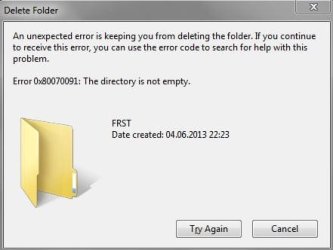
btw, yesterday i've deleted all progs-log files from desktop, and after a disk cleanup on my only hard drive (local disk c), i stuck with a folder called FRST, wich i cannot delete.
Capture1.JPG
 

My Computer

Computer type
Laptop
Computer Manufacturer/Model Number
SONY VAIO
OS
Windows 7 Home Premium x64
CPU
Intel i5
Memory
4GB
Hard Drives
TOSHIBA 500GB
Antivirus
MSE
Browser
Mozilla Firefox
:info: http://www.sevenforums.com/tutorials/55721-folder-delete-command-prompt.html

Use:
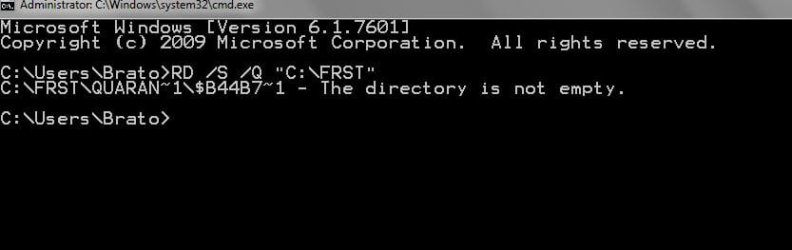
RD /S /Q "C:\FRST"


:info: Please Verify Java Version
Uncheck any toolbar and/or software offered with the Java update.

The Java Quick Starter (JQS.exe) that comes along adds a service to improve the initial startup time of Java applets and applications. If you don't want to run another extra service, go to:
Start > Control Panel > Java > Advanced > Miscellaneous
Uncheck the box for: Java Quick Starter
Click OK and restart your computer.

:info: Next, please remove any old Java version and its remnants...
Download JavaRa:
http://download.thewebatom.net/4eeb2b43dbb4b/JavaRa-1.16-16-12-11.zip
Save to the Desktop and unzip it.

Right click on JavaRa.exe, and select: Run As Administrator
Choose the language of your choice and click: Select
Click: Remove Older Versions
Accept any prompts as they appear.
 

My Computer

Computer type
PC/Desktop
Computer Manufacturer/Model Number
An ol' eMachines
OS
Windows 7 Home Premium
Internet Speed
Fine for me...I'm retired!
i've successfully installed the latest version of Java using 'Verify Java Version' service, and after that i removed the old one using JavaRa : View attachment JavaRa.log
However, despide the latest java version is version 7 update 21 (tells me when i'm verifying java version with Mozilla), when i hit Control Panel-Java-General-About, it tells me that i have the old version, version 6 update 26. I'm confused.
Captureaaa.JPG
When i try to verify Java version with Internet Explorer, it tells me that it's unable to verify.


I can't delete FRST folder, inside it is now only one folder called 'Quarantine'
Capture2.JPG
 
Last edited:

My Computer

Computer type
Laptop
Computer Manufacturer/Model Number
SONY VAIO
OS
Windows 7 Home Premium x64
CPU
Intel i5
Memory
4GB
Hard Drives
TOSHIBA 500GB
Antivirus
MSE
Browser
Mozilla Firefox
I will suggest doing this to fix the issue:

HTML:
Step 1: Enter into Windows safe mode (F8) 
Step 2: Download old and new version of MSE from filehippo.com 
Step 3: Delete old files/folders related to MSE (C:\Program Files\Microsoft Security Client) 
Step 4: Run Ccleaner to clear the registry. 
Step 5: Download Malwarebytes Antimalware, Update and then run a Complete System Scan. 
Step 6. Download Spybot search and Destroy. Update. Run a full Scan. 
Step 7: Download Emsisoft Emergency Kit, Update Database, Run a complete scan. 
Step 8: Download TDSSkiller. Run. Step 
9: Download Kaspersky Virus Cleaner. Run. 
Step 10: Download ComoboFix. Run. Let it fix file system permissions. 
Step 11: Delete control panel Entries for MSE using Ccleaner. 
Step 12: If possible run "Registry Reviver". 
Step 13: Open CMD.exe as Administrator. Execute these commands.  
net stop winmgmt 
cd /d %windir%\system32\wbem ren repository repository.old 
net start winmgmt  

Step 14: Reboot into Windows normal mode. 
Step 15: Try installing MSE v2.x.x installer. If does not work try a later version. 
This should probably gonna work.
 

My Computer

Computer type
PC/Desktop
OS
Windows 7 Ultimate x64
CPU
Core 2 Duo E7500
Motherboard
ASUS P5QPL-AM
Memory
4 GB
Hard Drives
SATA 500 GB
Antivirus
MSE
Browser
Firefox
brato92,

We need to use FRST again in order to remove C:\FRST\Quarantine\* the directory is not empty

Please do the following...

:info: Open Notepad (Start > All Programs > Accessories > Notepad)
Copy/paste all the contents of the quote box below to Notepad (do not copy the word 'Quote').
Save it on the Desktop as: fixlist.txt

start
Folder: c:\frst\quarantine
cmd: dir /a/s c:\frst\quarantine
cmd: rd /q/s c:\frst\quarantine
Folder: c:\frst\quarantine
End

Run FRST from the Desktop again, press the Fix button once.
Please post Fixlog.txt in your reply.

Need some info from theis report in order to proceed with another Fix to remove the folder...
 

My Computer

Computer type
PC/Desktop
Computer Manufacturer/Model Number
An ol' eMachines
OS
Windows 7 Home Premium
Internet Speed
Fine for me...I'm retired!
After following through with cottonball's instructions .... Please post what is needed for cb to ascertain.


you will need to follow these instructions "IF" you use Java:


Update Java:
  • Download the latest version of Java Runtime Environment (JRE) 7u21.
    Java SE Downloads
  • Scroll over to the right (JRE)
  • Click the "Download" button to the right.
  • Check the box that says: "Accept License Agreement".
  • The page will refresh.
  • Click on the link to download Windows Offline Installation with or without Multi-language and save to your desktop.
  • Close any programs you may have running - especially your web browser.
  • Go to Start > Control Panel double-click on Add/Remove programs and remove all older versions of Java.
    [*]Check any item with Java Runtime Environment (JRE or J2SE) in the name.
    [*]Click the Remove or Change/Remove button.
    [*]Repeat as many times as necessary to remove each Java versions.
  • Reboot your computer once all Java components are removed.
  • Then from your desktop double-click on jre-7u21-windows-i586-p.exe to install the newest version.
 
Last edited:

My Computer

Computer type
PC/Desktop
Computer Manufacturer/Model Number
Bruce ... somewhere in his 40's
OS
Windows 7 Ultimate 32bit SP1
CPU
Intel(R) Core(TM)2 Quad CPU @ 2.40GHz, 2400 MHz
Motherboard
INTEL/D975XBX2
Memory
4 GB
Graphics Card(s)
ATI Radeon HD 2600 Pro
Monitor(s) Displays
Samsung SyncMaster 914v
Screen Resolution
1280 x 1024
Hard Drives
2/500GB each ... ST3500630AS ATA Device.
One is not connected
PSU
Rocketfish 700 W
Case
G.Skill Gigabyte Chassis
Keyboard
Standard PS/2 Keyboard
Mouse
Microsoft PS/2 Mouse
Internet Speed
DSL
Antivirus
Avira Internet Security
Browser
IE 11
Other Info
ATI HDMI Audio
On Java...

What happens when you go to Control Panel > Java

Open the Java Control Panel > Update tab, and click: Update Now

Can you get Java 7 update 21?
 

My Computer

Computer type
PC/Desktop
Computer Manufacturer/Model Number
An ol' eMachines
OS
Windows 7 Home Premium
Internet Speed
Fine for me...I'm retired!
See if Java 6 update 26 is listed inside Programs and Features

Click on the :orb: button inside
2nqbqes.png
type in Programs and features and press [ENTER]

If its still shows inside you may click on Java 6 Update 26 and click on Uninstall .
 

My Computer

Computer Manufacturer/Model Number
Custom Built
OS
Windows 7 Ultimate 32-Bit & Windows 7 Ultimate 64-Bit
CPU
Intel Core i7 CPU 950 @ 3.07GHz
Motherboard
ASUS P6T DELUXE V2
Memory
OCZ 6GB (3 x 2GB) 240-Pin DDR3 SDRAM DDR3 1600 OCZ3X1600R2
Graphics Card(s)
ATI Radeon HD 5700 Series
Sound Card
OnBoard
Hard Drives
WD6400AACS-00M3B0 (640GB SATA )
PSU
CORSAIR 850w
Case
NZXT LEXA
Cooling
Intel Stock Heatsink Fan
Keyboard
Microsoft Wireless Laser Keyboard 7000
Mouse
Microsoft Wireless Laser Mouse 7000
I cannot download FRST again because website is down....
I went to Programs and features menu in Control Panel, where i had 3 versions of java installed (see below)
Capturejava.JPG


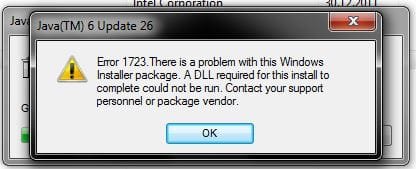
I successfully unistalled the x64 version, but when i try to remove the x86 one, it gives me this error (see below)
Capturejava2.JPG
After i've uninstalled x64 version of java 6 update 26, i've got in Control Panel - Java, the new version (7 update 21), but i don't have an 'Update' tab.
I think this old version was installed on my system since December 2011 when i bought the laptop, because i never updated it.

Next step ?
 

My Computer

Computer type
Laptop
Computer Manufacturer/Model Number
SONY VAIO
OS
Windows 7 Home Premium x64
CPU
Intel i5
Memory
4GB
Hard Drives
TOSHIBA 500GB
Antivirus
MSE
Browser
Mozilla Firefox
brato92,

You may be using a 32-bit browser!!

From Java:

Verify whether you are using 32-bit or 64-bit browser:

Internet Explorer
1.Launch Internet Explorer browser.
2.Click on the Help tab at the top.
3.Select About Internet Explorer which will bring up an information window.
If version of IE displays 64-bit Edition, then it is 64-bit IE, otherwise it is a 32-bit browser.

Firefox
To determine whether you are running on a 64-bit version of Firefox, use either of these methods.
•Check the About Firefox panel
•Type in the browser address about:support
If you are running 64-bit Firefox, it may be indicated as 64-bit (e.g., Win64); otherwise it is a 32-bit version of Firefox.

Java for 32-bit browsers:
Users should download 32-bit Java software, if they are using 32-bit browser on their 64-bit Windows.
For downloading and installing 32-bit Java on your system:
1.Go to: java.com: Java + You
2.Click on the Free Java Download button, and start the installation process

Source: Which Java download should I choose for my 64-bit Windows operating system?


Also try downloading FRST once again, so you can get rid of the folder that doesn't remove.
 

My Computer

Computer type
PC/Desktop
Computer Manufacturer/Model Number
An ol' eMachines
OS
Windows 7 Home Premium
Internet Speed
Fine for me...I'm retired!
Lets try removing the Java 6 Update 26 using the Microsoft FixIt

Click on Microsoft FixIt to Download Microsoft FixIt

  • Click on the Run Now button
  • Click on Java 6 Update and Follow the prompts
 
Last edited:

My Computer

Computer Manufacturer/Model Number
Custom Built
OS
Windows 7 Ultimate 32-Bit & Windows 7 Ultimate 64-Bit
CPU
Intel Core i7 CPU 950 @ 3.07GHz
Motherboard
ASUS P6T DELUXE V2
Memory
OCZ 6GB (3 x 2GB) 240-Pin DDR3 SDRAM DDR3 1600 OCZ3X1600R2
Graphics Card(s)
ATI Radeon HD 5700 Series
Sound Card
OnBoard
Hard Drives
WD6400AACS-00M3B0 (640GB SATA )
PSU
CORSAIR 850w
Case
NZXT LEXA
Cooling
Intel Stock Heatsink Fan
Keyboard
Microsoft Wireless Laser Keyboard 7000
Mouse
Microsoft Wireless Laser Mouse 7000
Disregard
 

My Computer

Computer type
PC/Desktop
Computer Manufacturer/Model Number
Bruce ... somewhere in his 40's
OS
Windows 7 Ultimate 32bit SP1
CPU
Intel(R) Core(TM)2 Quad CPU @ 2.40GHz, 2400 MHz
Motherboard
INTEL/D975XBX2
Memory
4 GB
Graphics Card(s)
ATI Radeon HD 2600 Pro
Monitor(s) Displays
Samsung SyncMaster 914v
Screen Resolution
1280 x 1024
Hard Drives
2/500GB each ... ST3500630AS ATA Device.
One is not connected
PSU
Rocketfish 700 W
Case
G.Skill Gigabyte Chassis
Keyboard
Standard PS/2 Keyboard
Mouse
Microsoft PS/2 Mouse
Internet Speed
DSL
Antivirus
Avira Internet Security
Browser
IE 11
Other Info
ATI HDMI Audio

My Computer

Computer Manufacturer/Model Number
Custom Built
OS
Windows 7 Ultimate 32-Bit & Windows 7 Ultimate 64-Bit
CPU
Intel Core i7 CPU 950 @ 3.07GHz
Motherboard
ASUS P6T DELUXE V2
Memory
OCZ 6GB (3 x 2GB) 240-Pin DDR3 SDRAM DDR3 1600 OCZ3X1600R2
Graphics Card(s)
ATI Radeon HD 5700 Series
Sound Card
OnBoard
Hard Drives
WD6400AACS-00M3B0 (640GB SATA )
PSU
CORSAIR 850w
Case
NZXT LEXA
Cooling
Intel Stock Heatsink Fan
Keyboard
Microsoft Wireless Laser Keyboard 7000
Mouse
Microsoft Wireless Laser Mouse 7000
My browsers (IE & Mozilla) are both 32bit. I've successfully managed to remove old version of Java (version 6 update 26) from Progs and features, using Microsoft FixIt, as VistaKing said. I've also reinstalled Java with latest version (32 bit) and this time i have 'Update' tab. The only problem is that i still cannot download FRST again to delete that folder, their website is still down.
What should i do now?
 
Last edited:

My Computer

Computer type
Laptop
Computer Manufacturer/Model Number
SONY VAIO
OS
Windows 7 Home Premium x64
CPU
Intel i5
Memory
4GB
Hard Drives
TOSHIBA 500GB
Antivirus
MSE
Browser
Mozilla Firefox

My Computer

Computer Manufacturer/Model Number
Custom Built
OS
Windows 7 Ultimate 32-Bit & Windows 7 Ultimate 64-Bit
CPU
Intel Core i7 CPU 950 @ 3.07GHz
Motherboard
ASUS P6T DELUXE V2
Memory
OCZ 6GB (3 x 2GB) 240-Pin DDR3 SDRAM DDR3 1600 OCZ3X1600R2
Graphics Card(s)
ATI Radeon HD 5700 Series
Sound Card
OnBoard
Hard Drives
WD6400AACS-00M3B0 (640GB SATA )
PSU
CORSAIR 850w
Case
NZXT LEXA
Cooling
Intel Stock Heatsink Fan
Keyboard
Microsoft Wireless Laser Keyboard 7000
Mouse
Microsoft Wireless Laser Mouse 7000
I managed to download FRST again. Here are the results, as requested from cottonball on page nr.5: View attachment Fixlog.txt
 

My Computer

Computer type
Laptop
Computer Manufacturer/Model Number
SONY VAIO
OS
Windows 7 Home Premium x64
CPU
Intel i5
Memory
4GB
Hard Drives
TOSHIBA 500GB
Antivirus
MSE
Browser
Mozilla Firefox
Back
Top