Microsoft Security Essentials Problems/Troubleshooting

MUff1N

Computer Enthusiast
Pro User
Local time
7:21 AM
Messages
268
Location
Payson/AZ
I thought I'd start a new thread on this since I don't see one anywhere.
This is using the "Official" beta downloaded directly from Microsoft, not the leaked version.


So with that said I'll start off with the first problem I've encountered using it.
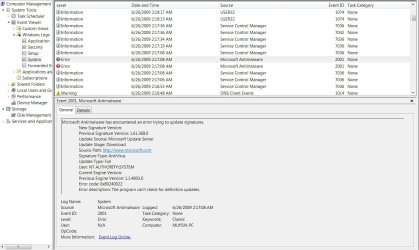
It is with the Update function failing when trying to download the update. :confused:
With error code: X080240022 (Screenshot)

If this happens to you like it has to me 3 times so far the fix is just restart your computer then update Microsoft Security Essentials & all is fixed & fine. ;)
 

Attachments

  • Microsoft Security Essentials Update Failure.jpg
    Microsoft Security Essentials Update Failure.jpg
    131.8 KB · Views: 301

My Computer

Computer Manufacturer/Model Number
ABS Tech Ultimate X9
OS
Windows® 7 Ultimate x64 SP1
CPU
Intel Core 2 Duo E8400 (E0) @ 4.0GHz
Motherboard
ASUS P5Q Pro Turbo / 1780 FSB
Memory
G.SKILL-F2-8500CL5D-4GBPK (2x2Gbs) (5-5-5-15) @ 1067Mhz
Graphics Card(s)
EVGA GTX 470 SC (845/1690/2000) 160Gbs
Sound Card
VIA HD Audio / Boston Acoustics
Monitor(s) Displays
Acer X222W HD 22" LCD 2500:1 / 5ms
Screen Resolution
1680x1050
Hard Drives
Seagate Barracuda SATAII 2 x 320GB
Seagate Barracuda SATAII 1Tb
Intel® Rapid Storage Technology v10.1.0.1008
AHCI-NCQ Enabled
PSU
Silent Pro GOLD 80 PLUS 800w /95% efficiency / SLI-Crossfire
Case
ABS Stealth Black-Custom
Cooling
CoolerMaster V6GT 6 Heatpipe 200w CPU Cooler
Keyboard
Logitech G15 Gaming Keyboard (Old Style Blue!)
Mouse
Logitech MX518 Gaming Mouse
Internet Speed
1Mbs-up/ 6Mbs-down
Happened to me when windows update and MSE tried updating the definitions at the same time. like 5 minutes ago :D
 

My Computer

Computer Manufacturer/Model Number
eMachines W3502
OS
Windows 7 Ultimate x32
CPU
Intel Celeron D 3.2 Ghz 533 fsb (LGA 775)
Motherboard
Intel D101GGC
Memory
1 GB (2x512MB) PC-3200 DDR @ 200Mhz
Graphics Card(s)
Nvidia GeForce 9400GT- 1GB
Sound Card
Sound Blaster X-Fi Xtreame Gamer
Monitor(s) Displays
19" LCD HDtv
Screen Resolution
1360x768 @ 60Htz
Hard Drives
SeaGate Barracuda 750GB
SeaGate Barracuda 100GB
Toshiba CD/DVDW/ TS-H552D [DVD+R, DL]
PSU
stock (idk)
Case
The busted remains of the stock case
Cooling
Dust cooled, waitwut?
Keyboard
Stock. Missing a few keys.
Mouse
Logitech LX8 5-btn mouse (wireless)
Internet Speed
TWC 10Mb
Other Info
Keeps going, and going, and going.......
We have the same problem. We have a brand new laptop that came with Windows Vista. We wiped everything and installed Windows 7, followed by MSE. We cannot update MSE at all and get an error message every time we try. We tried a manual install as suggested and that failed as well. We have restarted and restarted and restarted but nothing seems to make a difference.
The error message comes with the code 0x80248014 and includes that we should check our internet connection. There's no issue with our internet connection.
This is a clean install. All we're running on the laptop at the moment is Windows 7, MSE and some operational software from Toshiba...nothing else has been downloaded or installed.
Can you offer any suggestions?? This is driving us mad.
 

My Computer

OS
Windows 7
my problem w/MSE is that it does run the scan when i scheduled it to run

everynow and then it will run the scan on the scheduled time more time or not it does not

any ideas
 

My Computer

Computer Manufacturer/Model Number
home grown
OS
windows 7 ultimate 32 bit
CPU
intel core2 quad Q6600 2.4ghz
Motherboard
gigiabyte x38t-dq6.0
Memory
4gb ddr3 corsair-twin3x2048-1333c9dhx
Graphics Card(s)
nvidia geforce 8600gt 512mb
Sound Card
realtek onboard alc889a
Monitor(s) Displays
samsung 21.3
Screen Resolution
1024 by 768
Hard Drives
500gb wd

250gb wd
PSU
corsair cmpsu-750tx
Case
standard tower
Cooling
arctic cooling freezer 7 pro
Keyboard
microsoft wireless keyboard 7000
Mouse
microsoft wireless mouse 7000
Internet Speed
cable 850
Other Info
pioneer dvd-rw dvr215d

lite-on cd-rw sohr

creative inspire pt7800 7.1

hp officejet pro 8500 wireless
Found out what the problem was. Windows firewall was blocking the update. Once we disabled the firewall it updated fine.
 

My Computer

OS
Windows 7
hope find out what my problem is also
 

My Computer

Computer Manufacturer/Model Number
home grown
OS
windows 7 ultimate 32 bit
CPU
intel core2 quad Q6600 2.4ghz
Motherboard
gigiabyte x38t-dq6.0
Memory
4gb ddr3 corsair-twin3x2048-1333c9dhx
Graphics Card(s)
nvidia geforce 8600gt 512mb
Sound Card
realtek onboard alc889a
Monitor(s) Displays
samsung 21.3
Screen Resolution
1024 by 768
Hard Drives
500gb wd

250gb wd
PSU
corsair cmpsu-750tx
Case
standard tower
Cooling
arctic cooling freezer 7 pro
Keyboard
microsoft wireless keyboard 7000
Mouse
microsoft wireless mouse 7000
Internet Speed
cable 850
Other Info
pioneer dvd-rw dvr215d

lite-on cd-rw sohr

creative inspire pt7800 7.1

hp officejet pro 8500 wireless
Back
Top