Microsoft Security Essentials - Uninstall Completely

How to Completely Uninstall Microsoft Security Essentials


   Information
This tutorial will guide you through removing Microsoft Security Essentials completely from your machine, either so you may reinstall it or make sure everything is cleaned up to move to a new anti-virus.

This guide assumes you have no antivirus protection installed at the moment. If you do, disable it during this guide as it may interfere with this procedure.


   Warning
Always Uninstall Microsoft Security Essentials the proper way through Control Panel - Uninstall A Program when possible. DO NOT FOLLOW THIS TUTORIAL IF YOU HAVE WINDOWS 8 or WINDOWS 10, IT WILL CORRUPT WINDOWS DEFENDER.

Then continue to this method. If the uninstaller fails for whatever reason, then attempt this method.

   Information
Microsoft security essentials is now called windows defender in windows 8 and windows 10. They are the same product now, providing anti-virus and anti-spyware protection. Windows Defender in windows 7 and Vista is just anti-spyware protection.


1.) First, download the Microsoft Security Essentials removal tool fix it here:

Download


Source: How can I uninstall Microsoft Security Essentials from my computer?
2.) Close all programs. Open the fix it file you just downloaded.

3.) The utility opens, Choose I agree, then click next to uninstall like in the picture below.
picture.php

4.) The program will start to be removed. During the process you will see this image:
picture.php

5.) Choose Close to finish and then restart the PC.
picture.php

6.) You're finished!


Last edited:
Doesn't work for me. Fix It gives me the following message:
"Service "Microsoft Antimalware Service could not be stopped. Verify you have sufficient privileges to stop system services.
I am administrator. What other privileges do I need?
 

My Computer

Computer type
PC/Desktop
Computer Manufacturer/Model Number
Custom Build
OS
Microsoft Windows 7 Professional 64-bit 7601 Multiprocessor Free Service Pack 1
CPU
Intel(R) Core(TM) i5-3570K CPU @ 3.40GHz
Motherboard
ASUSTeK COMPUTER INC. P8Z77-V LE PLUS
Memory
16.00 GB
Graphics Card(s)
Intel(R) HD Graphics 4000
Sound Card
(1) Pro 9000 (2) Realtek High Definition Audio (3) Intel
Monitor(s) Displays
Asus 24"
Screen Resolution
1920 x 1080 x 32 bits (4294967296 colors) @ 60 Hz
Hard Drives
(1) SAMSUNG SSD 830 Series (2) WDC WD1002FAEX-00Z3A0 (3) WDC WD10EZEX-00RKKA0
PSU
Seasonic Gold 750
Case
Fractal Arc Midi
Cooling
CM Hyper 212
Keyboard
MS Sidewinder
Mouse
Logitech M510 Wireless
Internet Speed
60Mps/6Mps
Antivirus
MSE
Browser
FF
Try this.

Right tick on MSE go to Properties and select Advance and put a check mark in Run as Admin.
 

My Computer

Computer type
PC/Desktop
Computer Manufacturer/Model Number
Home made Desktop
OS
Windows 10 Pro. 64/ version 1709 Windows 7 Pro/64
CPU
Intel i7-6800K @ 4.3
Motherboard
ASUS X-99 Deluxe II
Memory
Corsair Platinum 16 gig @2400
Graphics Card(s)
EVGA GTX 1070 OC
Monitor(s) Displays
Asus 27" LED LCD/VE278Q
Screen Resolution
1920-1080 or 1280-720 HDMI
Hard Drives
INTEL SSD 730-240 Gb Sata 3.0/
PSU
EVGA Platium 1200W
Case
Phanteks Luxe Tempered Glass 8 fans/ one radiator
Cooling
XSPC/ Water Cooled CPU
Keyboard
Das 4 Professional
Mouse
Logitech M705/MX Anywhere 2-S
Internet Speed
100 mbits
Antivirus
Microsoft Security Essentials/ Malwarebytes Premium 3.0/ SAS
Browser
I.E. 11 default/Firefox/ ISP Time Warner Cable/Spectrum
Other Info
LG BluRay Burner/
Sound system-KLipsch-THX/
Icy Dock ssd Hot Swap bays.
Doesn't work for me. Fix It gives me the following message:
"Service "Microsoft Antimalware Service could not be stopped. Verify you have sufficient privileges to stop system services.
I am administrator. What other privileges do I need?

In this case, you can delete the service by using the
Code:
sc delete MsMpSvc
command in an elevated command prompt. Then run the tool again.
 

My Computer

Computer type
PC/Desktop
Computer Manufacturer/Model Number
Custom Built
OS
Windows 10 Pro
CPU
AMD Ryzen 5 2400G Processor with Radeon RX Vega 11 Graphics
Motherboard
ASRock X470 Master SLI/AC AM4 AMD Promontory X470 SATA 6Gb/s
Memory
G.SKILL Ripjaws V Series 16GB (2 x 8GB) 288-Pin DDR4 SDRAM D
Graphics Card(s)
2047MB NVIDIA GeForce GTX 1060 6GB (EVGA)
Sound Card
Motherboard Built in
Monitor(s) Displays
Acer R240HY bidx 23.8-Inch IPS HDMI DVI VGA (1920 x 1080) Wi
Screen Resolution
1920 x 1080
Hard Drives
1TB Sandisk SSD PLUS (Main drive)
500 GB Seagate 7200 RPM (Games)
500 GB Western Digital 7200 RPM (Virtual Machines)
PSU
CORSAIR TX Series TX650M 650W 80+ Gold Modular Power Supply
Case
CORSAIR CARBIDE SPEC-02 Mid-Tower Gaming Case, Red LED Fan
Cooling
220mm, two 120mm, and four 60mm fans
Keyboard
Wired Dell keyboard
Mouse
Wireless Logitech mouse
Internet Speed
250mb down, 30mb up
Antivirus
Panda Cloud Antivirus
Browser
Chrome-ish x64
Other Info
Your awesome for reading this.
Thanks, but I get "[SC] OpenService FAILED 5: Access is Denied". Any other ideas?
 

My Computer

Computer type
PC/Desktop
Computer Manufacturer/Model Number
Custom Build
OS
Microsoft Windows 7 Professional 64-bit 7601 Multiprocessor Free Service Pack 1
CPU
Intel(R) Core(TM) i5-3570K CPU @ 3.40GHz
Motherboard
ASUSTeK COMPUTER INC. P8Z77-V LE PLUS
Memory
16.00 GB
Graphics Card(s)
Intel(R) HD Graphics 4000
Sound Card
(1) Pro 9000 (2) Realtek High Definition Audio (3) Intel
Monitor(s) Displays
Asus 24"
Screen Resolution
1920 x 1080 x 32 bits (4294967296 colors) @ 60 Hz
Hard Drives
(1) SAMSUNG SSD 830 Series (2) WDC WD1002FAEX-00Z3A0 (3) WDC WD10EZEX-00RKKA0
PSU
Seasonic Gold 750
Case
Fractal Arc Midi
Cooling
CM Hyper 212
Keyboard
MS Sidewinder
Mouse
Logitech M510 Wireless
Internet Speed
60Mps/6Mps
Antivirus
MSE
Browser
FF
Doesn't work for me. Fix It gives me the following message:
"Service "Microsoft Antimalware Service could not be stopped. Verify you have sufficient privileges to stop system services.
I am administrator. What other privileges do I need?

In this case, you can delete the service by using the
Code:
sc delete MsMpSvc
command in an elevated command prompt. Then run the tool again.

Thanks, but I get "[SC] OpenService FAILED 5: Access is Denied". Any other ideas?
And that is as it should be. Would you really want an antivirus product that could be stopped by such a simple means :-)

I'm guessing that you are using this tutorial because the normal* means of uninstalling MSE failed.

*via Control Panel's Programs and Features interface.


andrew129260,
The tutorial instructs user to download a FixIt that is for MSE version 1. MSE is up to version 4 now.

The link that you offer as your source of the FixIt tool is:
And yet the title of that website is:
How to manually uninstall Microsoft Security Essentials 1.0.1963 if you cannot uninstall it by using the Add or Remove Programs item
Perhaps Microsoft changed the title of the webpage.

Anyway, when you visit the web page, you should see a note like this:
Note Use this Knowledge Base article only if you are running Microsoft Security Essentials version 1.0.1963 or an earlier version (1.0.1407.0, 1.0.1500.0, 1.0.1610.0, 1.0.1961.0). If you're running a version of Microsoft Security Essentials that begin with the number 2, visit:
~~~
MSE version 4 (and earlier versions) make folders and registry keys using the name Microsoft Security Client. The KB articles for versions 1 and 2 offer a "Let me fix it myself" section that uses MSE's old name (Microsoft Security Essentials) for registry keys. I bore you with that to say this: I would not try to follow the steps in those KBs without understanding the changes between versions.

The FixIt in your tutorial sometimes "works" on MSE version 4 because (just like so many other antivirus removal tools) the FixIt attempts a normal uninstall first. I watched it do that via Process Monitor. If that normal method fails, then the FixIt tries to rip MSE out by various hard coded methods. Those methods are version specific; hence, the different FixIt tool for MSE version 2. I do not know of a similar FixIt tool for versions 3 and 4 of MSE.


Zalophus,
If the normal uninstall process has failed for you, then something has damaged your MSE installation. The first thing that I would try would be to re-install MSE, restart and then try the normal uninstall method. But my guess is: MSE will not install and will not repair the current damaged installation... but try that and let us know how it goes.
 

My Computer

Computer type
Laptop
Computer Manufacturer/Model Number
Employer provided Dell Latitude
OS
W7 Pro SP1 64bit
CPU
i7
Memory
8GB
Graphics Card(s)
Intel HD Graphics
Hard Drives
crappy SSD
Antivirus
Employer mandated Symantec Endpoint Protection
Browser
Pale Moon 64bit, IE11 64bit & Chrome 64bit
Have tried everything that I can find on the various sites and forums. Already have tried reinstall, and am blocked because it reads MSE already on my machine. Since I can't uninstall, and can't reinstall until I uninstall...well you get the idea. Time to turn it off, and try something else. Interesting enough, it works fine in Safe Mode. except Safe Mode, won't let me uninstall, because...?
 

My Computer

Computer type
PC/Desktop
Computer Manufacturer/Model Number
Custom Build
OS
Microsoft Windows 7 Professional 64-bit 7601 Multiprocessor Free Service Pack 1
CPU
Intel(R) Core(TM) i5-3570K CPU @ 3.40GHz
Motherboard
ASUSTeK COMPUTER INC. P8Z77-V LE PLUS
Memory
16.00 GB
Graphics Card(s)
Intel(R) HD Graphics 4000
Sound Card
(1) Pro 9000 (2) Realtek High Definition Audio (3) Intel
Monitor(s) Displays
Asus 24"
Screen Resolution
1920 x 1080 x 32 bits (4294967296 colors) @ 60 Hz
Hard Drives
(1) SAMSUNG SSD 830 Series (2) WDC WD1002FAEX-00Z3A0 (3) WDC WD10EZEX-00RKKA0
PSU
Seasonic Gold 750
Case
Fractal Arc Midi
Cooling
CM Hyper 212
Keyboard
MS Sidewinder
Mouse
Logitech M510 Wireless
Internet Speed
60Mps/6Mps
Antivirus
MSE
Browser
FF
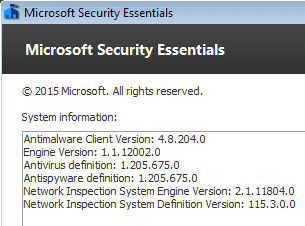
What version of MSE do you have?
MSE.PNG

You can attach screenshots via these steps:
http://www.sevenforums.com/tutorials/9733-screenshots-files-upload-post-seven-forums.html

Have you run a complete scan with MSE while in the safe mode?

What error(s) do you get from MSE during a normal uninstall?
Is MSE locking up during normal mode scans?
If so, on which file?
(We have seen a few threads about MSE locking up in the past few days.)

Have you tried a normal mode clean boot...
http://www.sevenforums.com/tutorial...ation-conflicts-performing-clean-startup.html
...and then uninstall MSE?

Would you be willing to scan your computer with WDO?
What is Windows Defender Offline? - Windows Help
I would be curious to see if it finds anything.
I use a USB flash drive (memory stick).

Are you current on your patches/updates?
 

My Computer

Computer type
Laptop
Computer Manufacturer/Model Number
Employer provided Dell Latitude
OS
W7 Pro SP1 64bit
CPU
i7
Memory
8GB
Graphics Card(s)
Intel HD Graphics
Hard Drives
crappy SSD
Antivirus
Employer mandated Symantec Endpoint Protection
Browser
Pale Moon 64bit, IE11 64bit & Chrome 64bit

My Computer

Computer type
PC/Desktop
Computer Manufacturer/Model Number
Custom Build
OS
Microsoft Windows 7 Professional 64-bit 7601 Multiprocessor Free Service Pack 1
CPU
Intel(R) Core(TM) i5-3570K CPU @ 3.40GHz
Motherboard
ASUSTeK COMPUTER INC. P8Z77-V LE PLUS
Memory
16.00 GB
Graphics Card(s)
Intel(R) HD Graphics 4000
Sound Card
(1) Pro 9000 (2) Realtek High Definition Audio (3) Intel
Monitor(s) Displays
Asus 24"
Screen Resolution
1920 x 1080 x 32 bits (4294967296 colors) @ 60 Hz
Hard Drives
(1) SAMSUNG SSD 830 Series (2) WDC WD1002FAEX-00Z3A0 (3) WDC WD10EZEX-00RKKA0
PSU
Seasonic Gold 750
Case
Fractal Arc Midi
Cooling
CM Hyper 212
Keyboard
MS Sidewinder
Mouse
Logitech M510 Wireless
Internet Speed
60Mps/6Mps
Antivirus
MSE
Browser
FF
...tried all the suggest solutions and none work.

http://answers.microsoft.com/en-us/.../17f5227a-01bf-47b8-92a2-4cb087aaa1e0?page=01

Thoughts?
Thanks
I hope that you did not try IObit Uninstaller as suggested on page 8 of that thread.

Avoid every app by IObit.


I did not see where you commented on these two parts of my last post:
~~~
Would you be willing to scan your computer with WDO?
What is Windows Defender Offline? - Windows Help
I would be curious to see if it finds anything.
I use a USB flash drive (memory stick).

Are you current on your patches/updates?

It is fine if you don't want to scan with WDO, just say so. The scan might run all night.

It is helpful to know if all other patches/updates are installed.
 

My Computer

Computer type
Laptop
Computer Manufacturer/Model Number
Employer provided Dell Latitude
OS
W7 Pro SP1 64bit
CPU
i7
Memory
8GB
Graphics Card(s)
Intel HD Graphics
Hard Drives
crappy SSD
Antivirus
Employer mandated Symantec Endpoint Protection
Browser
Pale Moon 64bit, IE11 64bit & Chrome 64bit
I did only the Advance Method using CMD and "mseremoval". Haven't tried WDO yet. Have it downloaded but was waiting to hear from you. Did not use IObit.

All patches and?updates are current.

Safe Mode scan seems to run ok on C drive. Scans work fine on my other HDDS. It;'s just "C" Drive

I'll try WDO next.
 

My Computer

Computer type
PC/Desktop
Computer Manufacturer/Model Number
Custom Build
OS
Microsoft Windows 7 Professional 64-bit 7601 Multiprocessor Free Service Pack 1
CPU
Intel(R) Core(TM) i5-3570K CPU @ 3.40GHz
Motherboard
ASUSTeK COMPUTER INC. P8Z77-V LE PLUS
Memory
16.00 GB
Graphics Card(s)
Intel(R) HD Graphics 4000
Sound Card
(1) Pro 9000 (2) Realtek High Definition Audio (3) Intel
Monitor(s) Displays
Asus 24"
Screen Resolution
1920 x 1080 x 32 bits (4294967296 colors) @ 60 Hz
Hard Drives
(1) SAMSUNG SSD 830 Series (2) WDC WD1002FAEX-00Z3A0 (3) WDC WD10EZEX-00RKKA0
PSU
Seasonic Gold 750
Case
Fractal Arc Midi
Cooling
CM Hyper 212
Keyboard
MS Sidewinder
Mouse
Logitech M510 Wireless
Internet Speed
60Mps/6Mps
Antivirus
MSE
Browser
FF
Just tried WDO, and it apparently requires that MSE be active and updated. Since I have uninstalled MSE, and Safe Mode/WDO will not allow reinstalling MSE, it appears I can't use WDO.
 

My Computer

Computer type
PC/Desktop
Computer Manufacturer/Model Number
Custom Build
OS
Microsoft Windows 7 Professional 64-bit 7601 Multiprocessor Free Service Pack 1
CPU
Intel(R) Core(TM) i5-3570K CPU @ 3.40GHz
Motherboard
ASUSTeK COMPUTER INC. P8Z77-V LE PLUS
Memory
16.00 GB
Graphics Card(s)
Intel(R) HD Graphics 4000
Sound Card
(1) Pro 9000 (2) Realtek High Definition Audio (3) Intel
Monitor(s) Displays
Asus 24"
Screen Resolution
1920 x 1080 x 32 bits (4294967296 colors) @ 60 Hz
Hard Drives
(1) SAMSUNG SSD 830 Series (2) WDC WD1002FAEX-00Z3A0 (3) WDC WD10EZEX-00RKKA0
PSU
Seasonic Gold 750
Case
Fractal Arc Midi
Cooling
CM Hyper 212
Keyboard
MS Sidewinder
Mouse
Logitech M510 Wireless
Internet Speed
60Mps/6Mps
Antivirus
MSE
Browser
FF
WDO should work without MSE.

That said, I cannot get WDO to create an ISO file.

Let's give up on WDO for now.


According to your post #10, you can still run MSE scans in the safe mode... even after running that mseremoval batch file as admin in the normal mode. Is that what you are saying?
 

My Computer

Computer type
Laptop
Computer Manufacturer/Model Number
Employer provided Dell Latitude
OS
W7 Pro SP1 64bit
CPU
i7
Memory
8GB
Graphics Card(s)
Intel HD Graphics
Hard Drives
crappy SSD
Antivirus
Employer mandated Symantec Endpoint Protection
Browser
Pale Moon 64bit, IE11 64bit & Chrome 64bit
Zalophus,

please post a new thread here in the security section of the forums with your issue. We can then take a deeper look.
 

My Computer

Computer type
PC/Desktop
Computer Manufacturer/Model Number
Custom Built
OS
Windows 10 Pro
CPU
AMD Ryzen 5 2400G Processor with Radeon RX Vega 11 Graphics
Motherboard
ASRock X470 Master SLI/AC AM4 AMD Promontory X470 SATA 6Gb/s
Memory
G.SKILL Ripjaws V Series 16GB (2 x 8GB) 288-Pin DDR4 SDRAM D
Graphics Card(s)
2047MB NVIDIA GeForce GTX 1060 6GB (EVGA)
Sound Card
Motherboard Built in
Monitor(s) Displays
Acer R240HY bidx 23.8-Inch IPS HDMI DVI VGA (1920 x 1080) Wi
Screen Resolution
1920 x 1080
Hard Drives
1TB Sandisk SSD PLUS (Main drive)
500 GB Seagate 7200 RPM (Games)
500 GB Western Digital 7200 RPM (Virtual Machines)
PSU
CORSAIR TX Series TX650M 650W 80+ Gold Modular Power Supply
Case
CORSAIR CARBIDE SPEC-02 Mid-Tower Gaming Case, Red LED Fan
Cooling
220mm, two 120mm, and four 60mm fans
Keyboard
Wired Dell keyboard
Mouse
Wireless Logitech mouse
Internet Speed
250mb down, 30mb up
Antivirus
Panda Cloud Antivirus
Browser
Chrome-ish x64
Other Info
Your awesome for reading this.
Update- Seemed to have fixed problem by restoring to August 24, just before the latest Win7 updates were installed which is when problems started. Had to do a start repair using the F8/boot, and now MSE is restored, and I have run two full scans with not a problem.
Thanks for help and I now consider problem solved.
 

My Computer

Computer type
PC/Desktop
Computer Manufacturer/Model Number
Custom Build
OS
Microsoft Windows 7 Professional 64-bit 7601 Multiprocessor Free Service Pack 1
CPU
Intel(R) Core(TM) i5-3570K CPU @ 3.40GHz
Motherboard
ASUSTeK COMPUTER INC. P8Z77-V LE PLUS
Memory
16.00 GB
Graphics Card(s)
Intel(R) HD Graphics 4000
Sound Card
(1) Pro 9000 (2) Realtek High Definition Audio (3) Intel
Monitor(s) Displays
Asus 24"
Screen Resolution
1920 x 1080 x 32 bits (4294967296 colors) @ 60 Hz
Hard Drives
(1) SAMSUNG SSD 830 Series (2) WDC WD1002FAEX-00Z3A0 (3) WDC WD10EZEX-00RKKA0
PSU
Seasonic Gold 750
Case
Fractal Arc Midi
Cooling
CM Hyper 212
Keyboard
MS Sidewinder
Mouse
Logitech M510 Wireless
Internet Speed
60Mps/6Mps
Antivirus
MSE
Browser
FF
Microsoft Security Essentials Removal - Final

Shut down your computer.
Remove the Hard Drive.
Connect it to another computer with equal or greater OS.
Rename the directory: C:\Program Files\Microsoft Security Client - I renamed mine to "Die"
Safely Eject the Hard Drive
Reconnect it to the original computer.
Boot Back Up - Navigate back to C:\Program Files\Die and delete that folder.
Lastly - Install a different Antivirus Program!

I spent an inordinate amount of time trying all the fixes proposed in many forums. In my case I had uninstalled to the point where it no longer showed up in the Programs and Features List, but the process MsMpEng.exe wouldn't go away and was eating a ton of memory and processor power.
 

My Computer

Computer type
PC/Desktop
OS
Windows 10 Professional 64BIT
I didn't have a problem uninstalling MSE through Control Panel but there is a definitions update left installed in Windows Updates which says it cannot be removed - KB2310138. Does this matter? Or will it cause issues on the machine or with other antivirus now installed? Thanks.
 

My Computer

Computer type
Laptop
Computer Manufacturer/Model Number
Sony Vaio VPCCW2S1E
OS
W7 HP 64 bit
CPU
Core i3 1st gen
Memory
8gb
Graphics Card(s)
Nvidia 330M
Internet Speed
8 mbps
Browser
Firefox

My Computer

Computer type
PC/Desktop
Computer Manufacturer/Model Number
Self built custom
OS
64-bit Windows 11 Pro for Workstations
CPU
Intel i7-8700K OC'd to 5 GHz
Motherboard
ASUS ROG Maximus XI Formula Z390
Memory
64 GB (4x16GB) G.SKILL TridentZ RGB DDR4 3600 MHz
Graphics Card(s)
ASUS ROG-STRIX-GTX1080TI-O11G-GAMING
Sound Card
Integrated
Monitor(s) Displays
2 x Samsung Odyssey G7 27"
Screen Resolution
2560x1440
Hard Drives
1TB Samsung 990 PRO M.2,
4TB Samsung 990 PRO PRO M.2,
TerraMaster F8 SSD Plus NAS
PSU
Seasonic Prime Titanium 850W
Case
Thermaltake Core P3
Cooling
Corsair Hydro H115i
Keyboard
Logitech wireless K800
Mouse
Logitech MX Master 4
Internet Speed
2 Gb/s Download and 100 Mb/s Upload
Antivirus
Malwarebyte Anti-Malware Premium
Browser
Google Chrome
Other Info
Logitech Z625 speaker system,
Logitech BRIO 4K Pro webcam,
HP Color LaserJet Pro MFP M477fdn,
APC SMART-UPS RT 1000 XL - SURT1000XLI,
Galaxy S23 Plus phone
Thanks very much! That's great to know it won't affect anything - I really didn't want to reinstall from scratch again and the update is on my recent system image too. I did remove old Windows updates through disk clean up but it didn't remove that one!
 

My Computer

Computer type
Laptop
Computer Manufacturer/Model Number
Sony Vaio VPCCW2S1E
OS
W7 HP 64 bit
CPU
Core i3 1st gen
Memory
8gb
Graphics Card(s)
Nvidia 330M
Internet Speed
8 mbps
Browser
Firefox
Glad I could help. :)
 

My Computer

Computer type
PC/Desktop
Computer Manufacturer/Model Number
Self built custom
OS
64-bit Windows 11 Pro for Workstations
CPU
Intel i7-8700K OC'd to 5 GHz
Motherboard
ASUS ROG Maximus XI Formula Z390
Memory
64 GB (4x16GB) G.SKILL TridentZ RGB DDR4 3600 MHz
Graphics Card(s)
ASUS ROG-STRIX-GTX1080TI-O11G-GAMING
Sound Card
Integrated
Monitor(s) Displays
2 x Samsung Odyssey G7 27"
Screen Resolution
2560x1440
Hard Drives
1TB Samsung 990 PRO M.2,
4TB Samsung 990 PRO PRO M.2,
TerraMaster F8 SSD Plus NAS
PSU
Seasonic Prime Titanium 850W
Case
Thermaltake Core P3
Cooling
Corsair Hydro H115i
Keyboard
Logitech wireless K800
Mouse
Logitech MX Master 4
Internet Speed
2 Gb/s Download and 100 Mb/s Upload
Antivirus
Malwarebyte Anti-Malware Premium
Browser
Google Chrome
Other Info
Logitech Z625 speaker system,
Logitech BRIO 4K Pro webcam,
HP Color LaserJet Pro MFP M477fdn,
APC SMART-UPS RT 1000 XL - SURT1000XLI,
Galaxy S23 Plus phone
Back
Top