
Did you read the first paragraph on my image ?
My Computer
At a glance
Win7 H.Prem. 32bit+SP1
- Computer Manufacturer/Model Number
- Look in my Signature.
- OS
- Win7 H.Prem. 32bit+SP1

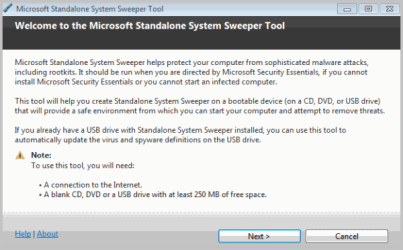
As I posted in post #3 the program didn't run on my PC. It stopped with an error message after installing the necessary Windows files.
Is the possible reason for this behaviour that I'm running a German Windows version?


I noticed the mpam-fe.exe file in the root of my drive and thought that looks familiar. It appears to be the Microsoft Security Essentials definitions file. If so you my be able to just download the latest from here > Get the latest definitions - Microsoft Malware Protection Center < and just replace that one file instead of formating your thumbdrive every time you want to update it. I compared the details tab under properties to a definitions file I downloaded today and they are a perfect match. Its mpam-fe64.exe for the 64 bit version.
Sounds like Microsoft is getting even deeper to stop the bad things from happening. If it still happens, a free tool to help you out. Yes it's in Beta, but doesn't most things start that way? I would like to thank all those who use Beta and all the testing so the rest of us get a great program.
I downloaded and installed the x64 on a USB drive and scanned. Worked out fine.
Although even though it says it just needs 250MB worth of space on a USB drive (which kind of implies it doesn't need to format it), it still needed to format the USB drive even though the drive was already bootable. So that was a little misleading...
...Maybe I'm a little short on basic PC knowledge. When I installed the program to the USB drive, it was "F", and I chose to scan "C". When the scan ran it was scanning drive "E", is this normal? Whatever drive the system boots from is considered C:\?
As I posted in post #3 the program didn't run on my PC. It stopped with an error message after installing the necessary Windows files.
Is the possible reason for this behaviour that I'm running a German Windows version?
I had the same problem with a Dell Optiplex 745, other 745's worked fine. I compared the BIOS settings and found that the 745 that set the error code had the Speedstep turned on. After turning Speedstep off... no worries program ran fine.
I noticed the mpam-fe.exe file in the root of my drive and thought that looks familiar. It appears to be the Microsoft Security Essentials definitions file. If so you my be able to just download the latest from here > Get the latest definitions - Microsoft Malware Protection Center < and just replace that one file instead of formating your thumbdrive every time you want to update it. I compared the details tab under properties to a definitions file I downloaded today and they are a perfect match. Its mpam-fe64.exe for the 64 bit version.
Nice find Kerry.
In addition though...
When running the Microsoft Standalone System Sweeper Tool again on the same USB flash drive, if the following conditions below are met, the tool will only download definitions (approx. 60MB) and update the USB drive without reformatting it.
The USB flash drive has Standalone System Sweeper previously installed on it.
The Microsoft Standalone System Sweeper Tool version that was used to create the bootable USB flash drive the first run is the same as being used for the second run.
Files on the USB flash drive are not damaged or missing (the tool will verify that).
 I have to admit, I just downloaded it to play with and didn't read though all the documentation. I also downloaded the latest versions for the Safety Scanner, Malicious Software Removal Tool, and MSE definitions, at the same time. Otherwise I probably wouldn't have noticed the mpam-fe file. I was thinking it would be kind of hard on your flash drive if it formated it every time you updated it. Looks like Microsoft thought of that too,

I just downloaded the x64 bit version to a USB drive. I have 3 hdds, 2 with Windows on and a whole drive with Linux Mint on. So I press F12 once "only boot choice" and choose either my Windows Drive or Linux.
When I tried to boot the system sweeper USB stick nothing happened for a while-black screen-and then Linux booted. Hey ho.
Yes, I ran it and chose to install on USB stick. It completed the install. I then set a boot choice for the USB but, as I say, after a while it booted Linux. It'll be GRUB grabbing the boot I reckon.

 Do you mean actually enter the BIOS and change the boot order? Isn't that what I'm effectively doing using F12 one time boot choice?
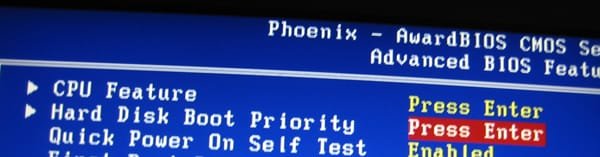
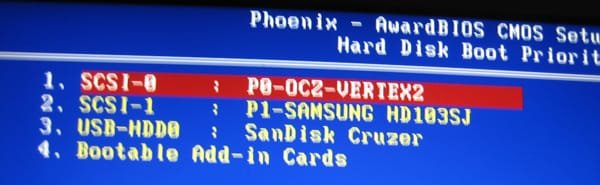
Both the Windows and the Linux install are on different HDDs so they are both active. As I say, I make the choice between which to run using F12 on the BIOS.
When I've done dual boot using more traditional methods GRUB always takes precedence. So you have to choose Windows in GRUB and then select it again in Winboot.
So I imagine that, with a boot choice set to USB, System Sweeper starts and sees GRUB as it is more powerful. As it cannot detect Windows, as you say, it doesn't do anything.
If I get any problems I could always just disconnect the Linux drive physically, I imagine this would work but I don't think I'll try it right now as everything is running smoothly.
Thanks for your input alph


