Solved Microsoft Virtual WiFi Miniport Adapter #8 or #9??

gabriolinari

New member
Member
VIP
Local time
8:47 AM
Messages
144
hi there guys,

Win 7 Ultimate 64bit...

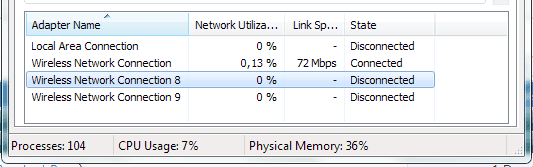
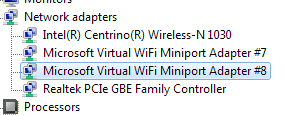
i would like to know why the Wireless Connection gets weird numbers, i believe it has a reference with the Microsoft Virtual WiFi Miniport Adapter....

i mean, device manager it says #7 and #8 but from the task manager it says #8 and #9...

not a massive annoyance but what if i wanted to rename them to 1 and 2? it would make me happier..

please see attached screen caps. PC works great, i can totally live with it, but well, just to have things "the right way", if is easy i wouldnt mind to fix it... :p

thanks
Gab
 

Attachments

  • network.png
    network.png
    7.1 KB · Views: 123
  • network-adapters.png
    network-adapters.png
    3.9 KB · Views: 7,447

My Computer My Computer

At a glance

Windows 7 Ultimate x64
Computer type
PC/Desktop
OS
Windows 7 Ultimate x64
If you are familiar with regedit, open it and go to key

HKEY_LOCAL_MACHINE\SYSTEM\CurrentControlSet\Control\Network\{xxxxxxxxxxxxxxxxxxxxx}\Descriptions

where xxxx is, I think, a system-specific CLSID number. You will find the names of the network interfaces there, with all the ###s. You can edit them there by clicking modify.
 

My Computer My Computer

At a glance

Windows 7 x64 Ultimate SP1Core i7-2630QM6 GB DDR3Nvidia GT 540M / Intel HD 3000 - Optimus swit...
Computer Manufacturer/Model Number
Asus N73SV
OS
Windows 7 x64 Ultimate SP1
CPU
Core i7-2630QM
Motherboard
Intel HM 65
Memory
6 GB DDR3
Graphics Card(s)
Nvidia GT 540M / Intel HD 3000 - Optimus switching
Sound Card
HD Audio (Intel Azalia/Realtek) ALC269
Monitor(s) Displays
LED flat panel
Screen Resolution
1920 x 1080
Hard Drives
2x Seagate Momentus 640 GB - 1,28 TB in total
Internet Speed
4 MB/256 kbps
Other Info
External HDs

WD Elements 1,5 TB
WD MyBook 500 GB
hi there guys,

Win 7 Ultimate 64bit...

i would like to know why the Wireless Connection gets weird numbers, i believe it has a reference with the Microsoft Virtual WiFi Miniport Adapter....

i mean, device manager it says #7 and #8 but from the task manager it says #8 and #9...

not a massive annoyance but what if i wanted to rename them to 1 and 2? it would make me happier..

please see attached screen caps. PC works great, i can totally live with it, but well, just to have things "the right way", if is easy i wouldnt mind to fix it... :p

thanks
Gab

If you aren't using the mini port to host a secondary WIFI network then you don't need them. I'm not sure why there are so many but it's best to remove them as the MINI port is famous for causing wireless connection problems. The link below shows you the commands to remove them, it's very simple to do using an http://www.sevenforums.com/tutorials/783-elevated-command-prompt.html

Uninstall Microsoft Virtual WiFi Miniport Adapter Permanantly
 

My Computer My Computer

At a glance

Windows 7 Ult, Windows 8.1 Pro,Q9650-4.275GHz, E8600 4.5GHz, E6750-3.8GHzG.Skill PC2 9600 1200Mhz 5 5 5 15 2TGTX480
Computer type
PC/Desktop
Computer Manufacturer/Model Number
Home built
OS
Windows 7 Ult, Windows 8.1 Pro,
CPU
Q9650-4.275GHz, E8600 4.5GHz, E6750-3.8GHz
Motherboard
Evga 780i FTW
Memory
G.Skill PC2 9600 1200Mhz 5 5 5 15 2T
Graphics Card(s)
GTX480
Sound Card
Asus Xonar D2
Monitor(s) Displays
HannsG
Screen Resolution
1680X1050
Hard Drives
GSkill Phoenix Pro 120GB SSD
PSU
ThermalTake Toughpower 1000Watt modular
Case
ThermalTake XaserV
Cooling
Xigmatek S1283
Keyboard
Logitech G15
Mouse
Logitech G9
Internet Speed
T1
well done, all fixed with Teerex solution..
 

My Computer My Computer

At a glance

Windows 7 Ultimate x64
Computer type
PC/Desktop
OS
Windows 7 Ultimate x64
If you are familiar with regedit, open it and go to key

HKEY_LOCAL_MACHINE\SYSTEM\CurrentControlSet\Control\Network\{xxxxxxxxxxxxxxxxxxxxx}\Descriptions

where xxxx is, I think, a system-specific CLSID number. You will find the names of the network interfaces there, with all the ###s. You can edit them there by clicking modify.

Necrobump!

I think this is a good place to investigate, but can anyone explain in detail what needs to be edited?
 

My Computer My Computer

At a glance

Windows 7 Professional x64Intel Core i5-2500K @ 3.3GHz8GBZotac ZONE GeForce GT 240 1GB [ZT-20404-20L]
Computer Manufacturer/Model Number
Homebrew
OS
Windows 7 Professional x64
CPU
Intel Core i5-2500K @ 3.3GHz
Motherboard
Fatal1ty P67 Professional
Memory
8GB
Graphics Card(s)
Zotac ZONE GeForce GT 240 1GB [ZT-20404-20L]
Sound Card
On board
Monitor(s) Displays
2x Samsung SyncMaster 203B
Screen Resolution
1400 x 1050
Case
CoolerMaster Elite
Cooling
Zalman
Keyboard
Microsoft Natural Wireless Ergonomic 7000
Mouse
Microsoft Natural Wireless Laser 7000
Multiple Microsoft Virtual WiFi Miniport Adapters [FIXED]

This has been bugging me for ages, and I think I have found the fix.

Set the Environment Variable to view nonpresent devices [click]
Open Device Manager and select Show Hidden Devices
Delete all instances of Microsoft Virtual WiFi Miniport Adapter (may only be the last one)
Reboot

This would also work on other devices with #1, #2, #3, ... #n suffixes
 

My Computer My Computer

At a glance

Windows 7 Professional x64Intel Core i5-2500K @ 3.3GHz8GBZotac ZONE GeForce GT 240 1GB [ZT-20404-20L]
Computer Manufacturer/Model Number
Homebrew
OS
Windows 7 Professional x64
CPU
Intel Core i5-2500K @ 3.3GHz
Motherboard
Fatal1ty P67 Professional
Memory
8GB
Graphics Card(s)
Zotac ZONE GeForce GT 240 1GB [ZT-20404-20L]
Sound Card
On board
Monitor(s) Displays
2x Samsung SyncMaster 203B
Screen Resolution
1400 x 1050
Case
CoolerMaster Elite
Cooling
Zalman
Keyboard
Microsoft Natural Wireless Ergonomic 7000
Mouse
Microsoft Natural Wireless Laser 7000
Back
Top