Solved Microsofts atdmt.com cookies

Layback Bear

3 Brain Cells
Guru
Gold Member
VIP
Local time
1:12 AM
Messages
24,243
Location
Northern Ohio
My understanding is cookies from atdmt.com are I.E. and Live Mail and are in partnership with Microsoft. Removing them is easy but keeping them from coming back is the problem I'm having. Other than being a tracking cookie what else do they do. If I could stop them would their be ill effects? Googling I have found this problem has been around for years. Every site has methods to stop them but when continuing to read proves that they don't work. So two questions.
1. The best way to stop them
2. Will their be ill effects when using I.E. or Live Mail.
Note: I use I.E. for my banking.
 

My Computer

Computer type
PC/Desktop
Computer Manufacturer/Model Number
Home made Desktop
OS
Windows 10 Pro. 64/ version 1709 Windows 7 Pro/64
CPU
Intel i7-6800K @ 4.3
Motherboard
ASUS X-99 Deluxe II
Memory
Corsair Platinum 16 gig @2400
Graphics Card(s)
EVGA GTX 1070 OC
Monitor(s) Displays
Asus 27" LED LCD/VE278Q
Screen Resolution
1920-1080 or 1280-720 HDMI
Hard Drives
INTEL SSD 730-240 Gb Sata 3.0/
PSU
EVGA Platium 1200W
Case
Phanteks Luxe Tempered Glass 8 fans/ one radiator
Cooling
XSPC/ Water Cooled CPU
Keyboard
Das 4 Professional
Mouse
Logitech M705/MX Anywhere 2-S
Internet Speed
100 mbits
Antivirus
Microsoft Security Essentials/ Malwarebytes Premium 3.0/ SAS
Browser
I.E. 11 default/Firefox/ ISP Time Warner Cable/Spectrum
Other Info
LG BluRay Burner/
Sound system-KLipsch-THX/
Icy Dock ssd Hot Swap bays.
I use Live Mail and Microsoft Partnership and have no cookies coming back from atdmt.com. These are the settings on my PC:
  • block cookies from the site
  • DNT+ BHO
  • Ghostery BHO
There's no problem accessing Live Mail with IE9. If in your case it keeps coming back, you could try adding this to the "host" file:

Code:
127.0.0.1       atdmt.com

That ought to prevent any browser connection to atdmt.com...

Note: I use IE as my main browser...
 

My Computer

Computer type
PC/Desktop
Computer Manufacturer/Model Number
Custom built at Home
OS
Windows 7 64-bit, Windows 8.1 64-bit, OSX El Capitan, Windows 10 (VMware)
CPU
Intel i5-3350P 3.1 GHz
Motherboard
Gigabyte GA-Z77X-UP5 TH
Memory
16 GBs GSkill Sniper
Graphics Card(s)
Radeon HD 7850
Sound Card
VIA HD Audio
Monitor(s) Displays
Dell U2410 24"
Screen Resolution
1920x1200
Hard Drives
1 x Intel 520 240 GBs
1 x Seagate 1TBs SATA 2.0,
1 x Seagate 1TBs eSATA 2.0
PSU
Thermaltake 850W
Case
Antec P183
Cooling
Noctua NH-D14 Heatsink 2 x 120mm fans, 4 x 120mm case fans
Keyboard
Dell Multimedia keyboard
Mouse
Logitech Trackball
Internet Speed
28.5 Mb/s
Thank you for your reply Cr00zng. I am slow so bear with me.
 

My Computer

Computer type
PC/Desktop
Computer Manufacturer/Model Number
Home made Desktop
OS
Windows 10 Pro. 64/ version 1709 Windows 7 Pro/64
CPU
Intel i7-6800K @ 4.3
Motherboard
ASUS X-99 Deluxe II
Memory
Corsair Platinum 16 gig @2400
Graphics Card(s)
EVGA GTX 1070 OC
Monitor(s) Displays
Asus 27" LED LCD/VE278Q
Screen Resolution
1920-1080 or 1280-720 HDMI
Hard Drives
INTEL SSD 730-240 Gb Sata 3.0/
PSU
EVGA Platium 1200W
Case
Phanteks Luxe Tempered Glass 8 fans/ one radiator
Cooling
XSPC/ Water Cooled CPU
Keyboard
Das 4 Professional
Mouse
Logitech M705/MX Anywhere 2-S
Internet Speed
100 mbits
Antivirus
Microsoft Security Essentials/ Malwarebytes Premium 3.0/ SAS
Browser
I.E. 11 default/Firefox/ ISP Time Warner Cable/Spectrum
Other Info
LG BluRay Burner/
Sound system-KLipsch-THX/
Icy Dock ssd Hot Swap bays.
Thank you for your reply Cr00zng. I am slow so bear with me.
Based on your forum name, I wouldn't expect anything less;)

Some history about the atdmt.com and other subdomains for this cookie monster.

aQuantive, Inc that owned this domain name had been purchased by Microsoft in 2007 for about six billions. Atlas Solution was part of this deal and formed the Advertiser and Publisher Solutions (APS) Group at MS; the solution later renamed MS Atlas. Integrating this cookie monster with their solutions, such as live.com, hotmail.com, etc., did cause issues in IE but these issues not as apparent nowadays. You can actually disable cookies for atdmt.com and its subdomains without impacting the access to MS online services. At least with the MS services accessed by my machine that is the case.

If you delete the atdmt.com cookies and don't accept new one from them, you shou should be fine. Do disable third-party cookies as well. My host file has entry for this domain and the known subdomains, such as these:

atdmt.com
att.atdmt.com
click.atdmt.com
clk.atdmt.com
image.atdmt.com
rmd.atdmt.com
spd.atdmt.com
spe.atdmt.com
switch.atdmt.com
view.atdmt.com

MS just had a 6.2 billion writeoff this year, mostly related to the aQuantive acquisition. It would've 200 mill profit, if they didn't acquire it... :doh:
 

My Computer

Computer type
PC/Desktop
Computer Manufacturer/Model Number
Custom built at Home
OS
Windows 7 64-bit, Windows 8.1 64-bit, OSX El Capitan, Windows 10 (VMware)
CPU
Intel i5-3350P 3.1 GHz
Motherboard
Gigabyte GA-Z77X-UP5 TH
Memory
16 GBs GSkill Sniper
Graphics Card(s)
Radeon HD 7850
Sound Card
VIA HD Audio
Monitor(s) Displays
Dell U2410 24"
Screen Resolution
1920x1200
Hard Drives
1 x Intel 520 240 GBs
1 x Seagate 1TBs SATA 2.0,
1 x Seagate 1TBs eSATA 2.0
PSU
Thermaltake 850W
Case
Antec P183
Cooling
Noctua NH-D14 Heatsink 2 x 120mm fans, 4 x 120mm case fans
Keyboard
Dell Multimedia keyboard
Mouse
Logitech Trackball
Internet Speed
28.5 Mb/s
I don't know how to do what you are suggesting. Could you give me some guide lines?
 

My Computer

Computer type
PC/Desktop
Computer Manufacturer/Model Number
Home made Desktop
OS
Windows 10 Pro. 64/ version 1709 Windows 7 Pro/64
CPU
Intel i7-6800K @ 4.3
Motherboard
ASUS X-99 Deluxe II
Memory
Corsair Platinum 16 gig @2400
Graphics Card(s)
EVGA GTX 1070 OC
Monitor(s) Displays
Asus 27" LED LCD/VE278Q
Screen Resolution
1920-1080 or 1280-720 HDMI
Hard Drives
INTEL SSD 730-240 Gb Sata 3.0/
PSU
EVGA Platium 1200W
Case
Phanteks Luxe Tempered Glass 8 fans/ one radiator
Cooling
XSPC/ Water Cooled CPU
Keyboard
Das 4 Professional
Mouse
Logitech M705/MX Anywhere 2-S
Internet Speed
100 mbits
Antivirus
Microsoft Security Essentials/ Malwarebytes Premium 3.0/ SAS
Browser
I.E. 11 default/Firefox/ ISP Time Warner Cable/Spectrum
Other Info
LG BluRay Burner/
Sound system-KLipsch-THX/
Icy Dock ssd Hot Swap bays.
The cookie settings can be changed in the "Internet options", accessible by clicking on the gear icon in top right corner of the browser. Doing so pops up this window:

ie option.png

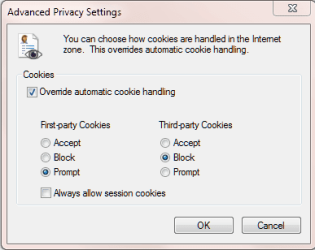
The cookie settings are under the "Privacy" tab, already selected in the above image. Within this tab, click on the "Advanced" bar that pops up a window such as this one:

ie cookies.png

The image above is the cookie settings my machine has and we've been discussing. Note that you'll need to place a checkmark to the "Override automatic cookie handling" checkbox.

The "host" file with no extension is in the "C:\Windows\System32\drivers\etc" folder. As an administrator you can edit this file with notepad and add the following entries;

127.0.0.1 atdmt.com
127.0.0.1 att.atdmt.com
127.0.0.1 click.atdmt.com
127.0.0.1 clk.atdmt.com
127.0.0.1 image.atdmt.com
127.0.0.1 rmd.atdmt.com
127.0.0.1 spd.atdmt.com
127.0.0.1 spe.atdmt.com
127.0.0.1 switch.atdmt.com
127.0.0.1 view.atdmt.com

The forum software removes the extra spaces between the last number and the first alfa character. You can just hit tab in notepad to restore the extra spaces, or just leave it as it is.

The host file is the first that Windows looks into to resolve the name to an IP address. Resolving all atdmt.com known hostnames to the loopback IP of your PC prevents your browser contacting these hosts on the Internet. If your browser cannot reach these hosts, then certainly the cookie won't come from these hosts either.

Let me know, if the info is helpful...
 

My Computer

Computer type
PC/Desktop
Computer Manufacturer/Model Number
Custom built at Home
OS
Windows 7 64-bit, Windows 8.1 64-bit, OSX El Capitan, Windows 10 (VMware)
CPU
Intel i5-3350P 3.1 GHz
Motherboard
Gigabyte GA-Z77X-UP5 TH
Memory
16 GBs GSkill Sniper
Graphics Card(s)
Radeon HD 7850
Sound Card
VIA HD Audio
Monitor(s) Displays
Dell U2410 24"
Screen Resolution
1920x1200
Hard Drives
1 x Intel 520 240 GBs
1 x Seagate 1TBs SATA 2.0,
1 x Seagate 1TBs eSATA 2.0
PSU
Thermaltake 850W
Case
Antec P183
Cooling
Noctua NH-D14 Heatsink 2 x 120mm fans, 4 x 120mm case fans
Keyboard
Dell Multimedia keyboard
Mouse
Logitech Trackball
Internet Speed
28.5 Mb/s
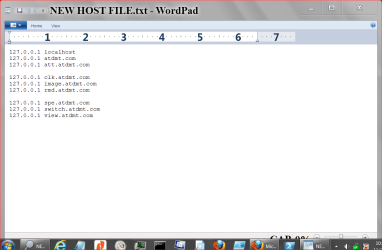
So far it's a no go. My new host file under C:\Windows\System32\drivers\etc

NEW HOST FILE.PNG

May be it's not installing properly. MSE gives me a notice when trying to do it.
What would be another good way to check if it is installed. When I go to
C:\Windows\System32\drivers\etc using Windows Explores I get as per the picture.
I still get the cookies. If you need anymore information just ask.
 

My Computer

Computer type
PC/Desktop
Computer Manufacturer/Model Number
Home made Desktop
OS
Windows 10 Pro. 64/ version 1709 Windows 7 Pro/64
CPU
Intel i7-6800K @ 4.3
Motherboard
ASUS X-99 Deluxe II
Memory
Corsair Platinum 16 gig @2400
Graphics Card(s)
EVGA GTX 1070 OC
Monitor(s) Displays
Asus 27" LED LCD/VE278Q
Screen Resolution
1920-1080 or 1280-720 HDMI
Hard Drives
INTEL SSD 730-240 Gb Sata 3.0/
PSU
EVGA Platium 1200W
Case
Phanteks Luxe Tempered Glass 8 fans/ one radiator
Cooling
XSPC/ Water Cooled CPU
Keyboard
Das 4 Professional
Mouse
Logitech M705/MX Anywhere 2-S
Internet Speed
100 mbits
Antivirus
Microsoft Security Essentials/ Malwarebytes Premium 3.0/ SAS
Browser
I.E. 11 default/Firefox/ ISP Time Warner Cable/Spectrum
Other Info
LG BluRay Burner/
Sound system-KLipsch-THX/
Icy Dock ssd Hot Swap bays.
I apologize for mistyping the file name, it is "hosts" and not "host" within the same directory...

You shouldn't edit the hosts file with Wordpad, it adds formating to the text file that may cause problems. You can use Notepad instead.

I've attached my host file with the "txt" extension, just rename it as "hosts" without the extension and copy/paste it to the "C:\Windows\System32\drivers\etc\" folder. The system will complain about the file already exists and ask you to confirm it. If you don't have any specific DNS entries, you can overwrite the existing file. If you have specific entries, you can just add the new entries from the attached hosts.txt file.

If you have MSE active it'll remove two of the DNS entries from the hosts file:

Code:
127.0.0.1       click.atdmt.com
127.0.0.1       spd.atdmt.com

The chances are that this is where the cookies coming from and you'll need to disable MSE for editing the hosts file.

Let me know how it works for you....
 

Attachments

My Computer

Computer type
PC/Desktop
Computer Manufacturer/Model Number
Custom built at Home
OS
Windows 7 64-bit, Windows 8.1 64-bit, OSX El Capitan, Windows 10 (VMware)
CPU
Intel i5-3350P 3.1 GHz
Motherboard
Gigabyte GA-Z77X-UP5 TH
Memory
16 GBs GSkill Sniper
Graphics Card(s)
Radeon HD 7850
Sound Card
VIA HD Audio
Monitor(s) Displays
Dell U2410 24"
Screen Resolution
1920x1200
Hard Drives
1 x Intel 520 240 GBs
1 x Seagate 1TBs SATA 2.0,
1 x Seagate 1TBs eSATA 2.0
PSU
Thermaltake 850W
Case
Antec P183
Cooling
Noctua NH-D14 Heatsink 2 x 120mm fans, 4 x 120mm case fans
Keyboard
Dell Multimedia keyboard
Mouse
Logitech Trackball
Internet Speed
28.5 Mb/s
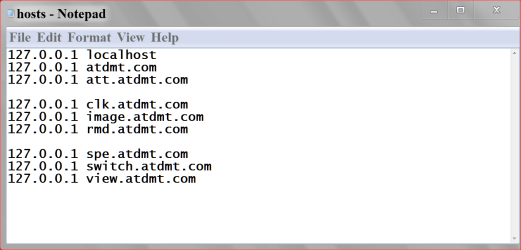
I just use Word Pad to post a snippit. The actual changing of the host was done with Note Pad. I will put things back and go from their.
This is what I actually did.
Capture.PNG HOST FILES.PNG
 

My Computer

Computer type
PC/Desktop
Computer Manufacturer/Model Number
Home made Desktop
OS
Windows 10 Pro. 64/ version 1709 Windows 7 Pro/64
CPU
Intel i7-6800K @ 4.3
Motherboard
ASUS X-99 Deluxe II
Memory
Corsair Platinum 16 gig @2400
Graphics Card(s)
EVGA GTX 1070 OC
Monitor(s) Displays
Asus 27" LED LCD/VE278Q
Screen Resolution
1920-1080 or 1280-720 HDMI
Hard Drives
INTEL SSD 730-240 Gb Sata 3.0/
PSU
EVGA Platium 1200W
Case
Phanteks Luxe Tempered Glass 8 fans/ one radiator
Cooling
XSPC/ Water Cooled CPU
Keyboard
Das 4 Professional
Mouse
Logitech M705/MX Anywhere 2-S
Internet Speed
100 mbits
Antivirus
Microsoft Security Essentials/ Malwarebytes Premium 3.0/ SAS
Browser
I.E. 11 default/Firefox/ ISP Time Warner Cable/Spectrum
Other Info
LG BluRay Burner/
Sound system-KLipsch-THX/
Icy Dock ssd Hot Swap bays.
Back
Top