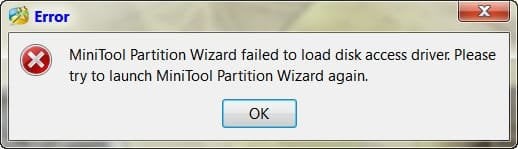
V vfusion New member Local time 9:22 AM Messages 16 May 22, 2011 #1 Hi, I got this error "Minitool partition wizard failed to load disk access driver. Please try to launch Minitool Partition Wizard again". I have tried reinstalling and restarting to no avail. Any ideas ? My Computer OSWindows 7 PRO 32BIT
Hi, I got this error "Minitool partition wizard failed to load disk access driver. Please try to launch Minitool Partition Wizard again". I have tried reinstalling and restarting to no avail. Any ideas ?
P pbcopter New member Guru VIP Local time 9:22 PM Messages 1,872 Location South Carolina, USA May 22, 2011 #2 Try running the program as administrator. Right click on the programs icon and select "Run as administrator" My Computer Computer typePC/DesktopComputer Manufacturer/Model NumberCustom BuiltOSWindows 10 Pro x64, Windows 8.1 Pro x64, Windows 7 Ultimate x64 SP1,CPUINTEL i9-7920X LGA 2066MotherboardGigabyte X299-WU8 F3Memory64 GB (4 X 16 GB) G-Skill V Series DDR4 3200 Quad ChannelGraphics Card(s)EVGA GTX 1060 SC 3 GBSound CardRealtek Onboard ALC1220Monitor(s) Displays2 x Samsung S27E310Screen Resolution1920x1080Hard DrivesSamsung 2 x 970 EVO Plus 500 GB NVMe 1 x 6TB WD 6003FZBX SATA 1 x 6TB WD 60EFRX SATA 12 x 3TB WD 30EFRX SATAPSUSeasonic X-1050CaseThermaltake Armor+CoolingCorsair H80i V2 Liquid AOI CoolerKeyboardLogitech G510sMouseLogitech MX Master 2SInternet Speed200 Mb/sAntivirusESET NOD32 13.1BrowserEDGE (Dev, Canary, Beta), ChromeOther InfoASUS RT-AC68U router Malwarebytes 4.0.4
Try running the program as administrator. Right click on the programs icon and select "Run as administrator"
V vfusion New member Thread Starter Local time 9:22 AM Messages 16 May 22, 2011 #3 pbcopter said: Try running the program as administrator. Right click on the programs icon and select "Run as administrator" Click to expand... Tried that earlier, not working. Thanks. Anyway, installed another, EASEUS Partition Master and resized the partitions without problem. My Computer OSWindows 7 PRO 32BIT
pbcopter said: Try running the program as administrator. Right click on the programs icon and select "Run as administrator" Click to expand... Tried that earlier, not working. Thanks. Anyway, installed another, EASEUS Partition Master and resized the partitions without problem.