MiniTool Partition Wizard reports different partitions to others

Sandra A

New member
Local time
2:31 AM
Messages
4
Hello everyone

Very much a newbie to this OS and to partitioning with MiniTool Partition Wizard. It seems lots of folk here use this tool so as I can't find an answer anywhere to this thing that's bugging me ... .

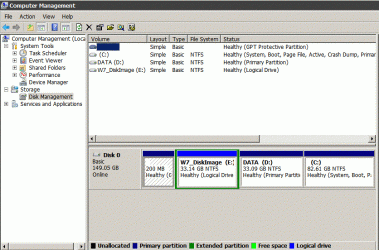
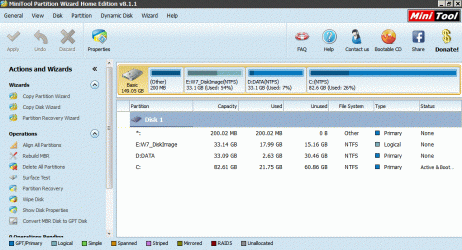
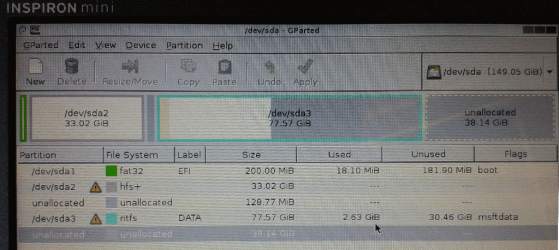
I installed and used 'MT' to 'Expand' my C drive, taking a chunk from the D drive to its left. All looks fine until I go to Macrium Reflect to make a backup and its reporting an entirely different partition schedule to MT. In fact it's reporting an older one with un-resized partitions and a third partition which I formatted as NTFS (using Disk Management) as HFS+, which it was previously. So what does Disk Management now say? Same as MT. OK, I think, so Macrium's wrong, best not use that then. But it niggles me so I boot with a GParted Live CD. But that agrees with Macrium and moreover reports the 'chunk' I thought I'd taken from the D drive as unallocated.

So which is right, MT/DM or Macrium/GParted?

This is probably more worrysome because I'm new to this side of the field but any insights would be most appreciated.

Best,

S
 

My Computer My Computer

At a glance

Windows 7 Starter
Computer type
PC/Desktop
OS
Windows 7 Starter

My Computer My Computer

At a glance

Win7 Enterprise, Win7 x86 (Ult 7600), Win7 x6...AMD fx8350 4ghz, AMD-32 2400mhz, AMD-64 3200m...2gb, 4gb on the Ult 7600, 4gb on Technet RTM,...Draw my own Graphics, several nVidia cards
Computer type
PC/Desktop
Computer Manufacturer/Model Number
Built them myself, Science Experiments !
OS
Win7 Enterprise, Win7 x86 (Ult 7600), Win7 x64 Ult 7600, TechNet RTM on AMD x64 (2.8Ghz)
CPU
AMD fx8350 4ghz, AMD-32 2400mhz, AMD-64 3200mhz, AMDx64 2.8G
Motherboard
SIS 755, ECS-K8M890M-M (Ult 7600), GigaByte & others
Memory
2gb, 4gb on the Ult 7600, 4gb on Technet RTM, 32gb on FX8350
Graphics Card(s)
Draw my own Graphics, several nVidia cards
Sound Card
on motherboard
Monitor(s) Displays
19" flat scr, 28" I-Inc widescr,22" Emprex Widescr, 23" Acer
Screen Resolution
1280 x 1024, 1440 x 900, 1920 x 1080
Hard Drives
6 pata Ide HD's & 2 Sata HD's
added 80gb external on Ult 7600 computer,
numerous extra 1tb, 2TB, 3Tb SATA HD's
A collection of ext HD Docks w/ HDs
PSU
430w, 550w, 600w, 700, 800, etc
Case
All Generic Full Towers
Cooling
Open Air & a few fans, some w/ colored LEDs
Keyboard
Compaq & Dell recycled from GoodWill
Mouse
Made in China Optical Wired Mouse
Internet Speed
Fast Cable InterNet
Antivirus
AVG Free on 24 different Desktops, NO Problems!
Browser
IE 8 is preferred, but use FireFox sometimes
Other Info
Linksys Routers, switches, & Hubs
Too Many USB Flash Drives to count, Biggest is 64GB !
Eight computers in my home network.
Sixteen computers at my business network.
Linked via TeamViewer !
Lots of old used spare computer parts everywhere!
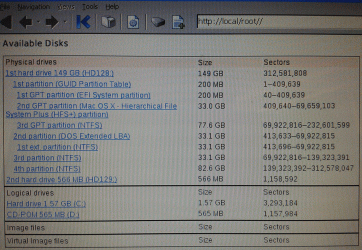
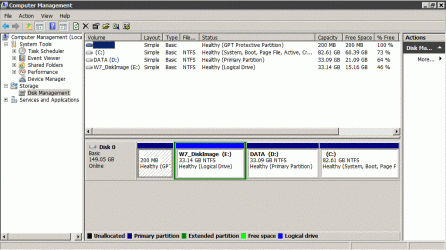
Thanks Doc. As you can see from the att. DM & MT agree; partition readers from two different Linux boot CDs differ, but agree between themselves.

It would be strange if the Linux boots can see some trace of HFS+ left over from a reformat, though I don't know how even that could happen. My chief concern is that I used MT to expand the C drive and the Linux programs suggest this has failed ...?

Best,

S
 

Attachments

  • Disk Management grab.gif
    Disk Management grab.gif
    76.6 KB · Views: 2
  • MiniTool.gif
    MiniTool.gif
    132.1 KB · Views: 1
  • DiskExplorer_forNTFS.gif
    DiskExplorer_forNTFS.gif
    589.2 KB · Views: 1
  • GParted.gif
    GParted.gif
    348.8 KB · Views: 1

My Computer My Computer

At a glance

Windows 7 Starter
Computer type
PC/Desktop
OS
Windows 7 Starter
Did you miss the clearly stated step in Disk Management - Post a Screen Capture Image
to maximize the window and expand all columns so we could see the recorded sizes on disk?

The disk is set up with the OS way over on the right side which is where one would only deliberately put it to get the slowest possible reads from the disk head which parks on the left side. This is why OS's are normally installed on the left side, not a bunch of data partitions which don't benefit at all. The 200mb System Reserved partition has also been abandoned somehow with the System now booting from C.

What I would do is start over, back up data externally, wipe the HD or delete all partitions during booted install then follow these same steps for a perfect Clean Reinstall - Factory OEM Windows 7 . As long as you stick with the tools and methods in the tutorial you will get and keep a perfect install, better than 95% of all others out there.
 
Dear gregrocker

Thank you very much for the feedback. Please accept my apologies for failing to read the Post a Screen Capture Image tutorial - in my arrogance I believed I knew how to do this! I have now att. a full screen grab which I believe shows the 200mb System Reserved partition on the left and C partition, as you write, on the right. The reason for this arrangement is, as far as I understand it, down to the guy who sold me the PC having installed an Apple OS on what is now the E partition. When I discovered that this installation contravened Apple's OS license I re-formatted the partition with it on.

Many thanks for the link to the excellent re-install tutorial. I'm afraid that that only causes me a new worry now: that this PC does not have a COA sticker. Does this mean that the W7 install is also in contravention of a licensing agreement? Presumably without this sticker I also cannot follow the re-install tutorial - is that right? I really hope I don't wind up having bought an OS-free PC!

Re. my original question - does anyone know why there are conflicting reports on how this drive is partitioned?

All good things,

S
 

Attachments

  • sizes.gif
    sizes.gif
    95.2 KB · Views: 0

My Computer My Computer

At a glance

Windows 7 Starter
Computer type
PC/Desktop
OS
Windows 7 Starter
The only way to tell whether the installation is good, is to generate a MGADIAG report, and post it here for analysis. We can have a look at that and let you know.

1. Download and save this tool to your desktop:
http://go.microsoft.com/fwlink/?linkid=52012

2. Run the tool, and then click Copy - ignore any errors if they appear

3. Use CTRL+V to paste the unedited results of the tool here in your next reply
 

My Computer My Computer

At a glance

Windows 10 Pro x64 ; Xubuntu x64Intel i7 860 @ 2.80 GHz O/C'ed to 4.0GHz16GB Corsair Vengance DDR3 @ 661 MHz Dual Cha...EVGA NVidia GTX 560 1024MB
Computer type
PC/Desktop
Computer Manufacturer/Model Number
Golden Mk. I.4
OS
Windows 10 Pro x64 ; Xubuntu x64
CPU
Intel i7 860 @ 2.80 GHz O/C'ed to 4.0GHz
Motherboard
Gigabyte P55A-UD3R Rev.1. Award BIOS F13
Memory
16GB Corsair Vengance DDR3 @ 661 MHz Dual Channel (9-9-9-24)
Graphics Card(s)
EVGA NVidia GTX 560 1024MB
Sound Card
Realtek Integrated
Monitor(s) Displays
Dual Samsung SyncMaster 2494HS
Screen Resolution
1920*1080 and 1920*1080
Hard Drives
1*Samsung 840 EVO 120GB SSD;
1*OCZ Vertex 2 60GB SSD;
2*Samsung F3 SpinPoint 1TB in RAID0;
1*Samsung F1 SpinPoint 1TB;
2*Western Digital 1TB External USB 3.0
1*Western Digital 500GB External USB 3.0
1*Seagate 500GB External USB 2.0
PSU
Thermaltake ToughPower QFan 750W
Case
Thermaltake Element S VK60001W2Z
Cooling
Corsair H60 Water Cooling, 2*230mm and 2*80mm case fans
Keyboard
Logitech G110
Mouse
Logitech MX518
Thanks for the tips,

x S
 
Last edited:

My Computer My Computer

At a glance

Windows 7 Starter
Computer type
PC/Desktop
OS
Windows 7 Starter
Back
Top