Miracle needed

pablo70

New member
Member
Local time
3:24 PM
Messages
62
iam having probs with sound on youtube metacafe etc ,iam using windows 7 and firefox ( uninstalled and reinstalled flash player etc ) , i have tried everywhere for a solution but no success , there seems to be a couple of solutions for xp but none for windows 7 , help please :cry:

forgot to mention there is sound with my media player
 

My Computer

OS
windows 7
iam having probs with sound on youtube metacafe etc ,iam using windows 7 and firefox ( uninstalled and reinstalled flash player etc ) , i have tried everywhere for a solution but no success , there seems to be a couple of solutions for xp but none for windows 7 , help please :cry:

forgot to mention there is sound with my media player


I found this.
Have you used this solution yet?
This is not mine but someone had a similiar problem with Win7


Wavemapper – msacm32.drv Adobe Flash Player No Sound Windows 7, Vista
Quite frequently, Windows users encounter the problem in which the system does not play the audio sounds – particularly when trying to playback Flash based media files. Moreover, this typically occurs after you have recently installed the latest version of Adobe Flash Payer (say version 9 or 10). This problem explicitly manifests itself when you are attempting to watch Flash videos on the internet – on sites such as YouTube, MetaCafe, Daily Motion, MySpace Video, Google Video, etc. In all these cases, what you will typically find is that, while the video is running perfectly, the audio fails to run.
There is a general resolution to this problem that involves a registry fix – however it is perfectly plausible that you might be uncomfortable tweaking those treacherous registry keys. In that case, the good news is that there is a far simpler trick that lets you fix this Flash no-sound problem at the drop of a hat.

Flash No-sound Wavemapper Solution
  1. Launch Registry Editor by typing ‘regedit’ at Run command
  2. Navigate to the following registry key:HKEY_LOCAL_MACHINE\SOFTWARE\Microsoft\Windows NT\CurrentVersion\Drivers32
  3. On the right pane, and check for existence of “wavemapper” registry subkey. If it is not there, then create a new string value named “wavemapper”, and give the entry value “msacm32.drv”.If wavemapper entry is already there, ensure that its value data is “msacm32.drv”.
Also, you have to ensure, and verify, that the msacm32.drv driver file exists in C:\Windows\System32 folder. If the file is missing in that location, search for another copy of msacm32.drv on your computer, or copy that file from another Windows PC.

 

My Computer

Computer type
PC/Desktop
Computer Manufacturer/Model Number
Self Built
OS
Windows 10 Pro
CPU
Intel i5
Motherboard
I have a fatherboard
Memory
I'm old and lost a few chips
Graphics Card(s)
Yup
Sound Card
Yup
Monitor(s) Displays
Samsung 32" UHD
Screen Resolution
3840 x 2160
Hard Drives
Samsung 860 EVO drives
PSU
450 Watt and some fans that blow
Case
Small tower
Cooling
Yes I am cool. lol
Keyboard
Who needs a keyboard?
Mouse
Logitech Laser G7 wireless
Internet Speed
Zippy fast UP and DOWN
Antivirus
I got a shot
Browser
The new Improved EDGE 2020
wavemapper entry is already there, and its value data is “msacm32.drv” , any other ideas :)
 

My Computer

OS
windows 7
When you right click the speaker icon in your system tray and select Open Volume Mixer, are the sliders for the web browsers at the same level as the speakers?

If the slider for the web browser, or any other application for that matter, is all the way down, even though the speaker slider is up, then that application will not have any sound.
 

Attachments

  • sounds.PNG
    sounds.PNG
    12.6 KB · Views: 1

My Computer

Computer Manufacturer/Model Number
Rig 1
OS
Windows 7 Ultimate x64
CPU
AMD Phenom II X4 940 Black Edition @ 3.4GHz (AM2+)
Motherboard
Gigabyte GA-MA790X-UD4P (AM2+)
Memory
Corsair CM2X4096-8500C5 (4 X 2GB)
Graphics Card(s)
XFX Radeon HD 5770 / Diamond Radeon HD 5770 CrossFireX
Sound Card
Asus Xonar DS (PCI)
Monitor(s) Displays
Samsung SyncMaster 932bw+ (3)
Screen Resolution
4320x900
Hard Drives
OCZ Vertex 2 80 GB - Windows 7 System --
WD Caviar Black 1TB - Music, Movies, Vids, Pics --
WD Caviar Black 640GB - User Profiles & Games --
WD My Book 320GB external
PSU
Corsair CMPSU-750TX
Case
Cooler Master HAF 932
Cooling
Corsair Hydro Series H50
Keyboard
Logitech Desktop Wave
Mouse
Logitech LX8 Laser
Internet Speed
20 down / 2 up
Other Info
LG GGC-H20L Blu-Ray / HDDVD combo --
Hauppauge HVR-1250 --
Silverstone MFP-51 --
Logitech Webcam C600
wavemapper entry is already there, and its value data is “msacm32.drv” , any other ideas :)

Sorry no other ideas at the moment. :(
 

My Computer

Computer type
PC/Desktop
Computer Manufacturer/Model Number
Self Built
OS
Windows 10 Pro
CPU
Intel i5
Motherboard
I have a fatherboard
Memory
I'm old and lost a few chips
Graphics Card(s)
Yup
Sound Card
Yup
Monitor(s) Displays
Samsung 32" UHD
Screen Resolution
3840 x 2160
Hard Drives
Samsung 860 EVO drives
PSU
450 Watt and some fans that blow
Case
Small tower
Cooling
Yes I am cool. lol
Keyboard
Who needs a keyboard?
Mouse
Logitech Laser G7 wireless
Internet Speed
Zippy fast UP and DOWN
Antivirus
I got a shot
Browser
The new Improved EDGE 2020
I experienced the same problem recently. I could not resolve it and tabled it.

I use (or have currently installed) several media players. WiMP, JetAudio, MPC Home Cinema 64, VLC, DivX Plus, Hulu, SopCast, and QuickTime.

Certain players lost their ability to play certain file types (notably MPC Home Cinema and JetAudio [video decode] and DivX Plus Player [audio loss]). I could just use another player and the videos played properly. Looking for a simple fix, I installed Shark's latest codec suite. Normally, I leave codec packs alone and do not recommend their general use.

Anyway, Shark's suite (default config/install) corrected my video playback problems across the board.

AND web-based Flash video with audio came back to life.

This report is anecdotal and provided solely for the purpose of "Yeah, I had that problem but it went away."
 

My Computer

Computer Manufacturer/Model Number
Asus P5B
OS
Windows 7 Ultimate
CPU
Intel Q9550
Motherboard
Asus P5B
Memory
4x2GB HyperX
Graphics Card(s)
ATI HD3850 512
Sound Card
Creative X-Fi Platinum
Monitor(s) Displays
Samsung 50 / Samsung 24
Screen Resolution
1920*1080 / 1920*1200
Hard Drives
Multiple RAID volumes
PSU
ThermalTake ToughPower
Case
Armor
Cooling
Liquid
Keyboard
$6 2.4 gHz desktop
Internet Speed
Just this side of fast enough.
did not work , anybody got any other ideas ?
 

My Computer

OS
windows 7
volume works on vettle now but still no youtube :cry:
 

My Computer

OS
windows 7
surely there must be a fix for this , media player is working fine but when streaming any footy etc on the internet i have nothing , i have the latest flash ware etc ,somebody help please :cry:
 

My Computer

OS
windows 7
Is this not working for any web browsers? is IE affected as well?

There is a safe-mode in firefox. I am not at my comp right now to tell you instructions, but you can find it by typing firefox into the start menu search bar (dont hit enter) and then selecting the Safe-Mode one from the list of programs. this is on the most recent firefox build.

you might be able to get it to work there. there are some options to choose from when starting firefox in safe-mode as well. I can post more later tonight.
 

My Computer

Computer type
Laptop
Computer Manufacturer/Model Number
ASUS G60-RBBX05
OS
Win7 Home Premium 64x
CPU
Intel Core 2 Duo P7450 / 2.13 GHz (2.29 with Extreme Turbo)
Memory
4 GB PC-6400 Hyundai (2X2) at 800Mhz
Graphics Card(s)
NVIDIA GeForce GTX 260M 1GB DDR3 VRAM
Monitor(s) Displays
16" LED Backlit
Screen Resolution
1366 x 768 on laptop 1600x1050 max res on 22" external mon
Hard Drives
OCZ Agility 3 60GB SSD / 320 GB - Serial ATA-150 - 7200 rpm
PSU
6-cell Lithium ion { lasts 1.5 hours }
Case
ASUS G60 Laptop
Keyboard
Chicklet type back-lit (white light) keyboard
Mouse
Logitech G9 Laser Mouse 3200dpi and 1000 reports per minute
Internet Speed
Comcast 8.60mb/s up - 3.11mb/s down
Antivirus
MSE
Browser
Firefox
Other Info
General mid-budget gaming Comp. Low batterylife - High FrameRates - currently overheating problems :(

2nd Rig: Case: Rosewill BLACKHAWK Gaming ATX Mid Tower Computer Case

Mobo: GIGABYTE GA-990FXA-UD3
CPU: AMD FX-6200 Zambezi 3.8GHz (4.1GHz Turbo)
Heatsink: COOLER MASTER V8 CPU Cooler
RAM: Patriot Viper 3 8GB (2 x 4GB) 240-Pin DDR3 SDRAM 1866 (PC3 15000)
GPU: SAPPHIRE Radeon HD 6850 1GB 2
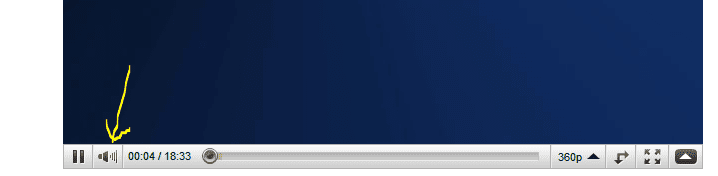
This is probably too obvious, but do you have the volume turned up on the You Tube player?
 

Attachments

  • youtube.PNG
    youtube.PNG
    10 KB · Views: 0

My Computer

Computer Manufacturer/Model Number
Rig 1
OS
Windows 7 Ultimate x64
CPU
AMD Phenom II X4 940 Black Edition @ 3.4GHz (AM2+)
Motherboard
Gigabyte GA-MA790X-UD4P (AM2+)
Memory
Corsair CM2X4096-8500C5 (4 X 2GB)
Graphics Card(s)
XFX Radeon HD 5770 / Diamond Radeon HD 5770 CrossFireX
Sound Card
Asus Xonar DS (PCI)
Monitor(s) Displays
Samsung SyncMaster 932bw+ (3)
Screen Resolution
4320x900
Hard Drives
OCZ Vertex 2 80 GB - Windows 7 System --
WD Caviar Black 1TB - Music, Movies, Vids, Pics --
WD Caviar Black 640GB - User Profiles & Games --
WD My Book 320GB external
PSU
Corsair CMPSU-750TX
Case
Cooler Master HAF 932
Cooling
Corsair Hydro Series H50
Keyboard
Logitech Desktop Wave
Mouse
Logitech LX8 Laser
Internet Speed
20 down / 2 up
Other Info
LG GGC-H20L Blu-Ray / HDDVD combo --
Hauppauge HVR-1250 --
Silverstone MFP-51 --
Logitech Webcam C600
Is this not working for any web browsers? is IE affected as well?

There is a safe-mode in firefox. I am not at my comp right now to tell you instructions, but you can find it by typing firefox into the start menu search bar (dont hit enter) and then selecting the Safe-Mode one from the list of programs. this is on the most recent firefox build.

you might be able to get it to work there. there are some options to choose from when starting firefox in safe-mode as well. I can post more later tonight.

thanks very much Thorsen
 

My Computer

OS
windows 7
hello Pablo70, I tried to look into this last night, but was busy. I wasn't able to get a menu on the safe-mode (I think because I already used it once before). Did you have any luck with this or getting sound working on any other browsers?
 

My Computer

Computer type
Laptop
Computer Manufacturer/Model Number
ASUS G60-RBBX05
OS
Win7 Home Premium 64x
CPU
Intel Core 2 Duo P7450 / 2.13 GHz (2.29 with Extreme Turbo)
Memory
4 GB PC-6400 Hyundai (2X2) at 800Mhz
Graphics Card(s)
NVIDIA GeForce GTX 260M 1GB DDR3 VRAM
Monitor(s) Displays
16" LED Backlit
Screen Resolution
1366 x 768 on laptop 1600x1050 max res on 22" external mon
Hard Drives
OCZ Agility 3 60GB SSD / 320 GB - Serial ATA-150 - 7200 rpm
PSU
6-cell Lithium ion { lasts 1.5 hours }
Case
ASUS G60 Laptop
Keyboard
Chicklet type back-lit (white light) keyboard
Mouse
Logitech G9 Laser Mouse 3200dpi and 1000 reports per minute
Internet Speed
Comcast 8.60mb/s up - 3.11mb/s down
Antivirus
MSE
Browser
Firefox
Other Info
General mid-budget gaming Comp. Low batterylife - High FrameRates - currently overheating problems :(

2nd Rig: Case: Rosewill BLACKHAWK Gaming ATX Mid Tower Computer Case

Mobo: GIGABYTE GA-990FXA-UD3
CPU: AMD FX-6200 Zambezi 3.8GHz (4.1GHz Turbo)
Heatsink: COOLER MASTER V8 CPU Cooler
RAM: Patriot Viper 3 8GB (2 x 4GB) 240-Pin DDR3 SDRAM 1866 (PC3 15000)
GPU: SAPPHIRE Radeon HD 6850 1GB 2
hello Pablo70, I tried to look into this last night, but was busy. I wasn't able to get a menu on the safe-mode (I think because I already used it once before). Did you have any luck with this or getting sound working on any other browsers?

using safe-mode but still no joy , tried everything tbh but no one has a solution at the moment :cry:
 

My Computer

OS
windows 7
Is this not working for any web browsers? is IE affected as well?

There is a safe-mode in firefox. I am not at my comp right now to tell you instructions, but you can find it by typing firefox into the start menu search bar (dont hit enter) and then selecting the Safe-Mode one from the list of programs. this is on the most recent firefox build.

you might be able to get it to work there. there are some options to choose from when starting firefox in safe-mode as well. I can post more later tonight.

tried safe mode etc and still the same , tried everywhere for a fix for this but no joy , will have to do a reinstall it looks like :cry:
 

My Computer

OS
windows 7
Back
Top