Missing 200 GB of Hard Disk space after trying to create partition

Mustang85

New member
Local time
6:23 PM
Messages
2
Hello everyone.

I have an HP Pavilion DV6 with a 600 GB hard disk (Windows 7 Home Premium). Last weekend I tried to create a new partition, so I can save some of my files in case I have to re-install the OS or another issue.

Anyways I started the process, right click on C, clicked on "shrink volume", picked the size of the new partition (200 GB) and then "shrink". After a couple of minutes I got an error message, I dont remember exactly what was the error to be honest, it said something about I/O device error.


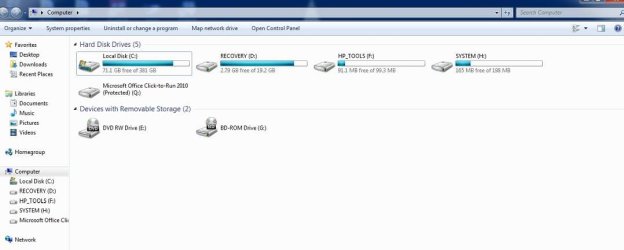
So after that and until today the size of my C drive changed from 576 GB to some 380 GB (as you could see, those 200 GB of the new partition I wanted to create are completely missing). I already ran chkdsk and some other software to try to recover that missed space without success.

Any ideas on how to fix this thing without formating the disk? Your help will be very appreciated.

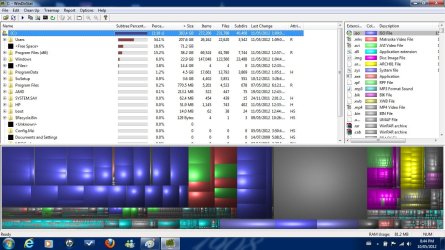
I attached the screens of my explorer window, my disk manager window & windirstat (notice on disk manager how it says C: 381 GB above and then below the graphic shows 576 GB on C)
 

Attachments
  • explorer1.JPG
    explorer1.JPG
    34.1 KB · Views: 79
  • diskm.JPG
    diskm.JPG
    53.8 KB · Views: 133
  • Windirstat.jpg
    Windirstat.jpg
    153.1 KB · Views: 71

My Computer My Computer

At a glance

Windows 7 Home Premium x64
OS
Windows 7 Home Premium x64
Welcome mustang85 to the windows 7 forums.

Sorry but windows only allows 4 primary partitions on a single drive.
My suggestion would be to delete the two hp partitions on the end and then after a reboot you should be able to then see your un partitioned space as you would then only have two partitions the boot
and your C.

Rich
 

My Computer My Computer

At a glance

Windows 7 Pro x64 SP1Intel Core I716 GigsNVIDIA GeForce GTX 670M
Computer type
Laptop
Computer Manufacturer/Model Number
Toshiba Laptop Qosimo X870
OS
Windows 7 Pro x64 SP1
CPU
Intel Core I7
Motherboard
Toshiba Qosmio
Memory
16 Gigs
Graphics Card(s)
NVIDIA GeForce GTX 670M
Monitor(s) Displays
17.7" laptop
Screen Resolution
1600 x 900
Hard Drives
256 Gig SanDisk SSD for C
256 Gig Intel SSD for D
Internet Speed
50/25 FIOS
Antivirus
Vipre (all you can eat for 10 machines)
Browser
IE and FF
Other Info
I have dos 6.22, wfwg 3.11, win98, 2000 and xp VHD's available for testing. MS's Virtual PC works great.
Thanks a lot for your answer Rich.

I feel like a stupid by not knowing the 4 partitions issue. Anyways, I've done some research after reading your post and I have some doubts about the recovery partition. The partition is supposed to restore my laptop to factory, my question is: If I make a backup of all my drivers (say with Driver Genius for example), and then I have a problem with my Windows and need to re-install it again, wouldnt it be enough to just use the Windows 7 dvd and then use the drivers backup I made?

Why would I need to restore to factory in any case?

I would love to hear some opinions before wiping the Recovery partition.


Thanks in advance.
 

My Computer My Computer

At a glance

Windows 7 Home Premium x64
OS
Windows 7 Home Premium x64
You should make recovery DVDs before getting rid of the HP recovery partition. The recovery DVDs will do the same thing as the recovery partition---restore you to a factory state.

Do you have a regular Windows installation disc? As far as I know, HP does not include them--but you can make one by downloading a Windows 7 ISO from mydigitallife.info and then burning the ISO to a disk. You would need your 25 character Product Key to activate this new installation.

If you install from the burned ISO, you will NOT have the recovery partition and the tools partition.

If you restore from the recovery partition or from the recovery DVDs, you will have both the recovery partition and the tools partition.
 

My Computer My Computer

At a glance

Windows 7 Home Premium SP1, 64-bitIntel Skylake i5-6600K, not overclocked8 GB HyperX DDR4-2666 (2 x 4 GB)none; graphics are integrated on CPU
Computer type
PC/Desktop
Computer Manufacturer/Model Number
Ignatz Special; 4 speed manual gearbox; factory air conditioning; one of one
OS
Windows 7 Home Premium SP1, 64-bit
CPU
Intel Skylake i5-6600K, not overclocked
Motherboard
AsRock Z170M Extreme 4, micro ATX
Memory
8 GB HyperX DDR4-2666 (2 x 4 GB)
Graphics Card(s)
none; graphics are integrated on CPU
Sound Card
onboard: Realtek ALC1150; external: USB Behringer UF0-202
Monitor(s) Displays
Dell S2340M 23 inch IPS
Screen Resolution
1600 x 900
Hard Drives
System: Crucial MX100 series SSD, 128 GB;
Data: Samsung Spinpoint 103SJ, 1 TB;
Backup: WD Caviar Green WD30EZRX-00D8PB0, 3 TB
PSU
Rosewill SilentNight 500 watt fanless, semi-modular
Case
Antec Solo II
Cooling
Noctua NH-U12S; Noctua F12 intake, Noctua S12A exhaust
Keyboard
Microsoft 200 6JH-00001 USB
Mouse
Dell or Microsoft optical wired; USB
Antivirus
Microsoft Security Essentials and Malwarebytes Premium
Browser
Pale Moon
Other Info
All fans PWM; speeds at idle: CPU circa 500 rpm; intake circa 600 rpm; exhaust circa 600 rpm; CPU temps 27 idle and 47 C load in a warm room (27 C/81 F) when running Intel Extreme Tuning Utility stress test.
Back
Top