
Hi,
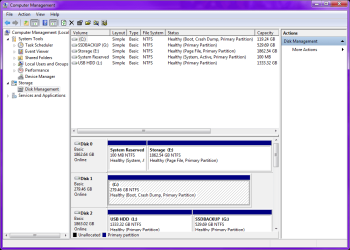
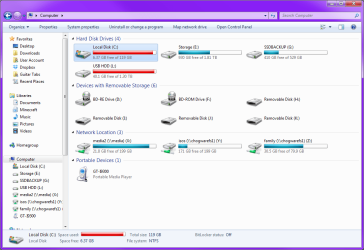
My OCZ Vestor SSD died the other day, but luckily I was able to get the ~120 GB of data I had on my drive off of it in Ubuntu (I didn't keep backups, that's changed now ), and copied it back on to a 300 GB Velociraptor (I used GNU ddrescue for the backup and dd to copy the file on to the Velociraptor). Thing is, while diskpart and Disk Manager both report about a 300 GB partition, Windows Explorer is still showing the 120 GB space from my SSD. How do I get the space to reappear in Explorer???
My OCZ Vestor SSD died the other day, but luckily I was able to get the ~120 GB of data I had on my drive off of it in Ubuntu (I didn't keep backups, that's changed now
), and copied it back on to a 300 GB Velociraptor (I used GNU ddrescue for the backup and dd to copy the file on to the Velociraptor). Thing is, while diskpart and Disk Manager both report about a 300 GB partition, Windows Explorer is still showing the 120 GB space from my SSD. How do I get the space to reappear in Explorer???Attachments

My Computer
At a glance
Windows 7 Ultimate x64AMD FX-6200 3.8 GHzPatriot Viper DDR3 1866 MHz 4GBx4ASUS nVidia GTX 660Ti DirectCU II
- Computer type
- PC/Desktop
- Computer Manufacturer/Model Number
- Custom Build
- OS
- Windows 7 Ultimate x64
- CPU
- AMD FX-6200 3.8 GHz
- Motherboard
- ASUS M5A97
- Memory
- Patriot Viper DDR3 1866 MHz 4GBx4
- Graphics Card(s)
- ASUS nVidia GTX 660Ti DirectCU II
- Sound Card
- Creative Sound Blaster Z
- Monitor(s) Displays
- 2x Dell U2312HM, Acer X233H
- Screen Resolution
- 1920x1080
- Hard Drives
- 1x Seagate Velociraptor 10k RPM 500GB
2x WD Green 5400 RPM 500GB
2x Seagate Barracuda 7200 RPM 500GB
- PSU
- Cooler Master 500 Watt
- Case
- Tsunami W1
- Cooling
- Corsair H60 push/pull
- Keyboard
- Razer BlackWidow Ultimate
- Mouse
- Razer Deathadder
- Internet Speed
- 2 mbit/s
- Antivirus
- Microsoft Security Essentials
- Browser
- Mozilla Firefox

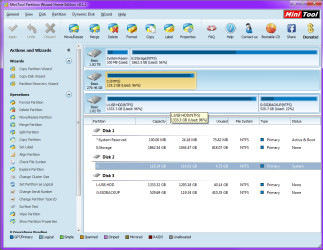


 Once I get the Samsung SSD I'll just copy the partition over with GPartEd and then resize it to match the drive size