Missing a drive partition

guice

New member
Local time
12:02 PM
Messages
8
I have a dual boot system with WinXP and Win7 on the same drive, partitioned out. I also have a second drive which contains most of my data files.

For some reason, Win7 isn't seeing my XP partition, however it has no problems seeing my data drive. XP can also successfully see the new Win7 partition when I boot into XP.

Is there a reason why Win7 can't see my XP partition? Is there a way to fix this? Doing a search on this was quite hard. I kept getting all sorts of irrelevant results (most about full missing hds which isn't my problem).
 

My Computer

OS
Windows 7

My Computers

System One System Two

  • Computer type
    PC/Desktop
    OS
    7 X64
    CPU
    i5 8400
    Motherboard
    gigabyte b365m ds3h
    Memory
    2x8gb 3200mhz
    Hard Drives
    various
    PSU
    pure power 11 400w cm
    Case
    Coolermaster
    Cooling
    cryorig m9i
  • Computer type
    PC/Desktop
    OS
    7x64
    CPU
    g5400
    Motherboard
    ga b365m ds3h
    Memory
    8gb ddr4 2400
    PSU
    xfx pro 450w
i got this problem too

on windows xp. i have 2 disks.

first disk, with 2 partitions ( C:/ and D:/)
second disk with 1 partition ( G:/ )

windows xp is installed on C:/

and i already installed windows 7 on G:/

ok, then i got dual boot...

when i use Windows xp i open windows explorer and i can see all partitions ( C:/ D:/ and G:/ )

When i use Windows 7 i open windows explorer I can see only C:/ and G:/

i already tried to change the D:/ drive letter but this option is disabled. can someone help me with this?
 

My Computer

OS
windows 7
Can you select any other letters for it or don't you have any options to assign a letter, you might find that one of your DVD drives is assigned with the d, if it is you will need to change that letter to something else before it becomes available for your HHD.
 

My Computer

Computer Manufacturer/Model Number
Home Brew
OS
Windows 7 Ultimate Vista Ultimate x64
CPU
Core 2 Duo E8500 3.16Ghz @ 3.8Ghz
Motherboard
eVGA 750i FTW
Memory
2x2Gigs Patriot PC2-6400 LL
Graphics Card(s)
Inno3D GeForce GTX260 216 SP
Monitor(s) Displays
ASUS VW222U 22" 2ms Response time
Screen Resolution
1680x1050
Hard Drives
SATA 150GB
SATA II 250GB
USB IDE 750GB Ext.
PSU
HYTEC 600W & Thermaltake 650W Toughpower Power Exp
Case
Thermaltake Armor LCS (Liquid Cooling System)
Cooling
Liquid Cooling System
Keyboard
Logitech G15 Gaming Keyboard
Mouse
Logitech G9 Gaming Mouse
i got this problem too

on windows xp. i have 2 disks.

first disk, with 2 partitions ( C:/ and D:/)
second disk with 1 partition ( G:/ )

windows xp is installed on C:/

and i already installed windows 7 on G:/

ok, then i got dual boot...

when i use Windows xp i open windows explorer and i can see all partitions ( C:/ D:/ and G:/ )

When i use Windows 7 i open windows explorer I can see only C:/ and G:/

i already tried to change the D:/ drive letter but this option is disabled. can someone help me with this?


Assign a drive letter to the hidden partition under disk management while logged on on Windows 7 .
 

My Computer

Computer Manufacturer/Model Number
ENIAC
OS
Windows 7 RC 7100 32bit/64bit
CPU
Intel Core2Duo E4500 2.20 GHz
Motherboard
ASUS P5LD2-X/1333
Memory
2x1GB Kinsgston DDR2 800MHz
Graphics Card(s)
Nvidia 8500GT
Sound Card
Onboard High Definition Audio Device
Monitor(s) Displays
Sony Bravia 42"
Case
LINKW 2222
Cooling
Standard Intel
Keyboard
Some cheap one
Mouse
Microsoft Intellimouse something
Internet Speed
24MBps ADSL
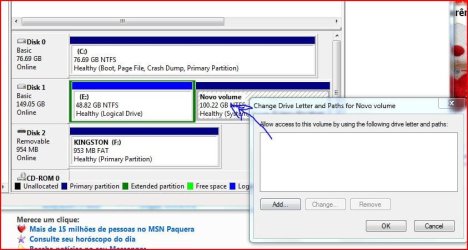
doesnt work... look atached pic:

C:/ same as G:/ on windows xp
E:/ same as C:/ on windows xp
another one without letter = D:/ on windows xp
 

Attachments

  • Capture.JPG
    Capture.JPG
    64.6 KB · Views: 772

My Computer

OS
windows 7
Have you clicked on the add button that you can see in your pic.
 

My Computer

Computer Manufacturer/Model Number
Home Brew
OS
Windows 7 Ultimate Vista Ultimate x64
CPU
Core 2 Duo E8500 3.16Ghz @ 3.8Ghz
Motherboard
eVGA 750i FTW
Memory
2x2Gigs Patriot PC2-6400 LL
Graphics Card(s)
Inno3D GeForce GTX260 216 SP
Monitor(s) Displays
ASUS VW222U 22" 2ms Response time
Screen Resolution
1680x1050
Hard Drives
SATA 150GB
SATA II 250GB
USB IDE 750GB Ext.
PSU
HYTEC 600W & Thermaltake 650W Toughpower Power Exp
Case
Thermaltake Armor LCS (Liquid Cooling System)
Cooling
Liquid Cooling System
Keyboard
Logitech G15 Gaming Keyboard
Mouse
Logitech G9 Gaming Mouse
woot... i was scary about that... tot it could format my partition... but works... thx and sorry.:o
 

My Computer

OS
windows 7
No worries Lucas and welcome to the Forums.
 

My Computer

Computer Manufacturer/Model Number
Home Brew
OS
Windows 7 Ultimate Vista Ultimate x64
CPU
Core 2 Duo E8500 3.16Ghz @ 3.8Ghz
Motherboard
eVGA 750i FTW
Memory
2x2Gigs Patriot PC2-6400 LL
Graphics Card(s)
Inno3D GeForce GTX260 216 SP
Monitor(s) Displays
ASUS VW222U 22" 2ms Response time
Screen Resolution
1680x1050
Hard Drives
SATA 150GB
SATA II 250GB
USB IDE 750GB Ext.
PSU
HYTEC 600W & Thermaltake 650W Toughpower Power Exp
Case
Thermaltake Armor LCS (Liquid Cooling System)
Cooling
Liquid Cooling System
Keyboard
Logitech G15 Gaming Keyboard
Mouse
Logitech G9 Gaming Mouse
Awesome. Got it to work, too. Thanks!
 

My Computer

OS
Windows 7
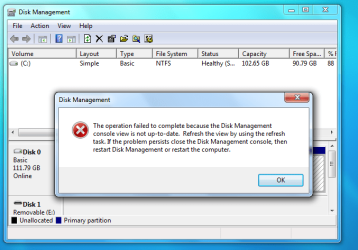
My disc can view but cannot assign drive!!!!

I have different scenario, one of my new HD missing while installed window 7. When I retrieved using computer disk management, manage to detect disk but fail to add disk ( as picture shown). Could someone tell me how to solve this problem
 

Attachments

My Computer

OS
windows 7

My Computer

Computer Manufacturer/Model Number
Home Brew
OS
Windows 7 Ultimate Vista Ultimate x64
CPU
Core 2 Duo E8500 3.16Ghz @ 3.8Ghz
Motherboard
eVGA 750i FTW
Memory
2x2Gigs Patriot PC2-6400 LL
Graphics Card(s)
Inno3D GeForce GTX260 216 SP
Monitor(s) Displays
ASUS VW222U 22" 2ms Response time
Screen Resolution
1680x1050
Hard Drives
SATA 150GB
SATA II 250GB
USB IDE 750GB Ext.
PSU
HYTEC 600W & Thermaltake 650W Toughpower Power Exp
Case
Thermaltake Armor LCS (Liquid Cooling System)
Cooling
Liquid Cooling System
Keyboard
Logitech G15 Gaming Keyboard
Mouse
Logitech G9 Gaming Mouse
I did try, but it cant. A message telling that I unable to continue this process. Attached picture
 

Attachments

  • hardidsk fail.png
    hardidsk fail.png
    5.3 KB · Views: 40

My Computer

OS
windows 7
If you are using Seagate SATA drive, here is
Code:
http://www.seagate.com/ww/v/index.jsp?locale=en-US&name=satatshooterstoragedrivenolonger&vgnextoid=226280b0bf3ea110VgnVCM100000f5ee0a0aRCRD
SATA.PNG

To download Seagate Tools as follows
Code:
http://www.seagate.com/ww/v/index.jsp?locale=en-US&name=seatools-win&vgnextoid=552bd20cacdec010VgnVCM100000dd04090aRCRD
 

My Computer

OS
windows 7
missing a drive in 7

Hi!
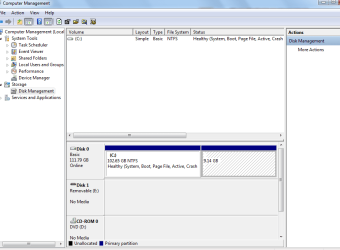
I had win xp, I installed windows 7; so it's greatful:)... but i have missing a drive:( (around 9 gigas)...
I got the same message than wan3350; with the SeaTools i can do nothing, so how i can solve this?
did wan3350 solve the problem? how? step by step, please; i have very important information there, i need get it...

THANKs
 

My Computer

OS
WINDOWS 7
Can you be more specific about the 'missing' drive?
 

My Computers

System One System Two

  • Computer type
    PC/Desktop
    Computer Manufacturer/Model Number
    The Beast Model A (homebrew)
    OS
    Windows 11 21H2 Current build
    CPU
    AMD Ryzen 9 3950X
    Motherboard
    MSI MEG X570 GODLIKE
    Memory
    4 * 32 GB - Corsair Vengeance 3600 MHz
    Graphics Card(s)
    EVGA GeForce RTX 3080 Ti XC3 ULTRA GAMING (12G-P5-3955-KR)
    Sound Card
    Realtek® ALC1220 Codec
    Monitor(s) Displays
    2x Eve Spectrum ES07D03 4K Gaming Monitor (Matte) | Eve Spec
    Screen Resolution
    3x 3840 x 2160
    Hard Drives
    3x Samsung 980 Pro NVMe PCIe 4 M.2 2 TB SSD (MZ-V8P2T0B/AM) } 3x Sabrent Rocket NVMe 4.0 1 TB SSD
    PSU
    PC Power & Cooling’s Silencer Series 1050 Watt, 80 Plus Plat
    Case
    Fractal Design Define 7 XL Dark ATX Full Tower Case
    Cooling
    SteelSeries Apex Pro Wired Gaming Keyboard
    Keyboard
    SteelSeries Apex Pro
    Mouse
    Logitech MX Master 3S | MX Master 3 for business
    Internet Speed
    AT&T LightSpeed Gigabit Duplex Ftth
    Antivirus
    Windows Defender + MB 3
    Browser
    Nightly (default) + Firefox (stable),Chrome, Edge
  • Computer type
    PC/Desktop
    System Manufacturer/Model Number
    Dell Latitude E5470
    OS
    ChromeOS Flex Dev Channel (current)
    CPU
    Intel(R) Core(TM) i5-6300U CPU @ 2.40GHz, 2501 Mhz, 2 Core(s), 4 Logical Processor(s)
    Motherboard
    Dell
    Memory
    16 GB
    Graphics Card(s)
    Intel(R) HD Graphics 520
    Sound Card
    Intel(R) HD Graphics 520 + RealTek Audio
    Monitor(s) Displays
    Dell laptop display 15"
    Screen Resolution
    1920 * 1080
    Hard Drives
    Toshiba 128GB M.2 22300 drive
    INTEL Cherryville 520 Series SSDSC2CW180A 180 GB SATA III SSD
    PSU
    Dell
    Case
    Dell
    Cooling
    Dell
    Keyboard
    Dell
    Mouse
    Logitech MX Master 3S (shared w. Sys 1) | Dell TouchPad
    Internet Speed
    AT&T LightSpeed Gigabit Duplex Ftth
missing a drive in 7

Thanks!
I had winxp in a C766LA COMPAQ; I had two partitions (C, and D (for restore, a system from COMPAQ:10 GG)); so i don't need the extra partition, i wanted more space...
i tried to format the partition with PATITION MAGIC, and then I opened PM, i got error, it was bad... i use partition magic in others pcs without problems...
with the same disk of XP, y format the unit D, so i was great, i had 10 gigas extra, then i installed win 7, and i had a missed drive :cry:
i had information in D, i liked win 7, also i need my files...
Sorry for my bad English, im spanish speaker
 

Attachments

  • problem.png
    problem.png
    22.5 KB · Views: 45

My Computer

OS
WINDOWS 7

My Computers

System One System Two

  • Computer type
    PC/Desktop
    Computer Manufacturer/Model Number
    The Beast Model A (homebrew)
    OS
    Windows 11 21H2 Current build
    CPU
    AMD Ryzen 9 3950X
    Motherboard
    MSI MEG X570 GODLIKE
    Memory
    4 * 32 GB - Corsair Vengeance 3600 MHz
    Graphics Card(s)
    EVGA GeForce RTX 3080 Ti XC3 ULTRA GAMING (12G-P5-3955-KR)
    Sound Card
    Realtek® ALC1220 Codec
    Monitor(s) Displays
    2x Eve Spectrum ES07D03 4K Gaming Monitor (Matte) | Eve Spec
    Screen Resolution
    3x 3840 x 2160
    Hard Drives
    3x Samsung 980 Pro NVMe PCIe 4 M.2 2 TB SSD (MZ-V8P2T0B/AM) } 3x Sabrent Rocket NVMe 4.0 1 TB SSD
    PSU
    PC Power & Cooling’s Silencer Series 1050 Watt, 80 Plus Plat
    Case
    Fractal Design Define 7 XL Dark ATX Full Tower Case
    Cooling
    SteelSeries Apex Pro Wired Gaming Keyboard
    Keyboard
    SteelSeries Apex Pro
    Mouse
    Logitech MX Master 3S | MX Master 3 for business
    Internet Speed
    AT&T LightSpeed Gigabit Duplex Ftth
    Antivirus
    Windows Defender + MB 3
    Browser
    Nightly (default) + Firefox (stable),Chrome, Edge
  • Computer type
    PC/Desktop
    System Manufacturer/Model Number
    Dell Latitude E5470
    OS
    ChromeOS Flex Dev Channel (current)
    CPU
    Intel(R) Core(TM) i5-6300U CPU @ 2.40GHz, 2501 Mhz, 2 Core(s), 4 Logical Processor(s)
    Motherboard
    Dell
    Memory
    16 GB
    Graphics Card(s)
    Intel(R) HD Graphics 520
    Sound Card
    Intel(R) HD Graphics 520 + RealTek Audio
    Monitor(s) Displays
    Dell laptop display 15"
    Screen Resolution
    1920 * 1080
    Hard Drives
    Toshiba 128GB M.2 22300 drive
    INTEL Cherryville 520 Series SSDSC2CW180A 180 GB SATA III SSD
    PSU
    Dell
    Case
    Dell
    Cooling
    Dell
    Keyboard
    Dell
    Mouse
    Logitech MX Master 3S (shared w. Sys 1) | Dell TouchPad
    Internet Speed
    AT&T LightSpeed Gigabit Duplex Ftth
missing a drive in 7

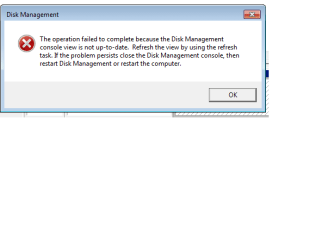
of course; but i got an error when i select "Change path..."
"The operation failed to complete because the Disk Management console view is not up to date. Refresh the view by using the refresh task. If the problem persists close the disk management console, then restart disk management or restart the computer"
the seatools isnt util only makes test (all are correct)
somebody said a tool called: "Test Disk" but i don't know, it can be dangerous...
I restart my pc, and nothing happens...

THANKS!!
 

Attachments

  • problem2.png
    problem2.png
    32.3 KB · Views: 18

My Computer

OS
WINDOWS 7
dual boot xp and 7 - missing drive for my xp partition

Hello
Had xp on my easynote ; installed W7 - works fine except that my xp drive is nowhere to be seen and the W7 partition is C.Can still see the xp partition in disk management , but cannot add a drive letter ( greyed out ) . Tried to change the W7 drive letter - does not allow me to . Pls help as my xp sp 3 is sitting there somewhere .
 

My Computer

OS
xp
Back
Top