Missing CD drives/ PCI Driver?

Shadowbound29

New member
Local time
6:32 AM
Messages
10
Well first thing I noticed is that my CD/DVD drives were not showing up in my computer. Checked device manager and saw that two devices are not installed, 1. Mass Storage Controller 2. PCI simple communications controller. I have uninstalled these both and restarted, have have used the trouble shooter, all to no avail. I get error code 25 I believe, which I have not researched yet. Both of my CD/DVD drives are hooked up via a HDD Controller card. These are shown in the bios as detected prior to launch, though gone once in 7. If you need my specs I posted them on the form I filled out to register, or I can just retype them. Any help would be great, thanks in advance, Shadow
 

My Computer

OS
Windows 7
CPU
I5 660
Motherboard
Asus P7HSS-m Pro
Memory
4gb DDR3
Graphics Card(s)
MSI HD 4550
Sound Card
Board
Monitor(s) Displays
Lame
PSU
600
Case
Old
Cooling
Fan
Thanks for the fast reply. I downloaded all drivers that seemed applicable to the issue (eg. not audio, vga,) and my DVD drives still do not show up. The BIOS driver update portion though did not work properly, got the windows needs to know what program created it pop up.

Any other ideas?
 

My Computer

OS
Windows 7
CPU
I5 660
Motherboard
Asus P7HSS-m Pro
Memory
4gb DDR3
Graphics Card(s)
MSI HD 4550
Sound Card
Board
Monitor(s) Displays
Lame
PSU
600
Case
Old
Cooling
Fan
All of this help and still no conclusion lol. I had went through this portion prior to posting on the forums. It gives me the A OK as it says it is installing the drivers, but then they fail. No drivers found error, after saying they were, funny I know. So maybe I should just try to put XP back on or something, see if they show up there, if so, I'll know it's a 7 problem right?
 

My Computer

OS
Windows 7
CPU
I5 660
Motherboard
Asus P7HSS-m Pro
Memory
4gb DDR3
Graphics Card(s)
MSI HD 4550
Sound Card
Board
Monitor(s) Displays
Lame
PSU
600
Case
Old
Cooling
Fan

My Computer

OS
Windows 7
CPU
I5 660
Motherboard
Asus P7HSS-m Pro
Memory
4gb DDR3
Graphics Card(s)
MSI HD 4550
Sound Card
Board
Monitor(s) Displays
Lame
PSU
600
Case
Old
Cooling
Fan

My Computer

Computer Manufacturer/Model Number
HP, Dell, Gateway, Toshiba - 4 laptops and 2 desktops
OS
Vista, Windows7, Mint Mate, Zorin, Windows 8
CPU
from 1.6GHz Duo to i7
Monitor(s) Displays
2x HP w2207
Hard Drives
5x HDD, 7x SSD, 12x Externals
Keyboard
with trackball - no mices
Mouse
Trackball mice
Internet Speed
DSL 6000
Shame I cannot delete last post as it definitely did not go to the same place I took link from. What link would you like?
 

My Computer

OS
Windows 7
CPU
I5 660
Motherboard
Asus P7HSS-m Pro
Memory
4gb DDR3
Graphics Card(s)
MSI HD 4550
Sound Card
Board
Monitor(s) Displays
Lame
PSU
600
Case
Old
Cooling
Fan
I went through all the steps on that page previously WHS, but after you wrote filter problem I re read it to see what you were referring to, did not see. Where would I find out if it is a filter problem? And what is a filter problem? =)
 

My Computer

OS
Windows 7
CPU
I5 660
Motherboard
Asus P7HSS-m Pro
Memory
4gb DDR3
Graphics Card(s)
MSI HD 4550
Sound Card
Board
Monitor(s) Displays
Lame
PSU
600
Case
Old
Cooling
Fan
I have googled the heck out of my board and I cannot seem to find a homepage for it, am I missing something? I am really not a dummy, but please lay it out for me simpler as I can't seem to retrieve what you need. My board is the Asus P7H55-M Pro with I5 660 CPU if that helps.
 

My Computer

OS
Windows 7
CPU
I5 660
Motherboard
Asus P7HSS-m Pro
Memory
4gb DDR3
Graphics Card(s)
MSI HD 4550
Sound Card
Board
Monitor(s) Displays
Lame
PSU
600
Case
Old
Cooling
Fan
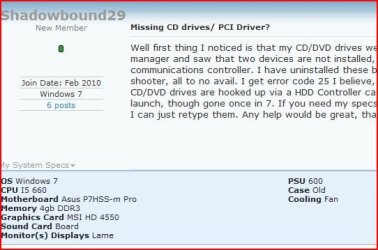
Your specs below. Picture 1

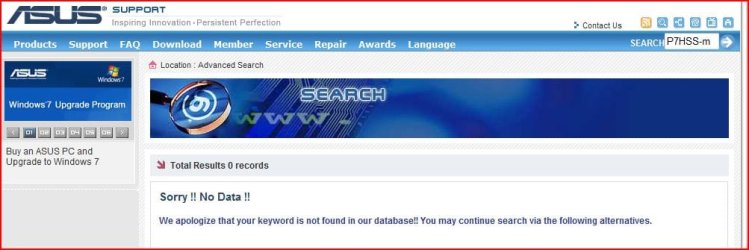
Asus search. Picture 2
 

Attachments

  • Capture2.JPG
    Capture2.JPG
    41.1 KB · Views: 7
  • Capture.JPG
    Capture.JPG
    55.5 KB · Views: 18

My Computer

OS
ME/XP/Vista/Win7
Ahhh I see what I did wrong. I typed SS instead of 55. K I will check site.
 

My Computer

OS
Windows 7
CPU
I5 660
Motherboard
Asus P7HSS-m Pro
Memory
4gb DDR3
Graphics Card(s)
MSI HD 4550
Sound Card
Board
Monitor(s) Displays
Lame
PSU
600
Case
Old
Cooling
Fan

My Computer

Computer Manufacturer/Model Number
Self Build 64bit
OS
Vista Ult64, Win7600
CPU
Intel Core 2 Quad Q6600 @ 2400 MHz 64bit OS
Motherboard
Asus P5E3 Deluxe WiFi @p 64 bit OS
Memory
4096 MB DDR3-SDRAM
Graphics Card(s)
ATI Radeon HD 3870 Series x2 Crossfired
Sound Card
Realtek on board
Monitor(s) Displays
Samsung SyncMaster - 23 inches
Screen Resolution
1680x1050 pixels at 60 Hz in True Colors
Hard Drives
Hitachi (250 GB)/Samsung 750 GB. /Barracuda 160 GB.
My Book 1 TB external..
PSU
Cooler Master 1000w
Case
Cooler Master Cosmos 1000.
Cooling
Fans and fresh air,
Keyboard
Wireless
Mouse
Wireless
Internet Speed
Never fast enough
Other Info
I use a Magnum.
I went through all the steps on that page previously WHS, but after you wrote filter problem I re read it to see what you were referring to, did not see. Where would I find out if it is a filter problem? And what is a filter problem? =)

Click on "filter problem" in my post which is a link and you will see. Then just apply the proposed fix. Maybe it helps, maybe it does'nt.
 

My Computer

Computer Manufacturer/Model Number
HP, Dell, Gateway, Toshiba - 4 laptops and 2 desktops
OS
Vista, Windows7, Mint Mate, Zorin, Windows 8
CPU
from 1.6GHz Duo to i7
Monitor(s) Displays
2x HP w2207
Hard Drives
5x HDD, 7x SSD, 12x Externals
Keyboard
with trackball - no mices
Mouse
Trackball mice
Internet Speed
DSL 6000
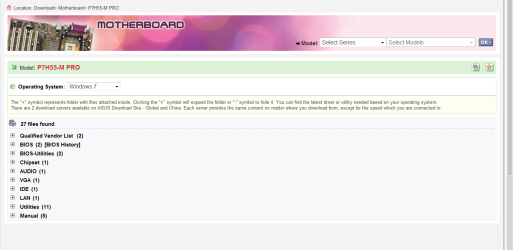
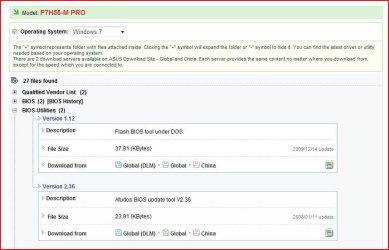
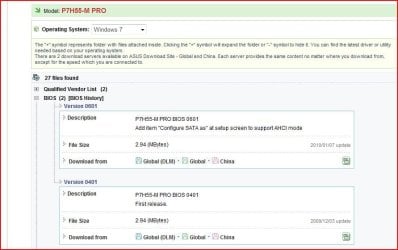
All your drivers are there.

If you need to update your BIOS to V0601,all there.
 

Attachments

  • Capture3.JPG
    Capture3.JPG
    63.7 KB · Views: 5
  • Capture4.JPG
    Capture4.JPG
    66.6 KB · Views: 1

My Computer

OS
ME/XP/Vista/Win7
Well I guess I am just screwed. I tried all the Bios settings and NONE of them say they are compatible with my version of windows. 32 and 64....even though I have 64. Driver detective I have already on a disk, the disk also contains my registration number, and I will not purchase another one just because I cannot access the disk. I just do not understand this at all. Everything worked fine with the XP install I had last night, and now I can not even bring up the set up menu for that because I have no cd drives to read from.

My drives have showed up on Windows 7 before though which is what is aggravating me the most. Nothing has changed except my board and processor and as far as I can tell I have all my drivers for those. Thanks for the effort.
 

My Computer

OS
Windows 7
CPU
I5 660
Motherboard
Asus P7HSS-m Pro
Memory
4gb DDR3
Graphics Card(s)
MSI HD 4550
Sound Card
Board
Monitor(s) Displays
Lame
PSU
600
Case
Old
Cooling
Fan
Hi go here and install these chipset drivers , just follow the instructions.
 

My Computer

Computer Manufacturer/Model Number
Self Build 64bit
OS
Vista Ult64, Win7600
CPU
Intel Core 2 Quad Q6600 @ 2400 MHz 64bit OS
Motherboard
Asus P5E3 Deluxe WiFi @p 64 bit OS
Memory
4096 MB DDR3-SDRAM
Graphics Card(s)
ATI Radeon HD 3870 Series x2 Crossfired
Sound Card
Realtek on board
Monitor(s) Displays
Samsung SyncMaster - 23 inches
Screen Resolution
1680x1050 pixels at 60 Hz in True Colors
Hard Drives
Hitachi (250 GB)/Samsung 750 GB. /Barracuda 160 GB.
My Book 1 TB external..
PSU
Cooler Master 1000w
Case
Cooler Master Cosmos 1000.
Cooling
Fans and fresh air,
Keyboard
Wireless
Mouse
Wireless
Internet Speed
Never fast enough
Other Info
I use a Magnum.
Back
Top